Why it matters
What it tends to unlock
Remote monitoring, app control, and cloud-linked workflows, over-the-air updates and fleet-wide configuration changes, and broader smart-home and ecosystem handoffs than local-only links.
Wi-Fi appears across 124 tracked robots, concentrated in Humanoid, Cleaning, and Lawn & Garden. Use this page to understand why the signal matters, who relies on it most, and which live profiles deserve the first comparison click.
Tracked robots
124
Listed Available
45
Manufacturers
85
Public prices
71
Why it matters
Remote monitoring, app control, and cloud-linked workflows, over-the-air updates and fleet-wide configuration changes, and broader smart-home and ecosystem handoffs than local-only links.
What to verify
Which bands or standards the robot actually supports, whether key features still work without the vendor cloud, and how onboarding behaves on real home and enterprise networks.
Coverage
The heaviest concentration is in Humanoid (39), Cleaning (28), and Lawn & Garden (17). Top manufacturers include eufy (6), AGIBOT (4), and iRobot (4).
Research brief
The useful questions here are how common Wi-Fi really is, which robot classes depend on it, and which live profiles are worth opening before you compare the whole stack.
Verified 30d
3
5 in the last 90 days
Top category
Humanoid
39 tracked robots
Paired most often with
Bluetooth, IMU, and Amazon Alexa
Market snapshot
Category concentration, manufacturer repetition, and the strongest adjacent signals.
Dense inventory
Featured first clicks up top, then the full scannable robot table below.
Browse the full Connectivity layer
Open the workbench when this one component is too narrow for the decision.
Compare the clearest profiles
Use the strongest ready-now matches as the fastest comparison anchor.
Decision brief
Where it helps most
What to validate
Evidence basis
Source pack
Use the structure first: which categories lean on Wi-Fi, which manufacturers repeat it, and what usually ships beside it.
Lead category
39 tracked robots currently anchor this label.
Most repeated manufacturer
6 tracked robots make this the clearest manufacturer-level signal on the route.
Most common adjacent signal
54 shared robots pair this component with Bluetooth.
| # | Name | Usage |
|---|---|---|
| 1 | Humanoid | 39 robots |
| 2 | Cleaning | 28 robots |
| 3 | Lawn & Garden | 17 robots |
| 4 | Companions | 14 robots |
| 5 | Research | 11 robots |
| 6 | Commercial | 7 robots |
| # | Name | Usage |
|---|---|---|
| 1 | eufy | 6 robots |
| 2 | AGIBOT | 4 robots |
| 3 | iRobot | 4 robots |
| 4 | Mammotion | 4 robots |
| 5 | Roborock | 4 robots |
| 6 | Segway Navimow | 4 robots |
| # | Name | Shared robots |
|---|---|---|
| 1 | Bluetooth | 54 robots |
| 2 | IMU | 25 robots |
| 3 | Amazon Alexa | 22 robots |
| 4 | Ethernet | 22 robots |
| 5 | Google Assistant | 16 robots |
| 6 | Cliff Sensors | 11 robots |
How to read the market
Category concentration tells you where the component is actually doing work, manufacturer repetition shows whether the signal is market-wide or vendor-specific, and pairings reveal which neighboring technologies usually ship alongside it.
The old card wall is replaced with a featured first-click strip and a dense inventory table so the route behaves like a serious directory.
Directory briefing
Open the clearest profiles first, then sweep the full inventory in a denser table. Featured cards are selected by listed status, image presence, and official link presence. Check each profile for purchase terms and supporting sources.
Listed Available
45
Public price
71
Official links
124
Featured now
3
How to scan this directory
Best first clicks
These robots rank highest on listed status, public detail presence, and image presence. Open their profiles to explore how Wi-Fi shows up in practice.
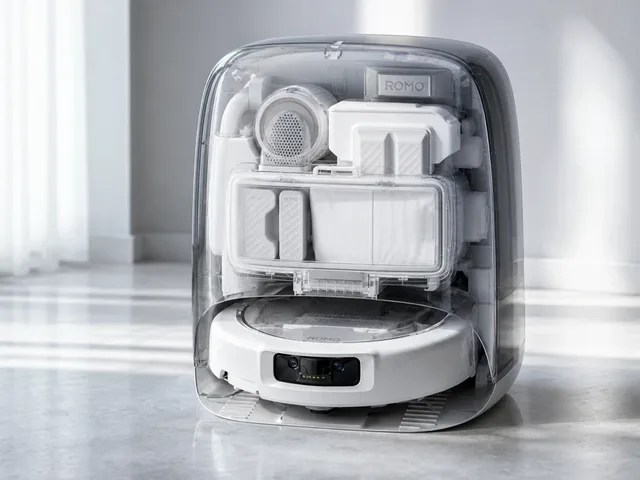
DJI ROMO P2 is the higher-trim model in the second-generation ROMO 2 robot vacuum-and-mop lineup launched in China in May 2026. It builds on the first ROMO series with whole-scene AI cleaning decisions, a new millimeter-level obstacle-avoidance system using area-array speckle LiDAR, binocular fisheye vision and ToF sensing, and transparent-object avoidance. The P2 also adds a 123-degree radar-adaptive swing arm for edge cleaning, 36,000 Pa suction, DualSweep anti-tangle hardware, dynamic mechanical feet for thresholds up to 8.5 cm, 55 W fast charging, dirt heatmaps, remote video calling, voice control, and a high-temperature self-cleaning dock with P2-specific antibacterial/UV maintenance features. Listed as Available with a recorded price; confirm current ordering and delivery terms.

Miko Mini is a compact AI companion robot for children ages 5–10. It combines an IPS display, microphone array, wide-angle HD camera, time-of-flight range sensing, and odometric sensors to support conversational learning and navigation in home environments. Miko positions it as a kid-safe, COPPA-compliant platform with moderated, age-appropriate AI conversations and parent controls. Listed as Available with a recorded price; confirm current ordering and delivery terms.
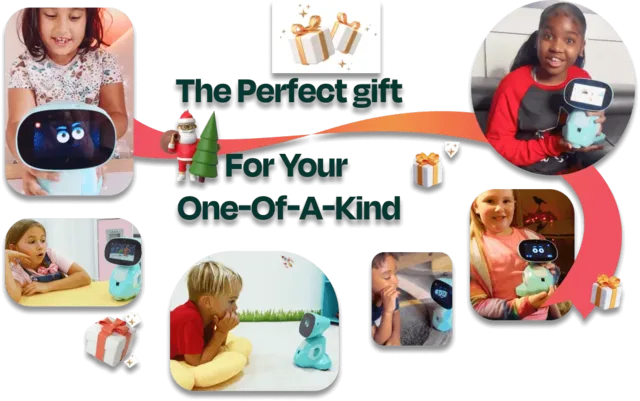
An AI-powered companion robot designed for kids aged 5–10. Miko 3 combines a 4.46-inch IPS touchscreen face with a wheeled body, using deep learning to hold conversations, play educational games, tell stories, and respond to touch and voice. It features face and voice recognition, autonomous navigation via time-of-flight and odometric sensors, and a parental control app for monitoring usage. The robot is COPPA-compliant and kidSAFE+ certified, with no identifiable voice recordings stored. Content includes STEM learning apps, Disney and Paramount stories, coding games, and music — with the full library unlocked via the Max subscription. Listed as Available with a recorded price; confirm current ordering and delivery terms.
Compact mobile scan: status, price, standout context, and links stay visible without sideways scrolling.
DJI · Cleaning
Price
CNY ¥4,999
Standout
Battery · Up to 3 hours in quiet vacuum mode
Miko · Companions
Price
EUR €169
Standout
Battery · Up to 1 hour active gameplay; up to 15 hours standby on Miko's global comparison page (India FAQ lists up to 7 hours standby)
Miko · Companions
Price
EUR €269
Standout
Battery · 5–7 hours active use, up to 12 hours standby
iRobot · Cleaning
Price
EUR €299
Standout
Size · 9.2 cm (3.6 in)
eufy · Lawn & Garden
Price
EUR €899
Standout
Official source linked
DJI · Cleaning
Price
EUR €1,299
Standout
Battery · Up to 3 hours in Vacuum (Quiet Suction) mode
Segway Navimow · Lawn & Garden
Price
EUR €1,599
Standout
Battery · About 75 min (i210 LiDAR Pro) / about 180 min (i220 LiDAR Pro) typical mowing time per full charge
Dreame · Lawn & Garden
Price
EUR €2,599
Standout
Battery · 36V Li-ion battery; runtime varies by terrain and area size
Husqvarna · Lawn & Garden
Price
EUR €4,999
Standout
Battery · 145 min per charge
LuxAI · Research
Price
EUR €10,900
Standout
Size · 64 cm
GROOVE X · Companions
Price
JPY ¥577,500
Standout
Battery · 30-45 minutes active, then returns to nest
Samsung · Cleaning
Price
KRW ₩1,907,000
Standout
Official source linked
iRobot · Cleaning
Price
USD $500
Standout
Size · 10.4 cm (4.1 in)
Ecovacs · Cleaning
Price
USD $700
Standout
Battery · Up to 130 minutes
iRobot · Cleaning
Price
USD $730
Standout
Size · 8.6 cm (3.4 in)
eufy · Cleaning
Price
USD $799
Standout
Battery · Up to 216 min (Vacuum, Standard) / 123 min (Vacuum + Mop, Standard)
Segway Navimow · Lawn & Garden
Price
USD $799
Standout
Battery · Up to 60 minutes full-charge mowing time
Aiper · Cleaning
Price
USD $800
Standout
Battery · Up to ~3 hours per cycle (~170–190 minutes)
Roborock · Cleaning
Price
USD $900
Standout
Battery · Up to 242 minutes
Shark · Cleaning
Price
USD $950
Standout
Battery · 3+ hours (NeverStop Battery)
Roborock · Cleaning
Price
USD $1,000
Standout
Battery · 6,400 mAh Li-ion; official FAQ says about 2h15+ vacuuming/mopping with the arm disabled, or about 2h10+ with the arm enabled while tidying 10 items (Mop Wash Frequency set to 15 minutes).
Ecovacs · Cleaning
Price
USD $1,100
Standout
Battery · Up to 291 minutes (low power mode)
MOVA · Cleaning
Price
USD $1,169
Standout
Payload · 70mL robot water tank; 3.2L base-station dust bag; ≥4.0L clean / 3.5L waste water tanks (base station)
Dyson · Cleaning
Price
USD $1,200
Standout
Battery · Up to 200 minutes
Ecovacs · Cleaning
Price
USD $1,249
Standout
Battery · Up to 223 minutes
eufy · Cleaning
Price
USD $1,300
Standout
Battery · Vacuum and Mop: 125 min (Standard); Vacuum: 216 min (Standard)
Mammotion · Lawn & Garden
Price
USD $1,399
Standout
Battery · 2.5h per charge
eufy · Cleaning
Price
USD $1,400
Standout
Battery · Vacuum and Mop: 125 min (Standard); Vacuum: 216 min (Standard)
iRobot · Cleaning
Price
USD $1,400
Standout
Size · 3.4 in
eufy · Cleaning
Price
USD $1,499
Standout
Battery · Up to 216 min (Vacuum, Standard) / 140 min (Vacuum + Mop, Standard)
Narwal · Cleaning
Price
USD $1,500
Standout
Battery · 7,000 mAh battery (up from 6,400 mAh on original Flow)
eufy · Cleaning
Price
USD $1,599
Standout
Battery · Up to 180 minutes
Sunseeker · Lawn & Garden
Price
USD $1,599
Standout
Official source linked
Roborock · Cleaning
Price
USD $1,600
Standout
Battery · Up to 190 minutes
Mammotion · Lawn & Garden
Price
USD $1,899
Standout
Official source linked
Segway Navimow · Lawn & Garden
Price
USD $2,499
Standout
Size · 351 mm
Lymow · Lawn & Garden
Price
USD $2,799
Standout
Battery · Up to 3 hours per charge
Segway Navimow · Lawn & Garden
Price
USD $2,799
Standout
Battery · Up to 200 min full-charge mowing time
Mammotion · Lawn & Garden
Price
USD $2,899
Standout
Battery · Up to 215 min per charge
AGIBOT · Quadruped
Price
USD $3,200
Standout
Battery · 1–2 hours per charge
AGIBOT · Humanoid
Price
USD $24,240
Standout
Battery · ~2 hours at 0.5 m/s walking
Realbotix · Companions
Price
USD $95,000
Standout
Battery · F-Series product page lists an estimated 4–8 hours from the built-in battery; Realbotix's April 2026 delivery update separately says robots can have up to 10 hours and can operate continuously when plugged in
AGIBOT · Humanoid
Price
USD $999,999
Standout
Battery · Standing: 3h, Walking: 1.5h+
Andromeda Robotics · Companions
Price
Price TBA
Standout
Battery · AC-powered for long sessions (battery not published)
Roborock · Cleaning
Price
Price TBA
Standout
Battery · Up to 240 minutes (runtime varies by mode)
Mammotion · Lawn & Garden
Price
USD $2,999
Standout
Battery · 190 min per charge
DEEPRobotics · Quadruped
Price
USD $17,999
Standout
Battery · 3 h / 15 km laboratory endurance
Faraday Future · Humanoid
Price
USD $19,990
Standout
Battery · Up to 2 hours
Shanghai Kepler Exploration Robot Co., Ltd. · Humanoid
Price
USD $30,000
Standout
Battery · 8 hours
Shanghai Kepler Exploration Robot Co., Ltd. · Humanoid
Price
USD $30,000
Standout
Battery · 8 hours
Faraday Future · Humanoid
Price
USD $34,990
Standout
Battery · Approx. 3 hours continuous standing time; hot-swappable without power interruption
Pollen Robotics · Research
Price
USD $70,000
Standout
Battery · 8 hours (mobile base, per official hardware docs)
1X Technologies · Humanoid
Price
Price TBA
Standout
Battery · 4-6 hours
AGIBOT · Humanoid
Price
Price TBA
Standout
Battery · Up to 10 hours (dual 1,152 Wh hot-swappable battery system)
ANYbotics · Commercial
Price
Price TBA
Standout
Battery · 90-120 minutes
Apptronik · Humanoid
Price
Price TBA
Standout
Battery · ~4 hours
Astrall Dynamics · Quadruped
Price
Price TBA
Standout
Battery · Up to 8 hours stated for Hypertron-T01; A01 platform lists 4-8 hours depending on load
Astribot (Stardust Intelligence) · Humanoid
Price
Price TBA
Standout
Battery · 4-6 hours (supports plug-in operation)
Boston Dynamics · Humanoid
Price
Price TBA
Standout
Battery · 4 hours nominal; 2 hours with heavy lifting
Boston Dynamics · Commercial
Price
Price TBA
Standout
Battery · Up to 16 hours (two full shifts)
Agility · Humanoid
Price
Price TBA
Standout
Battery · ~4 hours
Fauna Robotics · Humanoid
Price
Price TBA
Standout
Battery · 3–3.5 hours (swappable battery)
Figure AI · Humanoid
Price
Price TBA
Standout
Battery · ~5 hours
Fourier · Humanoid
Price
Price TBA
Standout
Battery · 2 hours (Humanoid.Guide; not manufacturer-published)
Fourier · Humanoid
Price
Price TBA
Standout
Battery · ≈3 hours (hot-swappable)
Fourier · Humanoid
Price
Price TBA
Standout
Battery · 2 hours
JAKA Robotics · Humanoid
Price
Price TBA
Standout
Battery · 2 hours (10 Ah, 48 VDC battery)
Leju Robotics · Humanoid
Price
Price TBA
Standout
Battery · 1 hour walking endurance
Lumos Robotics · Humanoid
Price
Price TBA
Standout
Size · 160 cm
Enchanted Tools · Commercial
Price
Price TBA
Standout
Battery · ~4 hours
NASA JSC · Research
Price
Price TBA
Standout
Battery · ~1 hour
Noetix Robotics · Humanoid
Price
Price TBA
Standout
Battery · 2–3 hours (48 V, 5.1 Ah quick-release battery)
PadBot · Companions
Price
Price TBA
Standout
Battery · Up to 6 hours continuous working time
PAL Robotics · Research
Price
Price TBA
Standout
Battery · 3h walking / 6h standby
PAL Robotics · Research
Price
Price TBA
Standout
Battery · 1.5h walking / 3h standby
PAL Robotics · Research
Price
Price TBA
Standout
Battery · 4–5h (1 battery) / 8–10h (2 batteries)
Sanctuary AI · Humanoid
Price
Price TBA
Standout
Payload · 55 lb (Phoenix Gen 6 official spec)
Pudu Robotics · Commercial
Price
Price TBA
Standout
Battery · 13 hours (no load)
Richtech Robotics · Commercial
Price
Price TBA
Standout
Battery · Mains powered
RobotEra · Humanoid
Price
Price TBA
Standout
Battery · ~4 hours
Serve Robotics · Commercial
Price
Price TBA
Standout
Battery · Up to 14 hours (~48 mi / 77 km Level 4 autonomous range)
Hanson Robotics · Research
Price
Price TBA
Standout
Battery · ~1.5 hours
Starship Technologies · Commercial
Price
Price TBA
Standout
Battery · ~18 hours
UBTECH · Humanoid
Price
Price TBA
Standout
Size · 170cm
UniX AI · Humanoid
Price
Price TBA
Standout
Battery · 6–12 hours depending on workload
UniX AI · Humanoid
Price
Price TBA
Standout
Battery · 8–16 hours depending on workload
UBTECH · Humanoid
Price
CNY ¥119,800
Standout
Battery · 2-4 hours per charge
EngineAI · Humanoid
Price
CNY ¥180,000
Standout
Battery · 4-5 hours
EEVE · Lawn & Garden
Price
EUR €8,990
Standout
Battery · 5-8 hours; 600 Wh battery
NEURA Robotics · Home Assistants
Price
EUR €9,999
Standout
Battery · 2-8 hours motion endurance (official datasheet)
Will Cogley · Companions
Price
GBP £250
Standout
Size · 22 cm
InsBotics · Companions
Price
USD $249
Standout
Official source linked
Beatbot · Cleaning
Price
USD $499
Standout
Battery · Up to 28 hours without sunlight; solar panel can charge during cleaning under suitable light
Rhem Labs · Companions
Price
USD $599
Standout
Official source linked
Keenon Robotics · Lawn & Garden
Price
USD $899
Standout
Battery · 120 min per charge
Vicon Technology · Cleaning
Price
USD $1,499
Standout
Battery · Approximately 2.5 to 3 hours in cordless mode; optional AC/DC power supply supports extended corded operation
GOKO · Lawn & Garden
Price
USD $1,769
Standout
Battery · Up to 180 min single battery; up to 360 min with extra battery
Yarbo · Lawn & Garden
Price
USD $2,199
Standout
Battery · ~110 min mowing (M20i model); varies by module and terrain
Faraday Future · Quadruped
Price
USD $2,490
Standout
Battery · 120 minutes
Beatbot · Cleaning
Price
USD $4,250
Standout
Battery · Up to 10 hours (surface), up to 5 hours (floor or wall/waterline)
NavBot · Quadruped
Price
USD $4,999
Standout
Battery · Up to 2 hours
Weave Robotics · Home Assistants
Price
USD $7,999
Standout
Battery · 8 hours
Menlo Research · Research
Price
USD $15,000
Standout
Size · 1.20 m
1X Technologies · Humanoid
Price
USD $20,000
Standout
Battery · ~4 hours
AiMOGA Robotics · Humanoid
Price
USD $41,400
Standout
Battery · 2 hours
Reon Robotics · Companions
Price
Price TBA
Standout
Size · ROLA One upper-body companion robot; ROLA Unity full-body companion robot
xLean · Cleaning
Price
Price TBA
Standout
Official source linked
OLLOBOT · Companions
Price
USD $198
Standout
Battery · Up to 4 hours
Kinetix AI · Humanoid
Price
Price TBA
Standout
Battery · 1.7 kWh semi-solid-state battery; about 4 hours per charge reported
Mentee Robotics · Humanoid
Price
Price TBA
Standout
Battery · Hot-swappable (continuous operation)
Tesla · Humanoid
Price
Price TBA
Standout
Size · 173cm
Xiaomi · Humanoid
Price
Price TBA
Standout
Size · 177cm
XPENG Robotics · Humanoid
Price
Price TBA
Standout
Payload · 20kg per hand
Hisense · Home Assistants
Price
Price TBA
Standout
Official source linked
Kawasaki Heavy Industries · Humanoid
Price
Price TBA
Standout
Size · 190 cm / 6 ft 3 in (MikeKalil.com; not manufacturer-published)
Ludens AI · Companions
Price
Price TBA
Standout
Official source linked
Tesla · Humanoid
Price
Price TBA
Standout
Size · 173cm (5'8")
Samsung · Companions
Price
Price TBA
Standout
Official source linked
Techman Robot · Humanoid
Price
Price TBA
Standout
Battery · ~2 hours
Mayfield Robotics · Companions
Price
USD $699
Standout
Size · 50 cm
Figure AI · Humanoid
Price
Price TBA
Standout
Payload · 25kg (Aparobot manufacturer-verified profile; current Figure AI site no longer lists specs)
Honda · Research
Price
Price TBA
Standout
Battery · 40 minutes walking; continuous operation possible using automatic recharging
AIST · Research
Price
Price TBA
Standout
Battery · ~20 minutes
Sony · Research
Price
Price TBA
Standout
Battery · ~1 hour
Sorted by listed status first; status alone does not confirm stock or delivery.
| Robot | Status | Price | Link |
|---|---|---|---|
ROMO P2 DJI · Cleaning |
Available | CNY ¥4,999 | Official |
Miko Mini Miko · Companions |
Available | EUR €169 | Official |
Miko 3 Miko · Companions |
Available | EUR €269 | Official |
Roomba Mini iRobot · Cleaning |
Available | EUR €299 | Official |
Robot Lawn Mower C15 eufy · Lawn & Garden |
Available | EUR €899 | Official |
ROMO DJI · Cleaning |
Available | EUR €1,299 | Official |
Navimow i2 LiDAR Pro Segway Navimow · Lawn & Garden |
Available | EUR €1,599 | Official |
A3 AWD Pro Dreame · Lawn & Garden |
Available | EUR €2,599 | Official |
Automower 450X NERA Husqvarna · Lawn & Garden |
Available | EUR €4,999 | Official |
QTrobot LuxAI · Research |
Available | EUR €10,900 | Official |
LOVOT GROOVE X · Companions |
Available | JPY ¥577,500 | Official |
Bespoke AI Jet Bot Steam Ultra Samsung · Cleaning |
Available | KRW ₩1,907,000 | Official |
Roomba Max 705 Vac iRobot · Cleaning |
Available | USD $500 | Official |
WINBOT W3 OMNI Ecovacs · Cleaning |
Available | USD $700 | Official |
Roomba Combo j5+ iRobot · Cleaning |
Available | USD $730 | Official |
Robot Vacuum Omni C28 eufy · Cleaning |
Available | USD $799 | Official |
Navimow i105 Segway Navimow · Lawn & Garden |
Available | USD $799 | Official |
Scuba V3 Aiper · Cleaning |
Available | USD $800 | Official |
Qrevo Curv 2 Flow Roborock · Cleaning |
Available | USD $900 | Official |
PowerDetect UV Reveal 2-In-1 Shark · Cleaning |
Available | USD $950 | Official |
Saros Z70 Roborock · Cleaning |
Available | USD $1,000 | Official |
Deebot X8 Pro Omni Ecovacs · Cleaning |
Available | USD $1,100 | Official |
Mobius 60 MOVA · Cleaning |
Available | USD $1,169 | Official |
Spot+Scrub Ai Dyson · Cleaning |
Available | USD $1,200 | Official |
Deebot X12 OmniCyclone Ecovacs · Cleaning |
Available | USD $1,249 | Official |
Robot Vacuum Omni E25 eufy · Cleaning |
Available | USD $1,300 | Official |
YUKA mini 2 1000H Mammotion · Lawn & Garden |
Available | USD $1,399 | Official |
Robot Vacuum Omni E28 eufy · Cleaning |
Available | USD $1,400 | Official |
Roomba Combo 10 Max iRobot · Cleaning |
Available | USD $1,400 | Official |
Robot Vacuum Omni S1 Pro eufy · Cleaning |
Available | USD $1,499 | Official |
Flow 2 Narwal · Cleaning |
Available | USD $1,500 | Official |
Robot Vacuum Omni S2 eufy · Cleaning |
Available | USD $1,599 | Official |
S4 Sunseeker · Lawn & Garden |
Available | USD $1,599 | Official |
Saros 20 Roborock · Cleaning |
Available | USD $1,600 | Official |
LUBA mini 2 AWD 1500 Mammotion · Lawn & Garden |
Available | USD $1,899 | Official |
Navimow X430 Segway Navimow · Lawn & Garden |
Available | USD $2,499 | Official |
Lymow One Plus Lymow · Lawn & Garden |
Available | USD $2,799 | Official |
Navimow X350 Segway Navimow · Lawn & Garden |
Available | USD $2,799 | Official |
LUBA 3 AWD 5000 Mammotion · Lawn & Garden |
Available | USD $2,899 | Official |
D1 Pro AGIBOT · Quadruped |
Available | USD $3,200 | Official |
X2 AGIBOT · Humanoid |
Available | USD $24,240 | Official |
David Realbotix · Companions |
Available | USD $95,000 | Official |
A2 Ultra AGIBOT · Humanoid |
Available | USD $999,999 | Official |
Abi Andromeda Robotics · Companions |
Available | Price TBA | Official |
Qrevo Edge 2 Pro Roborock · Cleaning |
Available | Price TBA | Official |
LUBA 2 AWD 5000 Mammotion · Lawn & Garden |
Active | USD $2,999 | Official |
Lynx Sport DEEPRobotics · Quadruped |
Active | USD $17,999 | Official |
FF Master Faraday Future · Humanoid |
Active | USD $19,990 | Official |
Forerunner K1 Shanghai Kepler Exploration Robot Co., Ltd. · Humanoid |
Active | USD $30,000 | Official |
Forerunner K2 Bumblebee Shanghai Kepler Exploration Robot Co., Ltd. · Humanoid |
Active | USD $30,000 | Official |
FF Futurist Faraday Future · Humanoid |
Active | USD $34,990 | Official |
Reachy 2 Pollen Robotics · Research |
Active | USD $70,000 | Official |
EVE 1X Technologies · Humanoid |
Active | Price TBA | Official |
Expedition A3 AGIBOT · Humanoid |
Active | Price TBA | Official |
ANYmal D ANYbotics · Commercial |
Active | Price TBA | Official |
Apollo Apptronik · Humanoid |
Active | Price TBA | Official |
Hypertron-T01 Astrall Dynamics · Quadruped |
Active | Price TBA | Official |
Astribot S1 Astribot (Stardust Intelligence) · Humanoid |
Active | Price TBA | Official |
Atlas (Electric) Boston Dynamics · Humanoid |
Active | Price TBA | Official |
Stretch Boston Dynamics · Commercial |
Active | Price TBA | Official |
Digit Agility · Humanoid |
Active | Price TBA | Official |
Sprout Fauna Robotics · Humanoid |
Active | Price TBA | Official |
Figure 03 Figure AI · Humanoid |
Active | Price TBA | Official |
GR-1 Fourier · Humanoid |
Active | Price TBA | Official |
GR-3 Fourier · Humanoid |
Active | Price TBA | Official |
GR-2 Fourier · Humanoid |
Active | Price TBA | Official |
JAKA π JAKA Robotics · Humanoid |
Active | Price TBA | Official |
Kuavo 5 Leju Robotics · Humanoid |
Active | Price TBA | Official |
LUS2 Lumos Robotics · Humanoid |
Active | Price TBA | Official |
Mirokaï Enchanted Tools · Commercial |
Active | Price TBA | Official |
Valkyrie (R5) NASA JSC · Research |
Active | Price TBA | Official |
Bumi Noetix Robotics · Humanoid |
Active | Price TBA | Official |
T2 PadBot · Companions |
Active | Price TBA | Official |
REEM-C PAL Robotics · Research |
Active | Price TBA | Official |
TALOS PAL Robotics · Research |
Active | Price TBA | Official |
TIAGo PAL Robotics · Research |
Active | Price TBA | Official |
Phoenix Sanctuary AI · Humanoid |
Active | Price TBA | Official |
BellaBot Pudu Robotics · Commercial |
Active | Price TBA | Official |
ADAM Richtech Robotics · Commercial |
Active | Price TBA | Official |
RobotEra STAR1 RobotEra · Humanoid |
Active | Price TBA | Official |
Serve Gen3 Serve Robotics · Commercial |
Active | Price TBA | Official |
Sophia Hanson Robotics · Research |
Active | Price TBA | Official |
Starship Delivery Robot Starship Technologies · Commercial |
Active | Price TBA | Official |
Walker S UBTECH · Humanoid |
Active | Price TBA | Official |
Panther UniX AI · Humanoid |
Active | Price TBA | Official |
Wanda 2.0 UniX AI · Humanoid |
Active | Price TBA | Official |
UWORLD U1 Series UBTECH · Humanoid |
Pre-order | CNY ¥119,800 | Official |
T800 EngineAI · Humanoid |
Pre-order | CNY ¥180,000 | Official |
Willow X EEVE · Lawn & Garden |
Pre-order | EUR €8,990 | Official |
MiPA NEURA Robotics · Home Assistants |
Pre-order | EUR €9,999 | Official |
Coglet Will Cogley · Companions |
Pre-order | GBP £250 | Official |
Pophie InsBotics · Companions |
Pre-order | USD $249 | Official |
iSkim Beatbot · Cleaning |
Pre-order | USD $499 | Official |
Rhem Rhem Labs · Companions |
Pre-order | USD $599 | Official |
KeenMow K1 Keenon Robotics · Lawn & Garden |
Pre-order | USD $899 | Official |
Vicon 3-in-1 AI Cordless Pool Cleaning Robot Vicon Technology · Cleaning |
Pre-order | USD $1,499 | Official |
M6 GOKO · Lawn & Garden |
Pre-order | USD $1,769 | Official |
Yarbo M Yarbo · Lawn & Garden |
Pre-order | USD $2,199 | Official |
FX Aegis Faraday Future · Quadruped |
Pre-order | USD $2,490 | Official |
AquaSense X Beatbot · Cleaning |
Pre-order | USD $4,250 | Official |
NavBot-D1 NavBot · Quadruped |
Pre-order | USD $4,999 | Official |
Isaac 1 Weave Robotics · Home Assistants |
Pre-order | USD $7,999 | Official |
Asimov DIY Kit (Here Be Dragons Edition) Menlo Research · Research |
Pre-order | USD $15,000 | Official |
NEO 1X Technologies · Humanoid |
Pre-order | USD $20,000 | Official |
Mornine M1 AiMOGA Robotics · Humanoid |
Pre-order | USD $41,400 | Official |
KOIBOT ROLA Series Reon Robotics · Companions |
Pre-order | Price TBA | Official |
TR1 xLean · Cleaning |
Pre-order | Price TBA | Official |
OlloNi OLLOBOT · Companions |
Development | USD $198 | Official |
KAI (KaiBot) Kinetix AI · Humanoid |
Development | Price TBA | Official |
MenteeBot Mentee Robotics · Humanoid |
Development | Price TBA | Official |
Optimus Gen 2 Tesla · Humanoid |
Development | Price TBA | Official |
CyberOne Xiaomi · Humanoid |
Development | Price TBA | Official |
Iron XPENG Robotics · Humanoid |
Development | Price TBA | Official |
Savvy Hisense · Home Assistants |
Prototype | Price TBA | Official |
Kaleido 9 Kawasaki Heavy Industries · Humanoid |
Prototype | Price TBA | Official |
Cocomo Ludens AI · Companions |
Prototype | Price TBA | Official |
Optimus Gen 1 Tesla · Humanoid |
Prototype | Price TBA | Official |
Ballie Samsung · Companions |
Prototype | Price TBA | Official |
TM Xplore I Techman Robot · Humanoid |
Prototype | Price TBA | Official |
Kuri Mayfield Robotics · Companions |
Discontinued | USD $699 | Official |
Figure 02 Figure AI · Humanoid |
Discontinued | Price TBA | Official |
ASIMO Honda · Research |
Discontinued | Price TBA | Official |
HRP-4C AIST · Research |
Discontinued | Price TBA | Official |
QRIO Sony · Research |
Discontinued | Price TBA | Official |
Quick answers
The short version of what this label means in the ui44 catalog, where it matters, and how to compare it without over-reading the marketing copy.
Wi-Fi currently appears on 124 tracked robots across 85 manufacturers. That makes this route useful for both deep research and fast shortlist scanning, not just one-off editorial reading.
The strongest concentration is in Humanoid (39), Cleaning (28), and Lawn & Garden (17). Category mix is the fastest clue for whether this component behaves like baseline plumbing or a more selective differentiator.
Available listings: 45. Pre-order listings: 21. Active records: 41. Available indicates an ordering listing, not confirmed stock. Pre-order indicates a reservation listing, not immediate delivery. Active status alone does not confirm public purchase availability or deployment. Other statuses do not establish a current purchase listing. Confirm regional access, stock, reservation terms, and delivery with the manufacturer. These counts describe robot profiles carrying this component label. Component presence does not establish that the component is sold separately.
Start with listed status, supporting official sources, and the standout spec column in the inventory table. On component routes, those three signals usually remove weak profiles faster than reading every descriptive paragraph.
The strongest shared-stack signals here are Bluetooth (54), IMU (25), and Amazon Alexa (22). Use those pairings to branch into adjacent component pages when one label is too narrow for the decision.
Published robot prices: CNY ¥5k–¥180k; EUR €169–€10.9k; GBP £250; JPY ¥578k; KRW ₩1.9M; USD $198–$1M. 71 of 124 records have a usable listed price. Ranges and averages are calculated separately within each currency; no currency conversion or cross-currency affordability ranking is implied. Missing prices do not establish a budget tier. Confirm configuration, taxes, regional access and current terms with the manufacturer. These are robot prices, not the cost of the component alone.
Start with eufy (6), AGIBOT (4), and iRobot (4). Repetition across manufacturers is often the clearest signal that the component is part of a stable market pattern rather than a one-off marketing callout.
The original long-form component research is still here, but collapsed so the main route can prioritize hierarchy and scan speed.
The baseline explanation of what Wi-Fi is, why it matters, and how to think about it before comparing implementations.
Wi-Fi is a connectivity component found in 124 robots tracked in the ui44 Home Robot Database. As a connectivity technology, Wi-Fi plays a specific role in enabling robot perception, interaction, or operation depending on its implementation in each platform.
Component Type
Used By
124 robots
Manufacturers
AGIBOT, Dreame, Andromeda Robotics +82 more
Categories
Humanoid, Lawn & Garden, Companions +5 more
Published prices
Multiple currencies (CNY, EUR, GBP, JPY, KRW, USD)
Listed Available
45 robots
Connectivity components define how a robot communicates with other devices, networks, and cloud services. Connectivity determines whether a robot can receive software updates, stream data, integrate with smart home systems, and be remotely controlled.
In the ui44 database, Wi-Fi is categorized under Connectivity components. For a comprehensive explanation of all component types, consult the components glossary.
A robot's connectivity stack determines its ecosystem compatibility and long-term value. Limited connectivity can mean the robot operates in isolation, cannot be updated, or requires specific hub hardware.
Broad connectivity support means more smart home platform integrations
Enables over-the-air updates that improve the robot over time
Allows remote monitoring and control from anywhere
Used in 124 robots across 8 categories (Humanoid, Lawn & Garden, Companions, Commercial…), indicating broad applicability across the robotics industry.
Wireless connectivity uses radio frequencies to transmit data between the robot and other devices. The robot's firmware manages protocol switching and connection prioritization automatically.
Wi-Fi
High-bandwidth local network access for data-heavy tasks like video streaming
Bluetooth
Direct device-to-device pairing for initial setup and nearby peripherals
Zigbee / Z-Wave
Low-power mesh networking for IoT device coordination
Cellular (4G/5G)
Operation beyond home Wi-Fi range for outdoor or commercial robots
Wi-Fi Integration
Implementation varies by robot platform and manufacturer. Each robot integrates Wi-Fi differently depending on system architecture, use case, and target tasks. Integration with other onboard connectivity modules and the main processing unit determines real-world performance.
Deeper technical framing, matched technology profiles, and the longer use-case treatment for Wi-Fi.
In-depth technical analysis of 1 technology domain relevant to this component
While the sections above cover general connectivity principles, this analysis focuses on the particular technology domains relevant to Wi-Fi based on its implementation characteristics.
Wi-Fi connectivity in robots provides high-bandwidth wireless networking for cloud connectivity, remote control, video streaming, and over-the-air updates. The Wi-Fi generation supported by a robot determines its theoretical maximum data rates, range, and behavior in congested network environments. Wi-Fi 4 (802.11n) operates on both 2.4 GHz and 5 GHz bands with speeds up to 600 Mbps. Wi-Fi 5 (802.11ac) adds wider channels and more spatial streams on 5 GHz. Wi-Fi 6 (802.11ax) introduces OFDMA and improved power management for better performance in dense device environments. Wi-Fi 6E and Wi-Fi 7 extend into the 6 GHz band for additional spectrum.
For home robots, the most important Wi-Fi characteristics are reliability and range rather than raw speed. A robot streaming 1080p video needs only 5-10 Mbps — well within any Wi-Fi generation's capability — but it needs that connection to be stable as it moves throughout the home. Dual-band support (2.4 GHz + 5 GHz) is particularly valuable: the 2.4 GHz band offers better range through walls and obstacles, while 5 GHz provides higher throughput and less interference in dense environments. Smart band steering, where the robot automatically selects the optimal band based on signal conditions, ensures the best connection quality at each location.
Wi-Fi power consumption is a significant design consideration for battery-powered robots. Maintaining an active Wi-Fi connection can consume 100-300 mW depending on signal strength and activity level. Many robots implement aggressive power saving — reducing Wi-Fi activity during autonomous operation and ramping up only for data transfer, user interaction, or cloud AI processing. Some robots maintain a low-power Bluetooth LE connection for basic status monitoring and use Wi-Fi only when higher bandwidth is needed, extending battery life without sacrificing connectivity when it matters.
Beyond the high-level overview, understanding the technical foundations of connectivity technologies like Wi-Fi helps buyers and researchers evaluate implementations more critically.
Wireless connectivity relies on electromagnetic radiation at specific frequency bands regulated by international standards bodies.
For robotics, latency is often more critical than raw bandwidth.
Robot connectivity has evolved from simple serial cables to sophisticated multi-protocol wireless systems.
Early robots: basic infrared remote control or proprietary radio links
Standardized protocols (Wi-Fi, Bluetooth) dramatically improved interoperability
IoT-specific protocols (Zigbee, Z-Wave, Thread) enabled efficient smart home integration
Matter standard (2022): unifying smart home communication under a single application layer
Wireless connectivity faces inherent challenges in home environments.
Key application domains for connectivity technologies like Wi-Fi.
Connectivity allows robots to communicate with other smart home devices — thermostats, lights, locks, cameras, and appliances. A well-connected robot can serve as a mobile hub or coordinator for your smart home, executing routines that involve multiple devices across different rooms.
Wi-Fi and cellular connectivity enable users to monitor and control their robot remotely via smartphone apps. This is particularly valuable for security robots, pet-monitoring robots, and home assistants, allowing owners to check in, receive alerts, and issue commands from anywhere.
Network connectivity is essential for receiving firmware and software updates that improve the robot's capabilities, fix bugs, and patch security vulnerabilities. Robots without reliable connectivity may become outdated quickly and miss important safety updates.
Some robots offload computationally intensive AI tasks to cloud servers via network connections. This allows smaller, more affordable robots to access powerful AI capabilities like advanced natural language processing, image recognition, and complex decision-making that would be impossible with on-device hardware alone.
In commercial and industrial settings, connectivity allows multiple robots to coordinate their activities, share maps, divide tasks, and avoid interfering with each other. This fleet management capability requires reliable, low-latency communication between robots and a central coordination system.
Visit each robot's detail page to see which capabilities are available on specific models.
Manufacturer mix, specs context, price context, category overlap, and adjacent components worth branching into next.
Wi-Fi is used by 85 manufacturers — showing how widely this technology is deployed across the industry.
Side-by-side comparison of all 124 robots using Wi-Fi.
| Robot | Price | Status |
|---|---|---|
| A2 Ultra | USD $1M | Available |
| A3 AWD Pro | EUR €2.6k | Available |
| Abi | Pricing not listed | Available |
| ADAM | Pricing not listed | Active |
| ANYmal D | Pricing not listed | Active |
| Apollo | Pricing not listed | Active |
| AquaSense X | USD $4.3k | Pre-order |
| ASIMO | Pricing not listed | Discontinued |
| Asimov DIY Kit (Here Be Dragons Edition) | USD $15k | Pre-order |
| Astribot S1 | Pricing not listed | Active |
| Atlas (Electric) | Pricing not listed | Active |
| Automower 450X NERA | EUR €5k | Available |
| Ballie | Pricing not listed | Prototype |
| BellaBot | Pricing not listed | Active |
| Bespoke AI Jet Bot Steam Ultra | KRW ₩1.9M | Available |
| Bumi | Pricing not listed | Active |
| Cocomo | Pricing not listed | Prototype |
| Coglet | GBP £250 | Pre-order |
| CyberOne | Pricing not listed | Development |
| D1 Pro | USD $3.2k | Available |
| David | USD $95k | Available |
| Deebot X12 OmniCyclone | USD $1.2k | Available |
| Deebot X8 Pro Omni | USD $1.1k | Available |
| Digit | Pricing not listed | Active |
| EVE | Pricing not listed | Active |
| Expedition A3 | Pricing not listed | Active |
| FF Futurist | USD $35k | Active |
| FF Master | USD $20k | Active |
| Figure 02 | Pricing not listed | Discontinued |
| Figure 03 | Pricing not listed | Active |
| Flow 2 | USD $1.5k | Available |
| Forerunner K1 | USD $30k | Active |
| Forerunner K2 Bumblebee | USD $30k | Active |
| FX Aegis | USD $2.5k | Pre-order |
| GR-1 | Pricing not listed | Active |
| GR-2 | Pricing not listed | Active |
| GR-3 | Pricing not listed | Active |
| HRP-4C | Pricing not listed | Discontinued |
| Hypertron-T01 | Pricing not listed | Active |
| Iron | Pricing not listed | Development |
| Isaac 1 | USD $8k | Pre-order |
| iSkim | USD $499 | Pre-order |
| JAKA π | Pricing not listed | Active |
| KAI (KaiBot) | Pricing not listed | Development |
| Kaleido 9 | Pricing not listed | Prototype |
| KeenMow K1 | USD $899 | Pre-order |
| KOIBOT ROLA Series | Pricing not listed | Pre-order |
| Kuavo 5 | Pricing not listed | Active |
| Kuri | USD $699 | Discontinued |
| LOVOT | JPY ¥578k | Available |
| LUBA 2 AWD 5000 | USD $3k | Active |
| LUBA 3 AWD 5000 | USD $2.9k | Available |
| LUBA mini 2 AWD 1500 | USD $1.9k | Available |
| LUS2 | Pricing not listed | Active |
| Lymow One Plus | USD $2.8k | Available |
| Lynx Sport | USD $18k | Active |
| M6 | USD $1.8k | Pre-order |
| MenteeBot | Pricing not listed | Development |
| Miko 3 | EUR €269 | Available |
| Miko Mini | EUR €169 | Available |
| MiPA | EUR €10k | Pre-order |
| Mirokaï | Pricing not listed | Active |
| Mobius 60 | USD $1.2k | Available |
| Mornine M1 | USD $41.4k | Pre-order |
| NavBot-D1 | USD $5k | Pre-order |
| Navimow i105 | USD $799 | Available |
| Navimow i2 LiDAR Pro | EUR €1.6k | Available |
| Navimow X350 | USD $2.8k | Available |
| Navimow X430 | USD $2.5k | Available |
| NEO | USD $20k | Pre-order |
| OlloNi | USD $198 | Development |
| Optimus Gen 1 | Pricing not listed | Prototype |
| Optimus Gen 2 | Pricing not listed | Development |
| Panther | Pricing not listed | Active |
| Phoenix | Pricing not listed | Active |
| Pophie | USD $249 | Pre-order |
| PowerDetect UV Reveal 2-In-1 | USD $950 | Available |
| Qrevo Curv 2 Flow | USD $900 | Available |
| Qrevo Edge 2 Pro | Pricing not listed | Available |
| QRIO | Pricing not listed | Discontinued |
| QTrobot | EUR €10.9k | Available |
| Reachy 2 | USD $70k | Active |
| REEM-C | Pricing not listed | Active |
| Rhem | USD $599 | Pre-order |
| Robot Lawn Mower C15 | EUR €899 | Available |
| Robot Vacuum Omni C28 | USD $799 | Available |
| Robot Vacuum Omni E25 | USD $1.3k | Available |
| Robot Vacuum Omni E28 | USD $1.4k | Available |
| Robot Vacuum Omni S1 Pro | USD $1.5k | Available |
| Robot Vacuum Omni S2 | USD $1.6k | Available |
| RobotEra STAR1 | Pricing not listed | Active |
| ROMO | EUR €1.3k | Available |
| ROMO P2 | CNY ¥5k | Available |
| Roomba Combo 10 Max | USD $1.4k | Available |
| Roomba Combo j5+ | USD $730 | Available |
| Roomba Max 705 Vac | USD $500 | Available |
| Roomba Mini | EUR €299 | Available |
| S4 | USD $1.6k | Available |
| Saros 20 | USD $1.6k | Available |
| Saros Z70 | USD $1k | Available |
| Savvy | Pricing not listed | Prototype |
| Scuba V3 | USD $800 | Available |
| Serve Gen3 | Pricing not listed | Active |
| Sophia | Pricing not listed | Active |
| Spot+Scrub Ai | USD $1.2k | Available |
| Sprout | Pricing not listed | Active |
| Starship Delivery Robot | Pricing not listed | Active |
| Stretch | Pricing not listed | Active |
| T2 | Pricing not listed | Active |
| T800 | CNY ¥180k | Pre-order |
| TALOS | Pricing not listed | Active |
| TIAGo | Pricing not listed | Active |
| TM Xplore I | Pricing not listed | Prototype |
| TR1 | Pricing not listed | Pre-order |
| UWORLD U1 Series | CNY ¥120k | Pre-order |
| Valkyrie (R5) | Pricing not listed | Active |
| Vicon 3-in-1 AI Cordless Pool Cleaning Robot | USD $1.5k | Pre-order |
| Walker S | Pricing not listed | Active |
| Wanda 2.0 | Pricing not listed | Active |
| Willow X | EUR €9k | Pre-order |
| WINBOT W3 OMNI | USD $700 | Available |
| X2 | USD $24.2k | Available |
| Yarbo M | USD $2.2k | Pre-order |
| YUKA mini 2 1000H | USD $1.4k | Available |
Wi-Fi spans 8 robot categories — from consumer to research platforms.
39
robots using Wi-Fi
Mean by currency: CNY ¥150k; USD $150k
A2 Ultra
Apollo
Astribot S1
+36 more
28
robots using Wi-Fi
Mean by currency: CNY ¥5k; EUR €799; KRW ₩1.9M; USD $1.3k
AquaSense X
Bespoke AI Jet Bot Steam Ultra
Deebot X12 OmniCyclone
+25 more
17
robots using Wi-Fi
Mean by currency: EUR €3.8k; USD $2k
A3 AWD Pro
Automower 450X NERA
KeenMow K1
+14 more
14
robots using Wi-Fi
Mean by currency: EUR €219; GBP £250; JPY ¥578k; USD $19.3k
Abi
Ballie
Cocomo
+11 more
11
robots using Wi-Fi
Mean by currency: EUR €10.9k; USD $42.5k
ASIMO
Asimov DIY Kit (Here Be Dragons Edition)
HRP-4C
+8 more
7
robots using Wi-Fi
Mean by currency: Pricing not listed
ADAM
ANYmal D
BellaBot
+4 more
5
robots using Wi-Fi
Mean by currency: USD $7.2k
D1 Pro
FX Aegis
Hypertron-T01
+2 more
3
robots using Wi-Fi
Mean by currency: EUR €10k; USD $8k
Isaac 1
MiPA
Savvy
Technologies most often paired with Wi-Fi across 124 robots.
Browse the full components directory or see the components glossary for detailed explanations of each technology.
Published robot prices: CNY ¥5k–¥180k; EUR €169–€10.9k; GBP £250; JPY ¥578k; KRW ₩1.9M; USD $198–$1M. 71 of 124 records have a usable listed price. Ranges and averages are calculated separately within each currency; no currency conversion or cross-currency affordability ranking is implied. Missing prices do not establish a budget tier. Confirm configuration, taxes, regional access and current terms with the manufacturer. These are robot prices, not the cost of the component alone.
CNY · 3 listed prices
Range: CNY ¥5k–¥180k
Mean: CNY ¥102k
EUR · 11 listed prices
Range: EUR €169–€10.9k
Mean: EUR €3.8k
GBP · 1 listed price
Range: GBP £250
Mean: GBP £250
JPY · 1 listed price
Range: JPY ¥578k
Mean: JPY ¥578k
KRW · 1 listed price
Range: KRW ₩1.9M
Mean: KRW ₩1.9M
USD · 54 listed prices
Range: USD $198–$1M
Mean: USD $27.2k
416 other connectivity technologies tracked in ui44, ranked by adoption.
70 robots · 54 also use Wi-Fi
37 robots · 22 also use Wi-Fi
22 robots
19 robots · 1 also use Wi-Fi
10 robots · 7 also use Wi-Fi
8 robots · 6 also use Wi-Fi
8 robots · 2 also use Wi-Fi
7 robots · 6 also use Wi-Fi
Browse all Connectivity components or use the robot comparison tool to evaluate how different connectivity configurations perform across specific robot models.
Robot connectivity is evolving rapidly as the smart home ecosystem matures and new wireless standards emerge. Supporting the right mix of protocols is a strategic decision for manufacturers.
Wi-Fi 6/7 adoption
Better performance in dense device environments typical of modern smart homes with dozens of connected devices
Matter protocol
Unified smart home standard backed by Apple, Google, Amazon, and Samsung — simplifying cross-platform integration
5G expansion
Opening new possibilities for outdoor robots, delivery platforms, and commercial service robots beyond home Wi-Fi
Industry Adoption Snapshot
Wi-Fi is adopted by 124 robots from 85 manufacturers in the ui44 database, providing a data-driven view of real-world deployment patterns.
Certifications carried by robots incorporating Wi-Fi, indicating compliance with safety, EMC, and quality standards.
Platform compatibility, voice integration, and AI capabilities across robots with Wi-Fi.
The long-form buyer, maintenance, and troubleshooting material kept available without forcing it into the main scan path.
If Wi-Fi is an important factor in your robot selection, here are key considerations to guide your decision.
Wi-Fi version
Dual-band (2.4/5 GHz) is preferred for reliability in congested environments
Smart home integration
Does it work with your existing ecosystem (Alexa, Google Home, HomeKit)?
Range & reliability
Important for large homes, multi-floor coverage, or outdoor robots
Data privacy
Does the robot require cloud connectivity to function, or can it operate locally?
Available listings: 45. Pre-order listings: 21. Active records: 41. Available indicates an ordering listing, not confirmed stock. Pre-order indicates a reservation listing, not immediate delivery. Active status alone does not confirm public purchase availability or deployment. Other statuses do not establish a current purchase listing. Confirm regional access, stock, reservation terms, and delivery with the manufacturer. These counts describe robot profiles carrying this component label. Component presence does not establish that the component is sold separately.
A component is only as good as its integration. Check how the manufacturer has incorporated Wi-Fi into the overall robot design and software stack.
Review what other connectivity technologies are paired with Wi-Fi in each robot — see the related components section.
Make sure the robot's category matches your use case. Wi-Fi serves different roles in different robot types.
Consider the manufacturer's reputation for software updates, support, and component reliability.
Compare Before You Buy
Use the ui44 comparison tool to evaluate robots with Wi-Fi side by side.
Connectivity components are generally among the most reliable parts of a robot, as they consist entirely of solid-state electronics with no moving parts. However, the evolving nature of wireless standards and smart home ecosystems means that connectivity capabilities can become outdated even while the hardware continues to function perfectly.
Wireless radio hardware (Wi-Fi, Bluetooth, Zigbee modules) is extremely durable under normal operating conditions. These components typically outlast the useful life of the robot itself.
Connectivity components require minimal physical maintenance. The primary ongoing concern is software-level maintenance: keeping firmware updated, managing Wi-Fi network changes (new router, changed password), and maintaining compatibility with evolving smart home platforms.
Connectivity is an area where future-proofing requires particular attention. Wireless standards evolve: Wi-Fi 6E and Wi-Fi 7 offer significant improvements over older standards, and a robot purchased with Wi-Fi 5 may not benefit from a new router upgrade.
For the 124 robots in the ui44 database using Wi-Fi, we recommend checking the individual robot pages for manufacturer-specific maintenance guidance and support documentation. Each manufacturer has different support policies, update frequencies, and warranty terms that affect the long-term ownership experience of their connectivity technologies.
Connectivity issues can make even the most capable robot frustrating to use. Wi-Fi drops, Bluetooth pairing failures, and smart home integration problems are among the most commonly reported issues. The good news is that most connectivity problems stem from network configuration rather than robot hardware, making them resolvable without manufacturer support.
Likely Causes
Resolution
Likely Causes
Resolution
Likely Causes
Resolution
For model-specific troubleshooting, visit the individual robot pages for the 124 robots using Wi-Fi. Each manufacturer provides model-specific support resources and diagnostic tools for their connectivity implementations.
What to do next
This page should hand you off to the next useful comparison step, not strand you at the bottom of a long detail route.
Widen the layer
Open the full connectivity workbench when Wi-Fi is only one part of the decision and you need the broader market map.
Side-by-side check
Move from label-level research into direct robot comparison once you know which profiles are documented well enough to trust.
Adjacent signal
This is the most common neighboring component on robots that already use Wi-Fi, so it is the fastest next branch if you need stack context.
