Commercial model
See pricing details
Official PadBot pages use a quote-request flow and do not publish a stable retail price; Kickstarter/KickTraq campaign data is crowdfunding history rather than a durable MSRP.
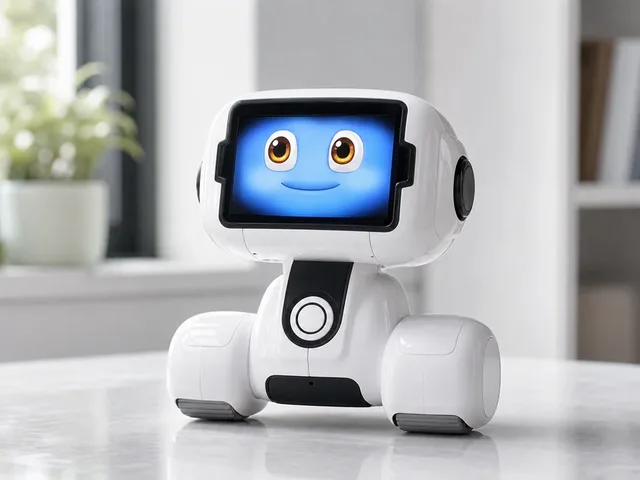
Height
22.5 cm
Weight
1.68 kg
Battery
up to 6 h
PadBot T2 is a wheeled desktop companion robot for children's learning and family communication. Official PadBot materials describe ChatGPT-based multilingual dialogue, storytelling, games, voice interaction, parental controls, activity monitoring, and mobile-app video calls, while the detailed product page lists a 5-inch screen, Wi-Fi, a 5000 mAh battery, 5-hour charging, 6-hour working time, and auto-charge support. It is closer to a kid-focused AI companion than a general home assistant, but its voice-controlled movement, face tracking, expressive head motion, and app-connected video calling make it a noteworthy smart robot entry rather than a static educational toy.
Listed price
See pricing details
Official PadBot pages use a quote-request flow and do not publish a stable retail price; Kickstarter/KickTraq campaign data is crowdfunding history rather than a durable MSRP.
Release window
Jan 1, 2025
Current status
Active
PadBot
Last verified
May 31, 2026
Share this robot
Open a plain share composer on X or Bluesky for this robot profile.
Technical overview
A fast read on the mechanical profile, sensing package, and listed platform details for T2.
Height
22.5 cm
Weight
1.68 kg
Dimensions
16.5 × 22.5 × 22cm (W × H × L)
Battery Life
up to 6 h
Charging Time
5 h
Max Speed
Not officially disclosed
Operational profile
Capabilities
10
Connectivity
1
Key capabilities
Listed platforms & ecosystem
Explore further
Benchmark set
Shortcuts to the closest alternatives in the current ui44 set.
Companions
Abi
Andromeda Robotics
See pricing details
Companions
Ballie
Samsung
See pricing details
Companions
Rhem
Rhem Labs
$599
Companions
KOIBOT ROLA Series
Reon Robotics
See pricing details
The T2 is a Companions robot built by PadBot. PadBot T2 is a wheeled desktop companion robot for children's learning and family communication. Official PadBot materials describe ChatGPT-based multilingual dialogue, storytelling, games, voice interaction, parental controls, activity monitoring, and mobile-app video calls, while the detailed product page lists a 5-inch screen, Wi-Fi, a 5000 mAh battery, 5-hour charging, 6-hour working time, and auto-charge support. It is closer to a kid-focused AI companion than a general home assistant, but its voice-controlled movement, face tracking, expressive head motion, and app-connected video calling make it a noteworthy smart robot entry rather than a static educational toy.
Official PadBot pages use a quote-request flow and do not publish a stable retail price; Kickstarter/KickTraq campaign data is crowdfunding history rather than a durable MSRP. See all PadBot robots on the PadBot page.
Detailed specifications for the T2
Height
22.5cmThe listed height is 22.5cm. Height alone does not establish working reach or clearance under furniture; check the documented operating configuration and required space.
Weight
1.68kgThe listed weight is 1.68kg. Weight alone does not establish locomotion, stability or safety around people. Check handling requirements and the model’s documented operating limits.
Dimensions
16.5 × 22.5 × 22cm (W × H × L)The overall dimensions of 16.5 × 22.5 × 22cm (W × H × L) are a recorded size entry. Check which axes and configuration it covers: a height-only entry does not establish width, depth or passage fit. Planning clearance also requires the operating envelope, turning space, attachments and documented margins.
Battery Life
Up to 6 hours continuous working timeThis is the recorded runtime entry. Test conditions and independent verification are not established by this field. Confirm workload, operating mode and environmental conditions before comparing runtimes.
Charging Time
5 hoursA charging time of 5 hours means the ratio of operation to downtime is an important consideration for applications requiring near-continuous availability. Some deployments use multiple robots in rotation to maintain uninterrupted service.
AI Platform
ChatGPT-based multilingual dialogue for kid-focused conversation, storytelling, games, and voice interactionRead this recorded AI entry alongside the model description and source notes for announcement or deployment context. A platform name alone does not establish implemented features, autonomy, or performance.
The profile lists the sensor descriptions below. These entries do not establish physical sensor counts, sensor fusion, redundancy, or performance.
Consult the linked profile sources for hardware configuration and tested behavior. A technology label alone does not verify an operating capability.
Explore sensor technologies: components glossary · full components directory
Companion robots provide social interaction, emotional support, and entertainment. Unlike utility robots, their primary value proposition is the relationship they build with their owner. The best companions learn preferences, develop personalities, and create genuine emotional connections.
The T2 record lists 10 capabilities. Keep any announcement or demonstration qualifiers attached to these entries; the count alone does not establish practical performance.
These are the capabilities listed in the profile. Hardware configuration and demonstrated performance should be checked against the linked sources.
These are the platforms, communities, or ecosystem relationships listed in the profile. A listed name or protocol alone does not confirm home-device interoperability or automation support.
10
Capabilities
AI
ChatGPT-based multilingual…
The T2 profile lists the following communication and voice-system descriptions.
The T2 by PadBot has the following technology descriptions in its profile. The physical platform features a height of 22.5cm, a weight of 1.68kg, providing the foundation on which this technology stack operates.
The profile lists Face-tracking camera, Wide-angle lens, Gravity sensor. Hardware quantities, integration, and tested behavior require separate source evidence.
The connectivity descriptions listed for the T2 are Wi-Fi. Specific services and device interoperability require separate documentation.
Social and companion robots are purchased by families, elderly individuals, and tech enthusiasts looking for interactive, emotionally engaging robotic pets or social companions. They are particularly popular in Japan and increasingly in senior care contexts worldwide.
Emotional expressiveness, interaction quality, voice recognition, personality development over time, and durability (especially for children) are what matter most. Privacy controls for cameras and microphones are increasingly important. Battery life determines how available the companion is throughout the day.
Listed pricing
The T2 is listed as Active. This status alone does not confirm public purchase availability or operational reliability. Contact PadBot for current access options and any purchase or participation requirements.
Recorded features and considerations to assess
The T2 record lists 10 capabilities. Review their qualifiers and supporting evidence for the tasks you need. The number of entries does not establish workflow coverage, reliability, or the ability to replace other robots.
The battery-life entry is Up to 6 hours continuous working time. Check the source conditions and operating mode before using this figure to plan a session. It does not establish task completion, area coverage, or continuous-use runtime.
Official PadBot pages use a quote-request flow and do not publish a stable retail price; Kickstarter/KickTraq campaign data is crowdfunding history rather than a durable MSRP.
Note: This strengths and trade-offs assessment is based on the T2's documented specifications as tracked in the ui44 database. Real-world performance depends on deployment conditions, firmware maturity, and environmental factors. For the most current information, check the PadBot manufacturer page or visit the official source. Use the comparison tool to evaluate these trade-offs against competing robots in the same category.
Understanding the engineering behind this category
Companion robots sit at the intersection of engineering and emotional design. Unlike utility robots measured by specifications like suction power or payload capacity, companion robots are judged by how well they make people feel — their expressiveness, responsiveness, personality, and ability to form genuine-seeming bonds with their owners. The technology behind these emotional machines is surprisingly sophisticated, drawing from psychology, animation, and cutting-edge AI.
Companion robots typically operate in confined indoor spaces and prioritize safe, predictable movement over sophisticated mapping. Most use simple but effective navigation combining bump sensors, cliff detection, and basic obstacle avoidance. Some advanced models incorporate camera-based person-following — the ability to track and follow a specific person through rooms. Unlike utility robots that need systematic coverage, companion robots navigate toward social engagement: moving toward voices, approaching detected family members, or positioning themselves for optimal interaction. The movement itself is often designed to convey personality — a curious robot might lean forward when exploring, while a timid one might approach cautiously.
AI is the heart of a companion robot's appeal. Emotion recognition systems analyze facial expressions, voice tone, and behavioral patterns to infer the user's emotional state and respond appropriately. Natural language processing enables conversational interaction that goes beyond simple command-response patterns. Personality systems create consistent behavioral traits that make the robot feel like an individual rather than a generic device. Machine learning allows the robot to adapt to its owner's preferences, schedule, and interaction style over time. The most advanced companion robots use generative AI to create novel responses and behaviors rather than relying solely on pre-programmed scripts, making interactions feel more natural and less repetitive.
Companion robot sensors prioritize social perception over environmental mapping. Cameras detect faces, read expressions, and enable recognition of family members. Microphone arrays with beamforming capture and localize voice from across a room, enabling natural conversation without shouting. Touch sensors across the body detect petting, hugging, and other physical interaction, triggering appropriate emotional responses. Some models include heart-rate or breathing-rate sensors in their touch surfaces, enabling health-monitoring features for elderly users. Temperature and light sensors help the robot understand context — bedtime versus activity time — and adjust its behavior accordingly.
Companion robots need to be available throughout the day to maintain the social bond with their owner. Battery life of eight hours or more is typical, with automatic return-to-charging-dock behavior when levels drop. Power management is designed to be invisible — the robot should seem always available and never interrupt a social moment to announce low battery. Some companion robots use sleep modes during inactive periods, with motion or sound detection to wake instantly when the owner approaches. Charging docks often double as the robot's designated resting spot, making the charging behavior feel natural rather than mechanical.
Companion robots prioritize child and elderly safety with rounded corners, pinch-free joint designs, and materials safe for skin contact. Emotional safety is equally important — companion robots are designed to never express anger, fear, or distress in ways that could upset vulnerable users. Privacy features include physical camera covers, microphone mute buttons, and transparent data handling policies. For elderly users, companion robots may include fall-detection alerts, activity monitoring, and remote check-in features that balance safety with privacy. The robot's emotional responses are carefully calibrated to avoid over-attachment or dependency concerns.
Companion robotics is evolving toward more nuanced emotional intelligence, deeper personalization, and expanded health-monitoring capabilities. Advances in generative AI are enabling more natural and varied conversational interaction. Future companion robots may serve as health monitoring platforms that detect changes in an owner's mood, activity levels, or cognitive patterns — providing early warning of health issues to family members or caregivers. The integration of companion features into utility robots (and vice versa) may blur category boundaries, creating household robots that are both helpful and emotionally engaging.
These are category-level technology examples; they do not establish the capabilities of the T2. For its recorded hardware details, see the sensor analysis and connectivity sections above. Check model-specific documentation from PadBot for supported behavior, or use the components glossary to look up terminology.
How this robot compares in the companions landscape
Official PadBot pages use a quote-request flow and do not publish a stable retail price; Kickstarter/KickTraq campaign data is crowdfunding history rather than a durable MSRP.
The T2 is listed as Active. This status alone does not confirm public purchase availability or operational reliability. Contact PadBot for current access options and any purchase or participation requirements.
Side-by-side specs, capability overlap analysis, and key differentiators.
For the full picture of PadBot's portfolio and market strategy, visit the PadBot manufacturer page.
What the public profile tells you, and what still needs direct vendor confirmation
From a buying and rollout perspective, the T2 should be read as a companions platform aimed at social, education, or care environments where interaction quality matters. ui44 currently tracks 10 capability signals and a last verification date of 2026-05-31. That mix gives buyers a useful first-pass picture, but it is still only the public layer of due diligence, especially when procurement, uptime, and support commitments are decided directly with PadBot.
Commercial model
See pricing details
Official PadBot pages use a quote-request flow and do not publish a stable retail price; Kickstarter/KickTraq campaign data is crowdfunding history rather than a durable MSRP.
Integration posture
1 connectivity option
The profile lists Wi-Fi. These labels do not establish APIs, fleet-management features, or workflow integration. These are the platforms, communities, or ecosystem relationships listed in the profile. A listed name or protocol alone does not confirm home-device interoperability or automation support.Recorded AI description: ChatGPT-based multilingual dialogue for kid-focused conversation, storytelling, games, and voice interaction
Spec disclosure
5/7 core specs public
ui44 currently has 5 of 7 core physical and operating specs filled in for this model, leaving 2 gaps that matter for deployment planning. Missing runtime, charge, speed, or payload details can materially change staffing and site-readiness assumptions.
The current profile is detailed enough to support early comparison work, shortlist creation, and cross-checking against other companions robots. It is still worth validating the final deployment package, because integration services, support coverage, software entitlements, and site-preparation requirements often sit outside the raw hardware spec sheet.
If you want a faster apples-to-apples read, compare the T2 against nearby alternatives in ui44's compare view, then cross-check the underlying AI, sensor, and subsystem terms in the components glossary. For manufacturer-level context, the PadBot profile helps anchor this robot inside the wider product lineup.
Recorded specifications and manufacturer guidance
Find product and source links on the PadBot page on ui44 or open PadBot's official source. Use model-specific manufacturer documentation for setup, cleaning, and service instructions.
The T2 record brings together the listed specifications and attributed claims. Consult the model description and source notes to distinguish manufacturer announcements, reported information, and unknowns. A source link or review date does not establish independent testing or manufacturer confirmation of every claim. Record last checked: 2026-05-31. Official source: PadBot official source. If you find outdated or incorrect information, please let us know — accuracy is our top priority.
See how the T2 stacks up — compare specs, browse the companions category, or search the full database.