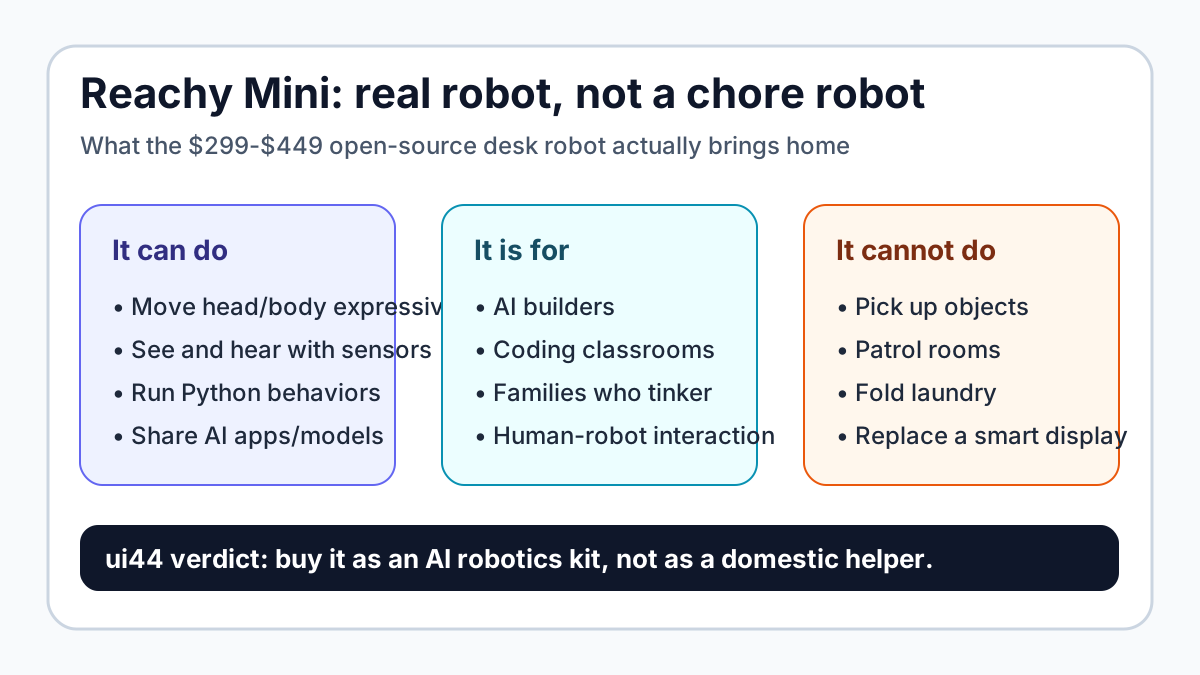
If you want a small robot that can look around, listen, speak, move expressively, run Python behaviors, and connect to the Hugging Face AI ecosystem, Reachy Mini is one of the most interesting sub-$500 robots in the ui44 database. If you want something that can pick up socks, patrol the house, carry objects, or clean, it is the wrong category.

That distinction matters. A robot can be real without being useful in the same way a vacuum, humanoid, or mobile security robot is useful. Reachy Mini is closer to an open-source AI character with a physical body: good for builders, classrooms, demos, and families that want to program something together. It is not a general-purpose home assistant.
What Is Reachy Mini?
Reachy Mini is a desktop companion and developer robot from Pollen Robotics and Hugging Face. In ui44 data, it sits in the companion-robot category, not the humanoid-labor category. The official materials describe it as a kit for human-robot interaction, creative coding, and AI experimentation.
The basic numbers are unusually concrete for a low-cost robot:
Reachy Mini spec
Starting price
- ui44 / official data
- $299 for Reachy Mini Lite; $449 for wireless Reachy Mini, plus taxes and shipping
Reachy Mini spec
Status
- ui44 / official data
- Pre-order / early-development kit
Reachy Mini spec
Size
- ui44 / official data
- 28 cm tall, 16 cm wide; about 23 cm tall in sleep mode
Reachy Mini spec
Weight
- ui44 / official data
- 1.5 kg
Reachy Mini spec
Sensors
- ui44 / official data
- Wide-angle camera, four microphones, speaker; accelerometer on wireless version
Reachy Mini spec
Movement
- ui44 / official data
- 6-DoF head movement, full body rotation, animated antennas
Reachy Mini spec
Compute
- ui44 / official data
- Host computer for Lite; Raspberry Pi 4 on wireless model
Reachy Mini spec
Connectivity
- ui44 / official data
- USB for Lite; Wi-Fi for wireless model
Reachy Mini spec
Software
- ui44 / official data
- Python SDK, simulation workflow, Hugging Face app/model integration
| Reachy Mini spec | ui44 / official data |
|---|---|
| Starting price | $299 for Reachy Mini Lite; $449 for wireless Reachy Mini, plus taxes and shipping |
| Status | Pre-order / early-development kit |
| Size | 28 cm tall, 16 cm wide; about 23 cm tall in sleep mode |
| Weight | 1.5 kg |
| Sensors | Wide-angle camera, four microphones, speaker; accelerometer on wireless version |
| Movement | 6-DoF head movement, full body rotation, animated antennas |
| Compute | Host computer for Lite; Raspberry Pi 4 on wireless model |
| Connectivity | USB for Lite; Wi-Fi for wireless model |
| Software | Python SDK, simulation workflow, Hugging Face app/model integration |
The most important line in that table is not the price. It is the combination of sensors, movement, and programmability. A smart speaker can talk. A tablet can show an AI avatar. Reachy Mini gives the AI a physical presence, even if that physical presence is limited to a desk.
The catch is equally important: Hugging Face says the robot is in an early development phase and is being shared as-is, without warranties or guarantees. That is not normal appliance language. It is builder-platform language.
Is Reachy Mini a Real Home Robot?
Yes, but only if you define "home robot" broadly enough to include learning, play, coding, and embodied AI experiments. Reachy Mini has a body, sensors, actuators, onboard or connected compute, and programmable behavior. That makes it more robot than a pure chatbot or screen-based companion.
But it is not a domestic worker. It has no arms, no mobile base, no gripper, no cleaning system, no payload rating, and no room-scale navigation. It cannot fetch a water bottle, follow a person through the house, empty a dishwasher, fold laundry, or inspect rooms while you are away.
That puts it in a different buying lane from robots like Amazon Astro, Samsung Ballie, Loona, or EBO X. Those robots are marketed around home presence, monitoring, mobility, companionship, or family interaction. Reachy Mini is marketed around building.
The best mental model is: Reachy Mini is a physical AI development companion for a desk, not a household appliance.
Why the $299 Price Still Matters
The home-robot market has a weird gap. Serious manipulation platforms are often priced like lab equipment. Social robots can be cheaper, but many are closed systems with fixed behaviors, subscriptions, or kid-focused content libraries. Reachy Mini lands in a third space: inexpensive, open, and explicitly meant for people who want to make new behaviors.
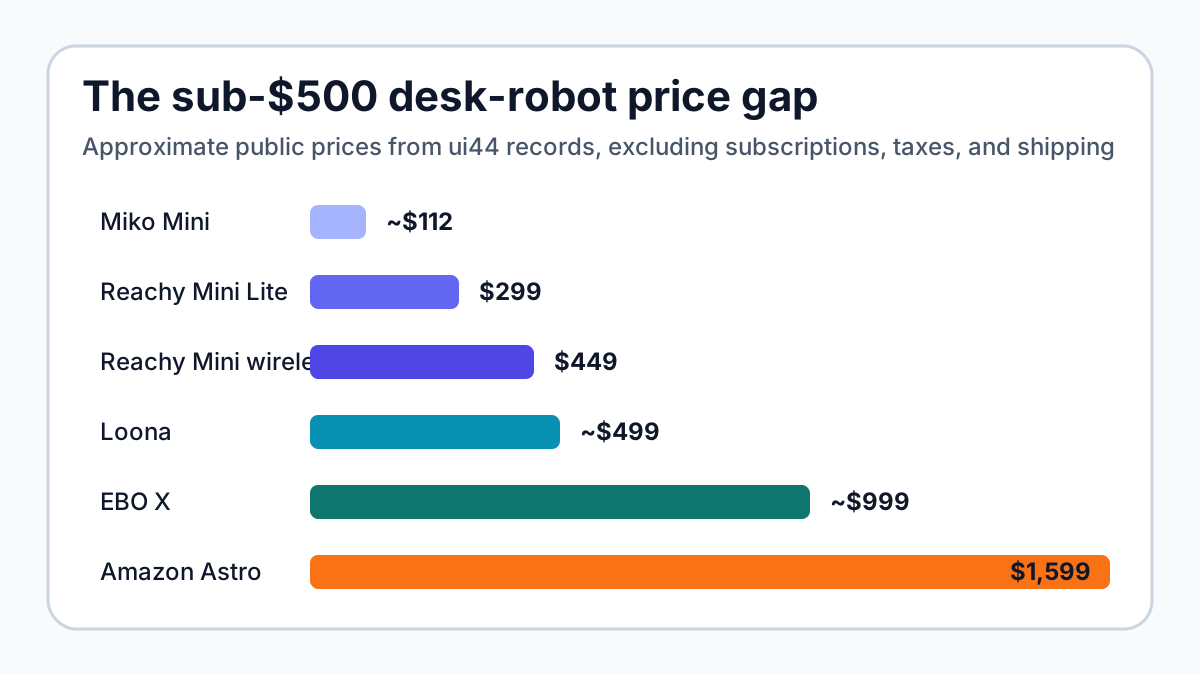
A few price comparisons from ui44 data make the positioning clearer:
Robot
- Public price / status in ui44
- about €112 sale price
- What you are really buying
- Kid-focused learning companion with moderated conversations and parent controls
Robot
- Public price / status in ui44
- $299 Lite / $449 wireless pre-order
- What you are really buying
- Open-source desk robot kit for AI builders and classrooms
Robot
- Public price / status in ui44
- about $499 premium bundle
- What you are really buying
- Expressive wheeled pet-style robot with games, face recognition, ChatGPT-4o integration, and auto-docking
Robot
- Public price / status in ui44
- about $999
- What you are really buying
- Rolling family companion / home monitor with 4K camera and AI voice interactions
Robot
- Public price / status in ui44
- $1,599.99 by invitation
- What you are really buying
- Mobile Alexa/Ring home patrol robot
Robot
- Public price / status in ui44
- $2,899.99 plus required plan
- What you are really buying
- Premium robotic dog companion with long-running ecosystem
Robot
- Public price / status in ui44
- about $70,000, contact Pollen/Hugging Face
- What you are really buying
- Research humanoid with two arms, mobile base, ROS 2, and manipulation capabilities
| Robot | Public price / status in ui44 | What you are really buying |
|---|---|---|
| Miko Mini | about €112 sale price | Kid-focused learning companion with moderated conversations and parent controls |
| Reachy Mini | $299 Lite / $449 wireless pre-order | Open-source desk robot kit for AI builders and classrooms |
| Loona | about $499 premium bundle | Expressive wheeled pet-style robot with games, face recognition, ChatGPT-4o integration, and auto-docking |
| EBO X | about $999 | Rolling family companion / home monitor with 4K camera and AI voice interactions |
| Amazon Astro | $1,599.99 by invitation | Mobile Alexa/Ring home patrol robot |
| Sony aibo | $2,899.99 plus required plan | Premium robotic dog companion with long-running ecosystem |
| Reachy 2 | about $70,000, contact Pollen/Hugging Face | Research humanoid with two arms, mobile base, ROS 2, and manipulation capabilities |
Reachy Mini is not the cheapest companion robot in the database. Miko Mini can be cheaper. But Reachy Mini is one of the rare low-cost options where openness is the point rather than a footnote. That changes the buyer profile.
If you want polished kid content, a Miko may make more sense. If you want a lively AI pet, Loona is more complete out of the box. If you want a robot you can program, simulate, modify, and use as a physical AI endpoint, Reachy Mini is more interesting.
What Can You Actually Do With It at Home?
For normal buyers, the most realistic Reachy Mini use cases are smaller than the marketing phrase "AI robot" might suggest.
You can build a physical AI character
The camera, microphones, speaker, head motion, body rotation, and antennas make Reachy Mini suited to character-like interactions. A model can answer a question, but the robot can also turn toward a person, react with movement, and use timing to feel more present.
That is not the same as emotional companionship on the level of LOVOT, aibo, or Moflin. It is more like a blank character platform. The value comes from what you or the community build on top.
You can teach robotics concepts without a lab robot
A $70,000 Reachy 2 is fascinating, but it is not a casual home purchase. Reachy Mini keeps the same family idea—open-source embodied AI from Pollen Robotics and Hugging Face—but strips it down to a desk-scale kit.
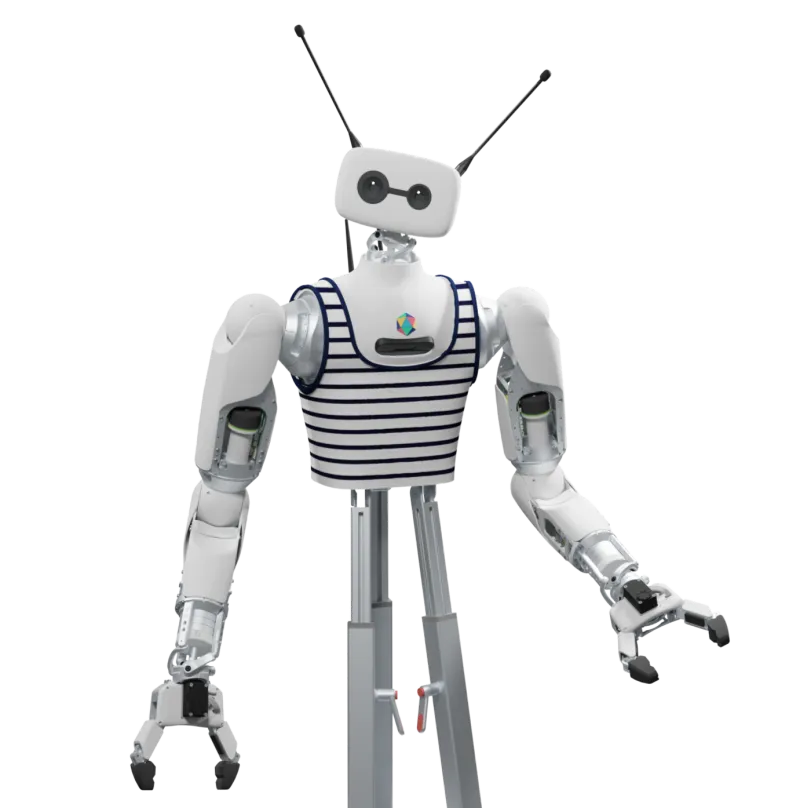
That makes the robot more realistic for classrooms, makerspaces, small research groups, and technically curious families. You can work on voice interaction, perception, behavior design, simulation, and timing without buying a mobile manipulator.
You can test AI apps in a body
Hugging Face says Reachy Mini is meant to use open-source models for speech, vision, and personality, and the broader LeRobot project is explicitly about lowering the barrier to real-world robotics with models, datasets, and tools.
That does not mean every model will run locally, privately, or smoothly. The Lite version depends on a connected computer. The wireless version adds onboard Raspberry Pi 4 compute, Wi-Fi, and battery, but that still does not turn it into a high-end AI workstation. Buyers should expect tinkering.
You can share behaviors with a community
This is where Reachy Mini is more promising than many novelty robots. Closed social robots often live or die by the manufacturer’s app roadmap. Reachy Mini’s strongest argument is that behaviors can be created, uploaded, downloaded, and remixed by a community.
Community ecosystems are messy. They can produce brilliant demos and half-finished experiments in equal measure. But for an open-source robot, that is the point.
What Are the Limitations?
The limitations are not small-print details. They define the product.
First, Reachy Mini is a kit. Assembly is part of the experience. Official materials describe a DIY kit workflow and early-development status, not a sealed consumer appliance. If you hate debugging, this is probably not the friendly robot you want.
Second, it does not move around the home. That makes it safer and simpler, but also less useful for monitoring, navigation, or household presence. A robot on a desk can be charming. It cannot check the kitchen.
Third, it cannot manipulate objects. The word "robot" makes many buyers imagine arms, grabbing, carrying, or helping with chores. Reachy Mini has expressive motion, not task motion.
Fourth, privacy depends on what you build. The official Reachy Mini materials say the robot does not store, transmit, or process personal data by default, and that camera and microphone use is under the user's control. That is a good starting point. But if you connect cloud speech recognition, vision models, or third-party services, your own configuration becomes the privacy policy.
That last point is especially important in a family setting. A camera-and-microphone robot on a desk should be treated like a programmable smart camera, not like a harmless toy.
Reachy Mini vs Loona, Miko, Astro, and Ballie
Reachy Mini is easiest to understand when compared with nearby home robots.
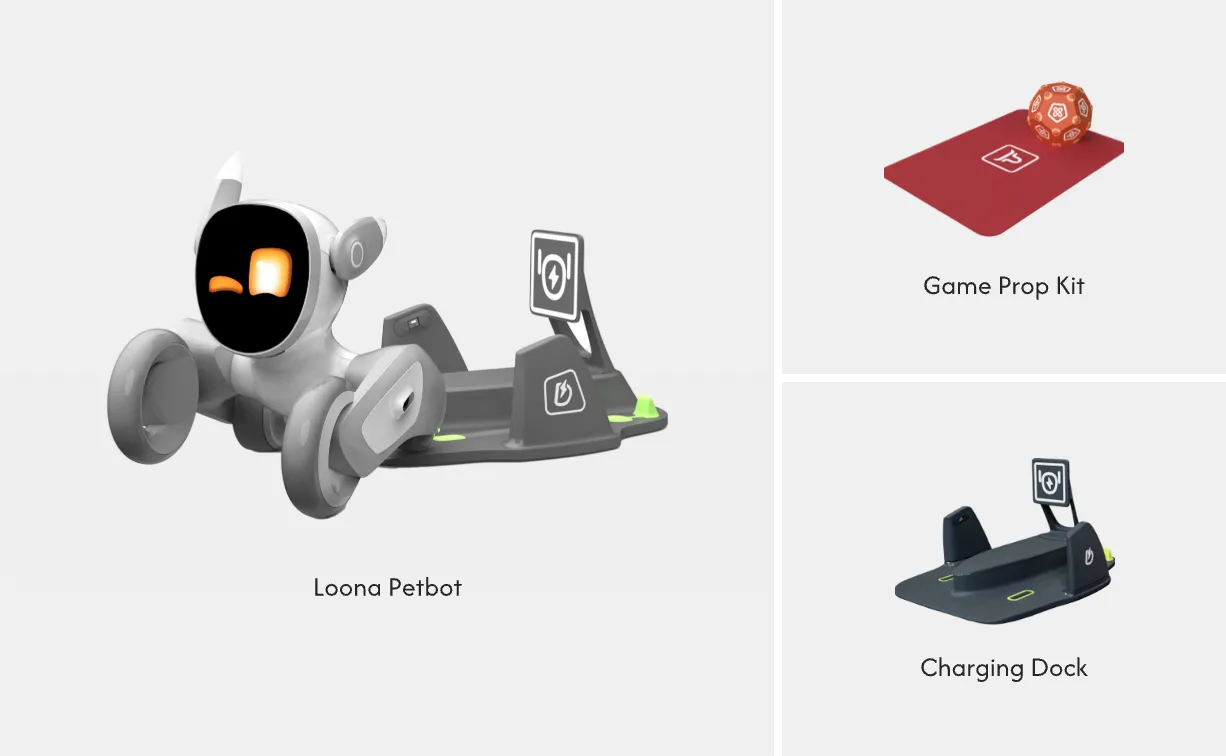
Compared with Loona: Loona is more complete as an interactive pet-style robot. It has autonomous navigation, auto-docking, a screen face, games, face recognition, and a polished companion personality. Reachy Mini is less finished, but more open for builders.
Compared with Miko: Miko 3 and Miko Mini are clearer children’s products. They emphasize age-appropriate content, parental controls, learning games, and kid-safe certification claims. Reachy Mini is better for coding and AI projects; Miko is better if you want a packaged learning companion.
Compared with Astro: Amazon Astro is larger, mobile, and built around home patrol, Alexa, Ring, video calling, and remote monitoring. It is also far more expensive and invite-limited. Reachy Mini is not a security robot.
Compared with Ballie: Samsung Ballie is a development-stage home companion built around SmartThings, a projector, mobile presence, and Gemini-powered multimodal AI. Ballie sounds more appliance-like, but price and release timing remain uncertain. Reachy Mini is simpler and more concrete: a small kit with published pricing.
Should You Buy Reachy Mini?
Buy Reachy Mini if you want a project. Do not buy it if you want a helper.
It makes sense for:
- AI developers who want a low-cost physical interface for speech, vision, and behavior experiments
- teachers who want a classroom-friendly robotics platform without a humanoid-lab budget
- families who enjoy coding together and understand that assembly/debugging is part of the fun
- makers who care about open-source hardware/software more than polished consumer features
- researchers who need a cheap human-robot interaction endpoint for early prototypes
It probably does not make sense for:
- anyone expecting chores, mobility, home patrol, or object manipulation
- buyers who want warranty-like appliance confidence from day one
- children who need a fully moderated, parent-managed content ecosystem out of the box
- households uncomfortable with configuring camera, microphone, cloud-model, and data-sharing settings
- people who would rather use a finished smart display than program a robot
The most honest buyer test is simple: would you still be excited if the robot spent its first weekend as a coding project instead of a polished companion? If yes, Reachy Mini is unusually compelling. If no, buy a more finished companion robot or wait.
The Bigger Signal for Home Robots
Reachy Mini may matter less as a single product than as a signal. The home-robot market has been split between expensive research humanoids, appliance-like cleaning robots, and closed companion products. A cheap open-source desk robot pushes from another direction: embodied AI should be something people can build with, not just watch in company demos.
That does not solve home robotics. A desk robot cannot pick up laundry. It cannot learn every household routine. It does not prove that general-purpose home robots are ready.
But it does lower the entry price for experimentation. More people can write behaviors, test multimodal interactions, understand what physical presence adds to AI, and discover where the hard problems still are.
For ui44 readers, that is the right way to view Reachy Mini. It is not a $299 shortcut to a robot butler. It is a $299 doorway into embodied AI.
Bottom Line
Reachy Mini is a real robot in the way that matters for builders: it has sensors, motion, software, community hooks, and a body that makes AI interactions feel different from a screen. It is not a real home helper in the way a buyer might hope from a robot advertisement.
If your goal is chores, skip it. If your goal is a low-cost, open-source desk robot for learning and experimentation, Reachy Mini is one of the most credible new entries in the sub-$500 home robot space.
Start with the Reachy Mini database page, compare it against other companion robots, and use /compare if you are deciding between a programmable kit, a kid-focused companion, and a finished home-monitoring robot.
Written by
ui44 Team
Published April 28, 2026
Share this article
Open a plain share link on X or Bluesky. No embeds, no widgets, no cookie baggage.