That is exactly why the privacy question matters. A robot that only tells jokes needs one level of trust. A robot that can look toward you, listen without a wake word, read context from your screen, summarize Gmail, check Calendar, and help in Slack needs a much higher one.
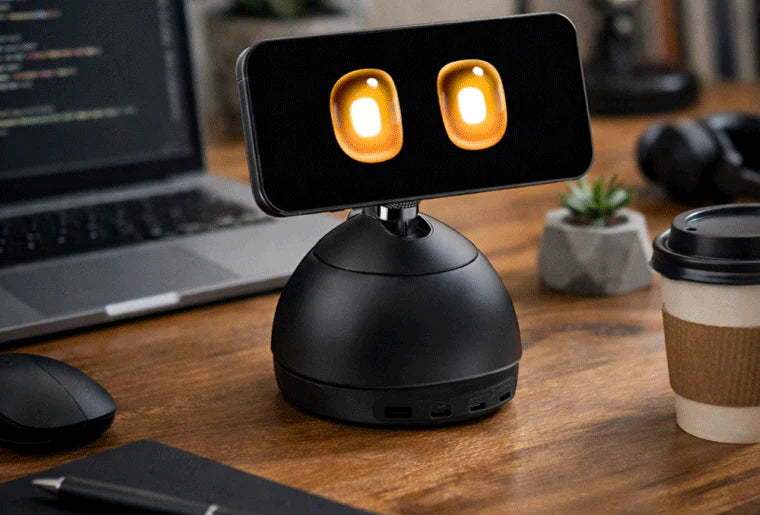
The short version: screen awareness can make an AI desk robot much more useful, but only if buyers know what it can see, when it can see it, where the data is processed, and how easily they can turn each permission off.
What is Loona DeskMate?
KEYi introduced Loona DeskMate at CES 2026 and later announced that it had launched on Kickstarter. The company's official descriptions call it an "emotion-aware embodied AI workmate" and a desktop companion built for a more continuous style of interaction than a normal voice assistant.
The design is unusual. Instead of giving the robot its own large display, camera, and mobile processor, DeskMate uses an iPhone as the display, sensor stack, and AI interface. The physical base works as a desktop body and charging hub, while the phone becomes the animated face. KEYi says the stand can orient the phone toward the user, creating the feeling of eye contact and presence rather than a static chatbot window.
The official feature list centers on three ideas:
- Wake-word-free multimodal perception. KEYi says DeskMate combines audio and visual cues so it can tell when you are addressing it, without requiring a fixed wake phrase.
- Screen and clipboard awareness. KEYi describes real-time screen and clipboard awareness, with Mac support and Windows support via a related app.
- Work-app integrations. The official CES post names Gmail, Calendar, Slack, Zoom via Calendly, and automated booking-style integrations such as Yelp and SendGrid.
Those features are not inherently bad. In fact, they are the reason DeskMate is more compelling than another novelty desk toy. But every one of them expands the permission surface.
Why screen awareness changes the buyer question
Most companion robots ask for predictable access: camera, microphone, Wi-Fi, maybe a mobile app account. A screen-aware desk robot asks for something closer to work-computer trust.
If DeskMate can answer questions based on what is currently on screen, then the important buyer question is not just "does it have a camera?" It is:
What counts as visible context?
That could mean the active browser tab. It could mean selected text. It could mean clipboard contents. It could mean a screenshot stream from a companion app. It could mean app-specific permissions for email, calendar, and messaging. The product can be useful in all of those modes, but they are not equal.
A safe product should explain the difference clearly. Reading a highlighted paragraph you intentionally share is very different from continuously indexing every window on a work laptop. Summarizing one email thread after confirmation is very different from having broad Gmail access. Helping schedule one meeting is very different from long-term access to Calendar, contacts, and workplace chat.
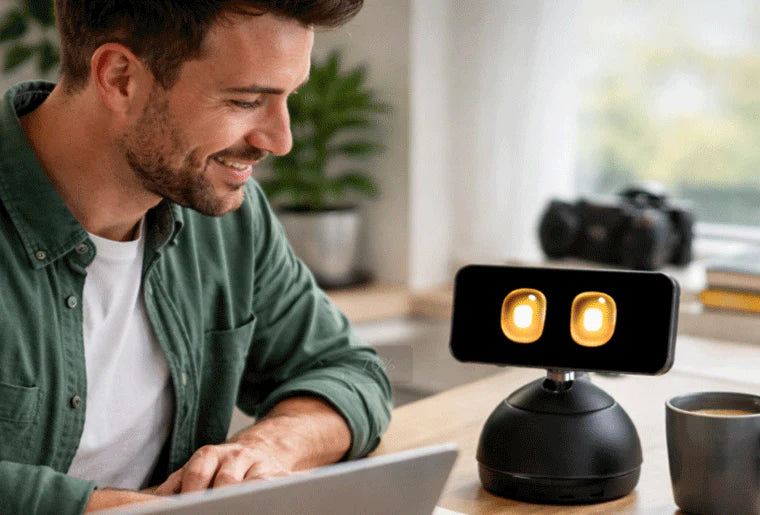
The best version of this category would behave like a permissioned desk layer, not a quiet surveillance layer. It should make active context obvious, offer per-app controls, and provide a visible "not looking" state that is as clear as a camera shutter.
The permission stack buyers should audit
Before backing or buying a screen-aware desktop robot, look for answers in six layers.
Permission layer
iPhone camera/mic
- What it enables
- Face, voice, gaze, room context, no-wake interaction
- Buyer risk if it is vague
- Always-present sensing can capture people near the desk who never agreed to use the robot.
Permission layer
Screen awareness
- What it enables
- Help with visible documents, tabs, tasks, and errors
- Buyer risk if it is vague
- Work documents, passwords, chats, or client data may be exposed if scope is too broad.
Permission layer
Clipboard awareness
- What it enables
- Fast help with copied text, links, or code
- Buyer risk if it is vague
- Clipboards often contain temporary secrets, invite links, addresses, or private snippets.
Permission layer
Gmail / email access
- What it enables
- Summaries, drafts, triage
- Buyer risk if it is vague
- Email is a full personal archive, not just today's inbox.
Permission layer
Calendar / meetings
- What it enables
- Planning, reminders, scheduling
- Buyer risk if it is vague
- Calendar data reveals routines, relationships, travel, health visits, and work patterns.
Permission layer
Slack / work apps
- What it enables
- Thread summaries and team lookup
- Buyer risk if it is vague
- Company data policies may prohibit connecting consumer AI tools to internal messages.
| Permission layer | What it enables | Buyer risk if it is vague |
|---|---|---|
| iPhone camera/mic | Face, voice, gaze, room context, no-wake interaction | Always-present sensing can capture people near the desk who never agreed to use the robot. |
| Screen awareness | Help with visible documents, tabs, tasks, and errors | Work documents, passwords, chats, or client data may be exposed if scope is too broad. |
| Clipboard awareness | Fast help with copied text, links, or code | Clipboards often contain temporary secrets, invite links, addresses, or private snippets. |
| Gmail / email access | Summaries, drafts, triage | Email is a full personal archive, not just today's inbox. |
| Calendar / meetings | Planning, reminders, scheduling | Calendar data reveals routines, relationships, travel, health visits, and work patterns. |
| Slack / work apps | Thread summaries and team lookup | Company data policies may prohibit connecting consumer AI tools to internal messages. |
This is where DeskMate differs from a simpler companion robot. ui44 lists Loona, KEYi's existing petbot, as a $429 companion robot with a 720p camera, 3D time-of-flight sensor, 4-microphone array, ChatGPT-4o integration, face recognition, voice commands, games, and remote monitoring. That is already a meaningful home-privacy profile.
DeskMate points the same companion idea at a more sensitive environment: the work desk. The robot does not just see a living room. It may sit beside invoices, source code, private messages, client files, medical portals, banking tabs, or a video call with someone who never consented to a robot assistant being present.
What should the robot be allowed to see?
A good default rule is simple: the robot should see the least context needed for the task you asked it to do.
For a screen-aware assistant, that means five practical settings should exist:
- Share selection only. The safest mode is letting the robot see only the highlighted text, copied snippet, active document section, or screenshot you intentionally send.
- Share active app, not whole desktop. If you are asking about a PDF, the assistant should not need your messaging app, password manager, or browser tabs.
- Require confirmation before app actions. Drafting an email is one thing; sending it should require an explicit confirmation.
- Separate memory from access. Remembering your preferred meeting style does not require storing raw emails, screen captures, or full chat logs.
- Show when sensing is active. If the camera, microphone, screen reader, or clipboard monitor is active, the user should know immediately.
That last point matters because embodied robots feel social. A device with a face can make surveillance feel less technical and more friendly. That can be useful for comfort and accessibility, but it can also make people underestimate how much access they have granted.

Reachy Mini is a useful contrast. It is also a desktop robot, but ui44 lists it as an open-source kit focused on human-robot interaction, creative coding, and AI experimentation rather than workplace account access. It starts at $299 for Reachy Mini Lite and $449 for the wireless version, stands 28 cm tall, weighs 1.5 kg, and includes a wide-angle camera, four microphones, a speaker, expressive 6-DoF head movement, and Hugging Face model integrations. The official Reachy Mini page also says it does not store, transmit, or process personal data by default and that camera/microphone use is under the user's control.
That does not automatically make Reachy Mini safer in every setup. A developer can connect it to almost anything. But the buyer posture is different: it is a programmable robot where the user deliberately builds behaviors, not a consumer assistant whose value depends on broad work-context access from day one.
How DeskMate compares with other companion robots
The screen-aware desk robot category sits between three existing home-robot lanes: AI pets, desktop developer robots, and mobile home companions. The table below shows why permission design matters more than raw cuteness.
Robot
- ui44 database snapshot
- $429; available; 17.3 cm; 1.1 kg; 720p camera; 3D ToF sensor; 4-mic array; ChatGPT-4o integration; remote monitoring
- Privacy angle for buyers
- A family petbot already needs clear camera, microphone, child, and remote-viewing controls.
Robot
Loona DeskMate
- ui44 database snapshot
- Kickstarter launch; iPhone-powered; screen/clipboard awareness; Mac support; Gmail, Calendar, Slack, Zoom/Calendly-style integrations claimed by KEYi
- Privacy angle for buyers
- The key issue is work-context scope: screen, clipboard, email, calendar, chat, and meeting permissions.
Robot
- ui44 database snapshot
- $299 Lite / $449 wireless; pre-order; 28 cm; 1.5 kg; camera; 4 microphones; open-source Python and Hugging Face integrations
- Privacy angle for buyers
- More transparent for builders, but privacy depends on what the owner connects it to.
Robot
- ui44 database snapshot
- $699; available; AI pet companion; on-device LLM for local interaction; face, gesture, touch, and emotion cues; optional paid Companion Care plans
- Privacy angle for buyers
- Local interaction is a strong claim to verify; photo capture, diary memories, and service plans still need care.
Robot
- ui44 database snapshot
- Development; no pricing; rolling home AI companion with camera, projector, SmartThings control, Gemini, Bixby, and pet/family video updates
- Privacy angle for buyers
- Whole-home mobility raises a different issue: where it can patrol, project, record, and control devices.
Robot
- ui44 database snapshot
- $999; available; 1.5 kg; 4K stabilized camera; night vision; Visual SLAM; GPT-4o mini; Alexa; two-way video
- Privacy angle for buyers
- It behaves more like a mobile family camera plus companion, so account security and remote access are central.
Robot
- ui44 database snapshot
- $299 list, often on sale; 22 cm; 0.9 kg; 5-7h active battery; 720p camera; COPPA-compliant and kidSAFE+ certified
- Privacy angle for buyers
- Child-focused robots need stricter rules for recordings, moderation, parental controls, and subscriptions.
| Robot | ui44 database snapshot | Privacy angle for buyers |
|---|---|---|
| Loona | $429; available; 17.3 cm; 1.1 kg; 720p camera; 3D ToF sensor; 4-mic array; ChatGPT-4o integration; remote monitoring | A family petbot already needs clear camera, microphone, child, and remote-viewing controls. |
| Loona DeskMate | Kickstarter launch; iPhone-powered; screen/clipboard awareness; Mac support; Gmail, Calendar, Slack, Zoom/Calendly-style integrations claimed by KEYi | The key issue is work-context scope: screen, clipboard, email, calendar, chat, and meeting permissions. |
| Reachy Mini | $299 Lite / $449 wireless; pre-order; 28 cm; 1.5 kg; camera; 4 microphones; open-source Python and Hugging Face integrations | More transparent for builders, but privacy depends on what the owner connects it to. |
| SwitchBot KATA Friends | $699; available; AI pet companion; on-device LLM for local interaction; face, gesture, touch, and emotion cues; optional paid Companion Care plans | Local interaction is a strong claim to verify; photo capture, diary memories, and service plans still need care. |
| Samsung Ballie | Development; no pricing; rolling home AI companion with camera, projector, SmartThings control, Gemini, Bixby, and pet/family video updates | Whole-home mobility raises a different issue: where it can patrol, project, record, and control devices. |
| Enabot EBO X | $999; available; 1.5 kg; 4K stabilized camera; night vision; Visual SLAM; GPT-4o mini; Alexa; two-way video | It behaves more like a mobile family camera plus companion, so account security and remote access are central. |
| Miko 3 | $299 list, often on sale; 22 cm; 0.9 kg; 5-7h active battery; 720p camera; COPPA-compliant and kidSAFE+ certified | Child-focused robots need stricter rules for recordings, moderation, parental controls, and subscriptions. |
The pattern is clear: the more context a robot can use, the more valuable it can be — and the more explicit its boundaries need to be.
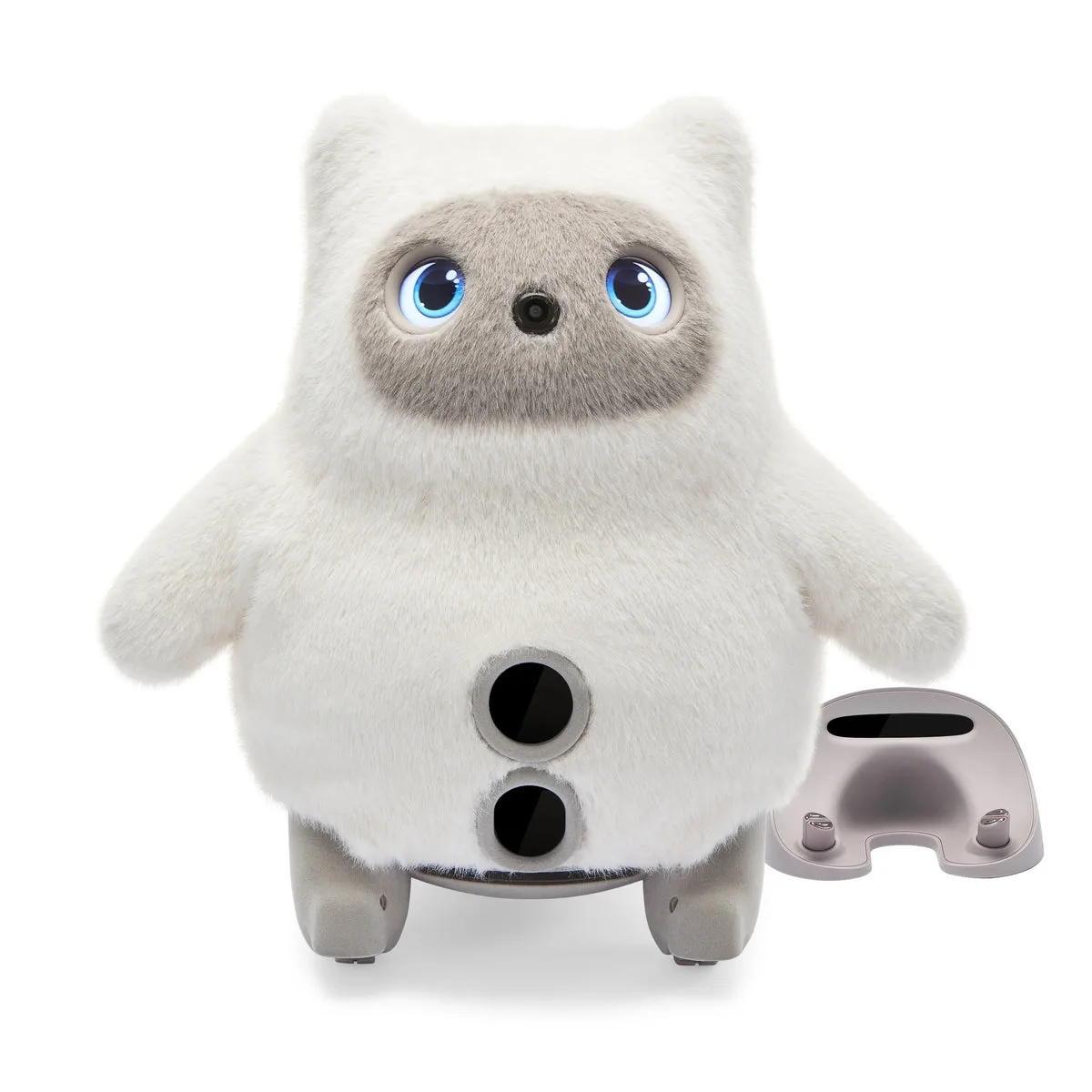
SwitchBot KATA Friends is especially relevant because it shows where companion robots are heading. ui44 lists it as a $699 AI pet line with voice commands, gestures, touch sensors, emotion cues, face recognition, diary memories, local app album storage, and an on-device LLM for core interaction. That is not a screen-aware work robot, but it raises the same buyer habit: do not judge the privacy story only by whether the robot is cute or whether the AI is local. Ask what is sensed, what is saved, what leaves the device, and what is locked behind a service plan.
A buyer checklist for Loona DeskMate
When screen awareness is genuinely useful
There are good reasons to want a screen-aware desk robot. It could help a student turn a confusing paragraph into a study prompt. It could notice that a meeting is about to start and surface the right notes. It could help someone with attention or executive-function challenges recover from context switching. It could make voice interaction feel more natural for people who struggle with keyboard-heavy workflows.
The form factor also has a real advantage over a normal app. A physical companion can signal presence, attention, and interruption more clearly than a browser tab. If it is quiet during focus time and active only when invited, it could be less distracting than another notification panel.
But usefulness does not remove the need for boundaries. In fact, the more useful DeskMate becomes, the more important boundaries become. The riskiest version of the product is not a bad robot that nobody uses. It is a charming, helpful robot that slowly accumulates permanent access to every part of a person's workday.
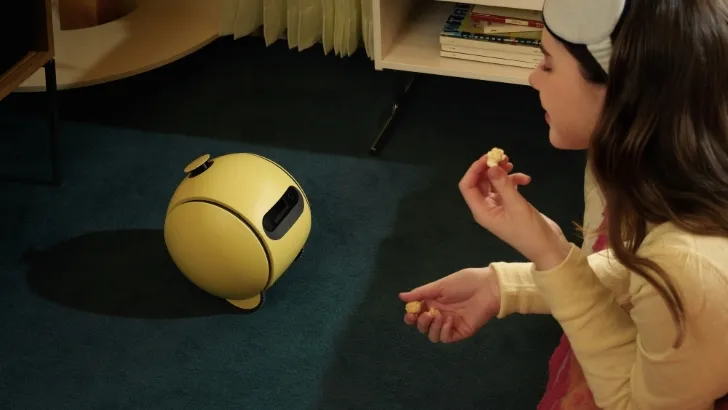
Samsung Ballie shows the broader home-robot version of this problem. ui44 lists Ballie as a development-stage rolling companion with no confirmed price, SmartThings control, a built-in projector, camera-based pet and family monitoring, Gemini and Bixby integration, and personalized scheduling. A mobile home companion asks, "where in the house can it go?" A screen-aware desk companion asks, "which parts of my digital life can it read?" Both questions matter before the robot becomes normal furniture.
Bottom line: screen-aware should not mean all-seeing
Loona DeskMate is a smart signal for where home and desk robots are going. The next wave of companions will not just wait for commands. They will try to infer intent, read context, remember preferences, and act inside the tools people already use.
That can be genuinely helpful. It can also become too intimate too quickly.
For buyers, the right question is not whether DeskMate is cute, clever, or a better iPhone stand. The right question is whether its permissions are narrow, visible, reversible, and understandable. A screen-aware desk robot should be allowed to see what helps with the task at hand — not everything on the desk, not every app, and not every private moment just because it has a friendly face.
Related in the database
Use this article as a privacy verification workflow
Turn the article into a privacy verification pass grounded in the robots, manufacturers, and components it actually references.
Loona DeskMate Privacy: What Can It See? already points you toward 6 linked robots, 6 manufacturers, and 5 countries inside the ui44 database. That matters because strong buyer guidance is easier to apply when you can move immediately from a claim or warning into concrete product pages, manufacturer directories, component explainers, and country-level context instead of treating the article as an isolated opinion piece. The fastest next step is to turn the article into a shortlist workflow: open the linked robot pages, verify which specs are actually published for those models, then compare the surrounding manufacturer and component context before you decide whether the underlying claim changes your buying plan.
For this topic, the useful discipline is to separate the editorial lesson from the catalog evidence. The article gives you the framing, but the robot pages tell you what each product actually ships with today: sensor stack, connectivity methods, listed price, release timing, category, and support-relevant compatibility notes. The manufacturer pages then show whether you are looking at a one-off launch, a broader lineup pattern, or a company that spans multiple categories. That layered workflow reduces the risk of buying on a single marketing phrase or a single support FAQ.
Use the robot pages to confirm which products actually expose cameras, microphones, Wi-Fi, or voice systems, then use the manufacturer pages to decide how much of the privacy question seems product-specific versus brand-wide. On this route cluster, Loona, Reachy Mini, and KATA Friends form the fastest reality check. If you want a quick working shortlist, open Compare Loona, Reachy Mini, and KATA Friends next, then keep this article open as the reasoning layer while you compare structured data side by side.
Practical Takeaway
Every robot, manufacturer, category, component, and country reference below resolves to a real ui44 page, keeping the follow-up path grounded in database records rather than generic advice.
Suggested next steps in ui44
- Open Loona and note the listed sensors, connectivity methods, and voice stack before you interpret any policy claim.
- Cross-check the wider brand context on KEYi Tech so you can see whether the privacy question touches one model or a broader lineup.
- Use the linked component pages to confirm how common the relevant sensors and connectivity layers are across the database.
- Keep a short note of which policy layers you checked, which device features are actually present on the robot page, and which items still depend on region- or app-level confirmation.
- Finish with Compare Loona, Reachy Mini, and KATA Friends so the policy reading sits next to structured product data.
Robot profiles worth opening next
Use the linked product pages as the evidence layer
The linked robot pages are where this article becomes operational. Instead of asking whether the headline is interesting, use the robot entries to inspect the actual mix of sensors, connectivity options, batteries, pricing, release timing, and stated capabilities attached to the products mentioned in the article. That is the easiest way to see whether the warning or opportunity described here affects one product family, a specific design pattern, or an entire buying lane.
Loona is tracked on ui44 as a available companions robot from KEYi Tech. The database currently records a listed price of $442, a release date of 2023, 2 hours continuous playtime; 1350 mAh, 11.1 V lithium-ion rechargeable battery battery life, Not officially disclosed charging time, and a published stack that includes 3D Time-of-Flight (ToF) Sensor, 720p RGB Camera, and Touch Sensor plus Wi-Fi (Dual-band 2.4G/5.8G, 802.11a/b/g/n) and USB Type-C (charging).
For privacy-focused reading, this page matters because it shows the concrete device surface behind the policy discussion. Use it to verify whether Loona combines sensors and connectivity in a way that could change the in-home data footprint, and compare the listed capabilities such as Face Recognition, Voice Commands, and Emotion Expression (LCD face) with any cloud, app, or voice layers.
Reachy Mini
Pollen Robotics · Companions · Available
Reachy Mini is tracked on ui44 as a available companions robot from Pollen Robotics. The database currently records a listed price of $299, a release date of 2025-07, Not officially disclosed battery life, Not officially disclosed charging time, and a published stack that includes 120° 12 MP autofocus wide-angle camera, 4 PDM MEMS digital microphones, and 5 W speaker plus USB (Reachy Mini Lite via host computer) and Wi-Fi (wireless Reachy Mini).
For privacy-focused reading, this page matters because it shows the concrete device surface behind the policy discussion. Use it to verify whether Reachy Mini combines sensors and connectivity in a way that could change the in-home data footprint, and compare the listed capabilities such as 6-DoF head movement, Full body rotation, and Animated antennas for expressive interaction with any cloud, app, or voice layers.
KATA Friends
SwitchBot · Companions · Available
KATA Friends is tracked on ui44 as a available companions robot from SwitchBot. The database currently records a listed price of $699, a release date of 2026-05-12, Not officially disclosed battery life, Not officially disclosed; CNET reports an 8-hour sleep/charge schedule charging time, and a published stack that includes Cameras, Microphones, and Touch sensors in ears, hands, tummy, and back plus SwitchBot companion app and On-device/offline AI interaction for core responses.
For privacy-focused reading, this page matters because it shows the concrete device surface behind the policy discussion. Use it to verify whether KATA Friends combines sensors and connectivity in a way that could change the in-home data footprint, and compare the listed capabilities such as AI pet companionship, Autonomous indoor movement, and Obstacle avoidance with any cloud, app, or voice layers.
Ballie is tracked on ui44 as a development companions robot from Samsung. The database currently records a listed price of Price TBA, a release date of TBD, Not officially disclosed battery life, Not officially disclosed charging time, and a published stack that includes Camera, Spatial Sensors, and Environmental Sensors plus Wi-Fi and SmartThings.
For privacy-focused reading, this page matters because it shows the concrete device surface behind the policy discussion. Use it to verify whether Ballie combines sensors and connectivity in a way that could change the in-home data footprint, and compare the listed capabilities such as Autonomous Home Navigation, Built-in Projector (Wall & Floor), and Smart Home Control via SmartThings with any cloud, app, or voice layers, including Bixby.
EBO X is tracked on ui44 as a available companions robot from Enabot. The database currently records a listed price of $999, a release date of 2023-05, 2-3 hours battery life, 2 hours charging time, and a published stack that includes 4K one-axis stabilized camera, 8MP ultra-low-light sensor, and 106° camera FOV plus 2.4GHz Wi-Fi and 5GHz Wi-Fi.
For privacy-focused reading, this page matters because it shows the concrete device surface behind the policy discussion. Use it to verify whether EBO X combines sensors and connectivity in a way that could change the in-home data footprint, and compare the listed capabilities such as Autonomous home patrol, Two-way video communication, and AI voice interactions with any cloud, app, or voice layers, including Amazon Alexa.
Manufacturer context behind the article
Check whether this is one product story or a broader company pattern
Manufacturer pages add the privacy context that individual product pages cannot show on their own. They help you check whether cameras, microphones, cloud accounts, app controls, and policy assumptions appear across a broader lineup or stay tied to one specific product story.
KEYi Tech
ui44 currently tracks 2 robots from KEYi Tech across 1 category. The company is grouped under USA, and the current catalog footprint on ui44 includes Loona, Loona DeskMate.
That wider brand context matters because privacy questions rarely stop at one FAQ page. A manufacturer route helps you see whether the article is centered on one premium model or on a company that has several relevant products and therefore more than one place where the same policy or app assumptions might matter. The category mix here currently points toward Companions as the most useful next route if you want to see whether this article reflects a wider pattern inside the brand.
Pollen Robotics
ui44 currently tracks 2 robots from Pollen Robotics across 2 categorys. The company is grouped under France, and the current catalog footprint on ui44 includes Reachy 2, Reachy Mini.
That wider brand context matters because privacy questions rarely stop at one FAQ page. A manufacturer route helps you see whether the article is centered on one premium model or on a company that has several relevant products and therefore more than one place where the same policy or app assumptions might matter. The category mix here currently points toward Research, Companions as the most useful next route if you want to see whether this article reflects a wider pattern inside the brand.
SwitchBot
ui44 currently tracks 3 robots from SwitchBot across 3 categorys. The company is grouped under USA, and the current catalog footprint on ui44 includes K20+ Pro, onero H1, KATA Friends.
That wider brand context matters because privacy questions rarely stop at one FAQ page. A manufacturer route helps you see whether the article is centered on one premium model or on a company that has several relevant products and therefore more than one place where the same policy or app assumptions might matter. The category mix here currently points toward Cleaning, Home Assistants, Companions as the most useful next route if you want to see whether this article reflects a wider pattern inside the brand.
Samsung
ui44 currently tracks 2 robots from Samsung across 2 categorys. The company is grouped under South Korea, and the current catalog footprint on ui44 includes Ballie, Bespoke AI Jet Bot Steam Ultra.
That wider brand context matters because privacy questions rarely stop at one FAQ page. A manufacturer route helps you see whether the article is centered on one premium model or on a company that has several relevant products and therefore more than one place where the same policy or app assumptions might matter. The category mix here currently points toward Companions, Cleaning as the most useful next route if you want to see whether this article reflects a wider pattern inside the brand.
Broaden the scan without leaving the database
Categories, components, and countries add the wider context
Category framing
Category pages are useful when the article touches a buying pattern that shows up across brands. A category route helps you confirm whether the linked products sit in a narrow niche or whether the same question should be tested across a larger field of alternatives.
Companions
The Companions category page currently groups 53 tracked robots from 48 manufacturers. ui44 describes this lane as: Social robots, robot pets, and elderly-care companions designed for emotional connection and everyday support at home.
That makes the category route a practical follow-up when you want to check whether the products linked in this article are typical for the lane or whether they sit at one edge of the market. Useful starting examples currently include PARO, Abi, Next-Generation Companion Robot.
Country and ecosystem context
Country pages give extra context when support practices, launch sequencing, regulatory posture, or manufacturer mix matter. They are not a substitute for model-level verification, but they do help you see which ecosystems cluster together and which manufacturers sit in the same regional field when you broaden the search beyond the article headline.
USA
The USA route currently groups 89 tracked robots from 69 manufacturers in ui44. That gives you a useful regional lens when the article points toward support practices, launch sequencing, or brand clusters that may share similar ecosystem assumptions.
On the current route, manufacturers like Faraday Future, iRobot, Boston Dynamics make the page a good way to broaden the scan without losing the regional context that often shapes availability, documentation style, and adjacent alternatives.
France
The France route currently groups 8 tracked robots from 7 manufacturers in ui44. That gives you a useful regional lens when the article points toward support practices, launch sequencing, or brand clusters that may share similar ecosystem assumptions.
On the current route, manufacturers like Pollen Robotics, Aldebaran / Maxtronics, Aldebaran Robotics make the page a good way to broaden the scan without losing the regional context that often shapes availability, documentation style, and adjacent alternatives.
South Korea
The South Korea route currently groups 9 tracked robots from 7 manufacturers in ui44. That gives you a useful regional lens when the article points toward support practices, launch sequencing, or brand clusters that may share similar ecosystem assumptions.
On the current route, manufacturers like ROBOTIS, Samsung, GenON make the page a good way to broaden the scan without losing the regional context that often shapes availability, documentation style, and adjacent alternatives.
Questions to answer before you move from reading to buying
A follow-up FAQ built from the entities already linked in this article
Frequently Asked Questions
Which page should I open first after reading “Loona DeskMate Privacy: What Can It See?”?
Start with Loona. That gives you a concrete product anchor for the article’s main claim. From there, branch into the manufacturer and component pages so you can tell whether the article is describing one specific model, a repeated brand pattern, or a wider technology issue that affects multiple shortlist options.
How do the manufacturer pages change the buying decision?
KEYi Tech help you zoom out from one article and one product. On ui44 they show lineup breadth, category spread, and the neighboring robots tied to the same company. That context is useful when you are deciding whether a risk belongs to a single model, whether it shows up across a brand’s portfolio, and whether you should keep looking at alternatives before committing.
When should I switch from reading to side-by-side comparison?
Move into Compare Loona, Reachy Mini, and KATA Friends as soon as you understand the article’s main warning or promise. The article explains what to watch for, but the compare view is where you can check whether price, status, battery life, connectivity, sensors, and category fit still make the robot a good match for your own home and budget.
Where to go next in ui44
Keep the research chain inside the database
If you want to keep going, these follow-on pages give you the cleanest expansion path from article to research session. Open the comparison route first if you are deciding between products today. Open the manufacturer, category, and component routes if you still need to understand the broader pattern behind the claim.
Written by
ui44 Team
Published May 17, 2026
Share this article
Open a plain share link on X or Bluesky. No embeds, no widgets, no cookie baggage.