SwitchBot
3 robots tracked on ui44 headquartered in USA and published pricing around $699–$10.0k.
- 2 active models
- Cleaning leads the lineup
- Updated May 29, 2026
Coverage snapshot
- Tracked robots
- 3
- Categories
- 3
- Available now
- 2
- Price view
- $699–$10.0k
Why this page matters
Use this route to scan the lineup, open the best in-brand comparisons, and jump into pricing, specs, and competitive context without leaving the manufacturer view.
Built to work for both multi-model brands and thinner manufacturer records.
Share this manufacturer
Plain outbound share links only, so this page stays cookie-light.
What stands out about SwitchBot
SwitchBot currently spans 3 robots in the ui44 database. The portfolio leans toward cleaning with 1 model leading the lineup. 2 models are already available or active today. Published pricing ranges from $699 to $10.0k.
1 Cleaning
SwitchBot is most concentrated in cleaning robotics, with 3 categories represented overall.
2/3
2 robots are marked available or active, which helps frame how commercial-ready this lineup is.
$699–$10.0k
The average published price across 3 models lands around $3.8k.
What this manufacturer actually covers
SwitchBot needs an at-a-glance summary before the page branches into deeper editorial content. This chapter brings the company snapshot, compare entry points, and model gallery into one clean first read.
About SwitchBot
SwitchBot is a robotics company headquartered in USA. The company currently has 3 robots tracked in the ui44 Home Robot Database, spanning 3 categories: Cleaning, Home Assistants, Companions.
Key Capabilities
At a Glance
Robots Tracked
3 models
Categories
Headquarters
Available Now
2 robots
Price Range
$699 – $10.0k
Browse all robotics companies on the manufacturers directory, or explore robots from USA.
Compare SwitchBot models side by side
These in-brand comparison links surface the most relevant matchups first, using category fit, shared capabilities, and verification freshness to decide what should be reviewed together.
K20+ Pro vs onero H1
Most recently verified in-brand pair
K20+ Pro vs KATA Friends
Most recently verified in-brand pair
onero H1 vs KATA Friends
Most recently verified in-brand pair
All SwitchBot Robots
Model coverage
The tracked SwitchBot lineup is grouped here so the catalog can be scanned quickly before diving deeper into pricing, specs, and context.
SwitchBot
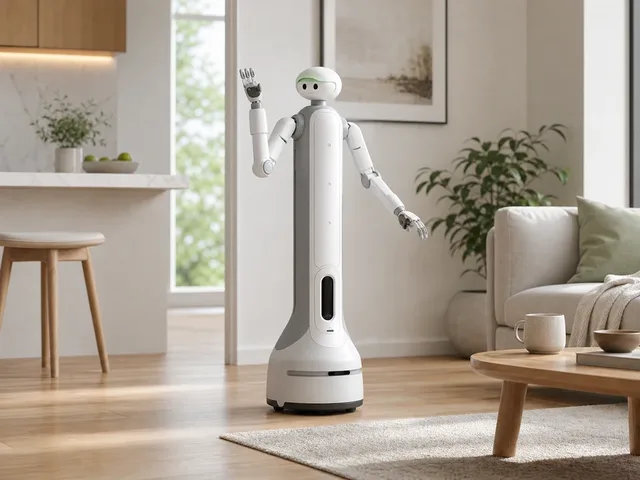
onero H1
Category
Home Assistants
Price
$9,999
SwitchBot
KATA Friends
Category
Companions
Price
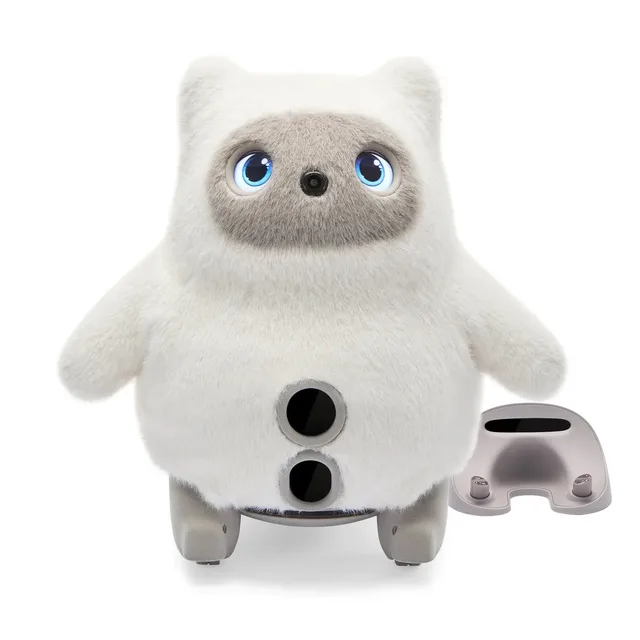
$699
KATA Friends
SwitchBot KATA Friends is an AI pet companion line with two character variants, Noa and Niko. Official SwitchBot launch…
Lineup structure and platform signals
A premium manufacturer page should make it easy to understand how the lineup is organized and what technical patterns show up across the portfolio, not just list robots one by one.
SwitchBot Product Lineup
SwitchBot offers 3 robot models across 3 categories. Below is a breakdown of each product line, current availability, and key specifications.
Cleaning (1 model)
Home Assistants (1 model)
Companions (1 model)
Technology & Capabilities
SwitchBot's robots combine a range of technologies and capabilities. Here is a consolidated look at the sensors, connectivity, AI platforms, and capabilities found across their product line.
Key Capabilities
-
Robot Vacuum Cleaning 1/3 (33%)
-
FusionPlatform Modular System (ClawLock attachment) 1/3 (33%)
-
Smart Delivery (up to 8 kg payload) 1/3 (33%)
-
Mobile Security Patrol (with Pan/Tilt Cam) 1/3 (33%)
-
Mobile Air Purification (with Air Purifier Kit) 1/3 (33%)
-
Mobile Air Circulation (with Circulator Fan) 1/3 (33%)
-
Cordless Vacuum Combo (handheld stick vac) 1/3 (33%)
-
D-ToF LiDAR Navigation 1/3 (33%)
-
Centimeter-Level Obstacle Avoidance 1/3 (33%)
-
Multi-Room Mapping 1/3 (33%)
+ 26 more
Sensor Technology
-
DToF laser radar 1/3 (33%)
-
Triple laser obstacle-avoidance sensors 1/3 (33%)
-
Cliff/fall-prevention sensors 1/3 (33%)
-
Carpet detection 1/3 (33%)
-
Multiple cameras 1/3 (33%)
-
Depth sensing 1/3 (33%)
-
Tactile feedback sensing 1/3 (33%)
-
Cameras 1/3 (33%)
-
Microphones 1/3 (33%)
-
Touch sensors in ears, hands, tummy, and back 1/3 (33%)
+ 3 more
Connectivity
-
Wi-Fi (2.4GHz / 5GHz) 1/3 (33%)
-
Bluetooth 1/3 (33%)
-
Matter (via SwitchBot Hub) 1/3 (33%)
-
SwitchBot companion app 1/3 (33%)
-
On-device/offline AI interaction for core responses 1/3 (33%)
AI & Intelligence
Explore these technologies across all robots:
Pricing, availability, and hard specs
Decision-making gets easier when pricing, availability, and comparable specs are presented as a coherent buying surface instead of disconnected blocks.
Pricing & Availability
$699
Starting from
$3.8k
Avg. across 3 models
$10.0k
Up to
2/3
Available now
SwitchBot offers robots with public pricing ranging from $699 to $10.0k.
K20+ Pro
Availableonero H1
DevelopmentKATA Friends
AvailableAvailability Breakdown
Available for purchase
In active development
Specifications Comparison
Compare the key technical specifications across all SwitchBot robots. All data is sourced from manufacturer disclosures and verified against official documentation.
K20+ Pro
onero H1
KATA Friends
Buyer guidance and plain-language spec decoding
This section translates the raw database into practical evaluation advice, which helps the page feel like expert editorial rather than a raw export.
Buying Guide: Is a SwitchBot Robot Right for You?
Choosing the right robot depends on your use case, budget, and technical needs. Here's what to consider when evaluating SwitchBot's product line.
Who Should Consider SwitchBot Robots
Consumer Buyers
If you're a home user or small business looking for an off-the-shelf robot, SwitchBot has consumer-priced options starting at $699. These models typically ship directly and don't require enterprise contracts.
Key Factors to Evaluate
Availability
2 of 3 models are currently available. Check individual robot pages for the latest status.
Category Fit
Make sure the robot's category matches your primary use case. Browse all categories.
Sensor Ecosystem
Review the technology section to understand what sensing and connectivity each model offers.
Price Transparency
3 of 3 models list public pricing. For unlisted models, request quotes early.
Ecosystem Compatibility
Some SwitchBot robots integrate with third-party platforms. Check compatibility on each robot's page.
Compare Before You Buy
Evaluate SwitchBot robots head-to-head or against competitors with our comparison tool.
SwitchBot Specifications Explained
Raw numbers only tell part of the story. Here is a plain-language explanation of what each specification means for the SwitchBot robots — and what it means for you as a buyer or researcher.
K20+ Pro
Specifications Breakdown
Height
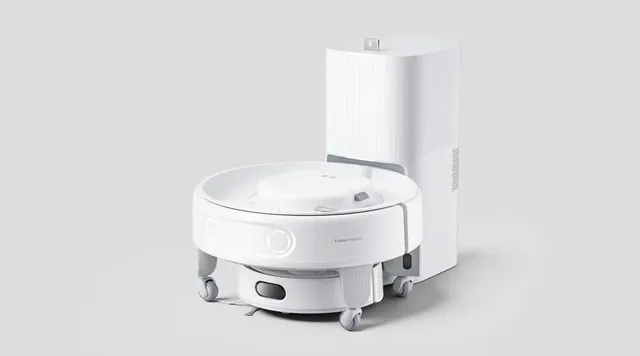
92 mm robot bodyWith a height of 92 mm robot body, the K20+ Pro is designed to operate at a mid-range level — suitable for navigating under tables, around furniture, and through standard doorways without issue. This compact-but-capable size balances visibility with maneuverability.
Weight
2.3 kg robot body; 4 kg mobile baseWeighing just 2.3 kg robot body; 4 kg mobile base, the K20+ Pro is lightweight and easy to relocate between areas or floors. Lightweight robots are ideal for homes with delicate flooring and are simple to pick up and move when needed.
Battery Life
3500 mAh battery capacity; runtime not officially disclosedThe K20+ Pro offers 3500 mAh battery capacity; runtime not officially disclosed of battery life per charge. Battery life is one of the most critical real-world performance metrics for any mobile robot. It determines how much work the robot can accomplish in a single session before needing to recharge. For cleaning robots, this runtime should be evaluated against the size of the area you need covered and the intensity of the tasks involved. Robots with self-charging capability can partially compensate for shorter battery life by autonomously returning to their dock.
Charging Time
About 4 hoursThe K20+ Pro requires About 4 hours to reach a full charge. Charging time directly impacts the robot's daily operating capacity — faster charging means less downtime and more productive hours. Combined with its battery life, the charge-to-runtime ratio reveals how much of each day the robot can actually spend working versus sitting on its dock.
AI Platform
AI obstacle avoidance, smart room mapping, autonomous schedulingThe K20+ Pro runs on AI obstacle avoidance, smart room mapping, autonomous scheduling for its artificial intelligence capabilities. The AI platform determines how intelligently the robot behaves — from basic reactive responses to sophisticated scene understanding, natural language processing, and adaptive learning. A more advanced AI platform generally means better obstacle avoidance, more natural interaction, and the ability to improve performance over time through software updates.
Dimensions: 248 × 248 × 92 mm robot body
Affects doorway clearance and operating space requirements
Sourced from official SwitchBot docs · Full K20+ Pro specs →
onero H1
Specifications Breakdown
Height
Not officially disclosedThe onero H1 stands Not officially disclosed, a size that affects how the robot interacts with its environment, what tasks it can reach, and how easily it fits into existing spaces.
Weight
Not officially disclosedThe onero H1 weighs Not officially disclosed. Weight affects stability, portability, floor compatibility, and how the robot interacts with its environment.
Battery Life
Not officially disclosedThe onero H1 offers Not officially disclosed of battery life per charge. Battery life is one of the most critical real-world performance metrics for any mobile robot. It determines how much work the robot can accomplish in a single session before needing to recharge. For home assistants robots, this runtime should be evaluated against the size of the area you need covered and the intensity of the tasks involved. Robots with self-charging capability can partially compensate for shorter battery life by autonomously returning to their dock.
Charging Time
Not officially disclosedThe onero H1 requires Not officially disclosed to reach a full charge. Charging time directly impacts the robot's daily operating capacity — faster charging means less downtime and more productive hours. Combined with its battery life, the charge-to-runtime ratio reveals how much of each day the robot can actually spend working versus sitting on its dock.
Max Speed
Not officially disclosedThe onero H1 can move at up to Not officially disclosed. Maximum speed affects how quickly the robot can traverse its operating area, respond to commands, and complete tasks. For home assistants robots, speed must be balanced against safety — faster robots need better obstacle detection and stopping capabilities to prevent collisions and ensure safe operation around people and pets.
AI Platform
On-device OmniSense vision-language-action (VLA) modelThe onero H1 runs on On-device OmniSense vision-language-action (VLA) model for its artificial intelligence capabilities. The AI platform determines how intelligently the robot behaves — from basic reactive responses to sophisticated scene understanding, natural language processing, and adaptive learning. A more advanced AI platform generally means better obstacle avoidance, more natural interaction, and the ability to improve performance over time through software updates.
Dimensions: Not officially disclosed
Affects doorway clearance and operating space requirements
Sourced from official SwitchBot docs · Full onero H1 specs →
KATA Friends
Specifications Breakdown
Height
Not officially disclosedThe KATA Friends stands Not officially disclosed, a size that affects how the robot interacts with its environment, what tasks it can reach, and how easily it fits into existing spaces.
Weight
Not officially disclosedThe KATA Friends weighs Not officially disclosed. Weight affects stability, portability, floor compatibility, and how the robot interacts with its environment.
Battery Life
Not officially disclosedThe KATA Friends offers Not officially disclosed of battery life per charge. Battery life is one of the most critical real-world performance metrics for any mobile robot. It determines how much work the robot can accomplish in a single session before needing to recharge. For companions robots, this runtime should be evaluated against the size of the area you need covered and the intensity of the tasks involved. Robots with self-charging capability can partially compensate for shorter battery life by autonomously returning to their dock.
Charging Time
Not officially disclosed; CNET reports an 8-hour sleep/charge scheduleThe KATA Friends requires Not officially disclosed; CNET reports an 8-hour sleep/charge schedule to reach a full charge. Charging time directly impacts the robot's daily operating capacity — faster charging means less downtime and more productive hours. Combined with its battery life, the charge-to-runtime ratio reveals how much of each day the robot can actually spend working versus sitting on its dock.
Max Speed
Not officially disclosedThe KATA Friends can move at up to Not officially disclosed. Maximum speed affects how quickly the robot can traverse its operating area, respond to commands, and complete tasks. For companions robots, speed must be balanced against safety — faster robots need better obstacle detection and stopping capabilities to prevent collisions and ensure safe operation around people and pets.
AI Platform
On-device LLM with local visual processing for speech, gesture comprehension, face recognition, emotion cues, diary memories, and real-time companion behaviorThe KATA Friends runs on On-device LLM with local visual processing for speech, gesture comprehension, face recognition, emotion cues, diary memories, and real-time companion behavior for its artificial intelligence capabilities. The AI platform determines how intelligently the robot behaves — from basic reactive responses to sophisticated scene understanding, natural language processing, and adaptive learning. A more advanced AI platform generally means better obstacle avoidance, more natural interaction, and the ability to improve performance over time through software updates.
Dimensions: Not officially disclosed
Affects doorway clearance and operating space requirements
Sourced from official SwitchBot docs · Full KATA Friends specs →
Use cases and category landscape
A strong manufacturer page should explain where the lineup fits in the broader robotics market, including who these robots are for and how the surrounding category is moving.
Real-World Use Cases for SwitchBot Robots
Understanding how a robot fits into your specific situation is more important than any single specification. Here are the real-world scenarios where SwitchBot robots can make a meaningful impact.
Home Cleaning Automation
For households looking to automate daily floor maintenance, a robot that can vacuum and mop on a schedule reduces one of the most time-consuming chores.
- The ideal setup includes a robot with strong navigation (LiDAR preferred), a self-emptying dock, and multi-room mapping.
- Consider your flooring type — robots with adjustable suction and mop lifting handle transitions between carpet and hard floors best.
- For pet owners, look for tangle-free brush rolls and specialized pet hair suction modes.
Elder Care and Companionship
For families caring for elderly relatives, companion robots can provide social engagement, activity reminders, medication scheduling, and emergency detection.
- These robots are designed to be intuitive and non-threatening, often featuring warm, approachable designs.
- Important factors include voice interaction quality, fall detection capabilities, video calling features for family check-ins, and the robot's ability to learn and adapt to individual routines and preferences over time.
Household Physical Tasks
Home assistant robots represent the next frontier in domestic automation — robots that can physically interact with your environment.
- From fetching items to folding laundry, these robots need sophisticated manipulation, reliable navigation, and an understanding of household objects and layouts.
- This category is still emerging, but early products demonstrate the potential for robots that handle physical chores beyond floor cleaning.
Child Education and Development
Educational robots help children develop STEM skills, coding literacy, and social interaction capabilities.
- The best educational robots combine engaging personality with genuine learning outcomes, offering age-appropriate programming interfaces and curriculum-aligned content.
- Consider the robot's content library, parental controls, screen-time management features, and whether it offers progressive learning paths that grow with the child.
Not sure which type of robot fits your needs? Browse our categories guide or use the comparison tool to evaluate options side-by-side.
SwitchBot in the Robotics Industry
SwitchBot operates in the following robotics segments: cleaning, home assistants, companions.
Cleaning Market Landscape
Market Overview
Cleaning robots are the most mature segment of the home robotics market, with robot vacuums and mops becoming mainstream household appliances. The market leader iRobot paved the way with the Roomba, but intense competition from Chinese manufacturers like Roborock and Narwal has driven rapid innovation in navigation, suction power, and self-maintenance features. Modern cleaning robots feature LiDAR navigation, AI-powered obstacle avoidance, and self-emptying and self-washing docks.
SwitchBot competes in this space with K20+ Pro.
Key Industry Trends
Common Use Cases for Cleaning Robots
Buyer Considerations
Future Outlook
The cleaning robot market continues to innovate rapidly. Expect more integration of AI for truly autonomous cleaning schedules, improved edge and corner cleaning, and deeper smart home integration. The trend toward all-in-one dock stations will continue, potentially adding features like automatic detergent dispensing and UV sterilization.
Home Assistants Market Landscape
Market Overview
Home assistant robots go beyond voice assistants by adding physical manipulation capabilities. These robots can fetch items, fold laundry, cook, and perform household tasks that require arms and hands. The category is still emerging, with most products in development or early commercial stages, but represents a massive potential market as aging populations need more physical help at home.
SwitchBot competes in this space with onero H1.
Key Industry Trends
Common Use Cases for Home Assistants Robots
Buyer Considerations
Future Outlook
Home assistant robots are poised for significant growth as manipulation technology matures. The combination of large language models for understanding tasks and improved robotic hands for executing them is closing the gap between what users want and what robots can deliver. Expect early commercial products to focus on specific tasks rather than general-purpose help.
Companions Market Landscape
Market Overview
Companion robots fill a unique niche between technology and emotional connection. From robotic pets like Sony's Aibo to social robots like GROOVE X's LOVOT, these machines are designed to provide comfort, engagement, and companionship. The segment serves children, elderly individuals, and anyone seeking the benefits of a pet-like presence without the responsibilities of live animal care.
SwitchBot competes in this space with KATA Friends.
Key Industry Trends
Common Use Cases for Companions Robots
Buyer Considerations
Future Outlook
As AI becomes more emotionally intelligent and hardware more expressive, companion robots will become increasingly convincing social partners. The aging population in many countries is creating strong demand for robots that can provide companionship, monitor health, and assist with daily routines. Ethical considerations around emotional attachment to machines will become more prominent.
Capabilities, sensors, and connectivity
For serious buyers and researchers, the important question is how the stack hangs together: capabilities, sensing, and integration depth all need to read as a coherent system.
SwitchBot Robot Capabilities Explained
Understanding what a robot can actually do is more important than raw specifications. Here is a detailed look at the 36 capabilities found across SwitchBot's robots.
Obstacle avoidance
Found in 1 of 3 models
Real-time detection and avoidance of obstacles using sensors like LiDAR, cameras, ultrasonic, and infrared. The robot can navigate around furniture, people, and unexpected objects.
Why it matters
Reliable obstacle avoidance prevents collisions, protects both the robot and your belongings, and enables truly autonomous operation in dynamic environments.
Gesture recognition
Found in 1 of 3 models
Understanding human hand and body gestures to receive non-verbal commands and interpret social cues.
Why it matters
Gesture recognition makes interaction more natural and intuitive — you can wave, point, or use hand signals instead of always needing voice or app commands.
Additional Capabilities
Connectivity & Smart Home Integration
How a robot connects to your network and integrates with your existing smart home determines how useful it will be in practice. SwitchBot's robots support 5 connectivity technologies, 3 voice assistants, and third-party integrations.
Short-range wireless connectivity for direct device-to-device communication, initial setup, and local control without requiring a Wi-Fi network.
For buyers
Bluetooth is commonly used for initial robot setup, connecting to nearby devices, and as a backup control method. Bluetooth Low Energy (BLE) is used for continuous low-power connections with companion devices.
Voice Assistant Support
SwitchBot robots support the following voice assistants: Amazon Alexa, Google Assistant, Siri Shortcuts. Voice assistant integration enables hands-free control, smart home device management, and natural language interaction with your robot.
Third-Party Compatibility
Learn more about robot connectivity options in our connectivity components guide or browse the full components directory.
Competitive posture and regional context
Manufacturer research is stronger when the page moves beyond specs and helps frame strategic position, regional ecosystem, and how the portfolio sits versus peers.
How SwitchBot Compares in the Market
How SwitchBot positions itself in the competitive landscape — beyond individual products.
Price positioning: With an average price of $3.8k, SwitchBot occupies the prosumer-to-professional segment. Their pricing reflects a balance between advanced capabilities and accessibility, targeting serious users who need more than entry-level robots.
Category breadth: SwitchBot operates across 3 robot categories (cleaning, home assistants, companions), indicating a diversified approach to the robotics market. Multi-category companies can leverage shared technology across product lines, potentially offering integrated solutions.
Technology breadth: Across its product line, SwitchBot integrates 13 unique sensor types and 36 distinct capabilities. This technology stack determines the range of tasks and environments their robots can handle, and indicates the depth of the company's engineering investment.
Geographic context: Based in USA, SwitchBot benefits from its country's robotics ecosystem and talent pool. Regional context can affect pricing, availability, support quality, and regulatory compliance in different markets.
Market maturity: SwitchBot has a mixed portfolio with 2 commercially available models and 1 still in development. This suggests an active R&D pipeline alongside current production, indicating the company is both serving today's market and investing in future products.
Compare Side by Side
Use the comparison tool or browse the manufacturers directory.
Robotics in USA: Where SwitchBot Comes From
The United States is the global leader in robotics innovation, home to powerhouses like Boston Dynamics, Agility Robotics, and Tesla's Optimus program.
American robotics companies benefit from deep venture capital markets, world-class universities (MIT, Stanford, CMU), and a strong defense research ecosystem (DARPA). Silicon Valley and Austin have emerged as major robotics hubs, while traditional manufacturing regions are adopting collaborative robots at scale.
SwitchBot contributes to USA's robotics landscape with 3 models in the cleaning and home assistants and companions categories.
Key Strengths of the USA Robotics Ecosystem
Unmatched AI and software capability (leveraging proximity to big tech companies)
Deep venture capital and corporate investment in robotics startups
World-leading university robotics programs feeding talent into industry
Strong defense and government research funding through DARPA, NASA, and NSF
Large domestic market for both consumer and commercial robotics
Ownership planning and final takeaways
The page should close with practical ownership guidance, supporting editorial, and a concise summary so the route ends with momentum instead of fatigue.
Owning a SwitchBot Robot: What to Expect
Purchasing a robot is the start of an ongoing relationship with technology that requires setup, maintenance, and periodic attention.
Setting Up Your Robot
First-time robot setup varies significantly by category and complexity. Consumer robots like vacuums and lawn mowers typically involve downloading a companion app, connecting to Wi-Fi, and running an initial mapping or boundary setup routine. More complex robots like humanoids or quadrupeds may require professional installation, calibration, and training. Allow extra time for the first session — the robot needs to learn your space, and you need to learn its controls. Most modern robots improve their performance over the first few uses as their maps and AI models refine based on your specific environment.
Ongoing Maintenance Requirements
Every robot requires some level of maintenance to operate at peak performance. For cleaning robots, this includes emptying dustbins, washing filters, replacing brush rolls, and cleaning sensors — typically a few minutes per week. Lawn mowing robots need periodic blade replacements and seasonal cleaning. Legged robots may require joint lubrication and firmware updates. Check the manufacturer's recommended maintenance schedule and factor replacement part costs into your total cost of ownership. Establishing a regular maintenance routine significantly extends the robot's useful life and maintains cleaning or task performance over time.
Software Updates and Long-Term Support
Modern robots receive regular software updates that can add features, improve navigation, fix bugs, and enhance security. When evaluating any robot, consider the manufacturer's track record for software support — how frequently do they release updates, and for how long do they support older models? Some companies provide updates for years after purchase, while others may discontinue support sooner. Cloud-dependent features are particularly important to evaluate: if the manufacturer shuts down cloud services, will your robot still function? Prefer robots with strong local processing capability for long-term reliability.
Safety Considerations
Robot safety encompasses both physical safety (preventing collisions, falls, and injuries) and digital safety (data privacy, network security, camera access). Physically, look for robots with emergency stop mechanisms, collision detection, cliff sensors, and speed-limiting features when operating near people or pets. Digitally, understand what data the robot collects, where it is stored, who can access it, and whether the manufacturer has a clear privacy policy. For robots with cameras and microphones, hardware privacy indicators (LED lights when recording) and physical mute switches provide important transparency and control.
Warranty and After-Sales Support
Robotics purchases represent significant investments, making warranty terms and after-sales support critical evaluation criteria. Standard warranties in the industry range from one to three years, with some manufacturers offering extended warranty options. Beyond warranty length, consider what the warranty covers — some exclude consumable parts like brushes and filters. Also evaluate the manufacturer's service infrastructure: do they have authorized repair centers in your region? Is support available by phone, email, or chat? Response times and repair turnaround times can vary significantly between companies. User community forums and third-party repair guides can supplement official support.
Total Cost of Ownership
The sticker price of a robot is just the beginning. Total cost of ownership includes the initial purchase price, replacement parts and consumables, electricity for charging, any subscription fees for cloud or premium features, and potential repair costs. For commercial robots, add integration, training, and downtime costs. For consumer robots, factor in accessories like extra mop pads, replacement brushes, or boundary accessories. A thorough TCO analysis over the expected product lifetime — typically three to five years for consumer robots and longer for commercial platforms — provides a much more accurate picture of value than purchase price alone.
For model-specific ownership details, visit individual robot pages or contact SwitchBot directly.
Deployment Planning for SwitchBot Robots
Successful robot deployment depends on preparation that goes well beyond selecting the right model.
Readiness Assessment
1
Site assessment and environment mapping
Before deploying any robot, conduct a thorough physical assessment of the intended operating environment. Measure doorway widths, identify floor surface transitions, map obstacle patterns, and document lighting conditions. For mobile robots, verify that navigation surfaces are compatible with the robot's locomotion system — wheeled robots need relatively smooth floors, while legged robots can handle more varied terrain but require different clearance profiles. Document Wi-Fi coverage maps and identify dead zones where connectivity-dependent features may fail. Establish a baseline understanding of foot traffic patterns so you can predict human-robot interaction frequency and plan safety zones accordingly.
2
Network infrastructure and cybersecurity planning
Modern robots are networked devices that require thoughtful integration with existing IT infrastructure. Plan a dedicated network segment or VLAN for robot operations to isolate robot traffic from critical business systems. Implement certificate-based authentication where supported, and verify that firmware update mechanisms use signed packages. Establish a security review cadence for robot software components, especially for robots that process camera feeds, microphone input, or personal data. Create an incident response plan specific to robot compromise scenarios — what happens if a robot's navigation system is tampered with, or if sensor data is intercepted? These questions are easier to answer before deployment than during an active incident.
3
Operator training and workflow integration
Even highly autonomous robots require human operators who understand normal behavior, can recognize anomalies, and know when and how to intervene. Develop a training program that covers daily operations (startup, shutdown, charging), routine maintenance (cleaning sensors, checking mechanical wear), and emergency procedures (manual override, safe power-down, physical recovery from stuck positions). Integrate robot operations into existing workflow documentation so that robot tasks and human tasks have clear handoff points. Track operator confidence levels over time and provide refresher training when procedures change or new capabilities are deployed through software updates.
4
Performance benchmarking and acceptance criteria
Define measurable success criteria before the robot arrives. For cleaning robots, this might be coverage percentage and cleaning quality scores. For commercial service robots, track task completion rates, customer interaction quality, and mean time between interventions. For research platforms, establish reproducibility metrics and data quality thresholds. Having objective benchmarks prevents the common failure mode where a robot is judged impressive in demos but disappointing in sustained operation. Create a 30-60-90 day evaluation framework with specific milestones at each stage, and define clear decision points for scaling up, adjusting configuration, or discontinuing the deployment.
5
Regulatory compliance and liability assessment
Deploying a robot in a commercial or public-facing setting triggers regulatory considerations that vary by jurisdiction. Verify compliance with local safety standards for autonomous machines, including emergency stop accessibility, speed limitations in human-occupied spaces, and noise level restrictions. Assess liability coverage — does your existing insurance policy cover robot-caused property damage or personal injury, or do you need a specific rider? For healthcare or eldercare companion deployments, review data privacy regulations that govern the collection and storage of health-related observations. Document your compliance posture before deployment so that auditors and regulators see proactive governance rather than reactive scrambling.
6
Fleet management and multi-unit coordination
Organizations planning to deploy multiple robots should evaluate fleet management capabilities early. Can the manufacturer's software manage multiple units from a single dashboard? How does the system handle scheduling conflicts when two robots need the same charging station or must navigate the same corridor? Understand the licensing model — some vendors charge per-robot software fees that change the economics significantly at scale. Plan for heterogeneous fleets if your use case spans multiple robot types, and verify that management tools can present a unified view across different models. Fleet deployments also amplify maintenance logistics, so establish spare-part inventory policies and service rotation schedules before scaling beyond pilot quantities.
7
Long-term maintenance and total cost modeling
The purchase price of a robot is typically a fraction of the total cost of ownership over its operational lifetime. Model the full cost picture including consumables (filters, brushes, wheels, batteries), scheduled maintenance (sensor calibration, actuator inspection, firmware updates), unscheduled repairs (motor replacement, sensor failure, structural damage), and operational costs (electricity, network bandwidth, operator time). Request maintenance schedules and spare-part pricing from the manufacturer before purchase. For commercial deployments, calculate the break-even point against the labor or service cost the robot replaces, factoring in realistic uptime assumptions rather than manufacturer-stated maximums. Revisit the cost model quarterly as real operating data replaces initial estimates.
Deployment planning is iterative — capture lessons learned and refine your approach as you progress with SwitchBot products.
Related articles and market reads
Broader reporting and buying guidance connected to SwitchBot, without interrupting the core manufacturer data.
SwitchBot: Summary and Key Takeaways
Next Steps
Frequently Asked Questions
What robots does SwitchBot make?
Where is SwitchBot headquartered?
How much do SwitchBot robots cost?
Can I buy a SwitchBot robot today?
What types of robots does SwitchBot specialize in?
What can SwitchBot robots do?
What sensors do SwitchBot robots use?
How current is the SwitchBot data on ui44?
Data Integrity
All SwitchBot robot data on ui44 is verified against official manufacturer sources, spec sheets, and press releases. Most recent verification: 2026-05-29. Oldest verification in this set: 2026-04-05. If you notice outdated or incorrect data, please let us know — accuracy is our top priority.
Related Categories
Key Components
Go beyond the spec sheet
Full specifications, side-by-side comparisons, and buyer guides for every robot.