Humanoid robot reliability is not mainly a chatbot problem. Better AI helps a robot choose a task, talk through a failure, and try a different grasp. It does not magically repair a hot knee actuator, a loose wrist cable, a worn gripper, or a battery pack that cannot survive daily charging.
That is the practical buyer lesson hiding behind the 2026 humanoid boom. The most impressive demos show reasoning, walking, and manipulation. The most important ownership questions are more boring: what breaks, how often, who fixes it, how much replacement parts cost, and whether the robot fails safely in a kitchen full of people, pets, rugs, cables, and wet floors.
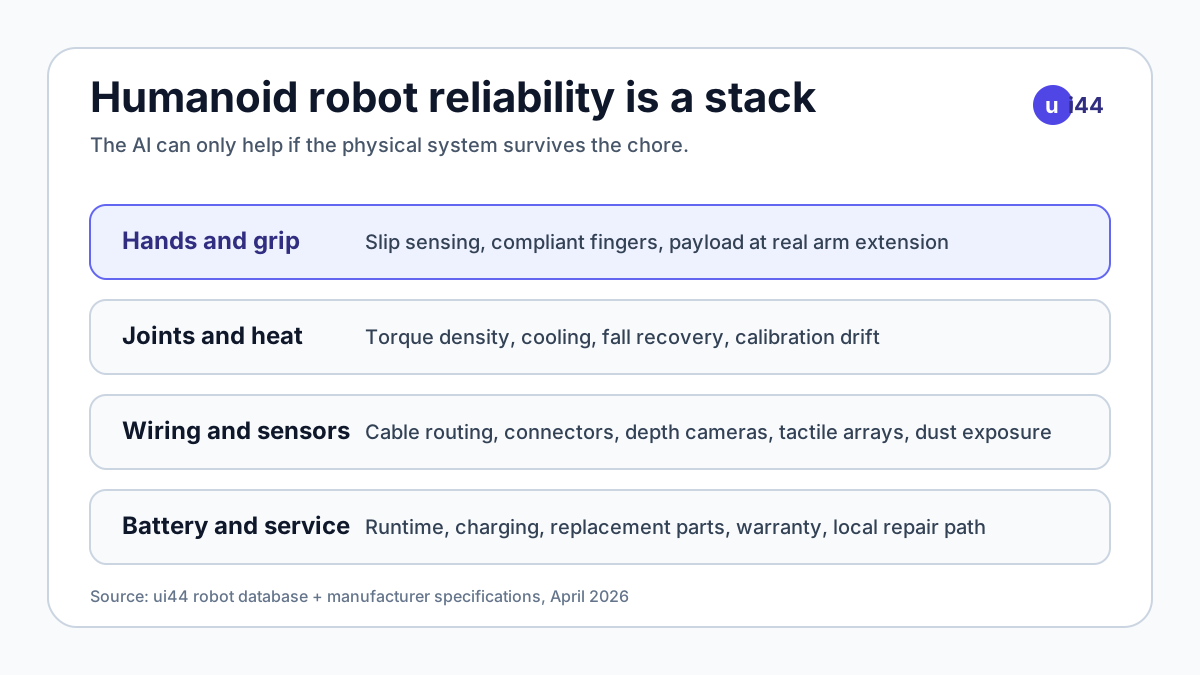
This is not an argument against home humanoids. It is an argument for reading the hardware sheet before you read the AI claims. In the ui44 database, the most interesting humanoids already show very different reliability bets: 1X NEO emphasizes a soft, lightweight home body; Figure 03 emphasizes tactile hands and wireless charging; Unitree G1 emphasizes accessible research hardware; and Atlas shows what enterprise-grade robustness looks like when the target customer is a factory, not a family.
Why does humanoid robot reliability start with the hand?
Hands are where home-robot hype meets reality. Walking across a room is hard, but a household chore usually fails at contact: the robot pinches a soft bag, misses a handle, drops a cup, twists a cable, or grips a toy too hard. A model can infer that the object is a mug. The hardware still has to feel slip, move precisely, and survive thousands of awkward grasps.
That is why recent humanoid announcements spend so much time on fingertips. In its Figure 03 launch note, Figure says the robot's hand was redesigned around palm cameras, compliant fingertips, and internal tactile sensors that can detect very small forces. Sanctuary AI takes another path with Phoenix, which ui44 lists as a 170 cm, 70 kg humanoid with 75-DOF hands and more than 1,000 tactile sensors. Unitree G1 keeps the base robot cheaper and smaller, then makes dexterous hands an optional part of the higher-end development configuration.
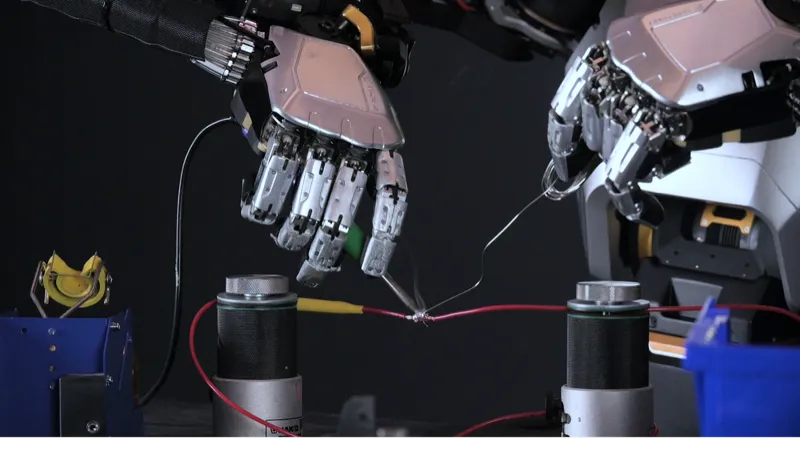
For buyers, the key is not "does it have hands?" It is "what kind of hands, and what happens when they wear out?" A useful home robot needs more than fingers. It needs replaceable fingertips, protected joints, calibrated sensors, safe force limits, and a service path when the end effector becomes the first consumable. A robot that can only pick up the same demo object under perfect lighting is not a household helper yet.
Which 2026 humanoids show the hardware trade-off?
The ui44 database makes the trade-off visible. Cheaper humanoids tend to be lighter, shorter-runtime, and more research-oriented. Larger enterprise robots have stronger hardware, but they are heavier, contact-sales products meant for controlled workplaces.
Robot
- Hardware signal
- Movement-first, low-cost humanoid
- ui44 data point
- From $4,900; about 29 kg for R1; about 1 hour runtime
- Buyer read
- Exciting entry price, but treat it as early hardware rather than a home appliance
Robot
- Hardware signal
- Compact research platform with optional dexterous hands
- ui44 data point
- $13,500 starting price; 35 kg; about 2 hours runtime; 23 DOF base robot
- Buyer read
- Strong developer value, but the home buyer still needs support, warranty, and task proof
Robot
- Hardware signal
- Soft, lightweight home-focused body
- ui44 data point
- $20,000 early-adopter price; 30 kg; about 4 hours runtime
- Buyer read
- The safest-looking home pitch, but still an early-access product with guided learning
Robot
- Hardware signal
- Tactile fingers, palm cameras, wireless charging
- ui44 data point
- No public price; 60 kg; about 5 hours runtime
- Buyer read
- Serious home-intent hardware, but not a normal consumer checkout product
Robot
- Hardware signal
- Highly dexterous tactile hands
- ui44 data point
- 70 kg; 75-DOF hands; 1,000+ tactile sensors
- Buyer read
- Dexterity is the point, but complexity raises service and durability questions
Robot
- Hardware signal
- Heavy-duty enterprise humanoid
- ui44 data point
- 73 kg; about 4 hours runtime; heavy payload around 25 kg
- Buyer read
- Factory-first reliability path, not a home preorder
Robot
- Hardware signal
- Industrial robustness and serviceability
- ui44 data point
- 90 kg; 4 hours runtime; IP67; 50 kg instant lift
- Buyer read
- Shows what durable humanoid hardware can look like when cost and environment differ
| Robot | Hardware signal | ui44 data point | Buyer read |
|---|---|---|---|
| Unitree R1 | Movement-first, low-cost humanoid | From $4,900; about 29 kg for R1; about 1 hour runtime | Exciting entry price, but treat it as early hardware rather than a home appliance |
| Unitree G1 | Compact research platform with optional dexterous hands | $13,500 starting price; 35 kg; about 2 hours runtime; 23 DOF base robot | Strong developer value, but the home buyer still needs support, warranty, and task proof |
| 1X NEO | Soft, lightweight home-focused body | $20,000 early-adopter price; 30 kg; about 4 hours runtime | The safest-looking home pitch, but still an early-access product with guided learning |
| Figure 03 | Tactile fingers, palm cameras, wireless charging | No public price; 60 kg; about 5 hours runtime | Serious home-intent hardware, but not a normal consumer checkout product |
| Phoenix | Highly dexterous tactile hands | 70 kg; 75-DOF hands; 1,000+ tactile sensors | Dexterity is the point, but complexity raises service and durability questions |
| Apptronik Apollo | Heavy-duty enterprise humanoid | 73 kg; about 4 hours runtime; heavy payload around 25 kg | Factory-first reliability path, not a home preorder |
| Atlas | Industrial robustness and serviceability | 90 kg; 4 hours runtime; IP67; 50 kg instant lift | Shows what durable humanoid hardware can look like when cost and environment differ |
The table does not say one robot is "best." It says hardware choices are visible if you look. A 30 kg soft home robot and a 90 kg industrial humanoid have very different risk profiles. A low-cost pre-order and an enterprise pilot should not be evaluated with the same checklist.
Unitree's own product pages are unusually direct about this. Both the G1 and R1 pages warn individual users to understand the limitations of humanoid robots before purchase and to keep a safe distance because the machines are complex and powerful. That is responsible wording. It is also a reminder that a humanoid is not a smart speaker with legs.
Can software updates fix weak humanoid hardware?
Software can improve a lot. Over-the-air updates can tune walking, add recovery behaviors, improve perception, and make a robot less likely to repeat a bad grasp. Fleet learning can help a company notice common failures sooner. Figure 03's launch material even frames wireless data offload as part of continuous learning: robots return data so the model can improve.
But software cannot turn a low-torque wrist into a high-payload arm. It cannot make a hot motor run cool without enough thermal margin. It cannot add tactile sensors that were never installed. It cannot make a battery pack last an entire day if the platform has one hour of mixed activity. And it cannot make a fragile connector reliable after repeated falls, bumps, and emergency stops.
This is where actuator quality matters. Industry analysts often point out that humanoid robots use dozens of joints, and those joint actuators can represent a large share of the bill of materials. That is not just a cost issue. It is a maintenance issue. A single bad knee, shoulder, wrist, or ankle can turn a useful robot into an expensive object waiting for service.
For home buyers, the software-update question should be specific:
- Does the robot have enough torque and sensing for the chore before any future update?
- Are hands, batteries, covers, and high-wear modules user-replaceable?
- Does the warranty cover actuators and dexterous hands, or only the main body?
- Is there a published service interval or expected duty cycle?
- Can the robot stop safely if a joint reports abnormal load or heat?
If those answers are vague, the product may still be fascinating. It is just not ready to be treated like a dependable home appliance.
Why do factories get reliable humanoids before homes?
Factories are easier places to make humanoids reliable. That sounds backwards because factories are harsh, but they are also structured. Lighting can be controlled. Workstations repeat. Floors are flat. Humans can be trained to keep clear. Maintenance staff are nearby. A robot can be assigned one profitable job and measured against that job every shift.
Homes are the opposite. A home robot must handle surprise clutter, pets, cables, chair legs, narrow bathrooms, children, reflective surfaces, wet floors, and objects that move between rooms. Nobody wants to submit a maintenance ticket because the robot bent a finger while loading a dishwasher.
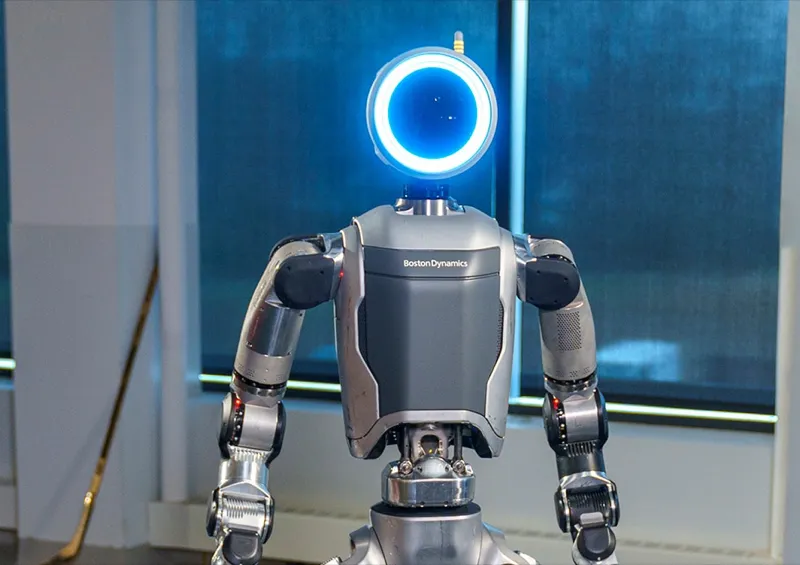
That is why the strongest reliability claims still come from industrial robots. Boston Dynamics describes Atlas as an enterprise-grade industrial humanoid with self-swappable batteries, fleet management through Orbit, an IP67 rating, 4 hours of battery life, and heavy-lift specs far beyond home robots. UBTECH's Walker S2 similarly centers its official pitch on autonomous battery swapping for continuous operation and a 15 kg handling capability in industrial environments.
None of that makes Atlas or Walker S2 a normal home robot. It shows the level of hardware system design required when uptime matters. A home humanoid will need a lighter, safer, cheaper version of the same thinking: not just a clever model, but charging, diagnostics, modules, service, and safe failure modes.
What should you ask before buying a humanoid robot?
A serious humanoid buyer should ask hardware questions before autonomy questions. Autonomy decides what the robot tries. Hardware decides whether it can keep trying safely.
Use this checklist before treating any home humanoid preorder as more than an early-adopter experiment:
- What is the rated payload at useful reach? A vertical lift claim is less helpful than a payload rating with the arm extended toward a counter or shelf.
- Which parts are consumables? Fingertips, gripper pads, covers, batteries, and wheels or foot pads may need replacement before the robot feels old.
- How long is the warranty on hands and actuators? The expensive failure points are not always covered like the screen or shell.
- Can the robot self-diagnose hardware faults? Look for joint load, heat, battery, and sensor-health reporting rather than only app-level error codes.
- What happens after a fall or collision? The answer should include safe power-down, inspection steps, and whether remote support can clear the robot for use again.
- Is local repair available? A 30 kg to 90 kg humanoid is not something most owners will casually ship across borders.
- Can it work offline or degraded? Cloud AI can be useful, but basic stop, dock, and manual recovery should not depend on a perfect internet connection.
- How many real task-hours has the company logged? Demo clips are useful; deployment hours, service logs, and repeated customer workflows are better.

The best answer does not have to be perfect. Early products rarely are. But the manufacturer should be able to explain the trade-offs. 1X NEO, for example, is interesting because 1X talks openly about soft design, tendon actuation, early autonomy, and Expert Mode for chores the robot cannot yet do by itself. That framing is more useful than pretending the robot is already a fully independent housekeeper.
Which hardware profile is safest for the first wave of home robots?
The safest first wave is probably not the strongest humanoid. It is the robot with the narrowest honest job, the lightest safe body, and the clearest service plan.
For many homes, that points away from full-size humanoids and toward constrained mobile manipulators or single-purpose robots. Hello Robot Stretch 3 is a useful contrast: it costs $24,950, weighs 24.5 kg, has a 2 kg payload, and uses a wheeled base with a telescoping arm. It is not trying to look like a person. It is designed around indoor mobile manipulation, assistive research, ROS 2, Python SDK access, and teleoperation. That may be less glamorous than a biped, but fewer degrees of freedom can mean fewer things to break.
A full humanoid can still be the right bet for developers, labs, and early adopters who want to participate in the learning curve. Unitree R1 puts humanoid hardware into a price band that was unthinkable a few years ago. XPENG Iron shows how car companies are bringing vehicle supply chains, batteries, sensors, and chips into robots. Figure 03 shows how a company can design directly for home-safe materials, tactile hands, and mass manufacturing.
The buyer mistake is not being excited. The mistake is treating every AI demo as proof that the hardware is ready for domestic uptime.
So what does hardware reliability really mean?
A reliable home humanoid is not the robot that wins the prettiest demo. It is the robot that can do a useful task repeatedly, fail gently, explain what went wrong, recover without drama, and get repaired without turning ownership into a logistics project.
That is why the next meaningful milestone for home humanoids will not be a single viral video. It will be something more mundane: published service terms, replacement-part pricing, clear payload ratings, battery-health reporting, field-hour data, and honest boundaries around what the robot should not do.
Until then, compare humanoids the way you would compare early electric vehicles or expensive appliances. The AI matters. The app matters. But the real question is whether the joints, hands, wiring, battery, and support system can survive the home after the novelty wears off.
Written by
ui44 Team
Published April 29, 2026
Share this article
Open a plain share link on X or Bluesky. No embeds, no widgets, no cookie baggage.