That distinction matters because a voice assistant that answers a question is low risk. A mobile robot that can drive through your house, point cameras at rooms, identify people, move an arm, pick up objects, open things, or control smart-home devices is a different category. The useful word is not intelligence. It is permission.
Boston Dynamics gave a clean example in its Spot and Gemini Robotics demo. The robot dog tidied shoes and soda cans in a home-like setting, but Gemini did not receive unlimited control. Boston Dynamics says its engineers gave Gemini a finite set of tools: navigate between locations, capture images, identify objects, grasp objects, and place them somewhere else. Gemini could sequence those tools, but it could not invent new capabilities or control Spot outside the available API.
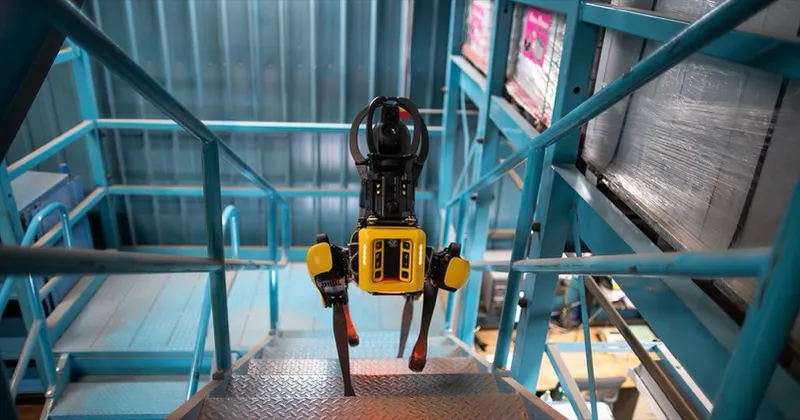
That is the right mental model for home robots. The AI is not the robot. The AI is a planner sitting behind a gate. The gate decides which tools exist, which rooms are allowed, which objects are off-limits, when the user must approve an action, what gets logged, and how the robot stops if things go wrong.
For buyers, this is becoming as important as price, payload, runtime, and sensor specs. A robot with a powerful model but vague permissions is not safer than a less glamorous robot with clear tool boundaries.
What does robot tool calling mean?
Tool calling is the bridge between an AI model and the robot's real abilities. Instead of directly controlling every motor, the model chooses from named actions that software developers expose to it.
In the Boston Dynamics example, a natural-language instruction such as “make sure all of the shoes at the front door are on the shoe rack” became a sequence: move to the front door, take a picture, identify shoes, move close enough, grasp one, carry it to the rack, and put it down. Spot's existing autonomy stack still handled locomotion, obstacle avoidance, manipulation details, and feedback. The AI picked and sequenced tools.
That is a safer pattern than giving an LLM raw motor authority. It also makes the system easier to audit. If the robot did something strange, a developer or owner can ask: which tool did the AI call, with what input, in which room, and what did the robot report back?
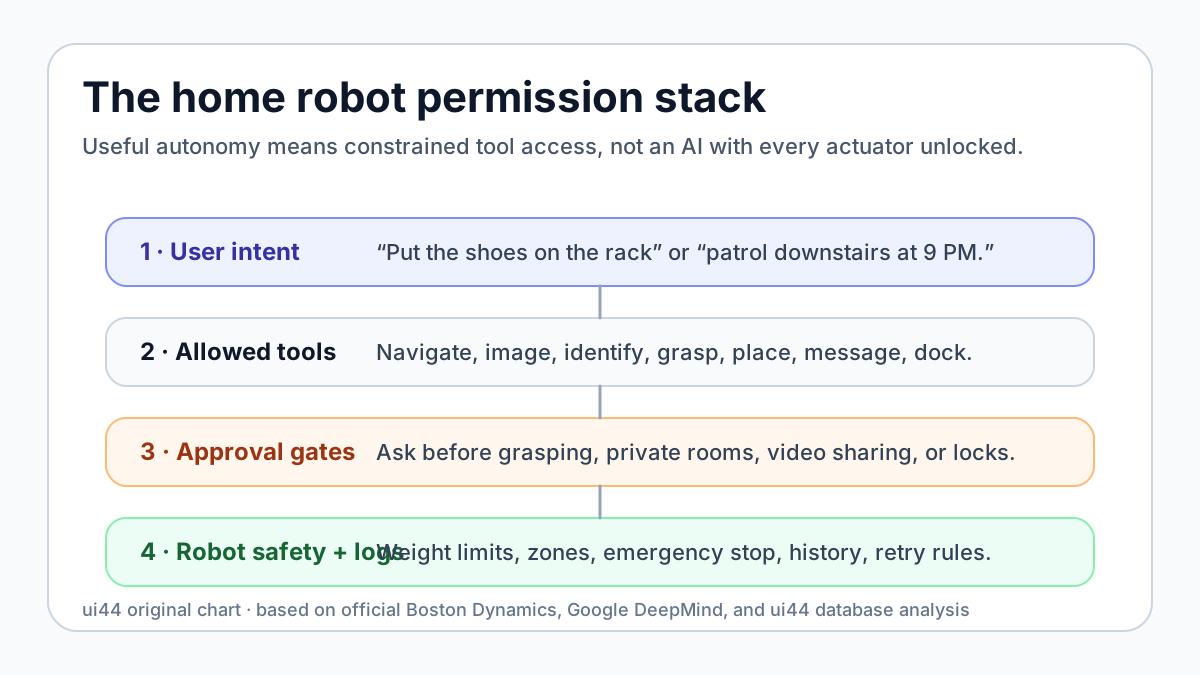
Google DeepMind describes Gemini Robotics-ER 1.6 in a similar high-level role: it can act as a reasoning model for robots and call tools such as Google Search, vision-language-action models, or user-defined functions. DeepMind also emphasizes success detection and physical safety constraints, such as avoiding objects that exceed gripper or material limits.
Those details sound technical, but the buyer lesson is simple: the home robot's assistant should be judged by the tool list, not only by the demo prompt.
The five tool categories that matter at home
A useful home robot assistant can call many kinds of tools. They are not equally risky.
Tool category
Conversation
- Examples
- Answer, explain, summarize, remind
- Buyer risk
- Low if it does not expose private data
Tool category
Perception
- Examples
- Take a photo, read a label, recognize a person, inspect a room
- Buyer risk
- Medium because cameras and identity are involved
Tool category
Mobility
- Examples
- Go to the kitchen, patrol downstairs, return to dock
- Buyer risk
- Medium to high around stairs, pets, children, and private rooms
Tool category
Manipulation
- Examples
- Pick up a shoe, move a cup, open a drawer, press a button
- Buyer risk
- High because property and people can be affected
Tool category
External control
- Examples
- Unlock, order, call, message, share video, control appliances
- Buyer risk
- Highest because the robot can affect people outside the immediate task
| Tool category | Examples | Buyer risk |
|---|---|---|
| Conversation | Answer, explain, summarize, remind | Low if it does not expose private data |
| Perception | Take a photo, read a label, recognize a person, inspect a room | Medium because cameras and identity are involved |
| Mobility | Go to the kitchen, patrol downstairs, return to dock | Medium to high around stairs, pets, children, and private rooms |
| Manipulation | Pick up a shoe, move a cup, open a drawer, press a button | High because property and people can be affected |
| External control | Unlock, order, call, message, share video, control appliances | Highest because the robot can affect people outside the immediate task |
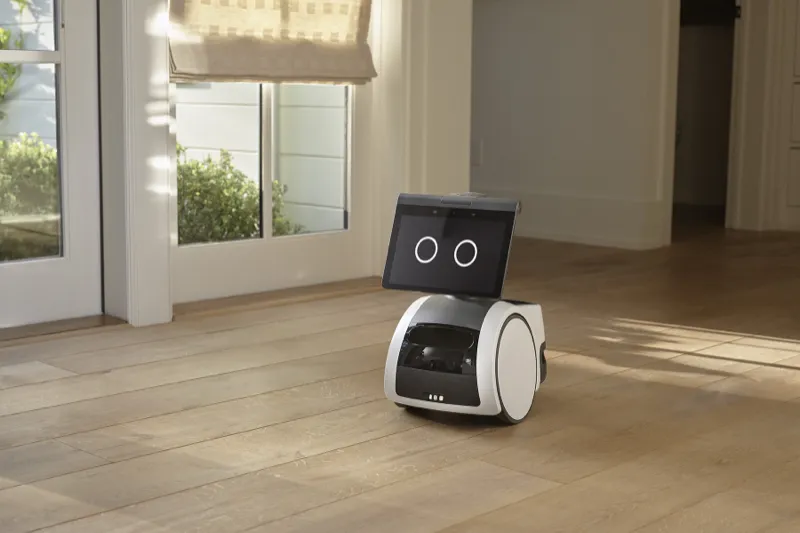
A robot can be excellent in one category and weak in another. Amazon Astro, for example, is primarily a mobile security and assistant robot. ui44 lists it at $1,599.99 by invitation only, with Alexa, Ring integration, room-to-room navigation, Visual ID, remote monitoring, and a 1080p periscope camera. Astro's permission problem is less about arms and more about who can view video, when patrols happen, how faces are recognized, and which smart-home actions Alexa can perform from a moving device.
Hello Robot Stretch 4 sits on the other end of the home-use spectrum. It is an Available $29,950 mobile manipulator with ROS 2 and Python support, self-charging, 8-hour light-load runtime, a 160 cm working height, and a telescoping arm rated for 2.5 kg extended / 4 kg retracted. Stretch 4's question is not “can the assistant talk?” It is “which code path is allowed to move the base, move the arm, close the gripper, and retry if a grasp fails?”
Samsung Ballie is different again. It is still in Development with no confirmed price or release date in ui44's database, but its pitch centers on SmartThings control, home navigation, camera-based pet/family updates, a projector, Bixby, and Google Gemini plus Samsung language models. A Ballie-style robot raises the smart-home version of the same issue: can the AI control lights, displays, appliances, cameras, reminders, calls, and routines without explicit approval?
The buyer question: what can it do without asking?
The safest default is not “no autonomy.” A robot that asks for confirmation after every harmless step will be annoying. The better default is tiered autonomy.
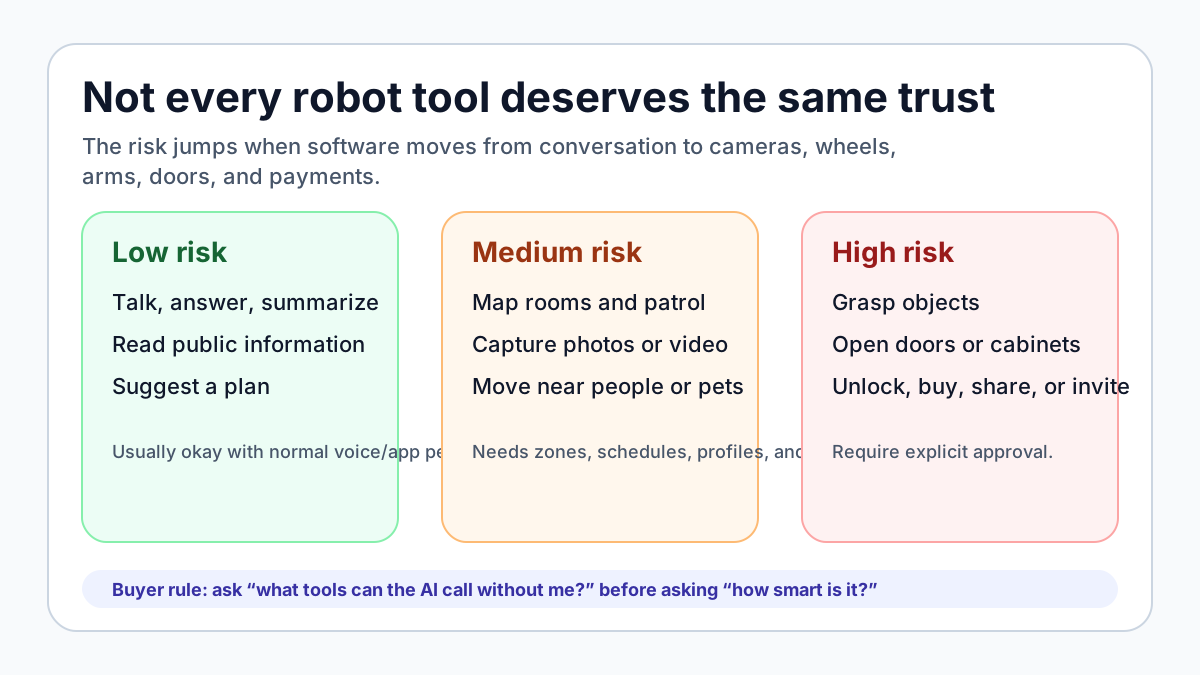
Low-risk tools can run freely. A robot can answer a question, announce that it is returning to its dock, or summarize what it plans to do next.
Medium-risk tools should be scoped. A patrol robot may be allowed in the living room and hallway, but not bedrooms. A companion robot may be allowed to remember its owner, but not upload every face it sees. A cleaning robot may map rooms, but not share that map beyond the account without a clear setting.
High-risk tools should require approval or be disabled until configured. That includes grasping unknown objects, opening cabinets, moving near a sleeping person, controlling smart locks, sharing camera feeds, making purchases, or calling outsiders.
This is where many product pages are still too vague. “AI-powered” does not tell you whether the assistant can call physical tools autonomously. “Smart home compatible” does not say whether the robot can run routines when no one is home. “Learns your habits” does not explain where the data is stored or how to delete it.
A serious home robot should make the permission model visible in the app. The owner should be able to review each tool, set room and time limits, require approval for risky actions, see a history of what the AI did, and revoke access without resetting the whole robot.
How current robots expose the problem
No current home robot fully solves this. But the database shows why the question is moving from theory to buying advice.
Robot
- ui44 database snapshot
- Enterprise quadruped, optional arm, 14 kg payload, API/SDK, Orbit fleet platform, 90-minute runtime
- Permission issue to check
- Which SDK tools are exposed to the AI, and which remain under operator control?
Robot
- ui44 database snapshot
- $1,599.99 invite-only home patrol robot with Alexa, Ring, Visual ID, periscope camera
- Permission issue to check
- Who can view video, trigger patrols, recognize people, and control smart-home devices?
Robot
- ui44 database snapshot
- Development-stage rolling companion with SmartThings, projector, camera updates, Gemini/Bixby
- Permission issue to check
- Which appliances, routines, calls, and camera actions can run without confirmation?
Robot
- ui44 database snapshot
- $20,000 preorder home humanoid, 167 cm, 30 kg, soft body, app compatibility, about 4h runtime
- Permission issue to check
- Which chores are autonomous, which are supervised, and what manipulation requires approval?
Robot
- ui44 database snapshot
- $29,950 available mobile manipulator with ROS 2/Python, self-charging, VLM grasping demos
- Permission issue to check
- Which code or model gets base, arm, gripper, camera, and retry permissions?
Robot
- ui44 database snapshot
- $299 Lite / $449 wireless desktop robot kit with Hugging Face app integration
- Permission issue to check
- Which apps can access camera, microphones, speech, and expressive motion?
Robot
- ui44 database snapshot
- $699 modular mobile platform with Matter, Alexa, Google Assistant, Siri Shortcuts, and up to 8 kg payload
- Permission issue to check
- Which accessories and smart-home automations can become mobile or scheduled?
| Robot | ui44 database snapshot | Permission issue to check |
|---|---|---|
| Spot | Enterprise quadruped, optional arm, 14 kg payload, API/SDK, Orbit fleet platform, 90-minute runtime | Which SDK tools are exposed to the AI, and which remain under operator control? |
| Amazon Astro | $1,599.99 invite-only home patrol robot with Alexa, Ring, Visual ID, periscope camera | Who can view video, trigger patrols, recognize people, and control smart-home devices? |
| Samsung Ballie | Development-stage rolling companion with SmartThings, projector, camera updates, Gemini/Bixby | Which appliances, routines, calls, and camera actions can run without confirmation? |
| 1X NEO | $20,000 preorder home humanoid, 167 cm, 30 kg, soft body, app compatibility, about 4h runtime | Which chores are autonomous, which are supervised, and what manipulation requires approval? |
| Hello Robot Stretch 4 | $29,950 available mobile manipulator with ROS 2/Python, self-charging, VLM grasping demos | Which code or model gets base, arm, gripper, camera, and retry permissions? |
| Reachy Mini | $299 Lite / $449 wireless desktop robot kit with Hugging Face app integration | Which apps can access camera, microphones, speech, and expressive motion? |
| SwitchBot K20+ Pro | $699 modular mobile platform with Matter, Alexa, Google Assistant, Siri Shortcuts, and up to 8 kg payload | Which accessories and smart-home automations can become mobile or scheduled? |
The pattern is clear. The more a robot can move, see, manipulate, and integrate with the home, the less useful a single privacy toggle becomes. Buyers need a permission map.
For 1X NEO, the important promise is household chores with a soft, lightweight humanoid body. That makes approval design central. A 30 kg humanoid moving around a kitchen is not the same risk as a smart speaker setting a timer. The app should distinguish between “answer a question,” “walk to the laundry room,” “pick up clothing,” “handle glass,” and “operate an appliance.”
For developer platforms, the issue flips. Stretch 4, Reachy Mini, and SwitchBot onero H1 are interesting because they expose more programmability or embodied AI behavior. That openness is useful, but it also means the tool boundary must be explicit. Who installed the app? What API scopes did it receive? Can it run when the owner is away? Can it access cameras, microphones, base motion, arms, or cloud models?

The approval model should match the consequence
A practical robot permission system should have at least four levels.
Always allowed should be limited to harmless local actions: respond to a voice prompt, say what it sees in the current camera view, return to dock, or show battery status.
Allowed within rules should cover routine autonomy: patrol public rooms, clean scheduled zones, follow a known person, or carry a light object within a known path. The rules should include rooms, time windows, people, object types, weight limits, and speed limits.
Ask every time should cover anything that changes the physical environment in a risky way: open a drawer, move an unfamiliar object, interact near a child or pet, enter a private room, share a camera view, or operate a heat, water, lock, or payment-related device.
Never allowed should be available for tools the owner does not want at all: recording bedrooms, opening exterior doors, purchasing items, controlling a stove, using a manipulator near medication, or sending video to a third party.
This sounds like smart-home permissions, but with physical consequences. A bad light automation is annoying. A bad robot-arm automation can break a glass, drop a phone, frighten a pet, or block a hallway.
Logs are not optional
If a home robot has an AI assistant, it should keep a readable action history. Not just developer logs. A normal owner should be able to see:
- the instruction the robot received
- the tools the AI called
- the room or zone involved
- the camera or sensor data used, at least at a summary level
- whether the robot asked for approval
- whether the action succeeded, failed, retried, or was aborted
- whether any data left the home
This is especially important for families and caregivers. If Astro starts a patrol, if Ballie projects a call, if NEO picks up an object, or if Stretch 4 moves its arm, the owner should not have to guess whether it was a schedule, voice command, app tap, remote operator, AI plan, or failed retry loop.
Google DeepMind's emphasis on success detection points in the right direction. Robots need to know whether a task is done before moving on. But success detection should not be a black box. A user-facing summary such as “I moved one shoe to the rack, but I left the second shoe because the path was blocked” is not cosmetic. It is part of trust.
Local vs cloud control changes the risk
The permission question also includes data flow. Boston Dynamics' AIVI-Learning page says its Gemini-powered inspection feature requires data sharing with Boston Dynamics to train and improve specialized models. That may be acceptable for an industrial facility that signs an enterprise agreement. It is a much harder sell inside a private home.
A home buyer should ask separate questions for local and cloud features:
- Does speech recognition happen locally or in the cloud?
- Are camera images uploaded for object recognition?
- Are maps, faces, routines, or action logs used to improve models?
- Can cloud learning be disabled while keeping core navigation?
- Are guest faces, children, medical objects, or bedrooms treated differently?
- What happens if the internet goes down?
This does not mean every robot must be fully offline. Cloud models can improve reasoning, speech, and visual understanding. But physical robots need degraded modes. A robot should be able to stop, dock, avoid obstacles, and obey emergency controls even when the AI service is unavailable.
A buyer checklist for AI-controlled robots
- What tools can the AI call? Ask for the actual categories: navigation,
- Which tools require approval? A serious product should distinguish
- Can I scope permissions by room, person, object, and time? “Allowed in
- Can I review and revoke permissions? You should not need a factory reset
- What gets logged? Look for human-readable action history, not only a
- What works without the cloud? Navigation, obstacle avoidance, docking,
- What is the fail-safe behavior? If the robot is confused, blocked,
- Who supports it when an AI-driven action causes a problem? Warranty,
The bottom line
The future home robot will probably feel less like a remote-controlled machine and more like an AI assistant with a body. That can be useful. It can also be weirdly opaque if companies sell “agentic” behavior without showing the tool permissions underneath.
The best sign is not a robot that claims it can do anything. The best sign is a robot that clearly says what it can do, what it cannot do, what it will ask about, and what it logged after acting.
Boston Dynamics' Spot and Gemini Robotics demo is valuable because it makes that boundary visible: a powerful model, a defined tool layer, and a robot that still relies on its own tested locomotion and manipulation stack. Home robots need the same honesty. Before asking whether the assistant is smart enough, ask what it is allowed to control.
Official source notes
- Boston Dynamics Spot + Gemini Robotics tool-layer demo:
- Google DeepMind Gemini Robotics-ER 1.6:
- Boston Dynamics AIVI-Learning / Gemini Robotics data-sharing notes:
- ui44 robot database entries cited above: Spot, Amazon Astro, Samsung Ballie, 1X NEO, Hello Robot Stretch 4, Reachy Mini, SwitchBot K20+ Pro, and SwitchBot onero H1.
Related in the database
Use this article as a privacy verification workflow
Turn the article into a privacy verification pass grounded in the robots, manufacturers, and components it actually references.
Home Robot AI Permissions: What Can It Control? already points you toward 8 linked robots, 7 manufacturers, and 4 countries inside the ui44 database. That matters because strong buyer guidance is easier to apply when you can move immediately from a claim or warning into concrete product pages, manufacturer directories, component explainers, and country-level context instead of treating the article as an isolated opinion piece. The fastest next step is to turn the article into a shortlist workflow: open the linked robot pages, verify which specs are actually published for those models, then compare the surrounding manufacturer and component context before you decide whether the underlying claim changes your buying plan.
For this topic, the useful discipline is to separate the editorial lesson from the catalog evidence. The article gives you the framing, but the robot pages tell you what each product actually ships with today: sensor stack, connectivity methods, listed price, release timing, category, and support-relevant compatibility notes. The manufacturer pages then show whether you are looking at a one-off launch, a broader lineup pattern, or a company that spans multiple categories. That layered workflow reduces the risk of buying on a single marketing phrase or a single support FAQ.
Use the robot pages to confirm which products actually expose cameras, microphones, Wi-Fi, or voice systems, then use the manufacturer pages to decide how much of the privacy question seems product-specific versus brand-wide. On this route cluster, Astro, Stretch 4, and Ballie form the fastest reality check. If you want a quick working shortlist, open Compare Astro, Stretch 4, and Ballie next, then keep this article open as the reasoning layer while you compare structured data side by side.
Practical Takeaway
Every robot, manufacturer, category, component, and country reference below resolves to a real ui44 page, keeping the follow-up path grounded in database records rather than generic advice.
Suggested next steps in ui44
- Open Astro and note the listed sensors, connectivity methods, and voice stack before you interpret any policy claim.
- Cross-check the wider brand context on Amazon so you can see whether the privacy question touches one model or a broader lineup.
- Use the linked component pages to confirm how common the relevant sensors and connectivity layers are across the database.
- Keep a short note of which policy layers you checked, which device features are actually present on the robot page, and which items still depend on region- or app-level confirmation.
- Finish with Compare Astro, Stretch 4, and Ballie so the policy reading sits next to structured product data.
Robot profiles worth opening next
Use the linked product pages as the evidence layer
The linked robot pages are where this article becomes operational. Instead of asking whether the headline is interesting, use the robot entries to inspect the actual mix of sensors, connectivity options, batteries, pricing, release timing, and stated capabilities attached to the products mentioned in the article. That is the easiest way to see whether the warning or opportunity described here affects one product family, a specific design pattern, or an entire buying lane.
Astro is tracked on ui44 as a active security & patrol robot from Amazon. The database currently records a listed price of $1,599, a release date of 2021, Not officially disclosed battery life, Not officially disclosed charging time, and a published stack that includes 5MP Bezel Camera, 1080p Periscope Camera (132° FOV), and Infrared Vision plus Wi-Fi 802.11ac and Bluetooth.
For privacy-focused reading, this page matters because it shows the concrete device surface behind the policy discussion. Use it to verify whether Astro combines sensors and connectivity in a way that could change the in-home data footprint, and compare the listed capabilities such as Autonomous Home Patrol, Visual ID (face recognition), and Remote Home Monitoring with any cloud, app, or voice layers, including Amazon Alexa.
Stretch 4
Hello Robot · Home Assistants · Available
Stretch 4 is tracked on ui44 as a available home assistants robot from Hello Robot. The database currently records a listed price of $29,950, a release date of 2026-05-12, 8 hours (light CPU load) battery life, Not officially disclosed charging time, and a published stack that includes Wide-FOV depth sensing, High-resolution RGB cameras, and Calibrated RGB + depth perception plus its listed connectivity stack.
For privacy-focused reading, this page matters because it shows the concrete device surface behind the policy discussion. Use it to verify whether Stretch 4 combines sensors and connectivity in a way that could change the in-home data footprint, and compare the listed capabilities such as Mobile Manipulation, Omnidirectional Indoor Mobility, and Autonomous Mapping and Navigation with any cloud, app, or voice layers.
Ballie is tracked on ui44 as a development companions robot from Samsung. The database currently records a listed price of Price TBA, a release date of TBD, Not officially disclosed battery life, Not officially disclosed charging time, and a published stack that includes Camera, Spatial Sensors, and Environmental Sensors plus Wi-Fi and SmartThings.
For privacy-focused reading, this page matters because it shows the concrete device surface behind the policy discussion. Use it to verify whether Ballie combines sensors and connectivity in a way that could change the in-home data footprint, and compare the listed capabilities such as Autonomous Home Navigation, Built-in Projector (Wall & Floor), and Smart Home Control via SmartThings with any cloud, app, or voice layers, including Bixby.
Spot
Boston Dynamics · Commercial · Active
Spot is tracked on ui44 as a active commercial robot from Boston Dynamics. The database currently records a listed price of Price TBA, a release date of 2020, ~90 minutes battery life, 60 minutes charging time, and a published stack that includes 360° Stereo Cameras, Time-of-Flight Sensor, and Ultrasonic Sensors (front + rear) plus Wi-Fi 2.4GHz/5GHz and Ethernet.
For privacy-focused reading, this page matters because it shows the concrete device surface behind the policy discussion. Use it to verify whether Spot combines sensors and connectivity in a way that could change the in-home data footprint, and compare the listed capabilities such as Autonomous Industrial Inspection, Stair Climbing (±30° slopes), and Dynamic Obstacle Avoidance with any cloud, app, or voice layers.
NEO
1X Technologies · Humanoid · Pre-order
NEO is tracked on ui44 as a pre-order humanoid robot from 1X Technologies. The database currently records a listed price of $20,000, a release date of 2025-10-28, ~4 hours battery life, Not disclosed charging time, and a published stack that includes RGB Cameras, Depth Sensors, and Tactile Skin plus Wi-Fi and Bluetooth.
For privacy-focused reading, this page matters because it shows the concrete device surface behind the policy discussion. Use it to verify whether NEO combines sensors and connectivity in a way that could change the in-home data footprint, and compare the listed capabilities such as Household Chores, Tidying Up, and Safe Human Interaction with any cloud, app, or voice layers.
Manufacturer context behind the article
Check whether this is one product story or a broader company pattern
Manufacturer pages add the privacy context that individual product pages cannot show on their own. They help you check whether cameras, microphones, cloud accounts, app controls, and policy assumptions appear across a broader lineup or stay tied to one specific product story.
Amazon
ui44 currently tracks 1 robot from Amazon across 1 category. The company is grouped under USA, and the current catalog footprint on ui44 includes Astro.
That wider brand context matters because privacy questions rarely stop at one FAQ page. A manufacturer route helps you see whether the article is centered on one premium model or on a company that has several relevant products and therefore more than one place where the same policy or app assumptions might matter. The category mix here currently points toward Security & Patrol as the most useful next route if you want to see whether this article reflects a wider pattern inside the brand.
Hello Robot
ui44 currently tracks 2 robots from Hello Robot across 1 category. The company is grouped under USA, and the current catalog footprint on ui44 includes Stretch 3, Stretch 4.
That wider brand context matters because privacy questions rarely stop at one FAQ page. A manufacturer route helps you see whether the article is centered on one premium model or on a company that has several relevant products and therefore more than one place where the same policy or app assumptions might matter. The category mix here currently points toward Home Assistants as the most useful next route if you want to see whether this article reflects a wider pattern inside the brand.
Samsung
ui44 currently tracks 2 robots from Samsung across 2 categorys. The company is grouped under South Korea, and the current catalog footprint on ui44 includes Ballie, Bespoke AI Jet Bot Steam Ultra.
That wider brand context matters because privacy questions rarely stop at one FAQ page. A manufacturer route helps you see whether the article is centered on one premium model or on a company that has several relevant products and therefore more than one place where the same policy or app assumptions might matter. The category mix here currently points toward Companions, Cleaning as the most useful next route if you want to see whether this article reflects a wider pattern inside the brand.
Boston Dynamics
ui44 currently tracks 3 robots from Boston Dynamics across 2 categorys. The company is grouped under USA, and the current catalog footprint on ui44 includes Atlas (Electric), Spot, Stretch.
That wider brand context matters because privacy questions rarely stop at one FAQ page. A manufacturer route helps you see whether the article is centered on one premium model or on a company that has several relevant products and therefore more than one place where the same policy or app assumptions might matter. The category mix here currently points toward Humanoid, Commercial as the most useful next route if you want to see whether this article reflects a wider pattern inside the brand.
Broaden the scan without leaving the database
Categories, components, and countries add the wider context
Category framing
Category pages are useful when the article touches a buying pattern that shows up across brands. A category route helps you confirm whether the linked products sit in a narrow niche or whether the same question should be tested across a larger field of alternatives.
Security & Patrol
The Security & Patrol category page currently groups 5 tracked robots from 5 manufacturers. ui44 describes this lane as: Autonomous surveillance and patrol robots that monitor homes, businesses, and perimeters — keeping watch without an operator on site.
That makes the category route a practical follow-up when you want to check whether the products linked in this article are typical for the lane or whether they sit at one edge of the market. Useful starting examples currently include Astro, Vision 60, K7 Autonomous Security Robot.
Home Assistants
The Home Assistants category page currently groups 16 tracked robots from 14 manufacturers. ui44 describes this lane as: Arm-based household helpers — laundry folders, kitchen robots, and mobile manipulators that take on hands-on physical tasks around the home.
That makes the category route a practical follow-up when you want to check whether the products linked in this article are typical for the lane or whether they sit at one edge of the market. Useful starting examples currently include Robody, Futuring 2 (F2), Stretch 3.
Country and ecosystem context
Country pages give extra context when support practices, launch sequencing, regulatory posture, or manufacturer mix matter. They are not a substitute for model-level verification, but they do help you see which ecosystems cluster together and which manufacturers sit in the same regional field when you broaden the search beyond the article headline.
USA
The USA route currently groups 89 tracked robots from 69 manufacturers in ui44. That gives you a useful regional lens when the article points toward support practices, launch sequencing, or brand clusters that may share similar ecosystem assumptions.
On the current route, manufacturers like Faraday Future, iRobot, Boston Dynamics make the page a good way to broaden the scan without losing the regional context that often shapes availability, documentation style, and adjacent alternatives.
South Korea
The South Korea route currently groups 9 tracked robots from 7 manufacturers in ui44. That gives you a useful regional lens when the article points toward support practices, launch sequencing, or brand clusters that may share similar ecosystem assumptions.
On the current route, manufacturers like ROBOTIS, Samsung, GenON make the page a good way to broaden the scan without losing the regional context that often shapes availability, documentation style, and adjacent alternatives.
Norway
The Norway route currently groups 2 tracked robots from 1 manufacturers in ui44. That gives you a useful regional lens when the article points toward support practices, launch sequencing, or brand clusters that may share similar ecosystem assumptions.
On the current route, manufacturers like 1X Technologies make the page a good way to broaden the scan without losing the regional context that often shapes availability, documentation style, and adjacent alternatives.
Questions to answer before you move from reading to buying
A follow-up FAQ built from the entities already linked in this article
Frequently Asked Questions
Which page should I open first after reading “Home Robot AI Permissions: What Can It Control?”?
Start with Astro. That gives you a concrete product anchor for the article’s main claim. From there, branch into the manufacturer and component pages so you can tell whether the article is describing one specific model, a repeated brand pattern, or a wider technology issue that affects multiple shortlist options.
How do the manufacturer pages change the buying decision?
Amazon help you zoom out from one article and one product. On ui44 they show lineup breadth, category spread, and the neighboring robots tied to the same company. That context is useful when you are deciding whether a risk belongs to a single model, whether it shows up across a brand’s portfolio, and whether you should keep looking at alternatives before committing.
When should I switch from reading to side-by-side comparison?
Move into Compare Astro, Stretch 4, and Ballie as soon as you understand the article’s main warning or promise. The article explains what to watch for, but the compare view is where you can check whether price, status, battery life, connectivity, sensors, and category fit still make the robot a good match for your own home and budget.
Where to go next in ui44
Keep the research chain inside the database
If you want to keep going, these follow-on pages give you the cleanest expansion path from article to research session. Open the comparison route first if you are deciding between products today. Open the manufacturer, category, and component routes if you still need to understand the broader pattern behind the claim.
Written by
ui44 Team
Published May 17, 2026
Share this article
Open a plain share link on X or Bluesky. No embeds, no widgets, no cookie baggage.