Home / Search

Find the right robot without browsing blind.

Search is the fastest route on ui44 for high-volume scanning: robot names, manufacturers, categories, capabilities, sensors, connectivity, and AI stacks all surface in one workspace that stays usable on mobile, laptop, and 4K.

205

robots indexed

9

categories

<1s

live refresh

Clear

Showing matches for LiDAR. Edit and the workspace updates in place.

Quick starts for common research modes: shortlist by category, validate a specific technology, or jump straight to a known brand.

Search results

Type a query to see live matches across the entire index of robots, or clear it to browse by category and find what you need through structured directory navigation.

Updating results...

Live results

70 results for "LiDAR"

Match labels show why each robot surfaced for this query. The result deck stays dense enough to scan fast while keeping individual entries distinct and readable.

Page 3 of 6
X2
Humanoid | AGIBOT

X2

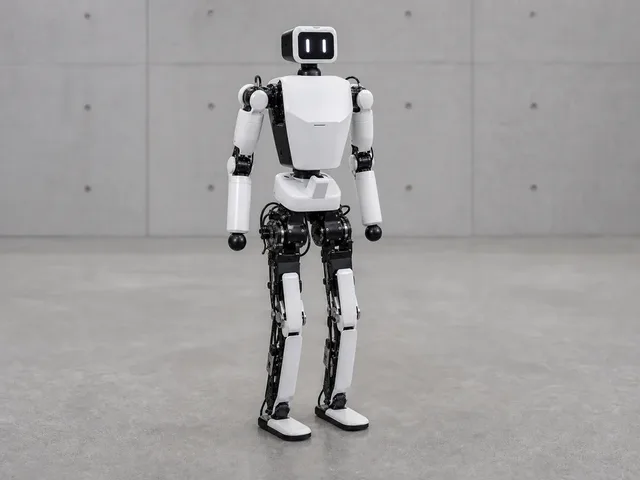
AGIBOT's compact bipedal humanoid robot, standing 1.31m tall with up to 30 degrees of freedom (Ultra version). Designed for research and commercial applications with swappable batteries, 3D LiDAR, and an NVIDIA Orin NX compute board for on-device AI. Walks at up to 1.8 m/s and carries up to 3kg.

Description Sensor

Price

$24,240

View robot
Humanoid | Agile Robots

Agile ONE

Full-size industrial humanoid robot from Munich-based Agile Robots, designed to work alongside humans on factory floors. Standing 174 cm tall, Agile ONE features dexterous hands with 21 joints per hand, integrated force and tactile sensors for precise manipulation, and a layered AI architecture trained on real-world industrial data. Equipped with cameras, LiDAR, and speech recognition for environmental perception and human interaction. Moves at up to 2 m/s and communicates intent through a chest display, expressive eyes, and proximity sensors. Series production is planned for 2026, with Google DeepMind's Gemini Robotics models being integrated following a strategic partnership announced in March 2026.

Description Sensor

Price

Not publicly disclosed

View robot
ANYmal D
Commercial | ANYbotics

ANYmal D

ANYbotics' autonomous quadruped robot designed for industrial inspection in demanding environments. Originating from ETH Zurich research, ANYmal D is an IP67-rated inspection robot deployed at oil & gas facilities, power plants, and chemical plants worldwide. Features a pan-tilt inspection payload with visual (20× optical zoom), thermal (-40-550°C), and ultrasonic (0-384kHz) sensors, plus a 360° LiDAR for autonomous navigation. Runs fully autonomous inspection missions with automatic docking and recharging. Customers include major energy and chemical companies. Based in Zürich, Switzerland.

Description Sensor

Price

Enterprise pricing (contact sales)

View robot
Cleaning | DJI

ROMO

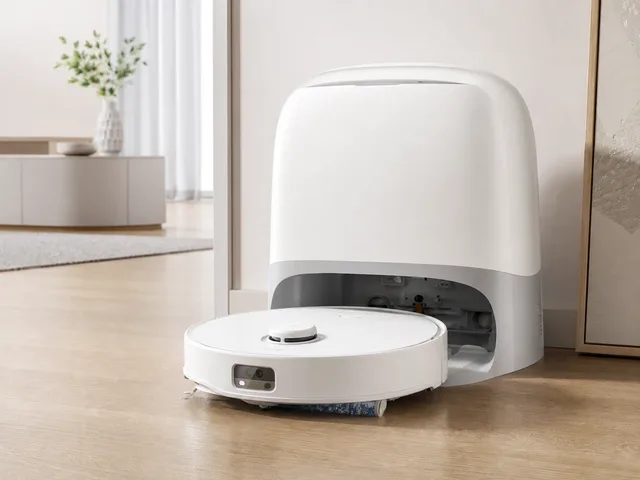
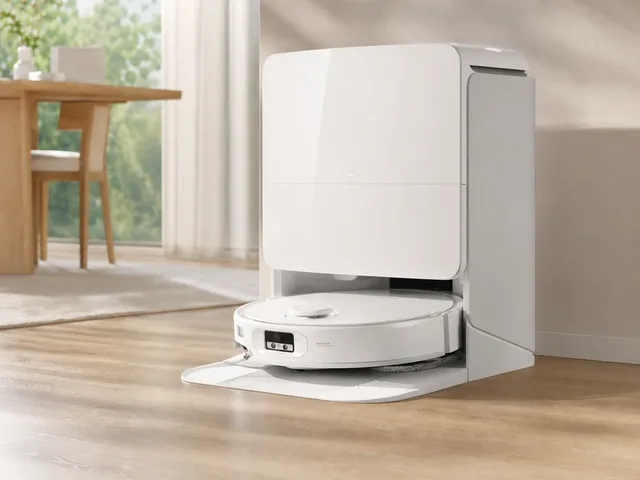
DJI's ROMO is the company's first robot vacuum-and-mop lineup for home cleaning, launched in China in 2025 and rolled out in Europe from October 2025. The ROMO family is sold in S, A, and P variants and brings DJI's drone-derived sensing into floor care with binocular fisheye vision, solid-state LiDAR, dual extendable edge-cleaning arms, up to 25,000 Pa suction, and a self-cleaning dock. Official DJI store and support materials also confirm setup through the DJI Home app, remote video and voice calling, and threshold crossing up to 2.5 cm.

Description Sensor

Price

€1.299

View robot
Commercial | Coco Robotics

Coco 2

Coco 2 is the next-generation fully autonomous delivery robot from Coco Robotics, a Venice Beach–based startup founded at UCLA in 2020. Unlike its predecessor which relied on remote human drivers, Coco 2 operates with full autonomy using end-to-end neural networks trained on millions of real-world city miles. The robot navigates sidewalks, bike lanes, and roads where permitted, reducing delivery times by up to 50% compared to the prior generation. Built around NVIDIA Jetson Orin NX edge computing and solid-state LiDAR, Coco 2 reaches speeds up to 21 km/h (13 mph) with a 32 km range per charge. It features a multi-compartment cargo area that fits up to four 18-inch pizza boxes or six separate customer orders, a 360-degree turn-in-place design, and a swappable battery. The robot is fully submersible for flood conditions and compatible with snow tires for winter operation. Coco powers deliveries through Uber Eats, DoorDash, and Wolt, serving over 3,000 merchants across US cities including Los Angeles, Chicago, Miami, and Jersey City, as well as Helsinki, Finland. The company plans to scale to thousands of robots globally through 2026 with expansion into Europe and Asia.

Description Sensor

Price

Not available for consumer purchase; operates as part of Coco delivery platform

View robot
Commercial | DoorDash

Dot

DoorDash Dot is the first commercial autonomous delivery robot designed to navigate roads, bike lanes, sidewalks, and driveways in a single trip. Developed entirely in-house by DoorDash Labs, Dot is roughly one-tenth the size of a car and fully electric. It features a locked, insulated cargo compartment that holds up to six pizza boxes or 30 lbs of items, with customizable merchant inserts including cupholders and coolers. Dot uses eight cameras, four radar units, and three LiDAR sensors for 360-degree situational awareness, paired with a real-time AI model combining deep learning and search-based path planning. The robot reaches speeds up to 20 mph on roads and 5 mph on sidewalks, with a removable battery providing over six hours of continuous operation. Launched commercially in the Phoenix metropolitan area (Tempe and Mesa, Arizona) in late 2025, Dot expanded to Fremont, California in March 2026. It integrates with DoorDash's Autonomous Delivery Platform, which orchestrates multi-modal delivery across Dashers, robots, and drones.

Description Sensor

Price

Not available for consumer purchase; operates as part of DoorDash delivery platform

View robot
Cleaning | Dyson

Spot+Scrub Ai

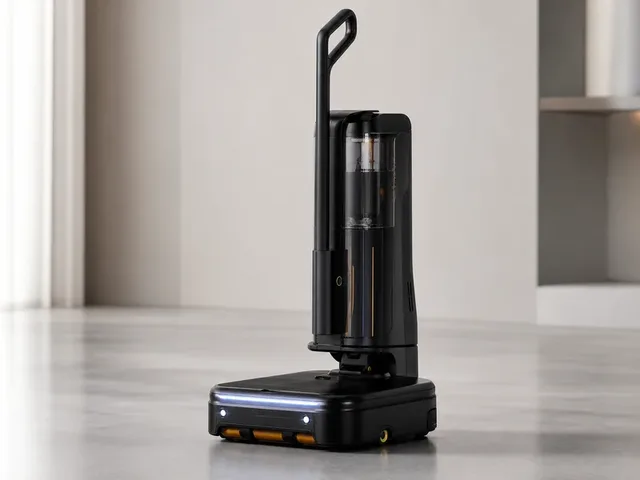
Dyson's first wet-and-dry robot vacuum and mop, replacing the 360 Vis Nav. The Spot+Scrub Ai features an AI-powered camera that identifies over 200 household material types and detects stains in real time, automatically adjusting suction and mop passes. A self-cleaning wet roller mop with a 12-point hydration system uses fresh water to rinse debris into a dirty-water tank as it rotates, and extends 40 mm to the side for edge cleaning. Green LED illumination highlights fine dust on hard floors — a first for Dyson's robot line and rarely seen in competitors. The bagless Omni-style dock uses Dyson's cyclone technology to empty the robot's 3-litre onboard bin without disposable bags, while also washing the mop roller, refilling clean water, and collecting wastewater. At 18,000 Pa suction, it sits below the 22,000 Pa class leaders but delivers solid vacuuming on both hard floors and carpets. LiDAR-based navigation enables quick, accurate home mapping via the MyDyson app, a significant improvement over the 360 Vis Nav's slower mapping process. The dock holds approximately 300 days' worth of dust according to Dyson, with a 2.3-litre clean-water tank and 2.1-litre dirty-water tank.

Description Sensor

Price

$1,200

View robot
Deebot X8 Pro Omni
Cleaning | Ecovacs

Deebot X8 Pro Omni

Ecovacs' flagship robot vacuum and mop combo for 2025. The X8 Pro Omni features the OZMO Roller — a self-washing roller mop that rinses itself 200 times per minute with 16 clean water nozzles, preventing cross-contamination. It delivers 18,000 Pa suction with ZeroTangle 2.0 anti-hair-wrap technology, TruEdge 2.0 extending mop and side brush for edge cleaning, and embedded dToF LiDAR for a slim 9.8cm profile. The Omni Station handles auto-emptying (3L bag), hot water mop washing up to 75°C, 63°C hot air drying, and automatic cleaning solution dispensing. YIKO-GPT voice assistant powered by a large language model lets you control the robot with natural conversation.

Description Sensor

Price

$729

View robot
Humanoid | EngineAI

T800

EngineAI's T800 is a full-size humanoid robot family positioned for industrial collaboration, inspection, research, logistics, and service deployments. Officially launched in December 2025 and shown globally at CES 2026, the platform is offered in Basic, Open Source, Pro, and Max editions. EngineAI says the T800 stands 173 cm tall, uses in-house joint modules capable of up to 450 N·m peak torque, supports hardware movement speeds of at least 3 m/s, and pairs active leg-joint cooling with quick-release battery packs for 4-5 hours of operation. Higher-tier versions add stereo-vision plus LiDAR perception, dexterous 7-DoF hands, and more onboard compute for developers and more demanding manipulation tasks.

Description Sensor

Price

¥180,000

View robot
Humanoid | Faraday Future

FF Futurist

Full-size professional humanoid robot from Faraday Future's EAI Robotics division, launched at the NADA Show in Las Vegas on February 5, 2026. Standing 169 cm tall and weighing 69 kg, the FF Futurist is powered by an NVIDIA Jetson Orin processor delivering 200 TOPS of AI compute. It features 28 high-performance motors with 500 Nm peak torque and harmonic drive gearing, enabling 40 degrees of freedom overall (7 DOF per arm) with five-fingered dexterous hands. A hot-swappable battery provides up to 3 hours of runtime. The perception suite includes 3D LiDAR, an RGB-D camera, a fisheye camera, multiple HD cameras, and tactile sensors, with connectivity via Wi-Fi, 4G, 5G, and VR teleoperation support. A customizable LCD face display enables natural interaction in up to 50 languages. The robot is positioned for professional roles including concierge services, sales advising, event hosting, teaching assistance, and brand ambassadorship, with future software updates planned for home and factory applications. First deliveries began in late February 2026, with over 20 units shipped by March 2026.

Description Sensor

Price

$34,990

View robot
Humanoid | Faraday Future

FF Master

Compact athletic humanoid robot from Faraday Future's EAI Robotics division, launched alongside the FF Futurist at the NADA Show in Las Vegas on February 5, 2026. Standing 131 cm tall and weighing 39 kg, the FF Master is designed for home companion, educational, and interactive roles rather than heavy professional tasks. It is powered by an NVIDIA Jetson Orin NX processor delivering 157 TOPS of AI compute and features 30 degrees of freedom in its body with five-fingered dexterous hands (7 DOF per arm). The robot's 30 high-efficiency drive motors produce up to 120 Nm of peak torque, enabling agile motion at speeds up to 7.2 km/h. Its perception suite includes 3D LiDAR, stereo RGB cameras, an interactive RGB camera, an RGB-D camera, and a rear RGB camera, with connectivity via Wi-Fi, 4G, 5G, and VR teleoperation. FF positions the Master as a home and family companion — it can help children with homework, converse with elderly family members, assist in remote home monitoring through onboard cameras and sensors, and serve as an interactive presence at events and in classrooms. The robot supports natural language interaction in up to 50 languages and is designed to adapt and learn new skills over time through OTA software updates. First deliveries began in late February 2026, with over 20 units shipped by March 2026.

Description Sensor

Price

$19,990

View robot
MobED
Commercial | Hyundai

MobED

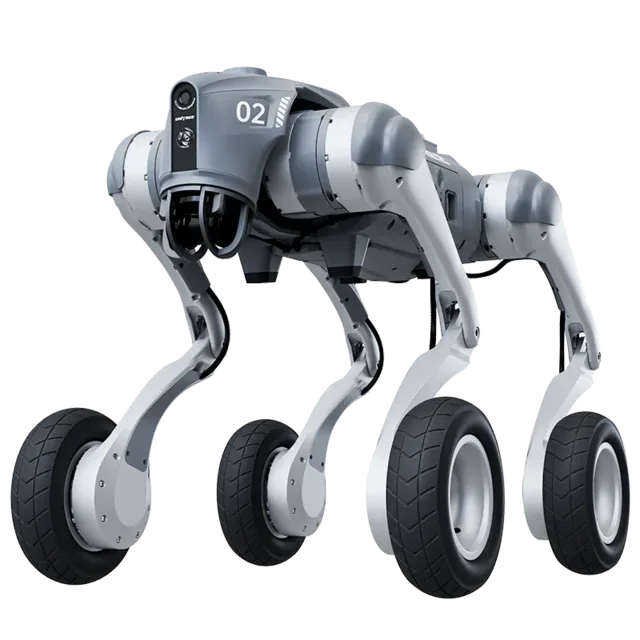
MobED (Mobile Eccentric Droid) is a modular mobile robot platform developed by Hyundai Motor Group's Robotics Lab. Unveiled at iREX in December 2025 with mass production and sales beginning Q1 2026, it features four independently controlled wheels with an eccentric mechanism that enables agile movement and stable balance across uneven terrain, including curbs up to 200mm. The platform comes in Pro and Basic variants — the Pro adds 2× 3D LiDAR, 3× cameras, 8× RADAR, IMU, GNSS antenna, and autonomous navigation. MobED is designed for delivery, patrol, education, and industrial logistics. Its mounting rail system allows easy customization for different use cases. It won a CES 2026 Best of Innovation Award in the robotics category.

Description Sensor

Price

Contact Hyundai Robotics Lab (enterprise pricing)

View robot

Next step after "LiDAR"

Turn 70 search results into an actual decision.

Once the deck stops feeling noisy, stop typing and change tools: compare finalists side by side, widen into a category map, or sanity-check the manufacturer context before committing to the shortlist.

Open compare

Reading the result deck

Stop searching once the shortlist starts to repeat.

70 results is usually enough to expose the right cluster. The next lift should come from structured comparison, not from typing more words into the same field.

1. Trim

Drop the obvious mismatches by maker, price, or category.

2. Open

Open the best 2-4 robots in parallel for deeper spec context.

3. Compare

Use compare once the decision is a tradeoff, not discovery.

Need a broader view?

Switch tools when the question changes.

Search wins when you know the signal. Directory routes win when you need a map of the entire field. Use both deliberately instead of forcing one tool to do both jobs badly.

Search playbook

The search indexes every attribute of 205 robots — names, manufacturers, categories, capabilities, sensors, connectivity, and AI stacks. Here is how to get the best results.

Query examples

The search indexes every attribute of all 205 robots — names, manufacturers, categories, capabilities, sensors, connectivity, and AI stacks.

Search for Example Finds
Robot nameOptimusTesla Optimus and similar names
ManufacturerUnitreeAll Unitree Robotics robots
CategoryhumanoidHumanoid category robots
Capabilityvoice interactionRobots with voice interaction
SensorLiDARRobots with LiDAR sensors
ProtocolMatterRobots supporting Matter

Price Sorting

No price filter in search? Sort results on the all robots page by price low-to-high or high-to-low.
1

Priority matching

Name matches rank highest, then manufacturer, then categories, sensors, and capabilities.

2

Cross-field matching

Multi-word queries match across fields — "Boston Dynamics quadruped" hits maker + category simultaneously.

3

Live refresh

Results update as you type with sub-second response — start broad, add specificity, watch the deck narrow.

4

Research workflow

Search → open 2–4 promising robots → compare finalists → check maker context.

Research strategies

The right search approach depends on your role and what decision you need to make. These strategies cover the most common research patterns.

Research strategies by role

Whether you are a consumer researching your first robot purchase, a journalist covering the robotics industry, an engineer evaluating competitive products, or an investor assessing market opportunities — the right search strategy depends on what signal you are tracking and what decision you need to make next.

First-time buyer

Start broad: try "cleaning robot" or "companion robot" for an overview of what is available. Review prices and features across multiple results, then narrow with specific terms like sensor types or brand names. The categories page has buyer guides with price ranges for each robot type to help set expectations.

Upgrading a robot

Search for features you wish your current robot had — "LiDAR navigation," "auto-empty," "voice control," or "obstacle avoidance." Compare your current model against candidates using the comparison tool to evaluate whether the upgrade justifies the cost. Pay attention to connectivity protocol changes — newer robots may use Matter instead of proprietary apps.

Tech enthusiast

Search cutting-edge terms: "bipedal locomotion," "force torque sensor," "large language model," or "ROS 2." Combine with status filters on the all robots page to distinguish currently available products from development-stage prototypes and pre-order models. The components directory provides deeper technical context on unfamiliar sensors and AI platforms.

Commercial buyer

Search deployment scenarios: "warehouse automation," "logistics," "reception desk," or "security patrol." Check manufacturer profiles for enterprise support options, fleet management capabilities, and commercial pricing arrangements for bulk deployments. Regional context matters — the countries directory shows production hubs and import considerations.

Research by technology

Search for component names like "LiDAR," "NVIDIA Jetson," "ROS 2," or "Matter" to find robots built on specific platforms. See the components directory for structured technology views and component trends for adoption momentum data over the past 30 days.

Research by use case

Search for the task rather than the product: "mopping," "lawn mowing," "security patrol," or "elderly care" surfaces robots designed for those applications. Cross-category queries like "security" can reveal surprising alternatives — dedicated security robots, companion robots with surveillance features, and quadrupeds with patrol capabilities all appear in one search.

Research by region

Search "Japan," "Chinese," or "European" to find robots from specific markets. The countries directory offers a structured geographic view with production hubs, manufacturer density, and regional market leaders for deeper comparison.

Complete research workflow

1

Explore categories

Understand the robotics landscape and identify which robot type matches your need.

2

Search candidates

Build a list of 3–5 promising results by name, capability, or sensor type.

3

Deep-dive profiles

Review full specifications, sensor breakdowns, and capability analysis on each candidate.

4

Compare finalists

Put top picks side by side with the comparison tool to highlight tradeoffs.

5

Research maker

Evaluate the company track record, portfolio breadth, and support infrastructure.

6

Check technology

Use the components directory to understand unfamiliar sensors, AI platforms, and connectivity protocols.

When to use search vs other tools

Use search when Use browse when
You know the robot name, maker, or a specific technology keywordYou need to understand the full market landscape first
You want fast results across the entire database in one queryYou want buyer guides with price ranges and recommendations
You are validating whether a specific sensor or protocol existsYou want to compare regional markets or manufacturer portfolios
You need shareable, bookmarkable result URLs for laterYou want structured side-by-side specification comparison

Cross-category discovery

One of the most valuable but underused search strategies is cross-category exploration. Searching across categories can reveal surprising alternatives you might not have considered:

  • Security needs? Searching "security" surfaces dedicated security robots, companion robots with surveillance features, quadrupeds with patrol capabilities, and cleaning robots with built-in cameras.
  • Specific sensor? Searching "camera" shows robots from every category that include cameras — from vacuums to humanoids to security bots — revealing technology adoption patterns across the market.
  • Budget comparison? Searching a price range or budget term can surface robots across categories that compete for the same spending decision, even if they serve different purposes.

Saving and sharing research

Bookmarkable URLs

Every search generates a permanent URL. Bookmark it, share it with colleagues, or paste it into a team chat — the same URL always shows the latest data for that query.

Multi-device research

Start on your laptop, continue on your phone. Search URLs work everywhere. Open candidate detail pages in parallel tabs for efficient comparison across devices.

Compare integration

Once your shortlist is small enough, move directly to the comparison tool for structured spec-by-spec analysis. The compare page also supports shareable URLs for team purchase decisions.

Search help

The practical questions people hit most often once they start narrowing the shortlist.

Frequently Asked Questions

What can I search for on ui44?
You can search across all 205 robots by name, manufacturer, category, capability, sensor type, connectivity option, or any keyword that appears in a robot's profile. The search indexes every attribute in the database for comprehensive results.
Why am I getting no results?
If your search returns no results, try simplifying your query. Use single keywords rather than phrases, check for typos, and try synonyms (e.g., "vacuum" instead of "cleaning robot"). You can also browse by category or manufacturer.
Can I filter search results by price?
The search page does not include a numerical price filter, but you can use the all robots page which offers category, manufacturer, and price sorting together.
Do search results update in real time?
Yes, results update as you type with a short debounce delay to balance responsiveness with efficiency. There is no need to press Enter or click a search button — just start typing and results appear automatically. You can also press Enter or click Search for an immediate update. The result cards are rendered server-side and delivered via HTMX partial updates, meaning only the search results section refreshes without disturbing the rest of the page.
How is search relevance determined?
Results are ranked by match quality across multiple data dimensions. The relevance algorithm prioritizes exact matches in high-importance fields — a robot name match ranks higher than a description mention, which ranks higher than a sensor or capability match. Multi-word queries are evaluated as a combined search, matching across any combination of fields. For example, searching "Boston Dynamics quadruped" surfaces robots from Boston Dynamics in the quadruped category.
Can I search by technical specifications?
Yes — search for specific sensor names, connectivity protocols, AI platforms, or capability keywords. For example, searching for "LiDAR" returns all robots that include LiDAR sensors, while "Matter" surfaces robots supporting the Matter smart home protocol. For structured technical browsing, the components directory provides dedicated pages for each technology with complete robot compatibility lists and detailed technical explanations.
Does search include robots not yet available for purchase?
Yes, the search indexes every robot in the database regardless of availability status. Results include robots that are Available, in Pre-order, in Development, and in Prototype stages. Each result card displays the robot's current status so you can quickly identify which results represent products you can buy today versus those still in development. To limit results to only purchasable robots, use the status filter tabs on the all robots page.
How often is the search data updated?
The search index is rebuilt whenever the database is updated, ensuring that new robots, updated specifications, and changed prices are immediately searchable without delay. Each robot detail page shows a "last verified" date so you can assess data freshness for any specific result. Available products are prioritized for frequent verification, ensuring that purchase-ready robots have the most current information.
Can I share or bookmark my search results?
Yes, every search query generates a shareable URL that preserves your exact search terms and results. You can bookmark searches to revisit later, share specific search results with colleagues evaluating robots together, or save a set of search URLs as a lightweight research project. The URL-based approach ensures your research is reproducible — the same URL always shows the latest data.
What is the best way to narrow down search results?
Start with a broad term and progressively add specificity. For example, typing "robot" shows everything, adding "cleaning" narrows to cleaning robots, and adding a manufacturer name further refines to that company's products. You can also combine search with other tools — identify candidates through search, then use the comparison tool to evaluate your shortlist side by side across all specification dimensions.
Should I use search or browse to find robots?
Use search when you have a specific keyword, name, manufacturer, or technology in mind — it is the fastest way to surface candidates from the entire database in one action. Use browse routes when you need market context: the categories page for understanding robot types and buyer guides, the manufacturers page for company-level research, and the comparison tool for final tradeoff analysis. Most effective research workflows use both: search to discover, browse to contextualize.
Can I search by price range?
Direct price-range filtering is not available in search. However, you can search by category (e.g., "cleaning robot") to see the full price spread, then sort by price on the all robots page for structured price browsing. Many category pages also include price distribution tables showing typical price ranges for budget, mid-range, and premium segments within that robot type.
How do I compare robots after searching?
Once your search results narrow to a manageable shortlist, open the most promising 2–4 robots in separate tabs and review their full detail pages. Then use the comparison tool to place up to 4 robots side by side across every specification dimension — price, sensors, capabilities, connectivity, battery life, dimensions, and AI stack. The comparison view highlights differences that are hard to spot across separate detail pages.
Does search work on mobile?
Yes, search is fully responsive and works on mobile, tablet, and desktop. On smaller screens, the search input is prominently placed at the top of the page, result cards stack vertically for easy scrolling, and all quick-start tags and category chips remain tappable. Every search generates a bookmarkable URL, so you can start research on your phone and continue on your laptop without losing context.
How do I find robots from a specific country?
You can search by country name or nationality — "Japan," "Chinese," "Korean," or "German" will surface robots from manufacturers based in those regions. For a structured geographic view, the countries directory provides dedicated pages for each manufacturing hub, including manufacturer counts, product portfolios, and regional market positioning. Country pages also show production trends and highlight leading manufacturers in each region.
Can I search by robot status (available, pre-order, development)?
The search indexes status labels, so searching for "available," "pre-order," "development," or "prototype" will surface robots matching that status. However, for more structured status filtering, use the status filter tabs on the all robots page, which lets you toggle between Available, Pre-order, Development, and Prototype robots while maintaining category and manufacturer filters. Status information on each robot profile includes a last verified date so you can assess how current the availability data is.
What data does each search result card show?
Each result card displays the robot name, manufacturer (linked to the manufacturer profile), category, a short description, the price (or price note if TBD), and match labels showing which fields matched your query (Name, Maker, Category, Capability, Sensor, or AI). Clicking any result opens the full robot detail page with complete specifications, sensor breakdowns, capability analysis, component details, and manufacturer context.
How do I research a specific technology like LiDAR or Matter?
Search for the technology name directly — "LiDAR," "Matter," "ROS 2," "NVIDIA Jetson," or "Bluetooth 5.0" will return all robots that include that technology. For deeper technical context, the components directory provides dedicated pages for each technology with explanations, adoption statistics, and complete robot compatibility lists. You can also check component trends to see which technologies are gaining or losing adoption across the market over the past 30 days.
What is the difference between search and the all robots page?
The search page is optimized for keyword-based discovery across the entire database — type any term and get instant results from all robots. It indexes every attribute including names, manufacturers, categories, capabilities, sensors, connectivity protocols, and AI platforms. The all robots page is a structured directory with sortable columns, category filters, manufacturer filters, status tabs, and price sorting. Use search when you have a keyword in mind; use the robots page when you want to browse, filter, and sort a structured table view. Both routes link to the same robot detail pages for deep specification analysis.

Keep the research moving

Need a different lens than raw keyword search?

Search is the fastest way to surface candidates. Once the problem becomes breadth, tradeoffs, or manufacturer context, switch tools on purpose instead of endlessly refining one query.