Home / Search

Find the right robot without browsing blind.

Search is the fastest route on ui44 for high-volume scanning: robot names, manufacturers, categories, capabilities, sensors, connectivity, and AI stacks all surface in one workspace that stays usable on mobile, laptop, and 4K.

205

robots indexed

9

categories

<1s

live refresh

Clear

Showing matches for LiDAR. Edit and the workspace updates in place.

Quick starts for common research modes: shortlist by category, validate a specific technology, or jump straight to a known brand.

Search results

Type a query to see live matches across the entire index of robots, or clear it to browse by category and find what you need through structured directory navigation.

Updating results...

Live results

70 results for "LiDAR"

Match labels show why each robot surfaced for this query. The result deck stays dense enough to scan fast while keeping individual entries distinct and readable.

Page 2 of 6
Quadruped | Faraday Future

FX Aegis

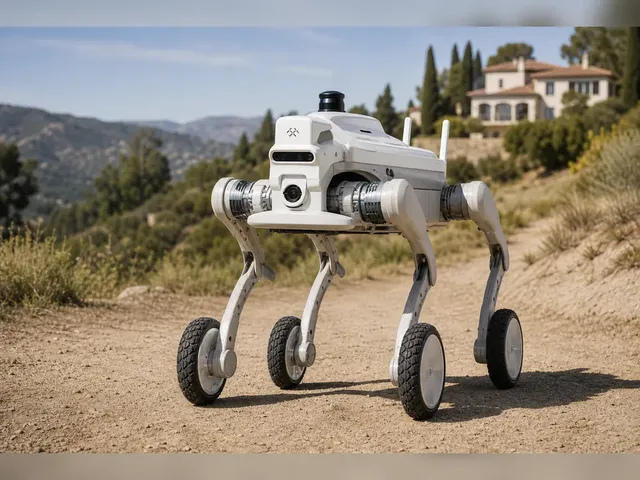
Quadruped robot from Faraday Future's EAI Robotics division, launched alongside the FF Futurist and FF Master at the NADA Show in Las Vegas on February 5, 2026. The FX Aegis features a peak joint torque of 48 Nm, enabling it to traverse obstacles up to approximately 13 inches and navigate slopes up to 40 degrees. It is available in both a four-legged quadruped configuration and an optional four-wheeled variant for different terrain requirements. The platform is designed around modularity — users can add LiDAR, depth cameras, communication modules, robotic arms, fire extinguishers, and professional security plugins. Connectivity includes Wi-Fi and 5G, with support for remote operation in environments with limited network coverage. On the software side, the FX Aegis integrates with home, campus, and industrial security systems and supports autonomous patrol and follow-me capabilities. Faraday Future positions it for security patrol, industrial inspection, law enforcement support, emergency response, asset inventory, and delivery of small items. FCC compliance certification was completed on April 2, 2026, enabling formal commercial sales in the United States. More than 20 units were shipped during the first delivery month (March 2026), with the company targeting over 1,000 cumulative shipments by end of 2026. Height, weight, battery life, and internal compute specifications have not been officially disclosed.

Description Capability Sensor

Price

$2,490

View robot
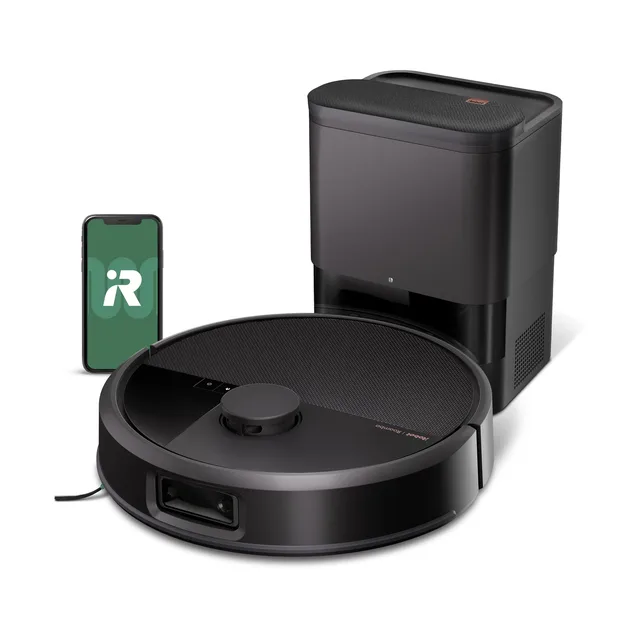
Roomba Max 705 Vac
Cleaning | iRobot

Roomba Max 705 Vac

Roomba Max 705 Vac is iRobot's 2025 flagship vacuum-only robot for pet-heavy and high-traffic homes. iRobot positions it around stronger debris pickup and reduced maintenance: 180x suction versus the Roomba 600 reference baseline, anti-tangle dual rubber brushes, LiDAR-based room mapping, camera-based obstacle avoidance, and a bundled AutoEmpty Dock rated for up to 75 days of dust storage. The robot supports room/zone cleaning in the Roomba Home app and voice-triggered cleaning through Alexa, Siri, and Google Assistant-enabled devices.

Description Capability Sensor

Price

$600

View robot
Lawn & Garden | Mammotion

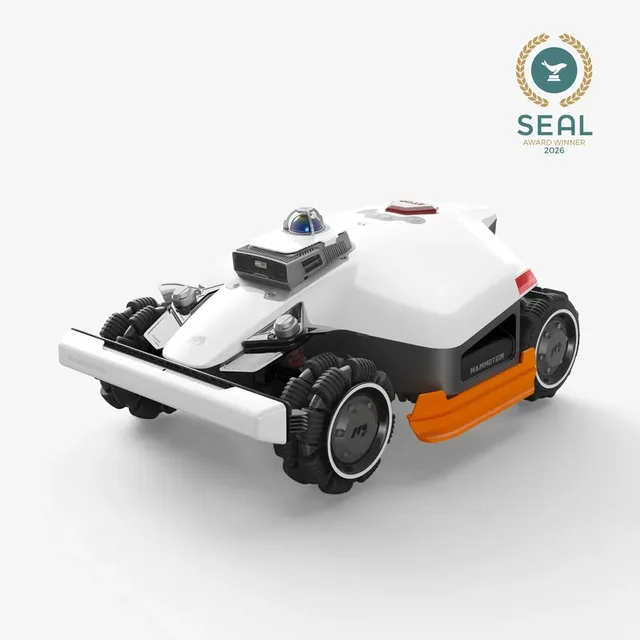
LUBA 3 AWD 5000

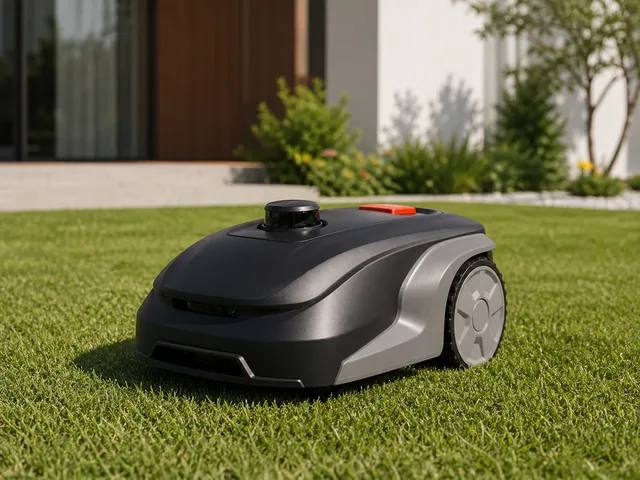
The Mammotion LUBA 3 AWD 5000 is Mammotion's 2026 flagship wire-free robotic lawn mower for lawns up to 5,000 m² (1.25 acres). It succeeds the LUBA 2 AWD 5000 with Mammotion's Tri-Fusion navigation stack, combining 360° LiDAR, NetRTK, and dual-camera AI vision for centimeter-level positioning without perimeter wire installation. Mammotion says the AWD platform can tackle slopes up to 80% (38.6°), use adaptive suspension to clear obstacles up to 3.15 inches, and mow with dual 165W cutting motors across a 15.8-inch deck. Official CES 2026 materials and the current store listing position it as the top residential LUBA 3 AWD model for larger, more complex yards.

Description Sensor AI

Price

$3,299

View robot
Lawn & Garden | MOVA

LiDAX Ultra 3000 AWD

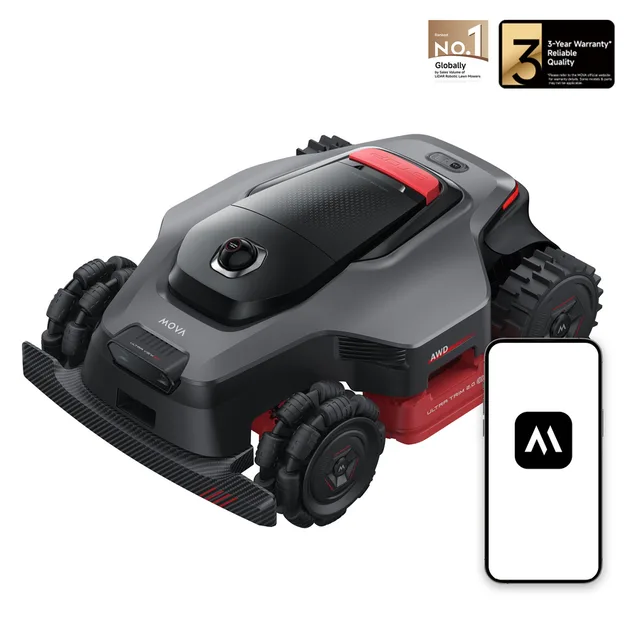
MOVA's LiDAX Ultra 3000 AWD is a wire-free robotic lawn mower for lawns up to 3,000 m² (about 0.75 acre). Official MOVA materials position it as the larger all-wheel-drive US launch model in the LiDAX Ultra line, combining 360° 3D LiDAR with AI dual vision for RTK-free auto mapping, obstacle avoidance, and multi-zone mowing. MOVA says it uses four hub motors to handle slopes up to 80% (38.6°), dual 15.8-inch cutting discs for wider coverage, and app-managed dual maps with support for up to 150 zones. Independent launch coverage from TechRadar also described it as MOVA's large-yard AI-navigation mower, broadly matching the official positioning.

Description Sensor AI

Price

$2,499

View robot
Cleaning | MOVA

Mobius 60

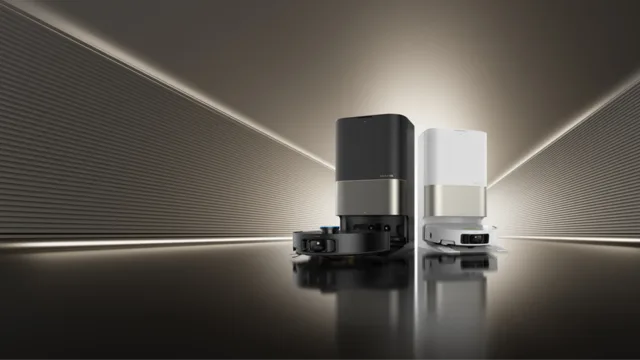
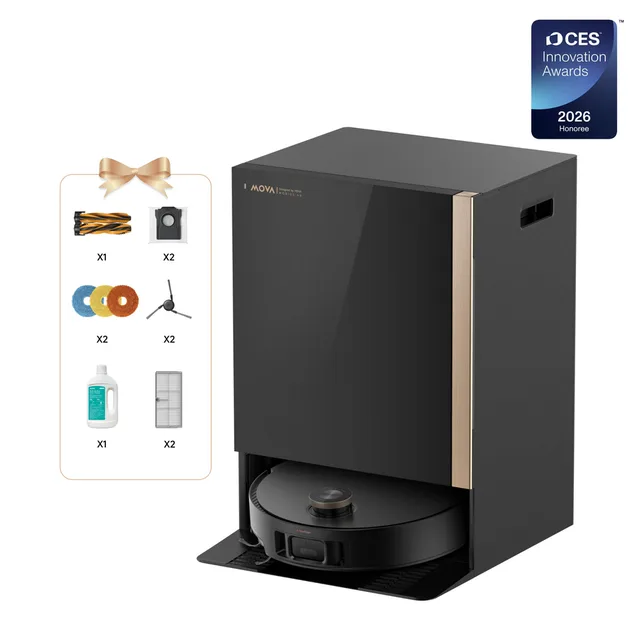
The MOVA Mobius 60 is a premium robot vacuum and mop combo featuring MOVA's MopSwap™ system — the first in its lineup to automatically select among three interchangeable mop pads (ThermoHold for grease, Plush for delicate wood, and HyperClean all-purpose) based on room type. It delivers up to 30,000Pa suction with a pressure-retention baffle that concentrates airflow on carpets, paired with a TroboWave™ DuoBrush dual-brush system and triple anti-tangle mechanisms. StepMaster 2.0 retractable legs lift the chassis to clear thresholds and obstacles up to 80mm (3.15 in). Navigation uses a retractable FlexScope™ DToF LiDAR sensor for low-profile cleaning under furniture, supplemented by AI SmartSight with a structured-light 3D scanner, LED fill light, and recognition of 240+ obstacle types. The all-in-one base station handles auto-emptying into a 3.2L dust bag, auto-refilling, hot-water mop washing at up to 212°F (100°C), heated-air drying, and dual cleaning-solution tanks. Independent testing by Vacuum Wars ranked it #4 on their Top 20 Robot Vacuums list, praising its carpet deep-clean performance (88%) and obstacle avoidance (22/24) while noting below-average battery life.

Description Capability Sensor

Price

$1,299

View robot
Freo X Ultra
Cleaning | Narwal

Freo X Ultra

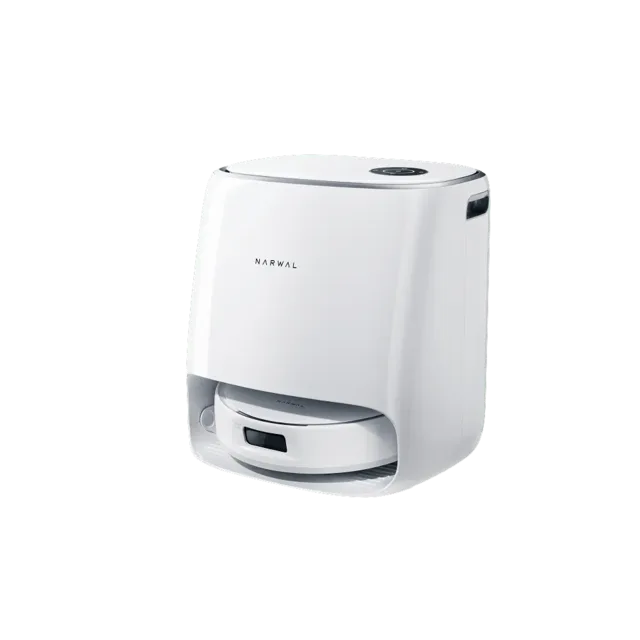
Narwal's flagship robot vacuum and mop combo, debuted at CES 2024. The Freo X Ultra pairs 8,200 Pa suction with patented Rouleaux triangular mop pads that press down with 12 Newtons of force at 180 RPM, leaving no gaps during mopping. A zero-tangle floating brush guides hair directly into the suction pipe, earning SGS and TÜV certification for a 0% tangle rate. The base station handles mop washing, drying, water refilling, and self-contained dust processing — no separate dust bag emptying needed. LiDAR SLAM 4.0 provides 360° mapping, while a tri-laser array handles obstacle avoidance. The mop pads auto-lift 12 mm on carpet so it can vacuum and mop in a single run. Battery life is strong at up to 210 minutes, covering large homes in one charge.

Description Capability Sensor

Price

$1,400

View robot
Saros Z70
Cleaning | Roborock

Saros Z70

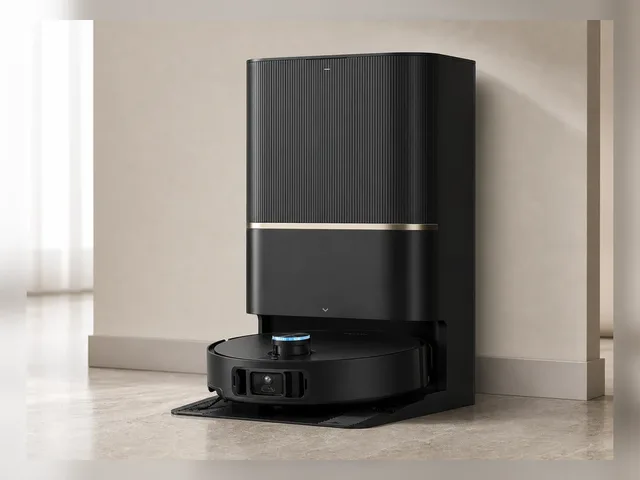
Roborock's first robot vacuum with a foldable five-axis mechanical arm (OmniGrip). The Saros Z70 can pick up objects like socks, shoes, and small items, move obstacles out of the way, and clean areas that were previously blocked — then return to clean the missed spots. At just 7.98cm (3.14 inches) tall, it's Roborock's slimmest design yet while packing 22,000 Pa suction, LiDAR navigation (StarSight 2.0), dual anti-tangle brushes, and an AdaptiLift chassis. The arm takes up only 10% of the space of prior prototypes. Announced at CES 2025, pre-orders opened March 2025, shipping since May 2025. 6,400 mAh battery for extended runtime.

Description Capability Sensor

Price

$1,299

View robot
Cleaning | Roborock

Qrevo Curv 2 Flow

Roborock's first roller-mopping robot vacuum, debuting the SpiraFlow self-cleaning roller mop system. A 270 mm roller spinning at 220 RPM applies 15 N of downward pressure with continuous clean-water delivery via eight nozzles and an internal scraper that extracts dirty water into a separate tank. The roller lifts 15 mm on carpet and an automatic shield covers it for protection. On the vacuum side, the Qrevo Curv 2 Flow delivers 20,000 Pa HyperForce suction through a DuoDivide anti-tangle main brush (0% hair-tangle score in independent testing) and dual Lifting Arc side brushes. Navigation uses PreciSense spinning LiDAR with Reactive AI obstacle avoidance (structured light + camera, 200+ object types). The Multifunctional Dock washes the roller mop with 75 °C (167 °F) hot water, dries with 55 °C (131 °F) warm air, and auto-empties dust into a 2.7 L sealed bag. Onboard "Hello Rocky" voice control works offline; the app offers SmartPlan 3.0 scheduling, multi-floor maps, virtual no-go zones, and pet monitoring with photo capture. Available in white, 119 mm (4.7 in) tall with a 325 ml onboard dustbin and up to 242 minutes of battery life.

Description Capability Sensor

Price

$1,000

View robot
Cleaning | Roborock

Qrevo Edge 2 Pro

Roborock's 2026 premium robot vacuum and mop featuring a 7.98 cm ultra-slim profile with the RetractSense retractable LiDAR tower, enabling it to clean under low furniture. Delivers 25,000 Pa HyperForce suction through a DuoDivide anti-tangle main brush paired with a FlexiArm Arc side brush that extends automatically into corners and along edges. Dual spinning mop pads scrub at up to 200 RPM with 12 N of downward pressure; the robot can fully detach its mops at the dock before vacuuming carpets to prevent moisture transfer — a step beyond simple mop lifting. The AdaptiLift Chassis handles thresholds up to 4 cm and adapts to carpet height. The included Multifunctional Dock 3.0 Hygiene+ washes mops with 100 °C hot water, dries with 55 °C warm air, auto-empties dust into a 2.7 L sealed bag (up to 65 days), dispenses detergent automatically, and self-cleans its own base with hot water. Reactive AI obstacle recognition covers over 200 object types via structured light and RGB camera. Onboard "Hello Rocky" voice assistant works offline. SmartPlan 3.0 handles AI-driven room-by-room scheduling. Matter protocol support is planned via a future OTA update. Launched globally starting February 2026.

Description Capability Sensor

Price

AUD $2,799 (Australia); US pricing and availability not yet confirmed as of April 2026.

View robot
K20+ Pro
Cleaning | SwitchBot

K20+ Pro

SwitchBot's modular home robot, unveiled at CES 2025 and shipping since mid-2025. At its core is a compact robot vacuum, but what sets the K20+ Pro apart is its FusionPlatform — a wheeled circular base that clips onto the vacuum via a mechanical ClawLock system. The platform can carry up to 8 kg and accepts various SwitchBot accessories: a pan/tilt security camera for mobile home monitoring, an air purifier for room-to-room filtration, a circulator fan, or even a cordless stick vacuum. It also supports third-party devices via USB-C power ports, and SwitchBot encourages 3D-printed custom attachments. The robot navigates with D-ToF LiDAR and dual laser sensors for centimeter-level obstacle avoidance. It works with Alexa, Google Assistant, Siri Shortcuts, and Matter-compatible smart home setups. Rather than trying to build a humanoid, SwitchBot took a practical approach: make existing home devices mobile.

Description Capability Sensor

Price

$699

View robot
Go2
Quadruped | Unitree Robotics

Go2

Unitree's consumer-grade quadruped robot dog featuring embodied AI and 4D LiDAR. The Go2 is available in four editions (Air, Pro, X, EDU) and gained global attention at the 2023 Hangzhou Asian Games where it transported discus and javelin on the field. Features AI-trained advanced gaits including upside-down walking, adaptive roll-over, and obstacle climbing. Supports 3D LiDAR mapping, intelligent side-follow (ISS 2.0), and OTA software updates. Official Unitree direct pricing is currently listed at $2,800 for Go2, with EDU pricing available via contact sales.

Description Capability Sensor

Price

$2,800

View robot
Humanoid | AiMOGA Robotics

Mornine M1

AiMOGA Robotics' full-size general-purpose humanoid, developed as a Chery Automobile subsidiary and now offered directly to consumers via JD.com. The Mornine M1 stands 167cm tall, weighs 70kg, and has 40 degrees of freedom in its body (excluding dexterous hands). It features 3D LiDAR, dual depth cameras, and ultrasonic radar sensing for autonomous navigation with ±5cm accuracy and dynamic obstacle avoidance. The robot can perform dual-hand collaborative tasks such as autonomously opening car doors, and supports VR-based remote operation. It is the first humanoid robot to achieve full EU CE certification covering both hardware (CE-MD, CE-RED) and software (EN 18031), verified by TÜV Rheinland. Over 300 units have already been deployed across more than 30 countries in automotive dealerships, retail, and public-service settings. AiMOGA's roadmap targets eventual expansion into household use.

Description Sensor

Price

$41,400

View robot

Next step after "LiDAR"

Turn 70 search results into an actual decision.

Once the deck stops feeling noisy, stop typing and change tools: compare finalists side by side, widen into a category map, or sanity-check the manufacturer context before committing to the shortlist.

Open compare

Reading the result deck

Stop searching once the shortlist starts to repeat.

70 results is usually enough to expose the right cluster. The next lift should come from structured comparison, not from typing more words into the same field.

1. Trim

Drop the obvious mismatches by maker, price, or category.

2. Open

Open the best 2-4 robots in parallel for deeper spec context.

3. Compare

Use compare once the decision is a tradeoff, not discovery.

Need a broader view?

Switch tools when the question changes.

Search wins when you know the signal. Directory routes win when you need a map of the entire field. Use both deliberately instead of forcing one tool to do both jobs badly.

Search playbook

The search indexes every attribute of 205 robots — names, manufacturers, categories, capabilities, sensors, connectivity, and AI stacks. Here is how to get the best results.

Query examples

The search indexes every attribute of all 205 robots — names, manufacturers, categories, capabilities, sensors, connectivity, and AI stacks.

Search for Example Finds
Robot nameOptimusTesla Optimus and similar names
ManufacturerUnitreeAll Unitree Robotics robots
CategoryhumanoidHumanoid category robots
Capabilityvoice interactionRobots with voice interaction
SensorLiDARRobots with LiDAR sensors
ProtocolMatterRobots supporting Matter

Price Sorting

No price filter in search? Sort results on the all robots page by price low-to-high or high-to-low.
1

Priority matching

Name matches rank highest, then manufacturer, then categories, sensors, and capabilities.

2

Cross-field matching

Multi-word queries match across fields — "Boston Dynamics quadruped" hits maker + category simultaneously.

3

Live refresh

Results update as you type with sub-second response — start broad, add specificity, watch the deck narrow.

4

Research workflow

Search → open 2–4 promising robots → compare finalists → check maker context.

Research strategies

The right search approach depends on your role and what decision you need to make. These strategies cover the most common research patterns.

Research strategies by role

Whether you are a consumer researching your first robot purchase, a journalist covering the robotics industry, an engineer evaluating competitive products, or an investor assessing market opportunities — the right search strategy depends on what signal you are tracking and what decision you need to make next.

First-time buyer

Start broad: try "cleaning robot" or "companion robot" for an overview of what is available. Review prices and features across multiple results, then narrow with specific terms like sensor types or brand names. The categories page has buyer guides with price ranges for each robot type to help set expectations.

Upgrading a robot

Search for features you wish your current robot had — "LiDAR navigation," "auto-empty," "voice control," or "obstacle avoidance." Compare your current model against candidates using the comparison tool to evaluate whether the upgrade justifies the cost. Pay attention to connectivity protocol changes — newer robots may use Matter instead of proprietary apps.

Tech enthusiast

Search cutting-edge terms: "bipedal locomotion," "force torque sensor," "large language model," or "ROS 2." Combine with status filters on the all robots page to distinguish currently available products from development-stage prototypes and pre-order models. The components directory provides deeper technical context on unfamiliar sensors and AI platforms.

Commercial buyer

Search deployment scenarios: "warehouse automation," "logistics," "reception desk," or "security patrol." Check manufacturer profiles for enterprise support options, fleet management capabilities, and commercial pricing arrangements for bulk deployments. Regional context matters — the countries directory shows production hubs and import considerations.

Research by technology

Search for component names like "LiDAR," "NVIDIA Jetson," "ROS 2," or "Matter" to find robots built on specific platforms. See the components directory for structured technology views and component trends for adoption momentum data over the past 30 days.

Research by use case

Search for the task rather than the product: "mopping," "lawn mowing," "security patrol," or "elderly care" surfaces robots designed for those applications. Cross-category queries like "security" can reveal surprising alternatives — dedicated security robots, companion robots with surveillance features, and quadrupeds with patrol capabilities all appear in one search.

Research by region

Search "Japan," "Chinese," or "European" to find robots from specific markets. The countries directory offers a structured geographic view with production hubs, manufacturer density, and regional market leaders for deeper comparison.

Complete research workflow

1

Explore categories

Understand the robotics landscape and identify which robot type matches your need.

2

Search candidates

Build a list of 3–5 promising results by name, capability, or sensor type.

3

Deep-dive profiles

Review full specifications, sensor breakdowns, and capability analysis on each candidate.

4

Compare finalists

Put top picks side by side with the comparison tool to highlight tradeoffs.

5

Research maker

Evaluate the company track record, portfolio breadth, and support infrastructure.

6

Check technology

Use the components directory to understand unfamiliar sensors, AI platforms, and connectivity protocols.

When to use search vs other tools

Use search when Use browse when
You know the robot name, maker, or a specific technology keywordYou need to understand the full market landscape first
You want fast results across the entire database in one queryYou want buyer guides with price ranges and recommendations
You are validating whether a specific sensor or protocol existsYou want to compare regional markets or manufacturer portfolios
You need shareable, bookmarkable result URLs for laterYou want structured side-by-side specification comparison

Cross-category discovery

One of the most valuable but underused search strategies is cross-category exploration. Searching across categories can reveal surprising alternatives you might not have considered:

  • Security needs? Searching "security" surfaces dedicated security robots, companion robots with surveillance features, quadrupeds with patrol capabilities, and cleaning robots with built-in cameras.
  • Specific sensor? Searching "camera" shows robots from every category that include cameras — from vacuums to humanoids to security bots — revealing technology adoption patterns across the market.
  • Budget comparison? Searching a price range or budget term can surface robots across categories that compete for the same spending decision, even if they serve different purposes.

Saving and sharing research

Bookmarkable URLs

Every search generates a permanent URL. Bookmark it, share it with colleagues, or paste it into a team chat — the same URL always shows the latest data for that query.

Multi-device research

Start on your laptop, continue on your phone. Search URLs work everywhere. Open candidate detail pages in parallel tabs for efficient comparison across devices.

Compare integration

Once your shortlist is small enough, move directly to the comparison tool for structured spec-by-spec analysis. The compare page also supports shareable URLs for team purchase decisions.

Search help

The practical questions people hit most often once they start narrowing the shortlist.

Frequently Asked Questions

What can I search for on ui44?
You can search across all 205 robots by name, manufacturer, category, capability, sensor type, connectivity option, or any keyword that appears in a robot's profile. The search indexes every attribute in the database for comprehensive results.
Why am I getting no results?
If your search returns no results, try simplifying your query. Use single keywords rather than phrases, check for typos, and try synonyms (e.g., "vacuum" instead of "cleaning robot"). You can also browse by category or manufacturer.
Can I filter search results by price?
The search page does not include a numerical price filter, but you can use the all robots page which offers category, manufacturer, and price sorting together.
Do search results update in real time?
Yes, results update as you type with a short debounce delay to balance responsiveness with efficiency. There is no need to press Enter or click a search button — just start typing and results appear automatically. You can also press Enter or click Search for an immediate update. The result cards are rendered server-side and delivered via HTMX partial updates, meaning only the search results section refreshes without disturbing the rest of the page.
How is search relevance determined?
Results are ranked by match quality across multiple data dimensions. The relevance algorithm prioritizes exact matches in high-importance fields — a robot name match ranks higher than a description mention, which ranks higher than a sensor or capability match. Multi-word queries are evaluated as a combined search, matching across any combination of fields. For example, searching "Boston Dynamics quadruped" surfaces robots from Boston Dynamics in the quadruped category.
Can I search by technical specifications?
Yes — search for specific sensor names, connectivity protocols, AI platforms, or capability keywords. For example, searching for "LiDAR" returns all robots that include LiDAR sensors, while "Matter" surfaces robots supporting the Matter smart home protocol. For structured technical browsing, the components directory provides dedicated pages for each technology with complete robot compatibility lists and detailed technical explanations.
Does search include robots not yet available for purchase?
Yes, the search indexes every robot in the database regardless of availability status. Results include robots that are Available, in Pre-order, in Development, and in Prototype stages. Each result card displays the robot's current status so you can quickly identify which results represent products you can buy today versus those still in development. To limit results to only purchasable robots, use the status filter tabs on the all robots page.
How often is the search data updated?
The search index is rebuilt whenever the database is updated, ensuring that new robots, updated specifications, and changed prices are immediately searchable without delay. Each robot detail page shows a "last verified" date so you can assess data freshness for any specific result. Available products are prioritized for frequent verification, ensuring that purchase-ready robots have the most current information.
Can I share or bookmark my search results?
Yes, every search query generates a shareable URL that preserves your exact search terms and results. You can bookmark searches to revisit later, share specific search results with colleagues evaluating robots together, or save a set of search URLs as a lightweight research project. The URL-based approach ensures your research is reproducible — the same URL always shows the latest data.
What is the best way to narrow down search results?
Start with a broad term and progressively add specificity. For example, typing "robot" shows everything, adding "cleaning" narrows to cleaning robots, and adding a manufacturer name further refines to that company's products. You can also combine search with other tools — identify candidates through search, then use the comparison tool to evaluate your shortlist side by side across all specification dimensions.
Should I use search or browse to find robots?
Use search when you have a specific keyword, name, manufacturer, or technology in mind — it is the fastest way to surface candidates from the entire database in one action. Use browse routes when you need market context: the categories page for understanding robot types and buyer guides, the manufacturers page for company-level research, and the comparison tool for final tradeoff analysis. Most effective research workflows use both: search to discover, browse to contextualize.
Can I search by price range?
Direct price-range filtering is not available in search. However, you can search by category (e.g., "cleaning robot") to see the full price spread, then sort by price on the all robots page for structured price browsing. Many category pages also include price distribution tables showing typical price ranges for budget, mid-range, and premium segments within that robot type.
How do I compare robots after searching?
Once your search results narrow to a manageable shortlist, open the most promising 2–4 robots in separate tabs and review their full detail pages. Then use the comparison tool to place up to 4 robots side by side across every specification dimension — price, sensors, capabilities, connectivity, battery life, dimensions, and AI stack. The comparison view highlights differences that are hard to spot across separate detail pages.
Does search work on mobile?
Yes, search is fully responsive and works on mobile, tablet, and desktop. On smaller screens, the search input is prominently placed at the top of the page, result cards stack vertically for easy scrolling, and all quick-start tags and category chips remain tappable. Every search generates a bookmarkable URL, so you can start research on your phone and continue on your laptop without losing context.
How do I find robots from a specific country?
You can search by country name or nationality — "Japan," "Chinese," "Korean," or "German" will surface robots from manufacturers based in those regions. For a structured geographic view, the countries directory provides dedicated pages for each manufacturing hub, including manufacturer counts, product portfolios, and regional market positioning. Country pages also show production trends and highlight leading manufacturers in each region.
Can I search by robot status (available, pre-order, development)?
The search indexes status labels, so searching for "available," "pre-order," "development," or "prototype" will surface robots matching that status. However, for more structured status filtering, use the status filter tabs on the all robots page, which lets you toggle between Available, Pre-order, Development, and Prototype robots while maintaining category and manufacturer filters. Status information on each robot profile includes a last verified date so you can assess how current the availability data is.
What data does each search result card show?
Each result card displays the robot name, manufacturer (linked to the manufacturer profile), category, a short description, the price (or price note if TBD), and match labels showing which fields matched your query (Name, Maker, Category, Capability, Sensor, or AI). Clicking any result opens the full robot detail page with complete specifications, sensor breakdowns, capability analysis, component details, and manufacturer context.
How do I research a specific technology like LiDAR or Matter?
Search for the technology name directly — "LiDAR," "Matter," "ROS 2," "NVIDIA Jetson," or "Bluetooth 5.0" will return all robots that include that technology. For deeper technical context, the components directory provides dedicated pages for each technology with explanations, adoption statistics, and complete robot compatibility lists. You can also check component trends to see which technologies are gaining or losing adoption across the market over the past 30 days.
What is the difference between search and the all robots page?
The search page is optimized for keyword-based discovery across the entire database — type any term and get instant results from all robots. It indexes every attribute including names, manufacturers, categories, capabilities, sensors, connectivity protocols, and AI platforms. The all robots page is a structured directory with sortable columns, category filters, manufacturer filters, status tabs, and price sorting. Use search when you have a keyword in mind; use the robots page when you want to browse, filter, and sort a structured table view. Both routes link to the same robot detail pages for deep specification analysis.

Keep the research moving

Need a different lens than raw keyword search?

Search is the fastest way to surface candidates. Once the problem becomes breadth, tradeoffs, or manufacturer context, switch tools on purpose instead of endlessly refining one query.