Voice will remain important. It is still the most natural way to ask for broad help: "check the kitchen," "remind me later," or "take this to the bedroom." But home robots are moving from smart speakers on wheels toward machines that see, move, follow, grasp, and sometimes require a human fallback. That makes voice only one control layer, not the whole interface.
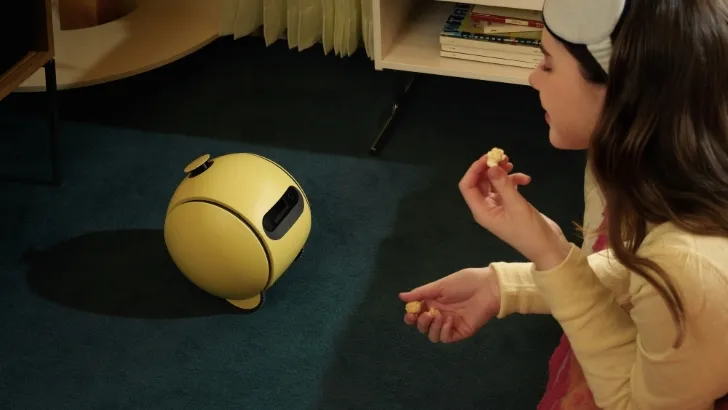
The useful question is not whether voice or gestures "win." It is whether the robot gives you enough ways to express intent: voice for broad goals, app controls for repeatable routines, pointing or gestures for spatial context, teleoperation for hard tasks, and autonomy when the robot can safely close the loop itself.
Why won't voice commands be enough for home robots?
Voice is excellent for low-risk intent. It is much less reliable when the robot needs precision, privacy, or confirmation.
A smart display can recover from a misunderstood weather request. A mobile robot with a camera can embarrass you if it starts a patrol at the wrong time. A manipulator can break something if "pick up the red one" refers to the wrong object. A companion robot in an elder-care or children's room may need to respond quietly without turning every interaction into a spoken command.
That is why the control stack matters. In the ui44 database, Samsung Ballie is a good example of the voice-first future becoming multimodal. Samsung says Ballie pairs Gemini with Samsung models and processes audio, voice, camera input, and environmental sensor data. That is not just a chatbot interface; it is an attempt to combine conversation with context about the room.
Amazon Astro shows the older smart-home pattern. It is a $1,599.99 invitation-only mobile home robot built around Alexa, home patrol, Visual ID, Ring integration, and remote monitoring. Astro proves that voice can make a moving robot approachable, but its most practical functions also depend on maps, cameras, app controls, alerts, and remote viewing.
Small companions make the same point. Loona is a $499 petbot with a 720p camera, 3D ToF sensor, touch sensor, four-microphone array, voice commands, remote monitoring, app controls, Blockly programming, and ChatGPT-4o integration. Miko 3 is a $299 child-focused companion with microphones, camera, touchscreen, touch sensors, face recognition, voice recognition, parental controls, and autonomous navigation. These are not humanoid workers, but they already blend speech, touch, app and visual context because one input mode is not enough.
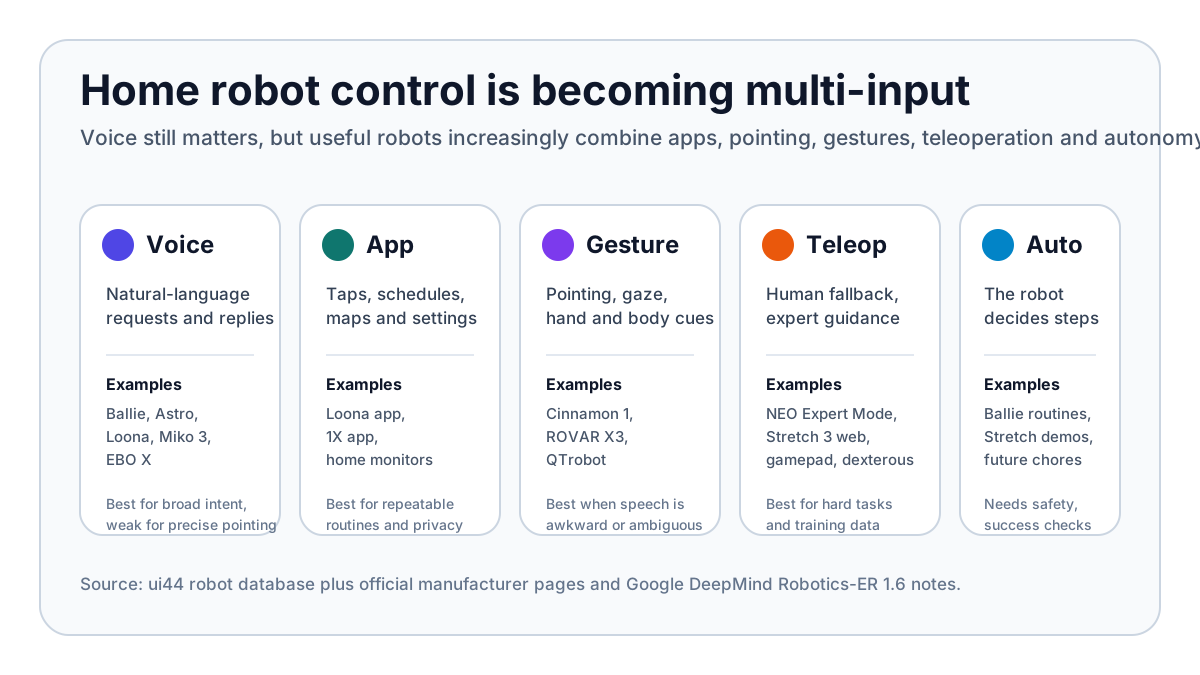
Voice is also socially awkward. Many people do not want to announce private reminders, health questions, accessibility needs, or family routines to everyone nearby. A silent tap, a physical button, a hand gesture, or a pointed camera view can be a more comfortable interface than speaking to a machine in the middle of the room.
What counts as home robot gesture control?
Gesture control does not have to mean waving like a conductor. For a home robot, it can mean several related things:
- Pointing: "that cup," "this spill," "go over there," or "avoid this area."
- Gaze and attention: the robot understands what you are looking at or who is addressing it.
- Hand signals: stop, follow, come here, wait, move left, or hand me that.
- Body cues: the robot recognizes posture, proximity, or a person preparing to interact.
- Demonstration: you show the robot a motion or correction instead of writing code.
The most useful near-term version is probably pointing plus confirmation. If a robot can show what it thinks you mean, then wait for a tap, nod, button press, or app confirmation, the interaction becomes safer than either voice alone or full autonomy alone.
Donut Robotics is the reason this topic is not just speculative UX chatter. The company's official homepage describes a mass-produced bipedal humanoid equipped with gesture control and says its own VLA, developed in Japan, is intended to power safe humanoids under a Japanese brand. HouseBots' coverage of Cinnamon 1 frames the idea around silent control in loud, awkward, or accessibility-sensitive environments. Cinnamon 1 is not yet a ui44 database robot, and buyers should treat it as an early signal rather than a proven household product. But the signal is important: humanoid makers are starting to market non-voice control as a first-class feature.
Google DeepMind's Gemini Robotics-ER 1.6 points in the same direction from the AI side. DeepMind describes pointing as a foundation for spatial reasoning: a way for an embodied model to identify objects, count, compare relationships, map trajectories, and reason about constraints such as which objects are small enough or safe enough to manipulate. That is exactly the gap voice leaves open. Saying "move that" is not enough unless the robot can ground "that" in space.
Which robots already show the control split?
No shipping consumer robot has solved the whole problem. But the database shows a clear pattern: the more physical the robot becomes, the more control channels it needs.
Robot
- ui44 status and price
- Development, no price announced
- Control lesson
- Voice and conversation are paired with camera, spatial sensors, SmartThings and Gemini-style multimodal reasoning.
Robot
- ui44 status and price
- Active, $1,599.99 by invitation
- Control lesson
- Alexa makes it approachable, but patrol, alerts and monitoring depend on maps, cameras, Ring and app workflows.
Robot
- ui44 status and price
- Available, $499 bundle
- Control lesson
- A small companion still needs voice, touch, app, camera, ToF sensing and programming modes.
Robot
- ui44 status and price
- Available, $999 retail
- Control lesson
- Home patrol and family communication blend autonomous movement, camera, app, Alexa and AI voice interactions.
Robot
- ui44 status and price
- Pre-order, $20,000 early-adopter price
- Control lesson
- A 167 cm, 30 kg humanoid cannot rely only on voice; 1X explicitly offers app control and Expert Mode fallback.
Robot
- ui44 status and price
- Active, $24,950 list price
- Control lesson
- Mobile manipulation needs web, gamepad and dexterous teleoperation alongside autonomy demos.
Robot
- ui44 status and price
- Pre-order, $299 Lite / $449 wireless
- Control lesson
- Desktop robots expose camera, microphones, expressive motion and Python/Hugging Face programming because builders need multiple input paths.
Robot
- ui44 status and price
- Prototype, no price announced
- Control lesson
- Sentigent lists gaze and gesture input sensing as part of multimodal adaptive following.
Robot
- ui44 status and price
- Available research robot, about €10,900 ex. VAT
- Control lesson
- Upper-body gestures, skeleton tracking and programmable behaviors are core HRI features, not decoration.
| Robot | ui44 status and price | Control lesson |
|---|---|---|
| Samsung Ballie | Development, no price announced | Voice and conversation are paired with camera, spatial sensors, SmartThings and Gemini-style multimodal reasoning. |
| Amazon Astro | Active, $1,599.99 by invitation | Alexa makes it approachable, but patrol, alerts and monitoring depend on maps, cameras, Ring and app workflows. |
| Loona | Available, $499 bundle | A small companion still needs voice, touch, app, camera, ToF sensing and programming modes. |
| EBO X | Available, $999 retail | Home patrol and family communication blend autonomous movement, camera, app, Alexa and AI voice interactions. |
| 1X NEO | Pre-order, $20,000 early-adopter price | A 167 cm, 30 kg humanoid cannot rely only on voice; 1X explicitly offers app control and Expert Mode fallback. |
| Stretch 3 | Active, $24,950 list price | Mobile manipulation needs web, gamepad and dexterous teleoperation alongside autonomy demos. |
| Reachy Mini | Pre-order, $299 Lite / $449 wireless | Desktop robots expose camera, microphones, expressive motion and Python/Hugging Face programming because builders need multiple input paths. |
| ROVAR X3 | Prototype, no price announced | Sentigent lists gaze and gesture input sensing as part of multimodal adaptive following. |
| QTrobot | Available research robot, about €10,900 ex. VAT | Upper-body gestures, skeleton tracking and programmable behaviors are core HRI features, not decoration. |

The split is especially obvious with manipulators. 1X NEO is listed in ui44 as a 167 cm, 30 kg humanoid with roughly four hours of battery life, tactile skin, RGB cameras, depth sensors, a microphone array, Wi-Fi, Bluetooth, a 1X app, and pre-order status. 1X's own page says NEO works autonomously by default, but for chores it does not know, a buyer can schedule a 1X Expert to guide it.
That is not a small caveat. It is the honest interface for an early home humanoid: autonomy for known tasks, voice or app for intent, and human guidance when the robot reaches the edge of its competence. In the real home, gesture or pointing should sit in that same stack. If the robot asks, "which mug?" you should not have to describe its exact color, position and handle direction in a sentence. You should be able to point, tap the camera view, or confirm a highlighted target.
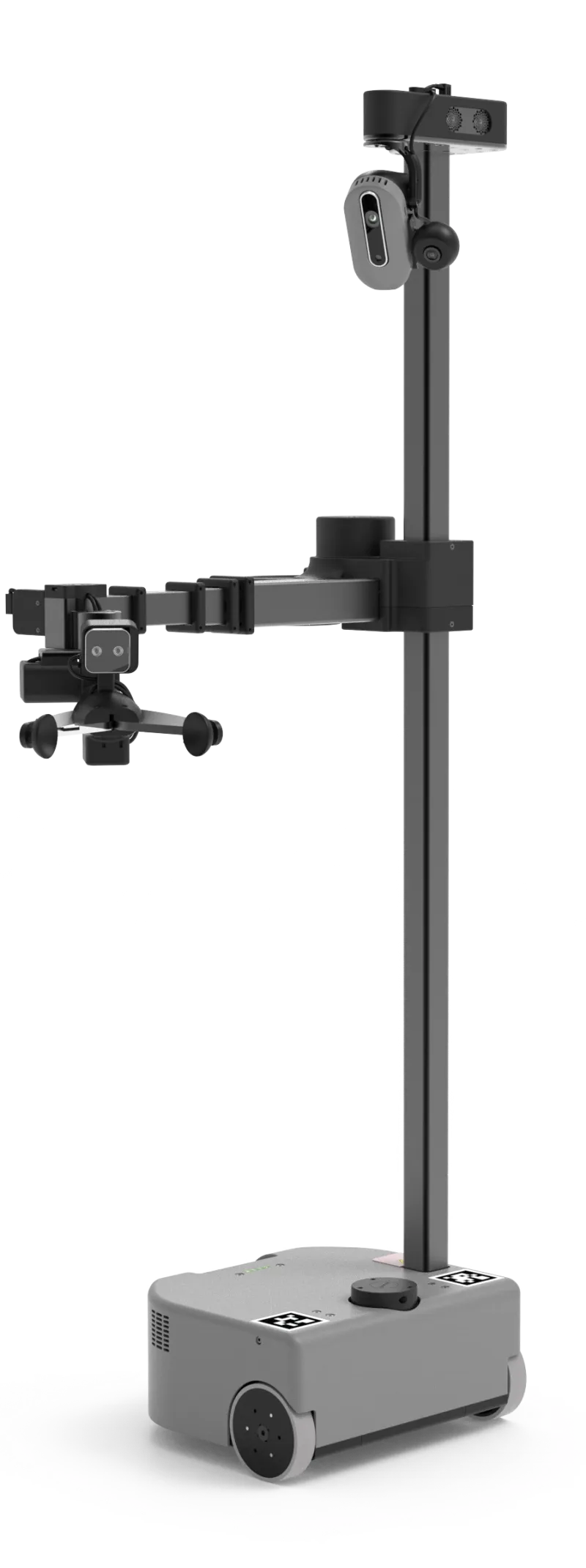
Hello Robot Stretch 3 is the more transparent research-side example. Stretch 3 costs $24,950, weighs 24.5 kg, has a 2 kg payload, a compact 33 × 34 × 141 cm body, 2-5 hours of runtime, RGB-D cameras, LiDAR, microphone array, ROS 2 and Python support. Hello Robot explicitly offers web, gamepad and dexterous teleoperation. That tells you something important: when a robot can physically touch the home, fallback control is not a luxury. It is part of making the system usable at all.
When should buyers care before buying?
Most buyers should not ask, "does it have gesture control?" as a yes/no feature. They should ask what happens in five common situations.
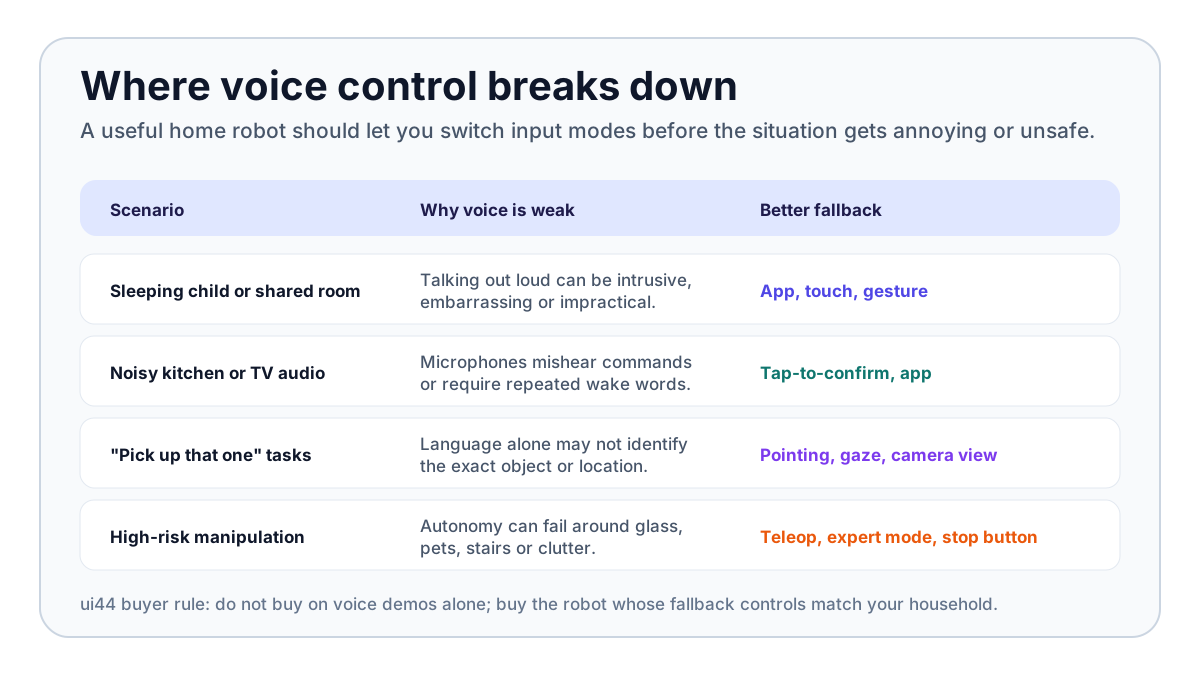
1. Can the robot confirm what it thinks you mean? A good interface shows intent before action. That could be a projected highlight, app preview, spoken summary, screen prompt, or simple stop/confirm gesture. This matters for any robot that moves, sees private spaces, or handles objects.
2. Is there a silent control path? If the only interface is a wake word, the robot will be annoying in bedrooms, shared apartments, elder-care rooms, calls, TV rooms, and late-night routines. Silent controls can be app buttons, touch surfaces, physical buttons, gestures, or scheduled automations.
3. Can you separate routine control from emergency control? "Start the patrol" and "stop now" should not feel like the same interaction. A physical stop, app stop, hand signal, or clearly visible pause control matters more than a flashy demo phrase.
4. Does the robot understand spatial language? If a robot accepts commands like "go there," "pick up that," or "watch this area," it needs visual grounding. DeepMind's Robotics-ER work is relevant because pointing, counting, multi-view reasoning, success detection and safety constraints are the real ingredients behind those casual phrases.
5. Is there a human fallback for manipulation? The more capable the robot, the more you should care about teleoperation or expert assistance. Stretch 3's web/gamepad/dexterous teleop and NEO's Expert Mode are not signs of failure. They are signs that the maker understands how hard homes are.
The accessibility angle is also real. Voice is not universally accessible. Some people cannot speak easily, do not want to speak, are hard of hearing, share a space where commands would be disruptive, or need a robot to interpret physical cues. Conversely, gesture-only control can exclude people with limited mobility or tremors. The best system is not voice-free; it is multi-input and user-configurable.
Will gesture control replace voice?
No. Voice is too useful to disappear. It is still the best interface for broad, low-risk intent: "remind me to take medication," "start a room check," "call my son," "play a game," or "what is on my schedule?" For companion robots, speech is part of the product.
But gesture control will matter wherever the robot needs physical context. A home robot should eventually understand a sentence like "put that over there" only because it can combine language with pointing, vision, object recognition, spatial memory, safety checks, and confirmation. The gesture is not the whole command. It is the missing coordinate system.
That is why Reachy Mini is interesting even though it is a small desktop kit rather than a chore robot. At $299 for the Lite version or $449 for the wireless version, it exposes the builder side of the future: camera, four microphones, expressive 6-DoF head motion, body rotation, animated antennas, Python programming, Hugging Face integrations and open-source behaviors. It is not trying to clean your home. It is showing how speech, vision, expression and programmable behaviors will get mixed together.
The same applies to social robots. QTrobot is a 64 cm, 5 kg research/social humanoid with upper-body gesture control and human gesture or skeleton tracking. ROVAR X3, still a prototype, explicitly lists gaze and gesture input sensing for multimodal adaptive following. Those features may look niche today, but they are the social interface primitives a future home robot will need if it is expected to follow, wait, approach, hand over, avoid, or respond without a full spoken script.
What should you look for in a multimodal home robot?
Use this buyer filter before getting excited by any voice or gesture demo:
- Voice: Can it understand natural commands, accents and interruptions? Does it process anything locally, or is every request cloud-dependent?
- Visual grounding: Can it identify objects, people, rooms and locations well enough to act safely?
- Pointing or selection: Can you indicate "this" and "there" without a long verbal description?
- App and schedule controls: Can routine tasks happen without repeated voice commands?
- Physical stop: Can anyone nearby stop or pause the robot quickly?
- Fallback mode: Is there teleoperation, expert mode, guided setup, or a manual control interface for hard tasks?
- Privacy controls: Can cameras, microphones, maps and logs be limited, reviewed or disabled?
- Accessibility: Can the interface work for people who cannot rely on voice, touch or fine hand gestures?
If a robot only has voice, it is probably a smart speaker with wheels or a companion device. If it only has an app, it may be useful but not socially fluid. If it only has autonomy, it is risky unless the task is narrow. The strongest home robots will feel boringly flexible: talk when that is natural, tap when that is quieter, point when the task is spatial, and let a human take over when the robot is not ready.
The bottom line: home robot gesture control is not a gimmick, but it also is not a magic feature. It is one layer in the bigger shift from voice assistants to embodied agents. The robots worth watching are not the ones that understand the most impressive sentence. They are the ones that can understand intent across speech, sight, motion, confirmation and safe fallback — then do the right thing in a messy home.
Written by
ui44 Team
Published April 29, 2026
Share this article
Open a plain share link on X or Bluesky. No embeds, no widgets, no cookie baggage.