That final centimeter is where home robots either become useful or become very expensive demo machines.
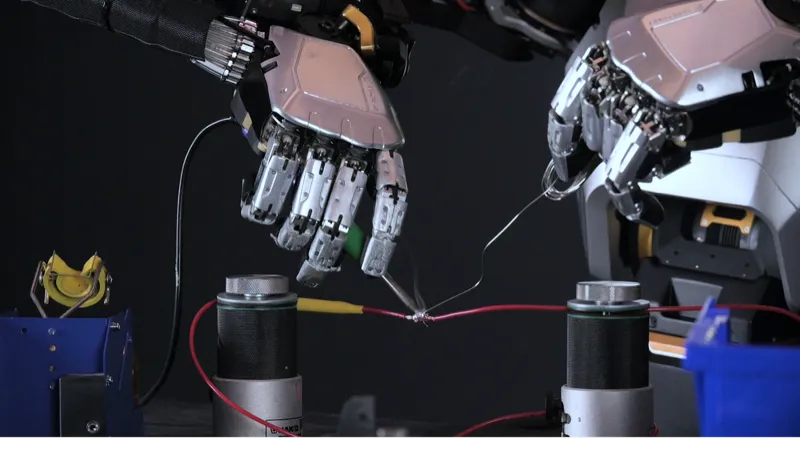
The useful short version: vision-language-action models try to connect what a robot sees, what a person asks, and what the robot should do. Vision-force-action adds the missing physical signal: how the world pushes back. For home robot hands, that may matter as much as the AI model itself.
This does not mean VFA is a product category you can buy today. It is a claim worth watching because it points at the hardest part of household manipulation: objects are soft, slippery, fragile, irregular, and often in the wrong place.
What is vision-force-action in robotics?
Vision-force-action, or VFA, is a robot-control approach that uses visual input, force/contact information, and learned actions in the same control loop. In plain English, the robot is not just asking "what does the object look like?" It is also asking "what is my hand feeling as I touch it?" and "how should I change my movement now?"
Eka Robotics uses the term directly. Its official site describes force as the "native language" of physical-world intelligence and says its VFA model is meant to combine generality, performance, and safety. In a WIRED hands-on report, Eka's robots were shown screwing in a lightbulb, recovering from fumbled keys, and placing chicken nuggets into moving containers. The important part was not that any one task looked magical. It was the recovery behavior: the gripper touched, slid, adjusted, and tried again instead of blindly executing a fixed path.
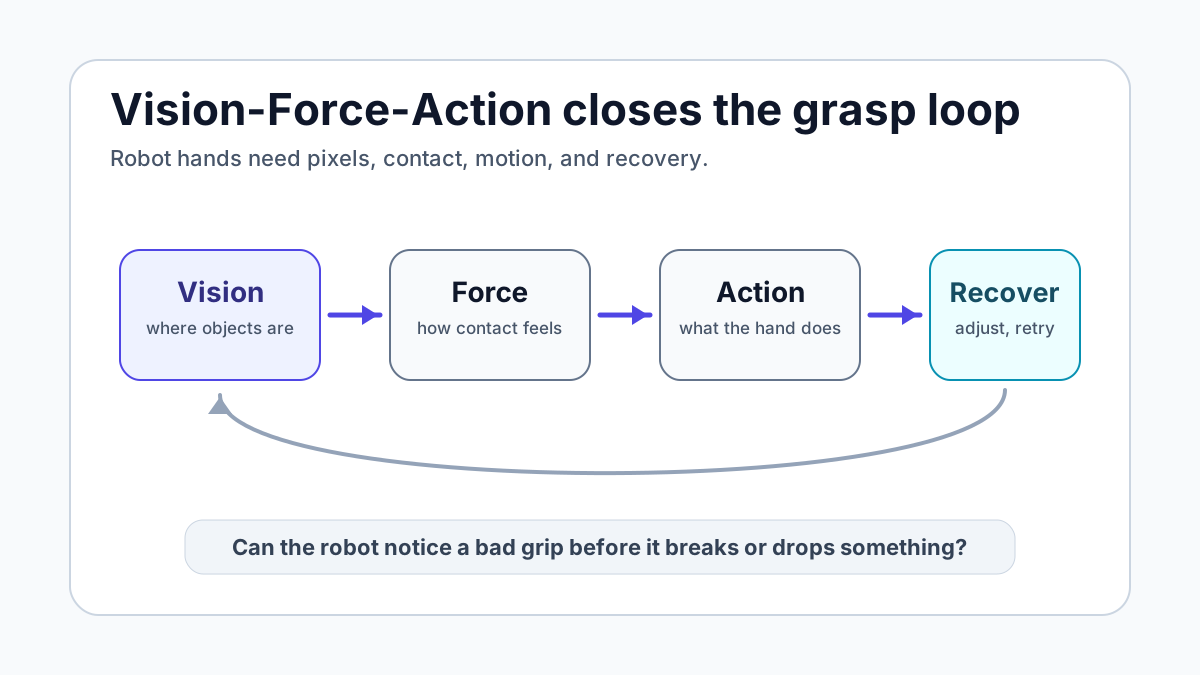
A good VFA system needs at least four pieces working together:
- Vision: cameras or depth sensors locate the object and estimate its pose.
- Force or touch: fingers, joints, wrists, skin, or actuators sense contact, pressure, slip, torque, or resistance.
- Action: the policy changes the robot's motion, grip, angle, or speed.
- Recovery: the robot notices failure early and adapts instead of dropping, crushing, or giving up.
That last step is the buyer-relevant part. If a robot can recover from a bad grip, it can eventually handle chores that are impossible to script object by object. If it cannot, even a very good camera model will struggle with towels, keys, food, bags, drawer handles, cables, and cups.
How is VFA different from VLA?
VLA stands for vision-language-action. It is already showing up in home-robot marketing because it gives robots a route from natural language to movement. Figure calls Helix a VLA model. 1X says Redwood learns from successes and failures while coordinating locomotion with manipulation. OpenVLA describes a 7B-parameter open-source model trained on 970,000 robot episodes.
That work matters. A home robot has to understand a command like "move the glass off the edge of the table" before it can act. VLA is the layer that tries to map language and visual context into robot behavior.
VFA is not a replacement for that. It is more like a missing sense added to the loop. The difference looks like this:
Layer
Vision-language-action
- What it helps with
- Understand the scene, instruction, and intended action
- Where it can fail at home
- May not know whether contact is secure, gentle, or failing
Layer
Tactile sensing
- What it helps with
- Detect touch, slip, pressure, and contact
- Where it can fail at home
- Raw touch data still needs a policy that can react well
Layer
Vision-force-action
- What it helps with
- Combine vision, contact, and motor control into adaptive movement
- Where it can fail at home
- Still early; demos do not prove broad home reliability
| Layer | What it helps with | Where it can fail at home |
|---|---|---|
| Vision-language-action | Understand the scene, instruction, and intended action | May not know whether contact is secure, gentle, or failing |
| Tactile sensing | Detect touch, slip, pressure, and contact | Raw touch data still needs a policy that can react well |
| Vision-force-action | Combine vision, contact, and motor control into adaptive movement | Still early; demos do not prove broad home reliability |
Figure's Helix page is a good example of why this distinction matters. Figure says Helix splits the problem into a slower semantic system running at 7-9 Hz and a fast reactive control system running at 200 Hz, with full upper-body control including fingers. That is exactly the direction home robotics needs: slow reasoning plus fast physical correction. VFA pushes the same conversation toward force-aware correction at contact time.
If VLA is the robot understanding the instruction, VFA is the robot finding out whether its hand is actually doing the right thing.
What does the ui44 database say about robot hands today?
The ui44 database is useful here because it shows how uneven the market still is. Many robots advertise intelligence. Fewer publish concrete touch, force, or hand specs. Fewer still are actually aimed at homes.
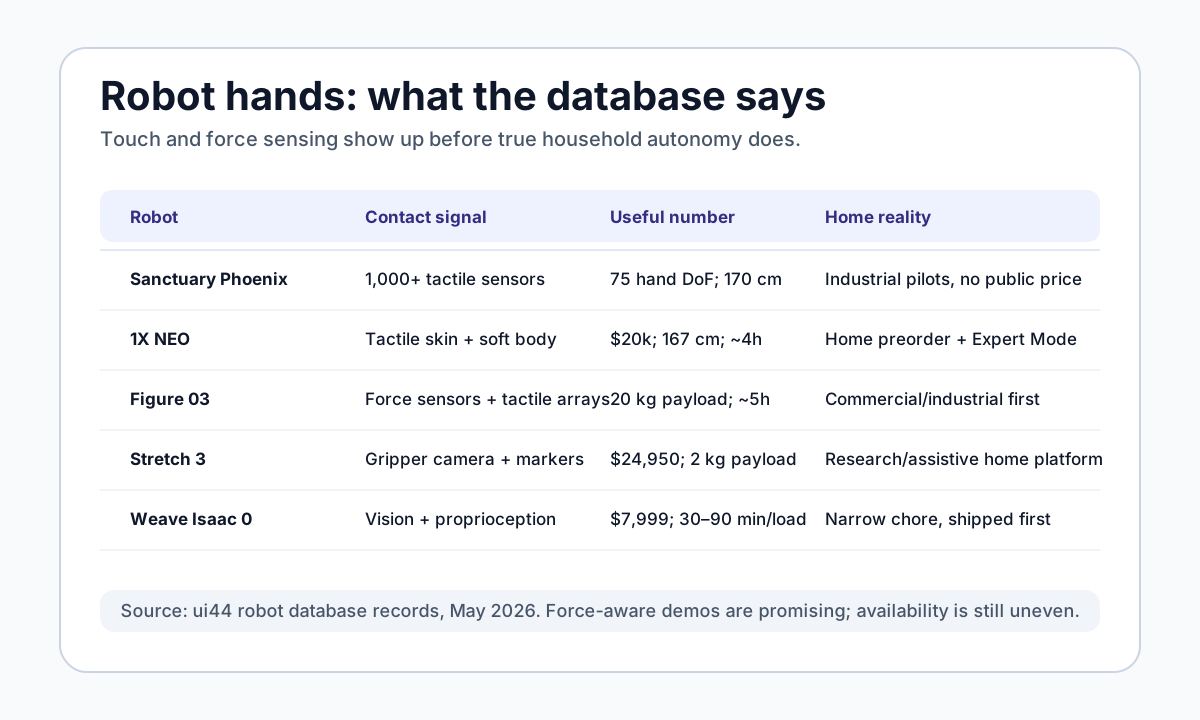
A few patterns stand out:
- Sanctuary AI Phoenix is one of the clearest dexterity-first examples in the database. It is a 170 cm, 70 kg humanoid with hands described in our database as having 75 degrees of freedom and 1,000+ tactile sensors. Sanctuary's own site emphasizes dexterity, tactile feedback, and fine manipulation. It is not a consumer product, but it is highly relevant to the force-aware-hand question.
- 1X NEO is closer to the home market. It is a $20,000 preorder robot, 167 cm tall, 30 kg, with roughly four hours of battery life. The database lists tactile skin, a soft body, and gentle manipulation. 1X also markets Expert Mode: if a chore is not yet autonomous, a human expert can guide it while the robot learns.
- Figure 03 is not for consumers yet, but it matters because the database lists force sensors, tactile arrays, a 20 kg payload, and a Helix VLA stack. The home claim is still future-facing, while the deployment path is commercial and industrial first.
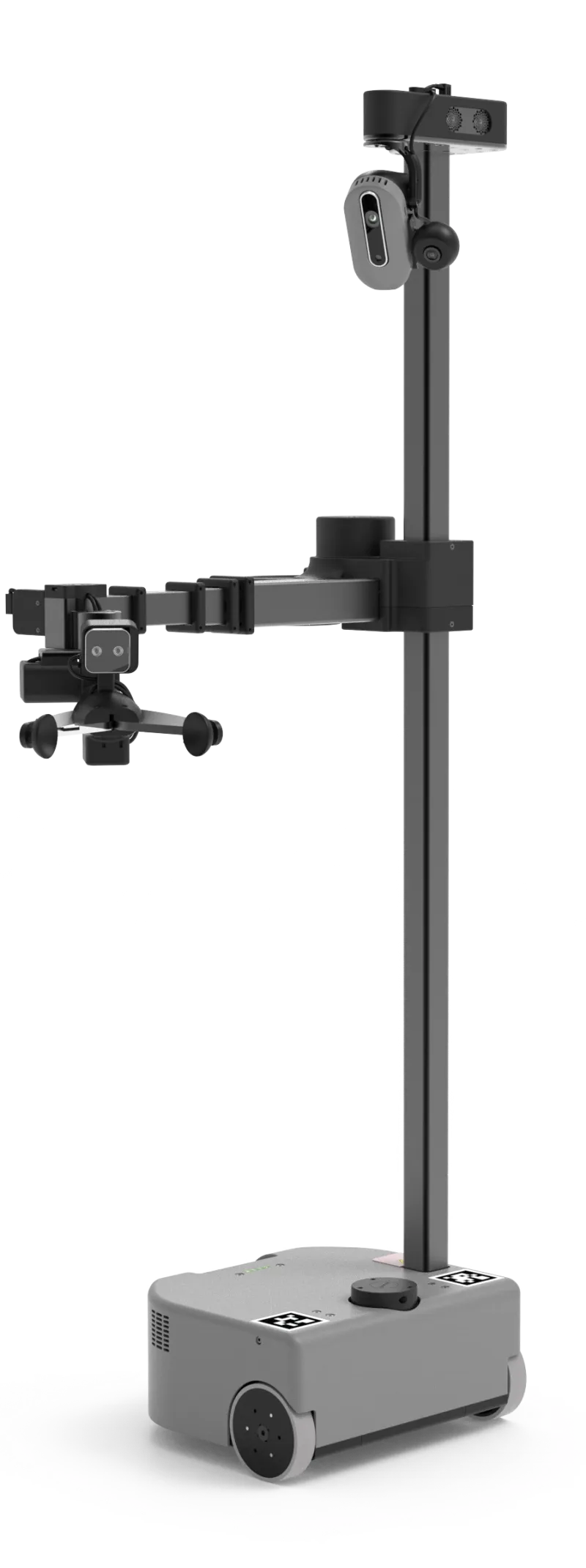
- Hello Robot Stretch 3 is not humanoid, but it is one of the most honest home-manipulation platforms available now: $24,950, 24.5 kg, 2-5 hours of battery life, a 2 kg payload, ROS 2 support, a gripper camera, and a large research community.
- Weave Isaac 0 shows the opposite strategy: skip the general hand problem and solve one chore narrowly. It is available at $7,999 or $450/month, folds laundry in roughly 30-90 minutes per load, and uses remote assist when needed.
That spread is the reality check. The more general the hand, the less home-ready the product tends to be. The more home-ready the product, the narrower the chore tends to be.
Which VFA-style demos should buyers take seriously?
A demo is worth more when it shows contact, uncertainty, and recovery. A robot that picks up a rigid cube from a clean table may be useful research, but it does not prove much about home chores. A stronger demo includes awkward objects, slipping, clutter, speed changes, or a task that requires gentle force.
Eka's lightbulb, keys, and food-handling demos are interesting for exactly that reason. A lightbulb punishes too much force. Keys are irregular and easy to fumble. Chicken nuggets vary in shape and texture, then have to be moved quickly into containers. Those are not complete household chores, but they are closer to the physics problem than another walking video.
Sanctuary AI's April 2026 hydraulic-hand demo is another useful signal. The company says its proprietary hand repeatedly reoriented a letter cube using a policy trained entirely in simulation, then transferred to the real world without extra real-world training for that specific policy. Sanctuary frames this as zero-shot sim-to-real in-hand manipulation. The buyer takeaway is not "Phoenix can do your kitchen tomorrow." It is that serious humanoid companies are now focusing on the hand as a system: hardware, touch, actuation, simulation, and learned policy together.
OpenAI's older Dactyl work is a good cautionary comparison. OpenAI used 6,144 CPU cores and 8 GPUs to collect about 100 years of simulated experience in 50 hours, then transferred a dexterity policy to a real hand. It was impressive, but it was also limited, heavily instrumented, and fragile outside its setup. That is the lesson: simulated practice helps, but home usefulness depends on closing the sim-to-real gap under messy contact.
Why robot hands need force before homes get real chores
Most household chores are not mainly about recognizing objects. They are about changing the world without damaging it.
A robot folding laundry needs to feel tension and slack. A robot loading a dishwasher needs to know whether a plate is wedged, slippery, or about to hit the rack. A robot opening a drawer needs to apply enough force without yanking the cabinet. A robot handing something to a person needs to release when the person has it, not half a second later.

This is why force-aware intelligence is not just a lab detail. It changes the risk profile of home robots. A camera can be blocked by the robot's own fingers. A language model can choose a plausible plan that is physically wrong. A pre-scripted grasp can work on a demo object and fail on the version sitting in your house.
Force gives the robot a second chance. It can slow down when resistance spikes, loosen when pressure is too high, grip tighter when slip begins, or abandon a grasp before it becomes unsafe. That is the kind of boring competence that buyers should care about.
The published ui44 guide on tactile sensing for home robots covered the sensor side of this problem. VFA is the next layer: not just whether the robot has touch, but whether its policy uses touch to act better.
How should you evaluate a robot hand claim?
When a company shows a new dexterity video, ignore the soundtrack and ask a few plain questions.
What sensory signal closes the loop? If the company only mentions cameras, ask how the robot detects slip, stuck objects, soft materials, or excessive force. Force-torque sensors, tactile arrays, tactile skin, proprioception, and compliant actuators are all relevant, but they are not interchangeable.
Does the demo include recovery? A single perfect grasp is weak evidence. A fumbled object, a changing target, or a successful retry is stronger evidence. The home is one long sequence of retries.
Is the robot learning from real failures? 1X says Redwood trains on successes and failures. Weave says Isaac 0 learns from human corrections. Those claims are important because households generate edge cases faster than engineers can hand code them.
Is the hand matched to the chore? A full humanoid hand is not always the right answer. Stretch 3 uses a simpler gripper and a 2 kg payload for research and assistive tasks. Weave Isaac 0 uses a dedicated laundry-folding setup. DOBOT Atom claims ±0.05 mm manipulation precision for industrial/service scenarios. The best hand is the one that matches the job.
Can you buy it, or only watch it? NEURA 4NE-1 is listed in our database at an estimated €98,000 reservation price with force-torque sensors, sensor skin, and a 15 kg payload. NEURA 4NE-1 Mini has a lower €19,999 standard tier and a €29,999 Pro tier with 12-DoF dexterous hands, but it is still a preorder. Tesla Optimus Gen 2 mentions force/torque and touch sensors, but remains in development with a stated target price rather than a consumer product.
What should buyers do with VFA in 2026?
For most people, VFA is not a buying spec yet. You should not wait for an Eka robot to clean your kitchen, because Eka has not announced a consumer product or pricing. You also should not assume that every humanoid with a camera, chatbot, or VLA label can safely handle your home.
What you can do is use VFA as a filter for hype.
If a robot company claims household manipulation, look for evidence of contact intelligence: tactile data, force control, compliant design, recovery from failed grasps, and training on messy physical variation. If the demo avoids contact or uses only perfect objects, treat it as early research. If the demo shows slipping, sliding, deformable objects, retries, and safe handoff behavior, it deserves more attention.
For actual buying decisions, the practical hierarchy is still simple:
- Buy narrow if you need help now. A focused product like Isaac 0 may be more useful than a general humanoid demo if laundry is the actual pain point.
- Consider research platforms if you can build. Stretch 3, Reachy 2, and ROBOTIS AI Sapiens K0 are better for labs and developers than ordinary homes.
- Treat humanoid preorders as early access. NEO and 4NE-1 Mini are exciting, but the useful question is not the launch video. It is what the robot does when a task fails.
- Watch force-aware hands closely. They are one of the clearest signals that home robots are moving from walking and talking toward doing.
Bottom line
Vision-force-action matters because home robots do not live in image datasets. They live in contact with tables, towels, food, glass, pets, people, and all the small surprises that make homes hard.
VLA helps a robot understand what you want. Tactile sensing helps it notice what it touched. VFA points toward the harder goal: a robot hand that can see, feel, act, and recover in one loop.
That is not enough to make a general home robot ready in 2026. But it is a much better sign than another humanoid walking demo. The future home robot will not be useful because it has hands that look human. It will be useful when those hands can feel what they are doing.
Related in the database
Use this article as a buyer workflow
Turn the article into a real verification pass grounded in the robots, manufacturers, categories, components, and countries it actually references.
What Is Vision-Force-Action for Robot Hands? already points you toward 9 linked robots, 8 manufacturers, and 6 countries inside the ui44 database. That matters because strong buyer guidance is easier to apply when you can move immediately from a claim or warning into concrete product pages, manufacturer directories, component explainers, and country-level context instead of treating the article as an isolated opinion piece. The fastest next step is to turn the article into a shortlist workflow: open the linked robot pages, verify which specs are actually published for those models, then compare the surrounding manufacturer and component context before you decide whether the underlying claim changes your buying plan.
For this topic, the useful discipline is to separate the editorial lesson from the catalog evidence. The article gives you the framing, but the robot pages tell you what each product actually ships with today: sensor stack, connectivity methods, listed price, release timing, category, and support-relevant compatibility notes. The manufacturer pages then show whether you are looking at a one-off launch, a broader lineup pattern, or a company that spans multiple categories. That layered workflow reduces the risk of buying on a single marketing phrase or a single support FAQ.
The fastest win is to keep the article’s editorial framing tied to real product pages. That way you can test whether Phoenix, NEO, and Figure 03 still make sense once price, category, release timing, and surrounding manufacturer context are visible in one place. If you want a quick working shortlist, open Compare Phoenix, NEO, and Figure 03 next, then keep this article open as the reasoning layer while you compare structured data side by side.
Practical Takeaway
Every robot, manufacturer, category, component, and country reference below resolves to a real ui44 page, keeping the follow-up path grounded in database records rather than generic advice.
Suggested next steps in ui44
- Open Phoenix first so the article’s main point is anchored to a real robot page.
- Use Sanctuary AI to see the broader company context around the products linked in the article.
- Open the linked component pages when you want to separate a shared technology pattern from a single-brand story.
- Build a working shortlist with Compare Phoenix, NEO, and Figure 03.
- Keep a short note of what is already verified in the article and what still needs live confirmation from current vendor documentation.
Robot profiles worth opening next
Use the linked product pages as the evidence layer
The linked robot pages are where this article becomes operational. Instead of asking whether the headline is interesting, use the robot entries to inspect the actual mix of sensors, connectivity options, batteries, pricing, release timing, and stated capabilities attached to the products mentioned in the article. That is the easiest way to see whether the warning or opportunity described here affects one product family, a specific design pattern, or an entire buying lane.
Phoenix
Sanctuary AI · Humanoid · Active
Phoenix is tracked on ui44 as a active humanoid robot from Sanctuary AI. The database currently records a listed price of Price TBA, a release date of 2023-05-16, Not disclosed battery life, Not disclosed charging time, and a published stack that includes Tactile Sensors (1000+), Vision System, and Proprioception plus Wi-Fi and 5G.
For general buyer research, this route gives you the concrete profile that the article alone cannot. Compare the published capabilities of Human-like Dexterity, Retail Tasks, and Assembly Work with the linked alternatives so the final decision is based on actual product fit, not just the framing of the article.
NEO
1X Technologies · Humanoid · Pre-order
NEO is tracked on ui44 as a pre-order humanoid robot from 1X Technologies. The database currently records a listed price of $20,000, a release date of 2025-10-28, ~4 hours battery life, Not disclosed charging time, and a published stack that includes RGB Cameras, Depth Sensors, and Tactile Skin plus Wi-Fi and Bluetooth.
For general buyer research, this route gives you the concrete profile that the article alone cannot. Compare the published capabilities of Household Chores, Tidying Up, and Safe Human Interaction with the linked alternatives so the final decision is based on actual product fit, not just the framing of the article.
Figure 03 is tracked on ui44 as a active humanoid robot from Figure AI. The database currently records a listed price of Price TBA, a release date of 2025-10-09, ~5 hours battery life, Not disclosed charging time, and a published stack that includes Stereo Vision, Depth Cameras, and Force Sensors plus Wi-Fi and Bluetooth.
For general buyer research, this route gives you the concrete profile that the article alone cannot. Compare the published capabilities of Complex Manipulation, Warehouse Work, and Manufacturing Tasks with the linked alternatives so the final decision is based on actual product fit, not just the framing of the article.
Stretch 3
Hello Robot · Home Assistants · Active
Stretch 3 is tracked on ui44 as a active home assistants robot from Hello Robot. The database currently records a listed price of $24,950, a release date of 2024, 2–5 hours battery life, Not disclosed charging time, and a published stack that includes Intel D405 RGBD Camera (gripper), Intel D435if RGBD Camera (head), and Wide-Angle RGB Camera (head) plus Wi-Fi 6E and Bluetooth.
For general buyer research, this route gives you the concrete profile that the article alone cannot. Compare the published capabilities of Mobile Manipulation, Autonomous Navigation, and Teleoperation (Web / Gamepad / Dexterous) with the linked alternatives so the final decision is based on actual product fit, not just the framing of the article.
Isaac 0
Weave Robotics · Home Assistants · Available
Isaac 0 is tracked on ui44 as a available home assistants robot from Weave Robotics. The database currently records a listed price of $3,999, a release date of 2026-02, Mains powered (600W, 120V) battery life, N/A (plugged in) charging time, and a published stack that includes Vision System and Proprioceptive Sensors plus Wi-Fi 2.4GHz/5GHz and Ethernet.
For general buyer research, this route gives you the concrete profile that the article alone cannot. Compare the published capabilities of Laundry Folding, T-shirts, Long Sleeves, Sweaters, and Pants and Towels with the linked alternatives so the final decision is based on actual product fit, not just the framing of the article.
Manufacturer context behind the article
Check whether this is one product story or a broader company pattern
Manufacturer pages add the market context that individual product pages cannot show on their own. They help you check whether the article is centered on a brand with a deep lineup, whether that brand spans several categories, and how much of its ui44 footprint depends on one flagship model versus a broader product strategy.
Sanctuary AI
ui44 currently tracks 1 robot from Sanctuary AI across 1 category. The company is grouped under Canada, and the current catalog footprint on ui44 includes Phoenix.
That wider brand context matters because the best buying decision usually depends on lineup depth and adjacent options, not just the one model featured most prominently in the article. The category mix here currently points toward Humanoid as the most useful next route if you want to see whether this article reflects a wider pattern inside the brand.
1X Technologies
ui44 currently tracks 2 robots from 1X Technologies across 1 category. The company is grouped under Norway, and the current catalog footprint on ui44 includes NEO, EVE.
That wider brand context matters because the best buying decision usually depends on lineup depth and adjacent options, not just the one model featured most prominently in the article. The category mix here currently points toward Humanoid as the most useful next route if you want to see whether this article reflects a wider pattern inside the brand.
Figure AI
ui44 currently tracks 2 robots from Figure AI across 1 category. The company is grouped under USA, and the current catalog footprint on ui44 includes Figure 03, Figure 02.
That wider brand context matters because the best buying decision usually depends on lineup depth and adjacent options, not just the one model featured most prominently in the article. The category mix here currently points toward Humanoid as the most useful next route if you want to see whether this article reflects a wider pattern inside the brand.
Hello Robot
ui44 currently tracks 2 robots from Hello Robot across 1 category. The company is grouped under USA, and the current catalog footprint on ui44 includes Stretch 3, Stretch 4.
That wider brand context matters because the best buying decision usually depends on lineup depth and adjacent options, not just the one model featured most prominently in the article. The category mix here currently points toward Home Assistants as the most useful next route if you want to see whether this article reflects a wider pattern inside the brand.
Broaden the scan without leaving the database
Categories, components, and countries add the wider context
Category framing
Category pages are useful when the article touches a buying pattern that shows up across brands. A category route helps you confirm whether the linked products sit in a narrow niche or whether the same question should be tested across a larger field of alternatives.
Humanoid
The Humanoid category page currently groups 129 tracked robots from 92 manufacturers. ui44 describes this lane as: Full-size bipedal humanoid robots built to work alongside people — from factory floors to household tasks. Compare the cutting edge of humanoid robotics.
That makes the category route a practical follow-up when you want to check whether the products linked in this article are typical for the lane or whether they sit at one edge of the market. Useful starting examples currently include NEO, EVE, Mornine M1.
Home Assistants
The Home Assistants category page currently groups 16 tracked robots from 14 manufacturers. ui44 describes this lane as: Arm-based household helpers — laundry folders, kitchen robots, and mobile manipulators that take on hands-on physical tasks around the home.
That makes the category route a practical follow-up when you want to check whether the products linked in this article are typical for the lane or whether they sit at one edge of the market. Useful starting examples currently include Robody, Futuring 2 (F2), Stretch 3.
Country and ecosystem context
Country pages give extra context when support practices, launch sequencing, regulatory posture, or manufacturer mix matter. They are not a substitute for model-level verification, but they do help you see which ecosystems cluster together and which manufacturers sit in the same regional field when you broaden the search beyond the article headline.
Canada
The Canada route currently groups 2 tracked robots from 2 manufacturers in ui44. That gives you a useful regional lens when the article points toward support practices, launch sequencing, or brand clusters that may share similar ecosystem assumptions.
On the current route, manufacturers like Clearpath Robotics, Sanctuary AI make the page a good way to broaden the scan without losing the regional context that often shapes availability, documentation style, and adjacent alternatives.
Norway
The Norway route currently groups 2 tracked robots from 1 manufacturers in ui44. That gives you a useful regional lens when the article points toward support practices, launch sequencing, or brand clusters that may share similar ecosystem assumptions.
On the current route, manufacturers like 1X Technologies make the page a good way to broaden the scan without losing the regional context that often shapes availability, documentation style, and adjacent alternatives.
USA
The USA route currently groups 89 tracked robots from 69 manufacturers in ui44. That gives you a useful regional lens when the article points toward support practices, launch sequencing, or brand clusters that may share similar ecosystem assumptions.
On the current route, manufacturers like Faraday Future, iRobot, Boston Dynamics make the page a good way to broaden the scan without losing the regional context that often shapes availability, documentation style, and adjacent alternatives.
Questions to answer before you move from reading to buying
A follow-up FAQ built from the entities already linked in this article
Frequently Asked Questions
Which page should I open first after reading “What Is Vision-Force-Action for Robot Hands?”?
Start with Phoenix. That gives you a concrete product anchor for the article’s main claim. From there, branch into the manufacturer and component pages so you can tell whether the article is describing one specific model, a repeated brand pattern, or a wider technology issue that affects multiple shortlist options.
How do the manufacturer pages change the buying decision?
Sanctuary AI help you zoom out from one article and one product. On ui44 they show lineup breadth, category spread, and the neighboring robots tied to the same company. That context is useful when you are deciding whether a risk belongs to a single model, whether it shows up across a brand’s portfolio, and whether you should keep looking at alternatives before committing.
When should I switch from reading to side-by-side comparison?
Move into Compare Phoenix, NEO, and Figure 03 as soon as you understand the article’s main warning or promise. The article explains what to watch for, but the compare view is where you can check whether price, status, battery life, connectivity, sensors, and category fit still make the robot a good match for your own home and budget.
Where to go next in ui44
Keep the research chain inside the database
If you want to keep going, these follow-on pages give you the cleanest expansion path from article to research session. Open the comparison route first if you are deciding between products today. Open the manufacturer, category, and component routes if you still need to understand the broader pattern behind the claim.
Written by
ui44 Team
Published May 1, 2026
Share this article
Open a plain share link on X or Bluesky. No embeds, no widgets, no cookie baggage.