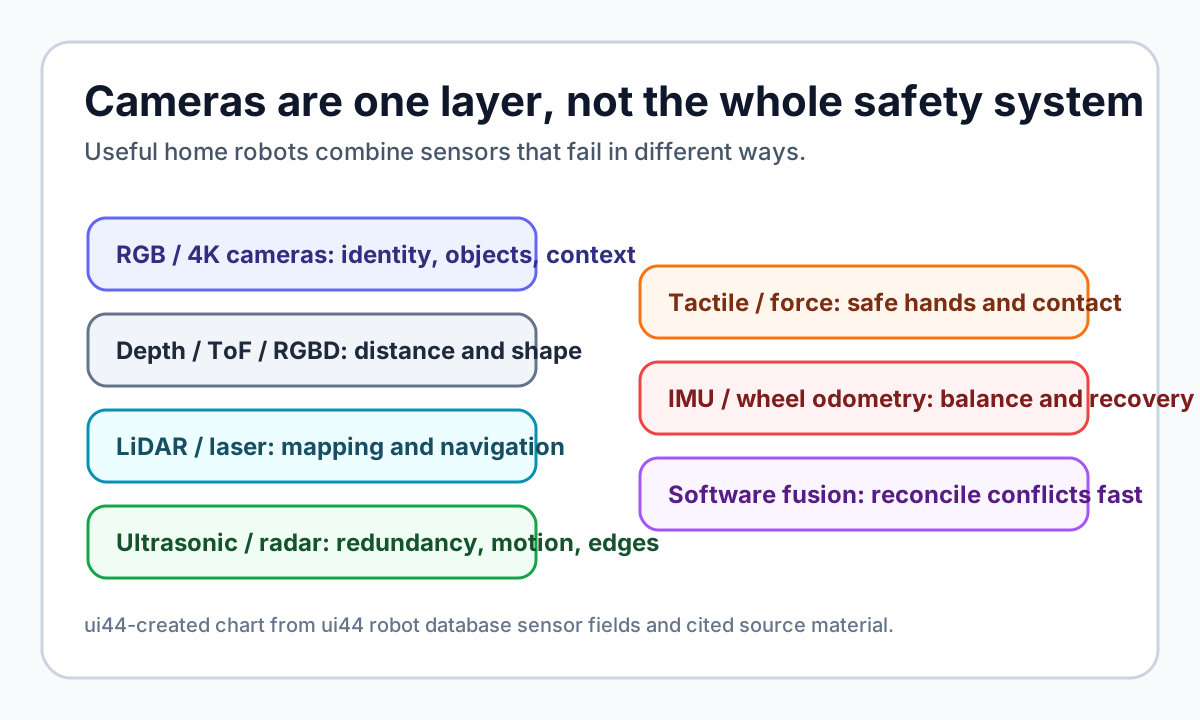
That is why the most credible home robots in the ui44 robot database rarely rely on one sensor. They mix cameras with depth, LiDAR, ultrasonic, radar, tactile, force, IMU, or wheel-odometry data. The point is not to make the spec sheet longer. The point is to make perception fail less dangerously in a real house.
Why are cameras so tempting for home robots?
Cameras are powerful because homes are full of visual meaning. A camera can see that the thing on the floor is a cable, not a dust bunny. It can recognize a familiar person, read a scene, identify a chair leg, notice a pet bowl, and feed an AI model with the same kind of visual context humans use.
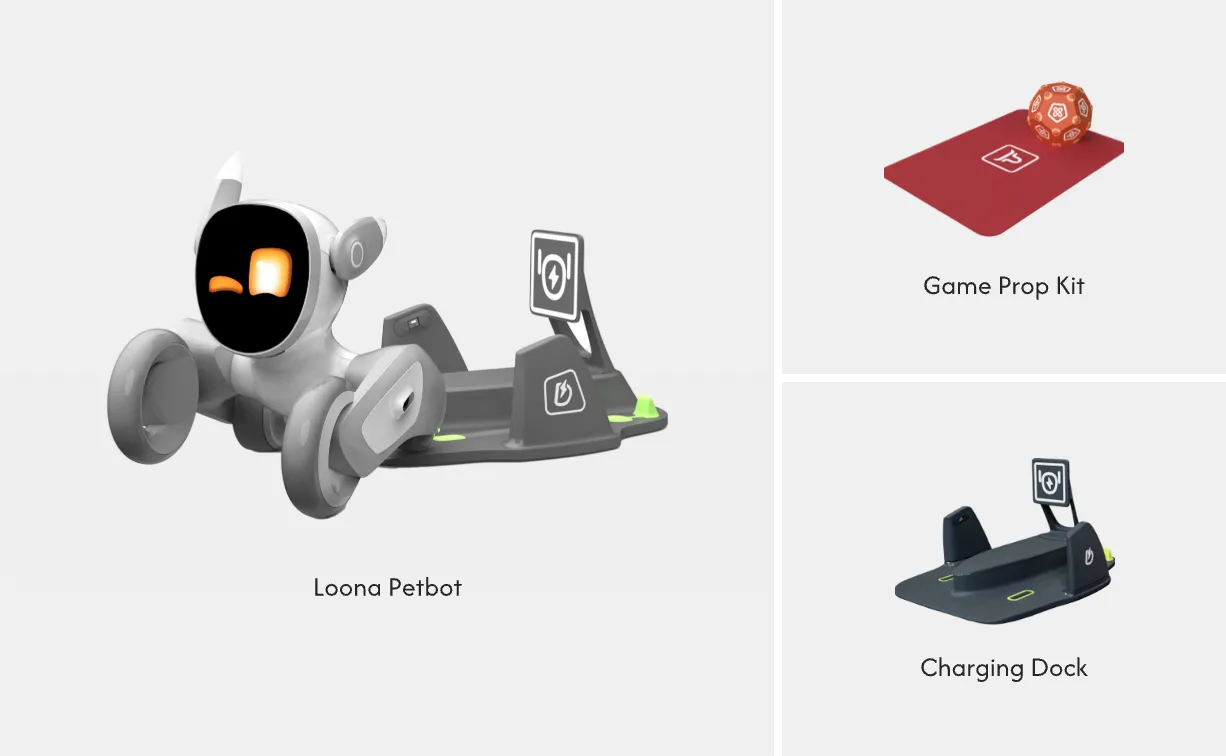
That is why camera-heavy products make sense in specific roles. Enabot EBO X, for example, is a $999 family companion robot with a 4K stabilized camera, night vision camera mode, Visual SLAM navigation, and Alexa-based assistant features in the ui44 database. Loona, at about $499, combines a 720p RGB camera with a 3D time-of-flight sensor, touch sensor, accelerometer, gyroscope, and microphone array. Those are not industrial safety machines; they are small companions. For face recognition, remote monitoring, pet interaction, and simple indoor movement, cameras are the obvious starting point.
Cameras also keep costs down. A good camera plus a vision model can do many jobs that once required several special-purpose sensors. That matters in home robots, where a $499 companion bot and a $2,899 compact helper have very different buyer expectations from a $25,000 research manipulator.
But the weakness is in the word "see." A robot camera does not understand the world the way a person does. It sees pixels, inferred depth, and learned patterns. If the lighting changes, the floor reflects, the glass door is too clean, or a child runs in from the side, a camera-only system may have less certainty than the marketing video suggests.
What can go wrong when a robot only sees with cameras?
The home is hard because it is inconsistent. Factory floors can be controlled. Warehouses can mark zones. Homes have transparent doors, mirrored furniture, toys, cords, pets, rugs, toddlers, sunlight, clutter, and unexpected human motion.
Roboticist Coleman Benson put the home problem bluntly in an interview with Robots Good Or Bad: homes are difficult because of unpredictability. He described gray-on-gray carpet bumps that a robot might miss and warned that "a lot of these sensors can't see glass," meaning a robot could try to walk through it if the rest of its safety stack does not catch the mistake.
That example is useful because it separates object recognition from safe operation. Recognizing an apple is not the same as knowing the table edge is close, the rug lip is raised, a glass panel blocks the path, or a child's foot just entered the robot's next step. For mobile robots with arms, the risk gets bigger: the robot is not only moving through the room, it is reaching into the room.
Texas Instruments' German Aguirre made the same point from a hardware angle in a 2026 Robotics & Automation News interview. He said the commercial gap for humanoids includes robust perception across lighting, occlusion, and dynamic environments, and that safety increasingly depends on real-time perception and sensor fusion rather than only hardwired interlocks. That is buyer-relevant: if a robot will operate near people, the question is not "does it have AI vision?" It is "what backs up the vision when vision is uncertain?"
What does sensor fusion mean in plain English?
Sensor fusion means the robot combines imperfect evidence from different sensors before deciding what to do. A camera might say, "this looks like open floor." LiDAR or depth sensing might say, "there is a vertical surface here." Ultrasonic sensing might catch a close obstacle. Radar might track motion or depth in lighting conditions where vision is weak. Tactile or force sensing might say, "the hand has touched something earlier than expected."
A good system does not treat all of those signals as trivia. It uses them to slow down, ask for help, stop the arm, choose a safer path, or mark the scene as uncertain. Sensor fusion is not magic, and it can still fail. But it gives the robot multiple ways to notice reality.
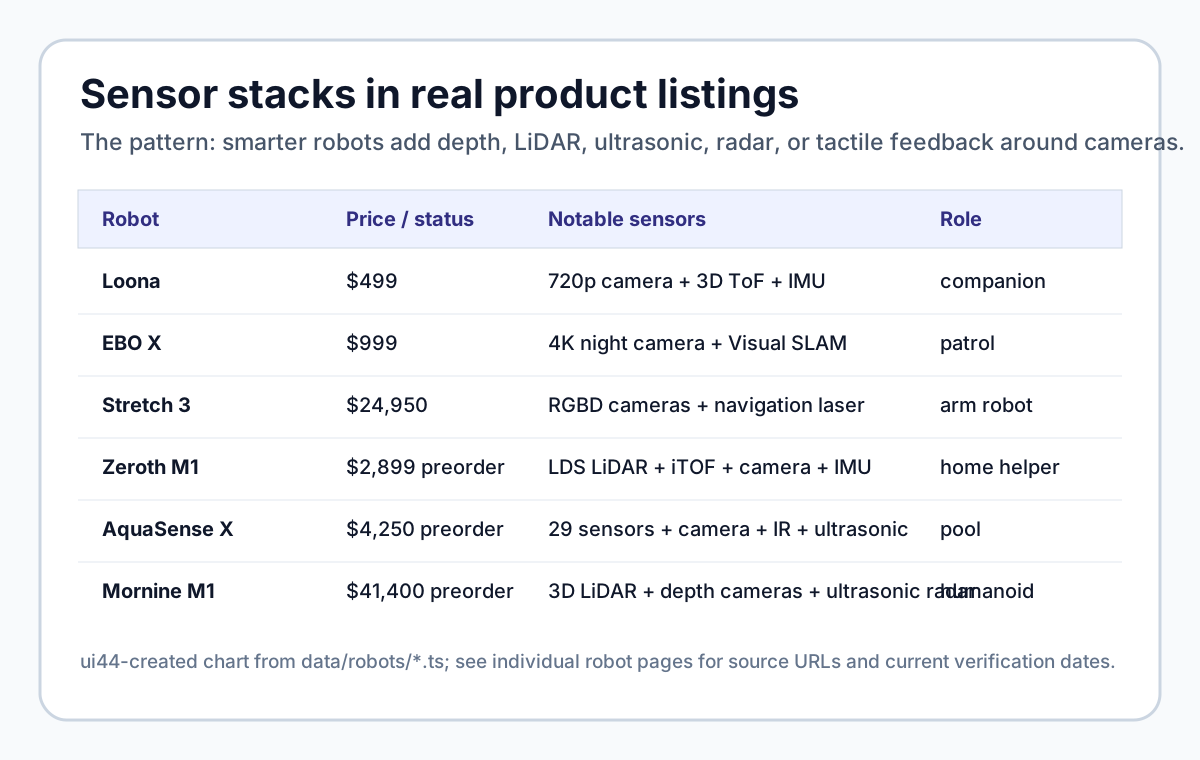
The database pattern is clear:
| Robot | ui44-listed sensor stack | Why it matters |
|---|---|---|
| Loona | 720p RGB camera, 3D ToF, touch, IMU, microphones | Visual companion features plus short-range depth and body-state sensing |
| EBO X | 4K stabilized camera, night vision, Visual SLAM | Home patrol and video features are camera-led |
| Stretch 3 | Gripper RGBD, head RGBD, wide-angle RGB, navigation laser, IMU, microphones | Mobile manipulation needs depth near the hand and map-level navigation |
| Zeroth M1 | LDS LiDAR, iTOF depth, vision camera, IMU, microphone array | Compact home helper uses both mapping and visual recognition |
| Beatbot AquaSense X | 29 sensors, AI camera, infrared array, ultrasonic sensors | Pool cleaning needs perception in water, at walls, and on surfaces |
| AiMOGA Mornine M1 | 3D LiDAR, two depth cameras, wide-angle camera, four ultrasonic radars | A full-size humanoid needs redundant navigation cues around people |
That does not make every robot equally safe or equally useful. It does show which products are at least acknowledging that real-world perception is multi-modal.
Why does LiDAR show up so often?
LiDAR and laser navigation are attractive because they provide distance and mapping cues without asking a camera to infer everything from image texture. In home products, LiDAR often appears when the robot needs repeatable navigation: mapping rooms, avoiding obstacles, and planning paths.
Hello Robot Stretch 3 is a good non-vacuum example. It is a $24,950 open-source mobile manipulator built for homes, assistive care, and embodied-AI research. ui44 lists an Intel D405 RGBD camera in the gripper, Intel D435if RGBD camera in the head, wide-angle RGB head camera, navigation laser, microphone array, high-accuracy base IMU, and ArUco fingertip markers. That stack is not decorative. A robot arm needs to see near the gripper, localize the base, and understand where its body is relative to the environment.
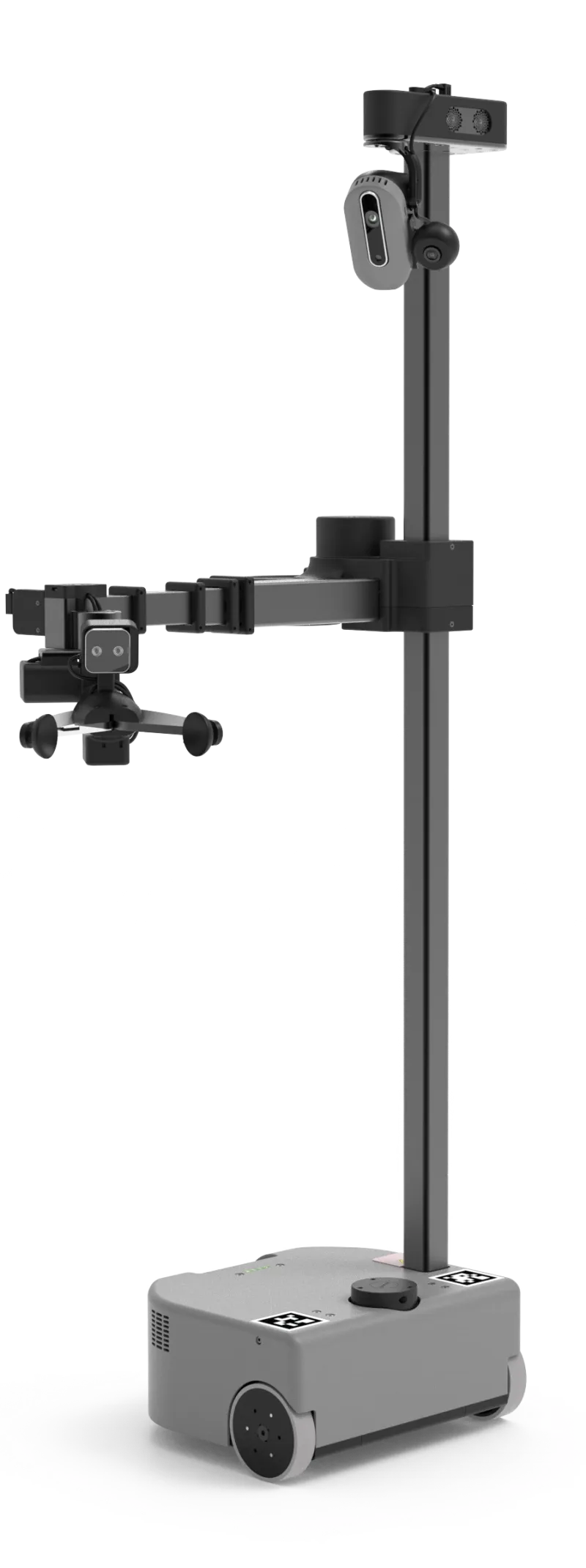
LiDAR is not a universal answer. It can struggle with some reflective or transparent surfaces, and a robot still needs software good enough to interpret the data. But when a product claims it can navigate a real home, LiDAR or another explicit depth/mapping method is worth looking for.
Where do radar and ultrasonic sensors fit?
Radar and ultrasonic sensors are especially interesting because they can complement cameras rather than replace them. In the TI interview, Aguirre said vision systems are affected by lighting, dust, occlusion, and texture. Radar, he argued, can add robust detection in varied environmental conditions, direct Doppler velocity measurement, and depth information independent of lighting. In other words: radar can help a robot notice motion and distance when a camera is unsure.
That matters in homes because many important events are dynamic. A dog darts underfoot. A child runs toward the robot. A person steps into the path while carrying laundry. A camera can classify the object, but velocity and redundancy are safety-relevant.
You can already see partial versions of this thinking in product data. AiMOGA Mornine M1, a 167 cm, 70 kg humanoid listed at about $41,400 in ui44, pairs 3D LiDAR and depth cameras with four ultrasonic radars. Beatbot AquaSense X, a $4,250 pool robot system, uses an AI camera, infrared array, ultrasonic sensors, and a 29-sensor package for debris recognition and adaptive cleaning. These are not the same environment, but the principle rhymes: camera plus other sensing is more credible than camera alone.
Why do arms need tactile and force sensing?
Navigation asks, "Can the robot move through the house?" Manipulation asks a harder question: "Can the robot touch the house safely?"
That is where tactile, force, torque, and compliant hardware matter. A robot with an arm must know whether it is pushing too hard, pinching something, missing a grasp, or contacting a person. Vision can guide the reach. It cannot fully replace contact sensing at the hand, wrist, joint, and gripper.
Aguirre called dexterous manipulation one of the hardest problems and highlighted high-resolution force/torque and tactile sensing embedded directly into hands and joints, plus tightly coupled sensing and control loops. That is not a spec-sheet luxury. It is the difference between "the robot reached toward the cup" and "the robot handled the cup without crushing, dropping, or scraping it."
This is one reason robot arms at home deserve more scrutiny than rolling cameras. A small companion robot that misreads a dark hallway may get stuck. A full-size humanoid or mobile manipulator that misreads contact can damage property or hurt someone.
What should buyers ask before trusting a home robot?
Do not ask only whether a robot has a camera. Ask what happens when the camera is wrong.
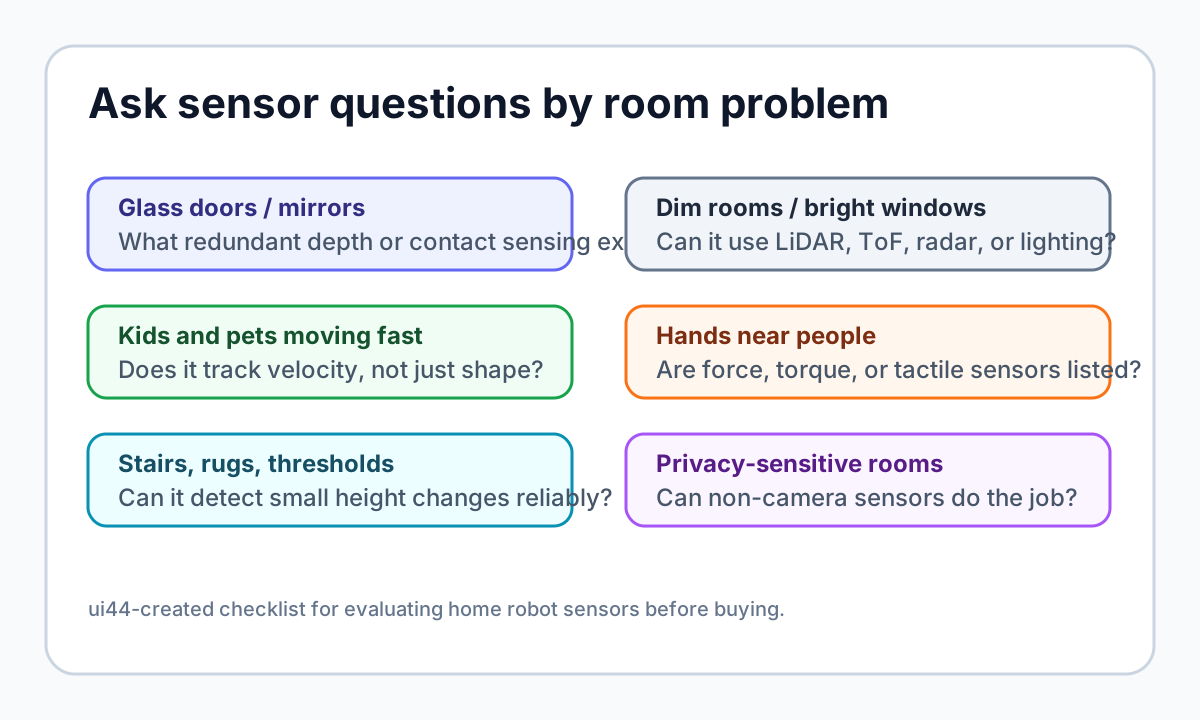
Use this checklist before taking a home-robot claim seriously:
- Glass and mirrors: Does the product mention depth sensing, LiDAR, ultrasonic, radar, bump/contact sensing, or a safety fallback for transparent and reflective surfaces?
- Low light and bright windows: Is there night vision, active illumination, LiDAR, ToF, radar, or another non-visible-light method?
- Pets and children: Does the robot only classify objects, or can it track motion and react safely to sudden movement?
- Arms and grippers: Are force, torque, tactile, compliance, payload, and emergency-stop behavior described clearly?
- Stairs, rugs, and thresholds: Does it mention cliff detection, height sensing, IMU recovery, or real threshold limits?
- Privacy: Can the robot do the job with fewer cameras, local processing, or camera-off modes in sensitive rooms?
- Failure behavior: When uncertain, does it stop, slow down, reroute, ask for help, or continue confidently?
If a manufacturer only says "AI camera" and gives no fallback story, treat that as an incomplete answer. The robot may still be useful, but the claim is weaker.
Which sensor stack is best for home robots?
There is no single best stack because the job matters.
A desk companion does not need the same sensors as a full-size humanoid. A mobile arm does not need the same waterline sensing as a pool robot. A robot dog patrolling a yard has different risks from a social robot rolling across a kitchen. The right question is whether the sensors match the promised task.
For a companion robot, camera plus depth plus microphones may be enough if the robot is light, slow, and not manipulating objects. For a patrol robot, night vision, mapping, obstacle avoidance, and privacy controls become more important. For a mobile manipulator, look for depth at the gripper, force/contact sensing, and clear payload limits. For a humanoid, camera-only marketing should make you cautious unless there is serious redundancy around balance, navigation, contact, and emergency stopping.
The future probably moves toward mixed sensing: cameras for meaning, depth for geometry, LiDAR for mapping, radar or ultrasonic for robustness and motion, tactile sensing for hands, and software that knows when the signals disagree.
Bottom line: camera-only robots can be clever, but not deeply trustworthy
Cameras are essential for many home robots. They are not enough by themselves for the hardest home-robot promises: walking around people, handling objects, navigating glass and mirrors, reacting to pets, and working in bad lighting without drama.
For buyers, the practical rule is simple: the more physical the robot's job, the more redundant its sensing should be. A lightweight companion can get away with a simpler stack. A robot with wheels, legs, or arms operating near people should explain how it sees, measures distance, senses contact, handles uncertainty, and stops safely.
That is the difference between a camera on wheels and a robot you can actually trust in a home.
Database context
Use this article as a privacy verification workflow
Turn the article into a real verification pass
Why Cameras Aren't Enough for Home Robots already points you toward 6 linked robots, 6 manufacturers, and 1 country inside the ui44 database. That matters because strong buyer guidance is easier to apply when you can move immediately from a claim or warning into concrete product pages, manufacturer directories, component explainers, and country-level context instead of treating the article as an isolated opinion piece. The fastest next step is to turn the article into a shortlist workflow: open the linked robot pages, verify which specs are actually published for those models, then compare the surrounding manufacturer and component context before you decide whether the underlying claim changes your buying plan.
For this topic, the useful discipline is to separate the editorial lesson from the catalog evidence. The article gives you the framing, but the robot pages tell you what each product actually ships with today: sensor stack, connectivity methods, listed price, release timing, category, and support-relevant compatibility notes. The manufacturer pages then show whether you are looking at a one-off launch, a broader lineup pattern, or a company that spans multiple categories. That layered workflow reduces the risk of buying on a single marketing phrase or a single support FAQ.
Use the robot pages to confirm which products actually expose cameras, microphones, Wi-Fi, or voice systems, then use the manufacturer pages to decide how much of the privacy question seems product-specific versus brand-wide. On this route cluster, EBO X, Loona, and Stretch 3 form the fastest reality check. If you want a quick working shortlist, open Compare EBO X, Loona, and Stretch 3 next, then keep this article open as the reasoning layer while you compare structured data side by side.
Practical Takeaway
Every robot, manufacturer, category, component, and country reference below resolves to a real ui44 page, keeping the follow-up path grounded in database records rather than generic advice.
Suggested next steps in ui44
- Open EBO X and note the listed sensors, connectivity methods, and voice stack before you interpret any policy claim.
- Cross-check the wider brand context on Enabot so you can see whether the privacy question touches one model or a broader lineup.
- Use the linked component pages to confirm how common the relevant sensors and connectivity layers are across the database.
- Keep a short note of which policy layers you checked, which device features are actually present on the robot page, and which items still depend on region- or app-level confirmation.
- Finish with Compare EBO X, Loona, and Stretch 3 so the policy reading sits next to structured product data.
Database context
Robot profiles worth opening next
Use the linked product pages as the evidence layer
The linked robot pages are where this article becomes operational. Instead of asking whether the headline is interesting, use the robot entries to inspect the actual mix of sensors, connectivity options, batteries, pricing, release timing, and stated capabilities attached to the products mentioned in the article. That is the easiest way to see whether the warning or opportunity described here affects one product family, a specific design pattern, or an entire buying lane.
EBO X is tracked on ui44 as a available companions robot from Enabot. The database currently records a listed price of $999, a release date of 2023-05, Not officially disclosed battery life, Not officially disclosed charging time, and a published stack that includes 4K stabilized camera and Night vision camera mode plus Wi-Fi.
For privacy-focused reading, this page matters because it shows the concrete device surface behind the policy discussion. Use it to verify whether EBO X combines sensors and connectivity in a way that could change the in-home data footprint, and compare the listed capabilities such as Autonomous home patrol, Two-way video communication, and AI voice interactions with any cloud, app, or voice layers, including Amazon Alexa.
Loona is tracked on ui44 as a available companions robot from KEYi Tech. The database currently records a listed price of $499, a release date of 2023, 1.5 hours continuous play; up to 30 hours depending on usage battery life, Not officially disclosed charging time, and a published stack that includes 3D Time-of-Flight (ToF) Sensor, 720p RGB Camera, and Touch Sensor plus Wi-Fi (Dual-band 2.4G/5.8G, 802.11a/b/g/n) and USB Type-C (charging).
For privacy-focused reading, this page matters because it shows the concrete device surface behind the policy discussion. Use it to verify whether Loona combines sensors and connectivity in a way that could change the in-home data footprint, and compare the listed capabilities such as Face Recognition, Voice Commands, and Emotion Expression (LCD face) with any cloud, app, or voice layers.
Stretch 3
Hello Robot · Home Assistants · Active
Stretch 3 is tracked on ui44 as a active home assistants robot from Hello Robot. The database currently records a listed price of $24,950, a release date of 2024, 2–5 hours battery life, Not disclosed charging time, and a published stack that includes Intel D405 RGBD Camera (gripper), Intel D435if RGBD Camera (head), and Wide-Angle RGB Camera (head) plus Wi-Fi and Ethernet.
For privacy-focused reading, this page matters because it shows the concrete device surface behind the policy discussion. Use it to verify whether Stretch 3 combines sensors and connectivity in a way that could change the in-home data footprint, and compare the listed capabilities such as Mobile Manipulation, Autonomous Navigation, and Teleoperation (Web / Gamepad / Dexterous) with any cloud, app, or voice layers.
M1
Zeroth Robotics · Companions · Pre-order
M1 is tracked on ui44 as a pre-order companions robot from Zeroth Robotics. The database currently records a listed price of $2,899, a release date of 2026-01-04, ~2 hours battery life, 80% in 1 hour charging time, and a published stack that includes LDS LiDAR, iTOF depth sensor, and Vision camera plus its listed connectivity stack.
For privacy-focused reading, this page matters because it shows the concrete device surface behind the policy discussion. Use it to verify whether M1 combines sensors and connectivity in a way that could change the in-home data footprint, and compare the listed capabilities such as Home companionship, Gentle fall detection, and Mobile safety checks with any cloud, app, or voice layers.
AquaSense X
Beatbot · Cleaning · Pre-order
AquaSense X is tracked on ui44 as a pre-order cleaning robot from Beatbot. The database currently records a listed price of $4,250, a release date of 2026-04-30, Up to 10 hours (surface), up to 5 hours (floor or wall/waterline) battery life, Approximately 4.5 hours (88W wireless via AstroRinse dock) charging time, and a published stack that includes 29 integrated sensors, AI camera, and Infrared array plus Wi-Fi and Mobile app.
For privacy-focused reading, this page matters because it shows the concrete device surface behind the policy discussion. Use it to verify whether AquaSense X combines sensors and connectivity in a way that could change the in-home data footprint, and compare the listed capabilities such as Cordless robotic pool cleaning, Floor, wall, waterline, surface, and elevated-platform cleaning, and AstroRinse automatic filter cleaning and debris disposal (22L bin) with any cloud, app, or voice layers, including Amazon Alexa and Google Home.
Database context
Manufacturer context behind the article
Check whether this is one product story or a broader company pattern
Manufacturer pages add the market context that individual product pages cannot show on their own. They help you check whether the article is centered on a brand with a deep lineup, whether that brand spans several categories, and how much of its ui44 footprint depends on one flagship model versus a broader product strategy. That matters for topics like privacy, warranty terms, setup friction, and launch promises because the surrounding lineup often reveals whether a pattern is isolated or systemic.
Enabot
ui44 currently tracks 2 robots from Enabot across 1 category. The company is grouped under Unknown, and the current catalog footprint on ui44 includes EBO X, EBO Max FamilyBot.
That wider brand context matters because privacy questions rarely stop at one FAQ page. A manufacturer route helps you see whether the article is centered on one premium model or on a company that has several relevant products and therefore more than one place where the same policy or app assumptions might matter. The category mix here currently points toward Companions as the most useful next route if you want to see whether this article reflects a wider pattern inside the brand.
KEYi Tech
ui44 currently tracks 1 robot from KEYi Tech across 1 category. The company is grouped under Unknown, and the current catalog footprint on ui44 includes Loona.
That wider brand context matters because privacy questions rarely stop at one FAQ page. A manufacturer route helps you see whether the article is centered on one premium model or on a company that has several relevant products and therefore more than one place where the same policy or app assumptions might matter. The category mix here currently points toward Companions as the most useful next route if you want to see whether this article reflects a wider pattern inside the brand.
Hello Robot
ui44 currently tracks 1 robot from Hello Robot across 1 category. The company is grouped under USA, and the current catalog footprint on ui44 includes Stretch 3.
That wider brand context matters because privacy questions rarely stop at one FAQ page. A manufacturer route helps you see whether the article is centered on one premium model or on a company that has several relevant products and therefore more than one place where the same policy or app assumptions might matter. The category mix here currently points toward Home Assistants as the most useful next route if you want to see whether this article reflects a wider pattern inside the brand.
Zeroth Robotics
ui44 currently tracks 2 robots from Zeroth Robotics across 2 categorys. The company is grouped under Unknown, and the current catalog footprint on ui44 includes W1, M1.
That wider brand context matters because privacy questions rarely stop at one FAQ page. A manufacturer route helps you see whether the article is centered on one premium model or on a company that has several relevant products and therefore more than one place where the same policy or app assumptions might matter. The category mix here currently points toward Home Assistants, Companions as the most useful next route if you want to see whether this article reflects a wider pattern inside the brand.
Database context
Broaden the scan without leaving the database
Categories, components, and countries add the wider context
Category framing
Category pages are useful when the article touches a buying pattern that shows up across brands. A category route helps you confirm whether the linked products sit in a narrow niche or whether the same question should be tested across a larger field of alternatives.
Companions
The Companions category page currently groups 33 tracked robots from 31 manufacturers. ui44 describes this lane as: Social robots, robot pets, and elderly care companions designed for emotional connection and daily support.
That makes the category route a practical follow-up when you want to check whether the products linked in this article are typical for the lane or whether they sit at one edge of the market. Useful starting examples currently include PARO, Abi, Moflin.
Home Assistants
The Home Assistants category page currently groups 12 tracked robots from 12 manufacturers. ui44 describes this lane as: Arm-based household helpers — laundry folders, kitchen robots, and mobile manipulators that handle physical tasks at home.
That makes the category route a practical follow-up when you want to check whether the products linked in this article are typical for the lane or whether they sit at one edge of the market. Useful starting examples currently include Robody, Futuring 2 (F2), Stretch 3.
Country and ecosystem context
Country pages give extra context when support practices, launch sequencing, regulatory posture, or manufacturer mix matter. They are not a substitute for model-level verification, but they do help you see which ecosystems cluster together and which manufacturers sit in the same regional field when you broaden the search beyond the article headline.
USA
The USA route currently groups 16 tracked robots from 12 manufacturers in ui44. That gives you a useful regional lens when the article points toward support practices, launch sequencing, or brand clusters that may share similar ecosystem assumptions.
On the current route, manufacturers like Boston Dynamics, Figure AI, Tesla make the page a good way to broaden the scan without losing the regional context that often shapes availability, documentation style, and adjacent alternatives.
Database context
Questions to answer before you move from reading to buying
A follow-up FAQ built from the entities already linked in this article
Frequently Asked Questions
Which page should I open first after reading “Why Cameras Aren't Enough for Home Robots”?
Start with EBO X. That gives you a concrete product anchor for the article’s main claim. From there, branch into the manufacturer and component pages so you can tell whether the article is describing one specific model, a repeated brand pattern, or a wider technology issue that affects multiple shortlist options.
How do the manufacturer pages change the buying decision?
Enabot help you zoom out from one article and one product. On ui44 they show lineup breadth, category spread, and the neighboring robots tied to the same company. That context is useful when you are deciding whether a risk belongs to a single model, whether it shows up across a brand’s portfolio, and whether you should keep looking at alternatives before committing.
When should I switch from reading to side-by-side comparison?
Move into Compare EBO X, Loona, and Stretch 3 as soon as you understand the article’s main warning or promise. The article explains what to watch for, but the compare view is where you can check whether price, status, battery life, connectivity, sensors, and category fit still make the robot a good match for your own home and budget.
Database context
Where to go next in ui44
Keep the research chain inside the database
If you want to keep going, these follow-on pages give you the cleanest expansion path from article to research session. Open the comparison route first if you are deciding between products today. Open the manufacturer, category, and component routes if you still need to understand the broader pattern behind the claim.
Written by
ui44 Team
Published April 26, 2026
Share this article
Open a plain share link on X or Bluesky. No embeds, no widgets, no cookie baggage.