Why it matters
What it tends to unlock
Perception, mapping, detection, and safer motion decisions, cleaner autonomy loops when the robot needs environmental context, and higher-quality data for navigation, manipulation, or monitoring.
Tactile Feedback Sensing appears across 1 tracked robots, concentrated in Home Assistants. Use this page to understand why the signal matters, who relies on it most, and which live profiles deserve the first comparison click.
Tracked robots
1
Ready now
0
Manufacturers
1
Public prices
1
Why it matters
Perception, mapping, detection, and safer motion decisions, cleaner autonomy loops when the robot needs environmental context, and higher-quality data for navigation, manipulation, or monitoring.
What to verify
Coverage, placement, and how the sensor performs in messy conditions, what decisions actually rely on the sensor versus backup systems, and whether the label signals depth, proximity, or full-scene understanding.
Coverage
The heaviest concentration is in Home Assistants (1). Top manufacturers include SwitchBot (1).
Research brief
The useful questions here are how common Tactile Feedback Sensing really is, which robot classes depend on it, and which live profiles are worth opening before you compare the whole stack.
Verified 30d
0
0 in the last 90 days
Top category
Home Assistants
1 tracked robots
Paired most often with
Depth Sensing, Multiple Cameras, and On-device OmniSense vision-language-action (VLA) model
Decision brief
Where it helps most
What to validate
Evidence basis
Source pack
Use the structure first: which categories lean on Tactile Feedback Sensing, which manufacturers repeat it, and what usually ships beside it.
Lead category
1 tracked robots currently anchor this label.
Most repeated manufacturer
1 tracked robots make this the clearest manufacturer-level signal on the route.
Most common adjacent signal
1 shared robots pair this component with Depth Sensing.
| # | Name | Usage |
|---|---|---|
| 1 | Home Assistants | 1 robot |
| # | Name | Usage |
|---|---|---|
| 1 | SwitchBot | 1 robot |
| # | Name | Shared robots |
|---|---|---|
| 1 | Depth Sensing | 1 robot |
| 2 | Multiple Cameras | 1 robot |
| 3 | On-device OmniSense vision-language-action (VLA) model | 1 robot |
How to read the market
Category concentration tells you where the component is actually doing work, manufacturer repetition shows whether the signal is market-wide or vendor-specific, and pairings reveal which neighboring technologies usually ship alongside it.
The old card wall is replaced with a featured first-click strip and a dense inventory table so the route behaves like a serious directory.
Directory briefing
Open the clearest profiles first, then sweep the full inventory in a denser table. Featured cards are selected by readiness, image quality, and official source availability, so the first click is usually the most informative one.
Ready now
0
Public price
1
Official links
1
Featured now
1
How to scan this directory
Best first clicks
These robots score highest on readiness, public detail quality, and image clarity, making them the fastest way to understand how Tactile Feedback Sensing shows up in practice.
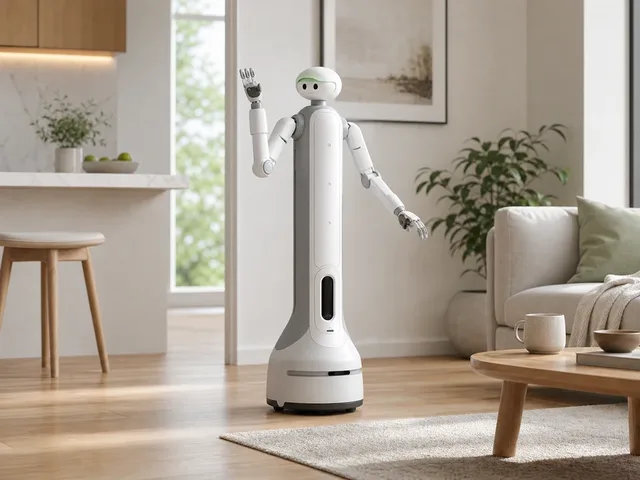
SwitchBot's onero H1 is a wheeled household robot unveiled at CES 2026 as part of the company's Smart Home 2.0 push. Official materials describe it as a multitask home robot built around 22 degrees of freedom and an on-device OmniSense vision-language-action model that combines visual perception, depth awareness, and tactile feedback for actions such as grasping, pushing, opening, and organizing. Independent CES coverage showed a tall wheeled platform with articulated arms handling demo chores including coffee prep, laundry loading, window cleaning, and folding clothes. As of 2026-04-05, SwitchBot has a live product page for the H1 and says availability is coming soon, but detailed hardware specifications and shipping timing remain limited. Useful for roadmap scanning, not yet a clean near-term shortlist.
Compact mobile scan: status, price, standout context, and links stay visible without sideways scrolling.
SwitchBot · Home Assistants
Price
$9,999
Standout
Official source linked
Quick answers
The short version of what this label means in the ui44 catalog, where it matters, and how to compare it without over-reading the marketing copy.
Tactile Feedback Sensing currently appears on 1 tracked robots across 1 manufacturers. That makes this route useful for both deep research and fast shortlist scanning, not just one-off editorial reading.
The strongest concentration is in Home Assistants (1). Category mix is the fastest clue for whether this component behaves like baseline plumbing or a more selective differentiator.
0 of the 1 tracked profiles are currently marked Available or Active. That means the label has live market relevance here, but you should still open the profiles with public pricing or official links first before treating it as a clean buyer signal.
Start with readiness, official source quality, and the standout spec column in the inventory table. On component routes, those three signals usually remove weak profiles faster than reading every descriptive paragraph.
The strongest shared-stack signals here are Depth Sensing (1), Multiple Cameras (1), and On-device OmniSense vision-language-action (VLA) model (1). Use those pairings to branch into adjacent component pages when one label is too narrow for the decision.
1 matching robots currently expose public pricing. That is enough to create directional context, but not enough to treat one price bracket as the whole market. Use the directory to find the transparent profiles first, then widen the sweep.
Start with SwitchBot (1). Repetition across manufacturers is often the clearest signal that the component is part of a stable market pattern rather than a one-off marketing callout.
The original long-form component research is still here, but collapsed so the main route can prioritize hierarchy and scan speed.
The baseline explanation of what Tactile Feedback Sensing is, why it matters, and how to think about it before comparing implementations.
Tactile Feedback Sensing is a sensor component found in 1 robot tracked in the ui44 Home Robot Database. As a sensor technology, Tactile Feedback Sensing plays a specific role in enabling robot perception, interaction, or operation depending on its implementation in each platform.
Component Type
Used By
1 robot
Manufacturer
Category
Price Range
$10k
Sensors are the perceptual backbone of any robot. They convert physical phenomena — light, sound, distance, motion, temperature — into digital signals that the robot's AI can process and act upon.
In the ui44 database, Tactile Feedback Sensing is categorized under Sensor components. For a comprehensive explanation of all component types, consult the components glossary.
The sensor suite is one of the most important differentiators between robots. Robots with richer sensor arrays can navigate more complex environments, avoid obstacles more reliably, and perform more nuanced tasks.
Directly impacts what a robot can actually do in practice — not just on paper
Richer sensor arrays enable more complex navigation and interaction
Determines obstacle avoidance reliability and object/person recognition
Used in 1 robot across 1 category — Home Assistants, indicating specialized use across the robotics industry.
Modern robot sensors work by emitting or detecting various forms of energy. The robot's processor fuses data from multiple sensors simultaneously (sensor fusion) to build a coherent understanding of its surroundings.
Active sensors
LiDAR and ultrasonic emit signals and measure reflections to determine distance and shape
Passive sensors
Cameras and microphones detect ambient light and sound without emitting anything
Sensor fusion
The processor combines data from all sensors simultaneously for a coherent environmental picture
Tactile Feedback Sensing Integration
Implementation varies by robot platform and manufacturer. Each robot integrates Tactile Feedback Sensing differently depending on system architecture, use case, and target tasks. Integration with other onboard sensors and the main processing unit determines real-world performance.
Deeper technical framing, matched technology profiles, and the longer use-case treatment for Tactile Feedback Sensing.
In-depth technical analysis of 1 technology domain relevant to this component
While the sections above cover general sensor principles, this analysis focuses on the particular technology domains relevant to Tactile Feedback Sensing based on its implementation characteristics.
Tactile sensors detect physical contact and pressure, providing robots with a sense of touch that complements non-contact sensing modalities like cameras and LiDAR. In home robots, tactile sensing ranges from simple mechanical bump sensors that register binary contact events to sophisticated force-torque sensors and tactile arrays that measure pressure distribution across a surface. This information is critical for safe physical interaction — knowing not just that contact occurred, but how much force is being applied and where.
Mechanical bump sensors are the simplest and most common tactile sensors in consumer robots. These spring-loaded switches are typically mounted behind a compliant bumper shell on the robot's perimeter, triggering when the bumper is compressed by contact with an obstacle. The detection is binary (contact or no contact) and tells the robot to stop and redirect. More advanced tactile sensors use resistive, capacitive, or piezoelectric principles to measure continuous force levels. Capacitive sensors detect pressure through changes in capacitance between conductive layers separated by a compressible dielectric material. Piezoelectric sensors generate electrical charge proportional to applied pressure, enabling dynamic force measurement that can distinguish a gentle touch from a hard collision.
For robots designed for physical interaction — companion robots, assistive robots, and humanoid platforms — distributed tactile sensing across the robot's body surface (sometimes called electronic skin or e-skin) enables whole-body awareness of contact. This technology uses arrays of miniaturized pressure sensors embedded in a flexible substrate that conforms to the robot's body shape. The resulting tactile map allows the robot to detect where it is being touched, how hard, and by what (distinguishing a human hand from a wall corner, for example). While currently more common in research and high-end platforms, tactile skin technology is expected to become more prevalent in consumer robots as manufacturing costs decrease and applications for safe human-robot physical interaction expand.
In the ui44 database, Tactile Feedback Sensing is currently tracked exclusively in the onero H1 by SwitchBot. This home assistants robot integrates Tactile Feedback Sensing as part of a total technology stack comprising 4 components: 3 sensors, 0 connectivity modules, and a On-device OmniSense vision-language-action (VLA) model AI platform.
SwitchBot's onero H1 is a wheeled household robot unveiled at CES 2026 as part of the company's Smart Home 2.0 push. Official materials describe it as a multitask home robot built around 22 degrees of freedom and an on-device OmniSense vision-language-action model that combines visual perception, depth awareness, and tactile feedback for actions such as grasping, pushing, opening, and organizing. …
The onero H1 is priced at $9,999, which includes Tactile Feedback Sensing as part of the integrated sensor package. Visit the full onero H1 specification page for complete technical details and purchasing information.
Tactile Feedback Sensing works alongside 2 other sensor components in the onero H1: Multiple cameras, Depth sensing. This combination of sensor technologies creates the onero H1's overall sensor capabilities, with each component contributing different aspects of environmental perception.
Beyond the high-level overview, understanding the technical foundations of sensor technologies like Tactile Feedback Sensing helps buyers and researchers evaluate implementations more critically.
Every sensor converts a physical quantity into an electrical signal that can be digitized and processed. The raw analog output is conditioned through amplification, filtering, and A/D conversion before reaching the processor.
Sensor performance involves key metrics with inherent engineering trade-offs.
Sensor technology in robotics has evolved dramatically over the past decade.
Early home robots relied on simple bump sensors and infrared proximity detectors
Today's platforms incorporate multi-spectral cameras, solid-state LiDAR, and millimeter-wave radar
Miniaturization: sensors that filled circuit boards now fit into fingernail-sized packages
Next frontier: sensor fusion at the hardware level — multiple sensing modalities in single chip-scale packages
No sensor is perfect in all conditions. Understanding limitations is critical for evaluating robots in specific environments.
Key application domains for sensor technologies like Tactile Feedback Sensing.
Sensors enable robots to build maps of their environment, detect obstacles in real time, and plan collision-free paths. This is essential for both indoor robots (navigating furniture and doorways) and outdoor robots (handling terrain variations and weather conditions). The quality and coverage of the sensor array directly determines how reliably a robot can navigate without human intervention.
Advanced sensors allow robots to identify objects by shape, color, and texture, enabling tasks like picking up items, sorting packages, or recognizing faces. Depth-sensing technologies are particularly important for calculating object distances and sizes, which is necessary for precise manipulation in both home and industrial settings.
In environments shared with humans, sensors provide the critical safety layer that prevents robots from causing harm. Proximity sensors, bumper sensors, and vision systems work together to detect people and obstacles, triggering immediate stop or avoidance maneuvers. This is a fundamental requirement for any robot operating in homes, hospitals, or public spaces.
Sensors can measure temperature, humidity, air quality, and other environmental parameters. Robots equipped with these sensors can perform automated monitoring rounds in warehouses, data centers, or homes, alerting users to abnormal conditions like water leaks, temperature spikes, or poor air quality.
Microphones, cameras, and touch sensors enable natural interaction between robots and humans. These sensors allow robots to recognize voice commands, detect gestures, respond to touch, and maintain appropriate social distances during conversations or collaborative tasks.
Visit each robot's detail page to see which capabilities are available on specific models.
Manufacturer mix, specs context, price context, category overlap, and adjacent components worth branching into next.
Tactile Feedback Sensing spans 1 robot category — from consumer to research platforms.
Technologies most often paired with Tactile Feedback Sensing across 1 robot.
Browse the full components directory or see the components glossary for detailed explanations of each technology.
1 of 1 robots with Tactile Feedback Sensing have public pricing, ranging $10k – $10k.
Lowest
$10k
onero H1
Average
$10k
1 robot with pricing
Highest
$10k
onero H1
1158 other sensor technologies tracked in ui44, ranked by adoption.
41 robots
23 robots
18 robots
16 robots
14 robots
14 robots
12 robots
12 robots
Browse all Sensor components or use the robot comparison tool to evaluate how different sensor configurations perform across specific robot models.
The robotics sensor market is one of the fastest-growing segments in the broader sensor industry. As robots move from controlled industrial environments into unstructured home and commercial spaces, the demands on sensor technology increase dramatically.
Multi-modal sensing
Robots combine multiple sensor types (vision, depth, tactile, inertial) to build comprehensive environmental understanding
Miniaturization
Sensors that once occupied entire circuit boards now fit into fingernail-sized packages, making advanced sensing affordable for consumer robots
Edge AI integration
AI processing directly in sensor modules enables faster perception without cloud latency
Industry Adoption Snapshot
Tactile Feedback Sensing is adopted by 1 robot from 1 manufacturer in the ui44 database, providing a data-driven view of real-world deployment patterns.
Platform compatibility, voice integration, and AI capabilities across robots with Tactile Feedback Sensing.
The long-form buyer, maintenance, and troubleshooting material kept available without forcing it into the main scan path.
If Tactile Feedback Sensing is an important factor in your robot selection, here are key considerations to guide your decision.
Coverage area
Does the sensor array provide 360° awareness or only forward-facing detection?
Range
How far can the robot sense obstacles or objects?
Resolution
How detailed is the sensor data for recognition tasks?
Redundancy
Are there backup sensors if one fails?
Serviceability
Are sensors user-serviceable or require manufacturer maintenance?
Currently, none of the robots with Tactile Feedback Sensing are listed as directly available for purchase. They are in development status. Monitor the individual robot pages for updates.
A component is only as good as its integration. Check how the manufacturer has incorporated Tactile Feedback Sensing into the overall robot design and software stack.
Review what other sensor technologies are paired with Tactile Feedback Sensing in each robot — see the related components section.
Make sure the robot's category matches your use case. Tactile Feedback Sensing serves different roles in different robot types.
Consider the manufacturer's reputation for software updates, support, and component reliability.
Compare Before You Buy
Use the ui44 comparison tool to evaluate robots with Tactile Feedback Sensing side by side.
Sensors are among the most maintenance-sensitive components in a robot. Their performance can degrade over time due to physical wear, environmental exposure, and calibration drift. Understanding the maintenance profile of a robot's sensor suite helps set realistic expectations for long-term ownership and operation.
Sensor durability varies significantly by type. Solid-state sensors like IMUs and accelerometers have no moving parts and typically last the lifetime of the robot.
Regular sensor maintenance primarily involves keeping optical surfaces clean. Camera lenses, LiDAR windows, and infrared emitters should be wiped with a soft, lint-free cloth to remove dust and fingerprints.
When evaluating sensor technology for long-term value, consider the manufacturer's track record for software updates that improve sensor utilization. A robot with good sensors and ongoing software development can actually improve its performance over time as algorithms are refined.
For the 1 robot in the ui44 database using Tactile Feedback Sensing, we recommend checking the individual robot pages for manufacturer-specific maintenance guidance and support documentation. Each manufacturer has different support policies, update frequencies, and warranty terms that affect the long-term ownership experience of their sensor technologies.
Sensor-related issues are among the most common problems home robot owners encounter. Many sensor issues can be resolved with simple maintenance or environmental adjustments, while others may indicate hardware problems requiring manufacturer support. Understanding common failure modes helps you diagnose and resolve issues quickly, minimizing robot downtime.
Likely Causes
Resolution
Likely Causes
Resolution
Likely Causes
Resolution
For model-specific troubleshooting, visit the individual robot pages for the 1 robot using Tactile Feedback Sensing. Each manufacturer provides model-specific support resources and diagnostic tools for their sensor implementations.
What to do next
This page should hand you off to the next useful comparison step, not strand you at the bottom of a long detail route.
Widen the layer
Open the full sensor workbench when Tactile Feedback Sensing is only one part of the decision and you need the broader market map.
Side-by-side check
Move from label-level research into direct robot comparison once you know which profiles are documented well enough to trust.
Adjacent signal
This is the most common neighboring component on robots that already use Tactile Feedback Sensing, so it is the fastest next branch if you need stack context.
