Unitree's ladder is really three different bets. The R1 is the cheap movement-first biped. The G1 is the compact research platform with more perception and optional hands. The H2 is the full-size flagship with far more payload, runtime, and compute headroom. The smaller R1-A7-D adds a fourth wrinkle: a wheeled dual-arm robot may be less exciting than a walking humanoid, but it can be closer to useful manipulation work.
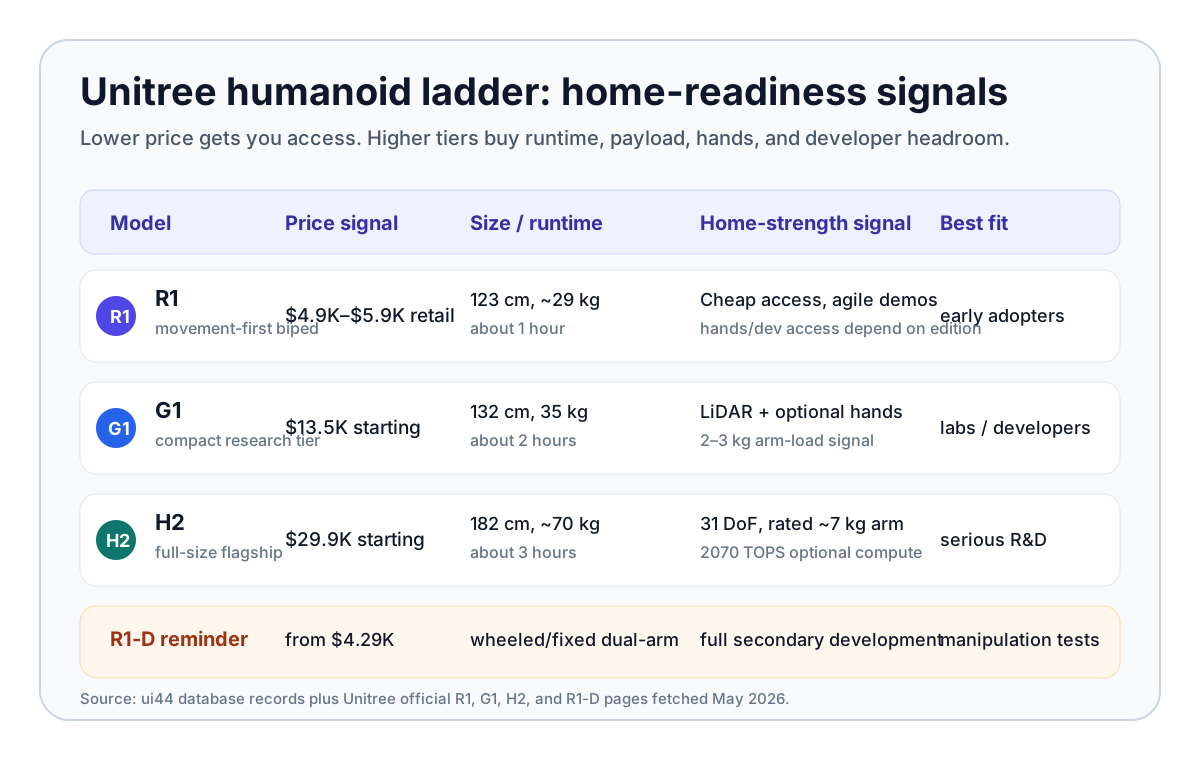
The short answer: G1 is the best current balance for a serious developer who wants a humanoid in a controlled home-like space. R1 is the cheapest way to experiment. H2 is the most capable hardware, but it is also the least normal thing to put in a home. None of them is a finished household helper.
Quick verdict: which Unitree humanoid is closest to home-ready?
If you mean "which one could a wealthy hobbyist actually buy and test at home," start with G1. It is compact by humanoid standards at 132 cm and 35 kg, runs for about 2 hours, starts at $13,500 before tax and shipping, and has the clearest middle-ground mix of mobility, sensors, optional manipulation, and research ecosystem.
If you mean "which one costs least and still feels like a real humanoid," the answer is R1. Unitree lists R1 Air from $4,900 and the standard R1 at $5,900. It stands 123 cm tall, weighs about 29 kg in the standard version, and has about 1 hour of battery life. That is an astonishing price signal for a bipedal robot. It is also a warning sign: the product is movement-first, short on runtime, and edition-limited for secondary development.
If you mean "which one has the strongest body for practical manipulation," the answer is H2, with major caveats. H2 is about 182 cm tall, roughly 70 kg, listed at $29,900, and rated by Unitree for about 3 hours of battery life. Its official specs list 31 degrees of freedom, 120 N·m arm-joint torque, 360 N·m leg-joint torque, a rated arm payload around 7 kg, and optional compute up to a Jetson AGX Thor module at 2070 TOPS. That sounds more useful, but a 70 kg full-size humanoid is not automatically safer or more home-friendly.
The comparison table that matters
Robot
- Official price signal
- R1 Air from $4,900; R1 from $5,900
- Size and runtime
- 123 cm; about 27-29 kg; about 1 hour
- Manipulation signal
- 20-26 DOF retail; EDU reaches 26-40 DOF with optional hands/configuration
- Development access
- Retail does not support secondary development; EDU does
- Best current fit
- cheapest humanoid experimentation
Robot
- Official price signal
- $13,500 starting
- Size and runtime
- 132 cm; about 35 kg; about 2 hours
- Manipulation signal
- 23 DOF base; 23-43 DOF EDU; optional Dex3-1 hand with tactile arrays
- Development access
- EDU supports secondary development
- Best current fit
- serious research and developer testing
Robot
- Official price signal
- $29,900 starting
- Size and runtime
- 182 cm; about 70 kg; about 3 hours
- Manipulation signal
- 31 DOF; 7-DOF arms; rated arm payload around 7 kg; optional dexterous hands
- Development access
- EDU supports secondary development
- Best current fit
- full-size humanoid R&D, not casual home use
Robot
- Official price signal
- Unitree R1-D line from $4,290; exact A7-D quote unclear
- Size and runtime
- wheeled mobile base; about 32 kg; about 1.5 hours
- Manipulation signal
- dual 7-DOF arms; 2-4 kg arm payload; optional grippers or hands
- Development access
- full-stack secondary development
- Best current fit
- manipulation experiments where wheels are acceptable
| Robot | Official price signal | Size and runtime | Manipulation signal | Development access | Best current fit |
|---|---|---|---|---|---|
| Unitree R1 | R1 Air from $4,900; R1 from $5,900 | 123 cm; about 27-29 kg; about 1 hour | 20-26 DOF retail; EDU reaches 26-40 DOF with optional hands/configuration | Retail does not support secondary development; EDU does | cheapest humanoid experimentation |
| Unitree G1 | $13,500 starting | 132 cm; about 35 kg; about 2 hours | 23 DOF base; 23-43 DOF EDU; optional Dex3-1 hand with tactile arrays | EDU supports secondary development | serious research and developer testing |
| Unitree H2 | $29,900 starting | 182 cm; about 70 kg; about 3 hours | 31 DOF; 7-DOF arms; rated arm payload around 7 kg; optional dexterous hands | EDU supports secondary development | full-size humanoid R&D, not casual home use |
| Unitree R1-A7-D | Unitree R1-D line from $4,290; exact A7-D quote unclear | wheeled mobile base; about 32 kg; about 1.5 hours | dual 7-DOF arms; 2-4 kg arm payload; optional grippers or hands | full-stack secondary development | manipulation experiments where wheels are acceptable |
The table shows why a pure price ranking is misleading. R1 wins on access. G1 wins on balance. H2 wins on raw hardware. R1-D may win for people who care more about arms than bipedal walking.
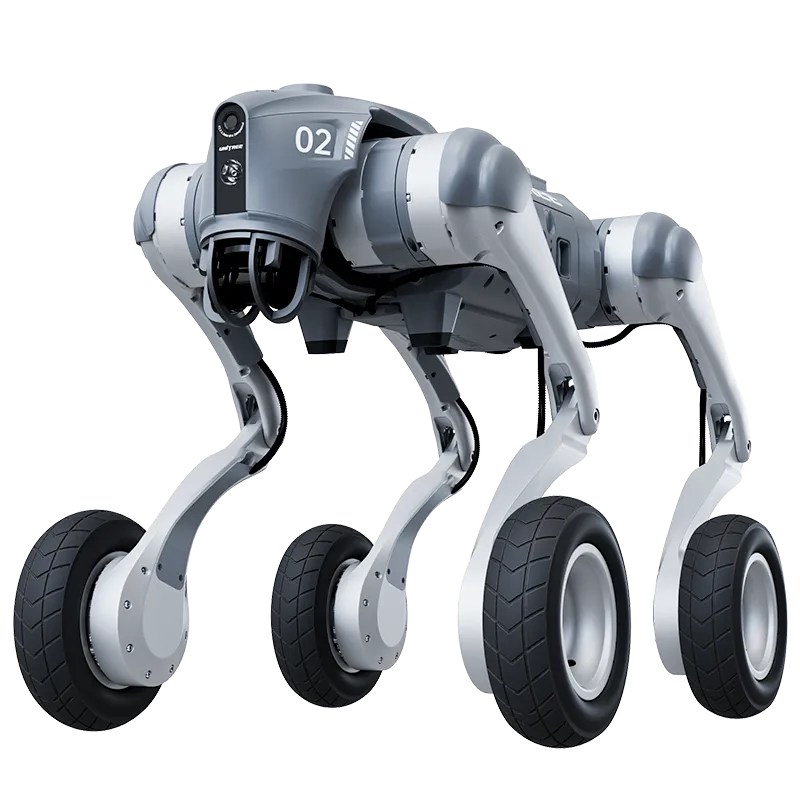
R1: the cheapest humanoid is not the most useful one
The Unitree R1 is the reason this comparison exists. A humanoid from a major manufacturer with official pricing from $4,900 would have looked impossible a few years ago. Unitree's official R1 page lists R1 Air at $4,900 and the standard R1 at $5,900 before tax and shipping. The shop page also states that shipments begin in June 2026, with shipping costs between $300 and $1,200 and customs duties handled by the buyer.
That makes R1 feel consumer-accessible, but the specs tell a narrower story. R1 is built around agility: the retail R1 Air and standard R1 span 20 to 26 degrees of freedom, while Unitree's official table lists the R1 EDU family at 26 to 40 DOF depending on optional hands and configuration. Battery life is about 1 hour, with Wi-Fi 6, Bluetooth 5.2, a 4-mic array, a speaker, and a large multimodal model for speech and image interaction. The standard R1 gets binocular cameras; R1 Air uses a simpler camera setup. The R1 EDU tier can add optional dexterous hands and an optional NVIDIA Jetson Orin module.
The biggest buyer trap is development access. Unitree's shop page says the retail R1 does not support secondary development and directs customization needs to the EDU edition. If you want to use R1 as a programmable platform, verify the exact edition before buying. A cheaper checkout page is not a deal if it locks you out of the interfaces you need.
For home use, R1 is best understood as a supervised experiment. It can make humanoid hardware affordable enough for educators, creators, and hobbyists. It is not evidence that a $5,000 humanoid can load a dishwasher, pick laundry off a floor, or safely improvise around pets.
G1: the strongest all-around early-adopter choice
The Unitree G1 is still the cleanest recommendation if the buyer is technical and understands the risk. It starts at $13,500 before tax and shipping, stands 132 cm tall, weighs about 35 kg with battery, folds down to 69 cm, and runs for about 2 hours. That makes it substantially more expensive than R1, but also more plausible as a real robotics platform.
G1's official spec sheet lists depth camera plus 3D LiDAR, Wi-Fi 6, Bluetooth 5.2, a 4-microphone array, a 5 W speaker, quick-release 9000 mAh battery, and 23 total degrees of freedom on the base model. The G1 EDU configuration can reach 23 to 43 degrees of freedom, add NVIDIA Jetson Orin compute, support secondary development, and use the Dex3-1 three-fingered hand with optional tactile sensor arrays.
That optional hand detail matters. A home robot without hands is mostly a mobile performer or telepresence machine. A home robot with hands can at least start to approach useful tasks, though the limit is still modest. Unitree lists about 2 kg arm maximum load for G1 and about 3 kg for G1 EDU, with the usual warning that arm load varies greatly depending on extension posture. A milk jug, a pan, a loaded drawer, or a high shelf can quickly become harder than the headline number suggests.
G1's biggest home-readiness advantage is not that it is safe or finished. It is that it has enough perception, runtime, optional manipulation, and developer support to be worth evaluating in a controlled environment. That is a very different bar from mainstream household usefulness, but it is the most honest place to put G1 today.
H2: bigger, stronger, and less casual
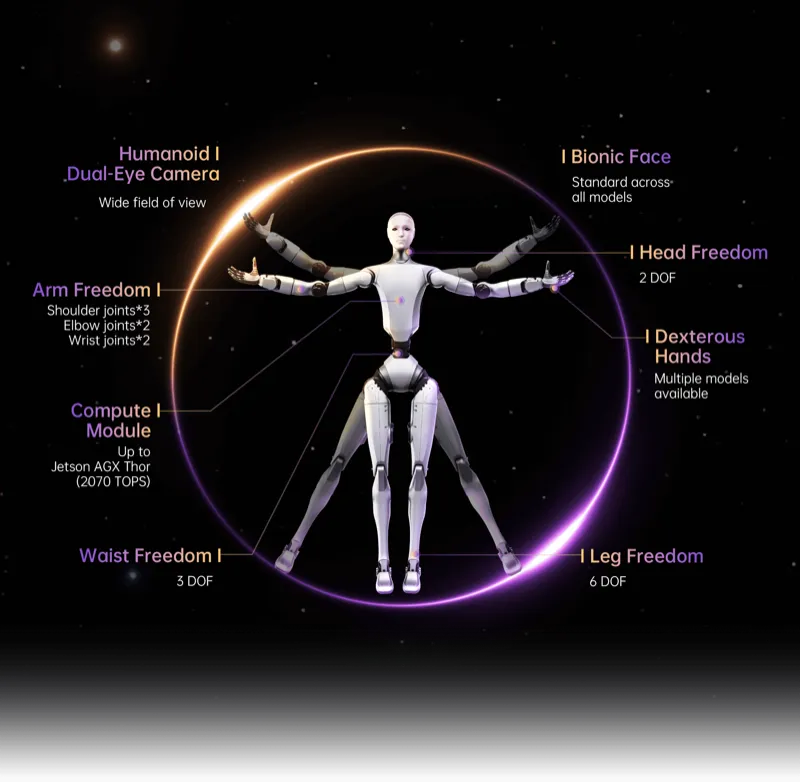
The Unitree H2 is the impressive one. Unitree lists it at $29,900 before tax and shipping, with an EDU version through sales contact. It is about 182 cm tall, weighs around 70 kg, uses aircraft-grade aluminum, titanium alloy, and high-strength engineering plastics, and has 31 degrees of freedom.
The payload numbers move H2 into a different class. Unitree lists 120 N·m maximum arm-joint torque, 360 N·m maximum leg-joint torque, peak arm payload around 15 kg, and rated arm payload around 7 kg. Battery life is about 3 hours. The H2 EDU configuration can add compute up to Jetson AGX Thor with 2070 TOPS, while both H2 and H2 EDU include a wide-field binocular camera, array microphone, high-power speaker, Wi-Fi 6, Bluetooth 5.2, quick-release battery, and OTA updates.
Those are the right directions for household usefulness: longer runtime, more payload, better arm structure, and more compute headroom. The problem is that home readiness is not only a spec sheet. A 70 kg humanoid with powerful joints inside a domestic space creates a different class of safety, liability, floor, noise, repair, and supervision questions.
Unitree's own pages include the caution buyers should take seriously: the humanoid robot has a complex structure and powerful output, users should keep a safe distance, and individual users are strongly advised to understand current humanoid limitations before purchase. That language is not boilerplate to ignore. It is the line between a research platform and a consumer appliance.
So H2 is the best current Unitree answer if your question is "which body is most capable?" It is not the best answer if your question is "which robot should an ordinary person put next to a couch?"
Do not overlook R1-D if you care about chores
The most home-relevant Unitree robot may not be the most humanoid-looking one. The Unitree R1-A7-D is part of Unitree's R1-D dual-arm line, which starts from $4,290. The A7-D configuration uses a wheeled mobile base, height-adjustable body, two 7-DOF arms, chassis LiDAR, binocular vision, voice interaction, optional wrist camera, and optional end effectors including two-finger grippers, three-finger hands, or five-finger hands.
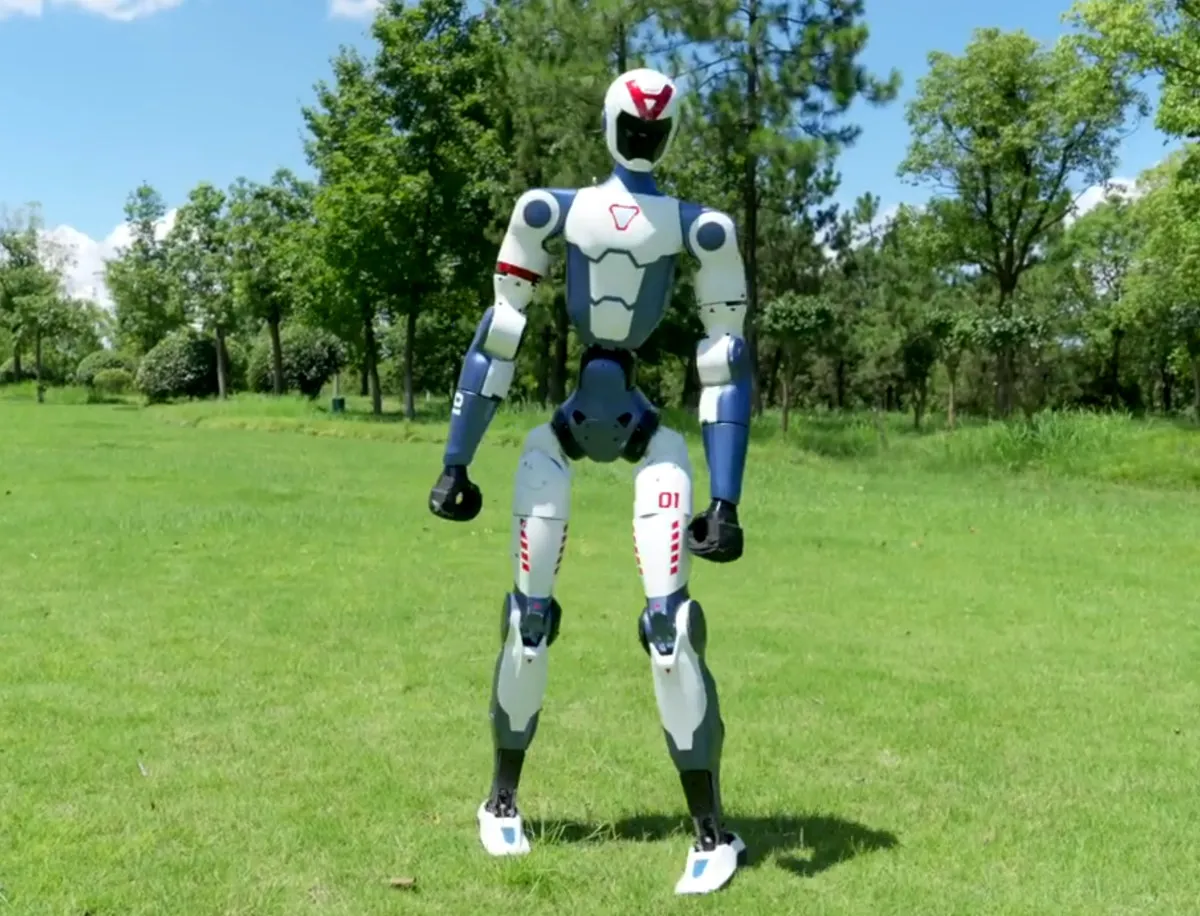
That is not a classic walking humanoid. It is also exactly why it is interesting. Wheels remove much of the balance problem. A fixed or mobile dual-arm platform can focus on reaching, grasping, teleoperation, perception, and tool use. Unitree lists full-stack secondary development across the R1-D line, about 1.5 hours of battery-powered operation, 2-4 kg maximum arm payload depending on posture, and ±0.1 mm end-clamp accuracy.
For actual chores, stable arms may matter more than a dramatic walking demo. Kitchen counters, tabletops, bins, shelves, and laundry baskets do not require a robot to jog across a stage. They require repeatable manipulation, safe reach, and recovery from small mistakes. R1-D is still a development product, and exact A7-D pricing is not public in the same clean way as R1/G1/H2. But for buyers trying to predict where useful home robotics goes next, it deserves a place in the comparison.
What should a home buyer check before choosing one?
Before treating any Unitree humanoid as a home purchase, answer these questions:
- Which exact edition is it? R1 Air, R1, R1 EDU, G1, G1 EDU, H2, and H2 EDU are not interchangeable.
- Does it support secondary development? Unitree's public retail pages make this edition-dependent. If you need custom software, do not assume the base model is enough.
- Does it have hands, and what kind? Optional dexterous hands are not the same as included hands, and grippers may be better for simple tasks.
- What is the realistic total landed cost? Add shipping, customs, tax, service, spare batteries, repairs, and return logistics.
- What is the safe operating plan? A powerful robot in a home needs clear boundaries, emergency stop behavior, supervision, and no child/pet exposure until proven otherwise.
- What task proof exists? Walking, dancing, and push recovery are not the same as successful chores.
- Who repairs it? Warranty periods and service path matter more than demo videos once an actuator, battery, sensor, or joint fails.
For most normal buyers, the right answer is still to watch, compare, and wait. For labs and advanced hobbyists, the right answer depends on what you want to learn: locomotion, manipulation, embodied AI, or product operations.
Bottom line: pick the job, not the fanciest robot
If we had to rank the lineup for home-adjacent usefulness today, we would put it like this:
- Best balanced humanoid platform: Unitree G1
- Best cheapest bipedal experiment: Unitree R1
- Best raw hardware capability: Unitree H2
- Most interesting manipulation detour: Unitree R1-A7-D
That ranking is deliberately cautious. Unitree has done more than most companies to turn humanoid robots into products with prices, variants, official shops, and buyer warnings. That is real progress. It does not make any current Unitree humanoid a normal household helper.
Use ui44's Unitree robot pages or the comparison tool to stack R1, G1, H2, and R1-D against other home and humanoid robots. The specs are finally concrete enough to compare. The chores are still the missing proof.
Related in the database
Use this article as a warranty and coverage workflow
Turn the article into a warranty and coverage pass grounded in the robots and manufacturers it actually references.
Unitree H2 vs G1 vs R1: Which Is Home-Ready? already points you toward 4 linked robots, 2 manufacturers, and 1 country inside the ui44 database. That matters because strong buyer guidance is easier to apply when you can move immediately from a claim or warning into concrete product pages, manufacturer directories, component explainers, and country-level context instead of treating the article as an isolated opinion piece. The fastest next step is to turn the article into a shortlist workflow: open the linked robot pages, verify which specs are actually published for those models, then compare the surrounding manufacturer and component context before you decide whether the underlying claim changes your buying plan.
For this topic, the useful discipline is to separate the editorial lesson from the catalog evidence. The article gives you the framing, but the robot pages tell you what each product actually ships with today: sensor stack, connectivity methods, listed price, release timing, category, and support-relevant compatibility notes. The manufacturer pages then show whether you are looking at a one-off launch, a broader lineup pattern, or a company that spans multiple categories. That layered workflow reduces the risk of buying on a single marketing phrase or a single support FAQ.
The most practical move is to keep warranty language and product context together. Compare the linked robots first, then check whether the manufacturer pages suggest a mature service lane or a more limited lineup. On this article, R1, G1, and Unitree H2 are the right place to start. If you want a quick working shortlist, open Compare R1, G1, and Unitree H2 next, then keep this article open as the reasoning layer while you compare structured data side by side.
Practical Takeaway
Every robot, manufacturer, category, component, and country reference below resolves to a real ui44 page, keeping the follow-up path grounded in database records rather than generic advice.
Suggested next steps in ui44
- Compare the listed price, release timing, and category fit of the linked robots before you treat warranty length as a direct value proxy.
- Open Unitree to see whether the brand has several relevant models in the same lane or whether the article is centered on one flagship product.
- Record what the article proves, what still depends on seller or region rules, and which consumables or battery-related details you still need to verify externally.
- Use Compare R1, G1, and Unitree H2 before checkout so the warranty conversation stays anchored to a real shortlist.
- Do not treat the article as the final source of truth on coverage terms. Treat it as the framing layer that tells you which documentation you still need to inspect before purchase.
Robot profiles worth opening next
Use the linked product pages as the evidence layer
The linked robot pages are where this article becomes operational. Instead of asking whether the headline is interesting, use the robot entries to inspect the actual mix of sensors, connectivity options, batteries, pricing, release timing, and stated capabilities attached to the products mentioned in the article. That is the easiest way to see whether the warning or opportunity described here affects one product family, a specific design pattern, or an entire buying lane.
R1
Unitree Robotics · Humanoid · Pre-order
R1 is tracked on ui44 as a pre-order humanoid robot from Unitree Robotics. The database currently records a listed price of $4,900, a release date of 2025, ~1 hour (mixed activity) battery life, Not officially disclosed charging time, and a published stack that includes Monocular camera (R1 Air); binocular camera (R1/R1 EDU), 4-Mic Array, and Dual 6-Axis IMU plus Wi-Fi 6 and Bluetooth 5.2.
For warranty and coverage questions, the robot page gives you the operating context that fine print often leaves out. Review the published capability mix, including Bipedal Walking & Running, Cartwheels & Handstands, and Push Recovery, and the listed battery and charging profile before deciding whether a coverage term meaningfully reduces your ownership risk or merely sounds reassuring in isolation.
G1 is tracked on ui44 as a available humanoid robot from Unitree. The database currently records a listed price of $13,500, a release date of 2024-05-13, ~2 hours battery life, Not disclosed charging time, and a published stack that includes Depth Camera, 3D LiDAR, and 4 Microphone Array plus Wi-Fi 6 and Bluetooth 5.2.
For warranty and coverage questions, the robot page gives you the operating context that fine print often leaves out. Review the published capability mix, including Bipedal Walking, Object Manipulation, and Dexterous Hands (optional Dex3-1), and the listed battery and charging profile before deciding whether a coverage term meaningfully reduces your ownership risk or merely sounds reassuring in isolation.
Unitree H2
Unitree Robotics · Humanoid · Available
Unitree H2 is tracked on ui44 as a available humanoid robot from Unitree Robotics. The database currently records a listed price of $29,900, a release date of 2025-10-20, About 3 hours battery life, Not officially disclosed charging time, and a published stack that includes Binocular Camera (Wide FOV), Array Microphone, and IMU plus Wi-Fi 6 and Bluetooth 5.2.
For warranty and coverage questions, the robot page gives you the operating context that fine print often leaves out. Review the published capability mix, including 31 Degrees of Freedom, 360 N·m Peak Leg Joint Torque, and 120 N·m Peak Arm Joint Torque, and the listed battery and charging profile before deciding whether a coverage term meaningfully reduces your ownership risk or merely sounds reassuring in isolation.
R1-A7-D
Unitree Robotics · Humanoid · Active
R1-A7-D is tracked on ui44 as a active humanoid robot from Unitree Robotics. The database currently records a listed price of $100,000, a release date of 2026-04-30, Approx. 1.5 hours (battery-powered; external power also supported) battery life, Not officially disclosed charging time, and a published stack that includes Chassis LiDAR, Binocular camera / depth module, and Optional wrist camera plus Wi-Fi 6 and Bluetooth 5.2.
For warranty and coverage questions, the robot page gives you the operating context that fine print often leaves out. Review the published capability mix, including Mobile Dual-Arm Manipulation, 7-DOF Arms, and Wheeled Mobile Base, and the listed battery and charging profile before deciding whether a coverage term meaningfully reduces your ownership risk or merely sounds reassuring in isolation.
Manufacturer context behind the article
Check whether this is one product story or a broader company pattern
Manufacturer pages add the support context that individual product pages cannot show on their own. They help you check whether the article is pointing at one coverage promise or at a company with a broader service footprint and multiple products to maintain.
Unitree
ui44 currently tracks 2 robots from Unitree across 1 category. The company is grouped under China, and the current catalog footprint on ui44 includes H1, G1.
That wider brand context matters because support confidence is easier to judge when you can see the company’s overall footprint, not just one warranty phrase attached to one product. A broader tracked lineup can change how you interpret the article’s coverage discussion. The category mix here currently points toward Humanoid as the most useful next route if you want to see whether this article reflects a wider pattern inside the brand.
Unitree Robotics
ui44 currently tracks 9 robots from Unitree Robotics across 3 categorys. The company is grouped under China, and the current catalog footprint on ui44 includes B2, B1, Go2.
That wider brand context matters because support confidence is easier to judge when you can see the company’s overall footprint, not just one warranty phrase attached to one product. A broader tracked lineup can change how you interpret the article’s coverage discussion. The category mix here currently points toward Quadruped, Humanoid, Research as the most useful next route if you want to see whether this article reflects a wider pattern inside the brand.
Broaden the scan without leaving the database
Categories, components, and countries add the wider context
Category framing
Category pages are useful when the article touches a buying pattern that shows up across brands. A category route helps you confirm whether the linked products sit in a narrow niche or whether the same question should be tested across a larger field of alternatives.
Humanoid
The Humanoid category page currently groups 129 tracked robots from 92 manufacturers. ui44 describes this lane as: Full-size bipedal humanoid robots built to work alongside people — from factory floors to household tasks. Compare the cutting edge of humanoid robotics.
That makes the category route a practical follow-up when you want to check whether the products linked in this article are typical for the lane or whether they sit at one edge of the market. Useful starting examples currently include NEO, EVE, Mornine M1.
Country and ecosystem context
Country pages give extra context when support practices, launch sequencing, regulatory posture, or manufacturer mix matter. They are not a substitute for model-level verification, but they do help you see which ecosystems cluster together and which manufacturers sit in the same regional field when you broaden the search beyond the article headline.
China
The China route currently groups 189 tracked robots from 87 manufacturers in ui44. That gives you a useful regional lens when the article points toward support practices, launch sequencing, or brand clusters that may share similar ecosystem assumptions.
On the current route, manufacturers like AGIBOT, Dreame, Unitree Robotics make the page a good way to broaden the scan without losing the regional context that often shapes availability, documentation style, and adjacent alternatives.
Questions to answer before you move from reading to buying
A follow-up FAQ built from the entities already linked in this article
Frequently Asked Questions
Which page should I open first after reading “Unitree H2 vs G1 vs R1: Which Is Home-Ready?”?
Start with R1. That gives you a concrete product anchor for the article’s main claim. From there, branch into the manufacturer and component pages so you can tell whether the article is describing one specific model, a repeated brand pattern, or a wider technology issue that affects multiple shortlist options.
How do the manufacturer pages change the buying decision?
Unitree help you zoom out from one article and one product. On ui44 they show lineup breadth, category spread, and the neighboring robots tied to the same company. That context is useful when you are deciding whether a risk belongs to a single model, whether it shows up across a brand’s portfolio, and whether you should keep looking at alternatives before committing.
When should I switch from reading to side-by-side comparison?
Move into Compare R1, G1, and Unitree H2 as soon as you understand the article’s main warning or promise. The article explains what to watch for, but the compare view is where you can check whether price, status, battery life, connectivity, sensors, and category fit still make the robot a good match for your own home and budget.
Where to go next in ui44
Keep the research chain inside the database
If you want to keep going, these follow-on pages give you the cleanest expansion path from article to research session. Open the comparison route first if you are deciding between products today. Open the manufacturer, category, and component routes if you still need to understand the broader pattern behind the claim.
Written by
ui44 Team
Published May 7, 2026
Share this article
Open a plain share link on X or Bluesky. No embeds, no widgets, no cookie baggage.