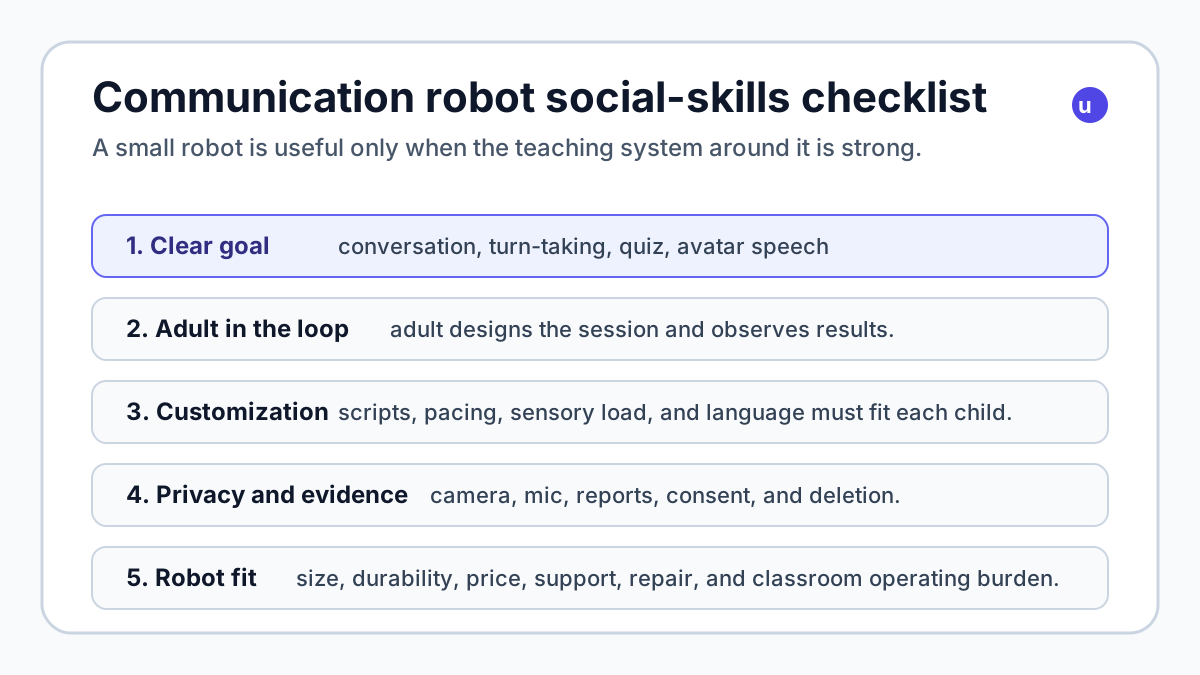
The headline matters because it points to a more useful buyer question than "does the robot have AI?" For parents, caregivers, teachers, and clinics, the real question is whether a physical robot can create a safe, repeatable practice space for skills that are hard to rehearse with people: greetings, waiting for a turn, asking a question, answering a quiz, using body language, or speaking through an avatar.
The short answer: communication robots can help in the right supervised setting, but the robot body is only one layer. The curriculum, adult control, privacy rules, customization, and evidence trail matter more than the cuteness of the machine.
Do communication robots actually help children practice social skills?
They can, but the best evidence supports them as practice partners, not magic therapists.
DCS's new Japanese project offers a clear example. The company says it will lend its custom-programmed Aruku MechatroWeGo communication robots to up to 10 special-support schools or classes for the 2026 school year. The loan period runs until March 31, 2027, the implementation cost is free, and participating schools are asked to cooperate with surveys, case publication, and effect measurement. Schools need to provide a tablet or PC plus a Wi-Fi environment.
The robot itself is tiny: DCS describes Aruku MechatroWeGo as a palm-sized bipedal robot about 13 cm tall. The program menu is deliberately simple: conversation practice, quizzes, and an avatar mode where the robot can speak and use body language on behalf of a student. That is exactly the kind of constrained interaction where a robot can be useful. It gives the child something embodied to look at, but it does not require the robot to understand an entire messy classroom.
DCS also has prior evidence from a 2023-2024 demonstration in Toyama Prefecture. That project used its Link & Robo for Growing service with students at two special-support high schools: four groups, 16 students, and teacher feedback plus video/emotion-analysis data. DCS reported that the robot worked well as a "first step" for social-skills training because students often found it easier to interact with than a person. The report also noted that a humanoid form can support nonverbal practice such as eye contact and appropriate distance.
That is promising. It is also not the same as a broad medical claim. The report itself says the data set was limited and that reliability and validity need more work. A parent or school should read this as early, practical evidence for a teaching tool, not proof that any robot will improve every child's social life.
That cautious view lines up with broader research. A 2022 PLOS ONE systematic review and meta-analysis of robot interventions for autistic children and young people found 40 eligible studies, including 17 randomized controlled trials. The review found a significant improvement in social functioning in its RCT meta-analysis, while emotional and motor outcomes were not clearly improved because the number of trials was small. In plain English: robots can be a useful intervention medium, especially for social and communication practice, but outcomes depend heavily on the child, setting, activity design, and adult support.
Why Japan's 2026 pilot is worth watching
The important part of the DCS pilot is not that it uses a famous humanoid. It is almost the opposite. Aruku MechatroWeGo is small, approachable, and limited. It is closer to an embodied classroom interface than a general home robot.
Living Robot's official Walking MechatroWeGo materials list the consumer model at ¥109,780, with a monthly usage fee, and describe a Scratch-like programming environment. The robot includes a camera, brightness sensor, distance sensor, seven-color LED, bipedal walking, expressive arms, and removable/customizable parts. Living Robot's older public metrics say more than 50 schools or education institutions had introduced it on a trial basis or otherwise, more than 5,000 users had experienced it, and more than 500 experiential programs had been run as of November 2021.
Those are not home-robot specs in the usual sense. They are education-platform signals. The body is there to make a scripted interaction feel alive enough that a child will engage. The software and lesson design carry the actual learning load.
That makes the DCS loan model smart. A school does not have to buy a robot first and hope it fits. It can test whether the interaction mode works for its students, whether teachers can operate the system without technical overhead, and whether reports or measurements are useful rather than intrusive.
For buyers, the lesson is simple: before buying any social-skills robot, ask what program it comes with. If the answer is mostly "AI chat," be skeptical. A special-education tool needs controllable sessions, predictable prompts, customizable content, adult review, and a clear way to stop, redirect, or adapt when a child is overloaded.
How does this compare with QTrobot, NAO6, Miko 3, and LOVOT?
ui44 tracks several robots that sit near this category, but they are not interchangeable. A school social-skills robot, a therapy-support platform, a consumer kid companion, and an emotional pet-like robot solve different jobs.
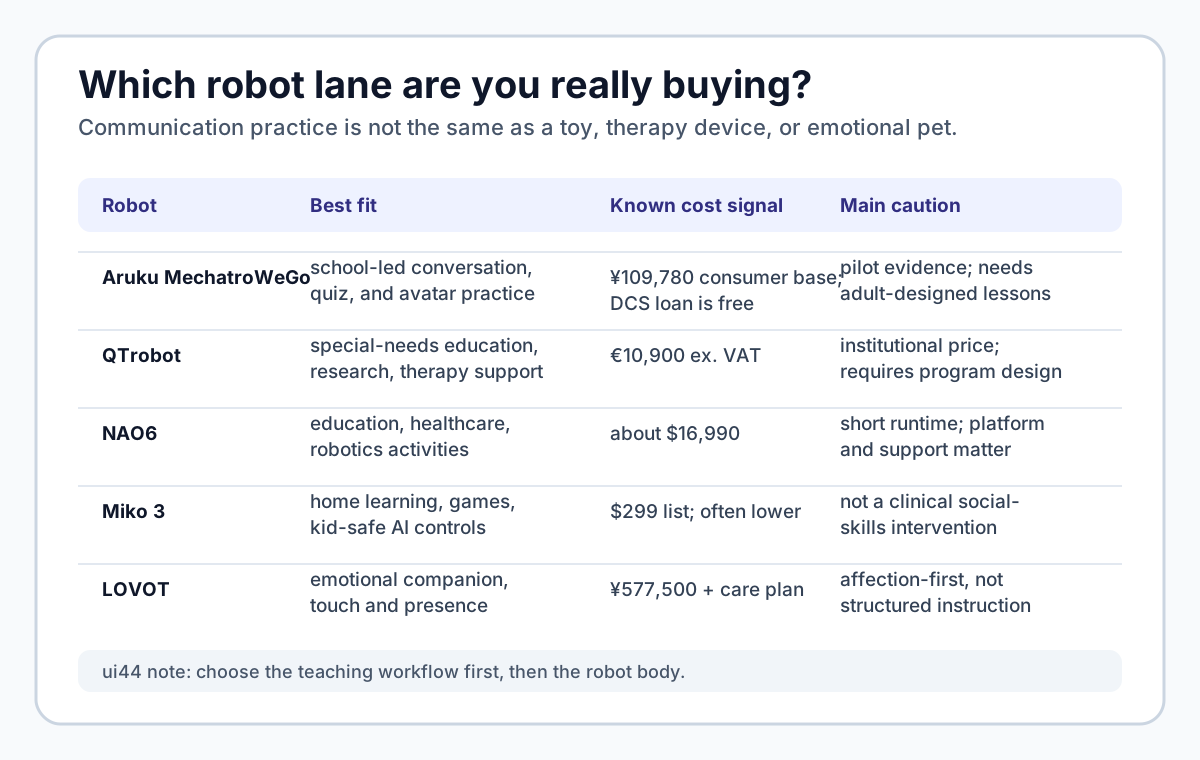
QTrobot is the clearest specialist in the ui44 database. LuxAI positions it for human-robot interaction research, special-needs education, and therapy support. Our current record lists the QTrobot RD-V2 i5 at €10,900 ex. VAT, with higher i7 and AI@Edge variants. It is a 64 cm, 5 kg tabletop social humanoid with an Intel RealSense depth camera, microphone array, ROS-based development stack, visual programming tools, expressive gestures, and support for autism intervention and special-needs education workflows.
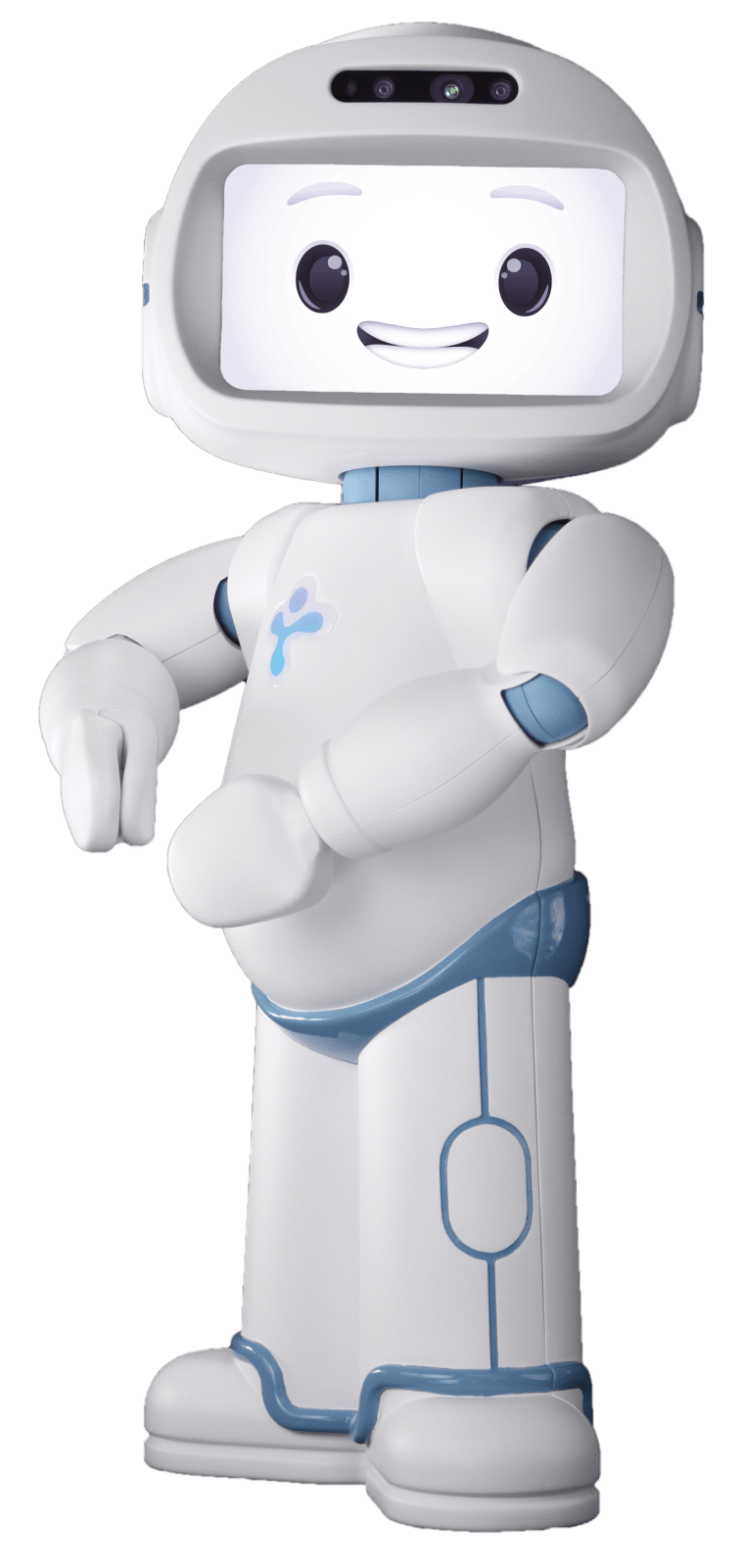
LuxAI is also moving the category toward longer home evidence. The company says it is working with the Luxembourg Institute of Health and the University of Birmingham on a 10-month home study with 69 families of autistic children aged 2.5 to 4.5 years. That is important because many robot-social-skills studies have been short, small, or clinic-based. It still does not make QTrobot a casual toy purchase; it makes it a serious assistive-education platform that needs professional or structured parent involvement.
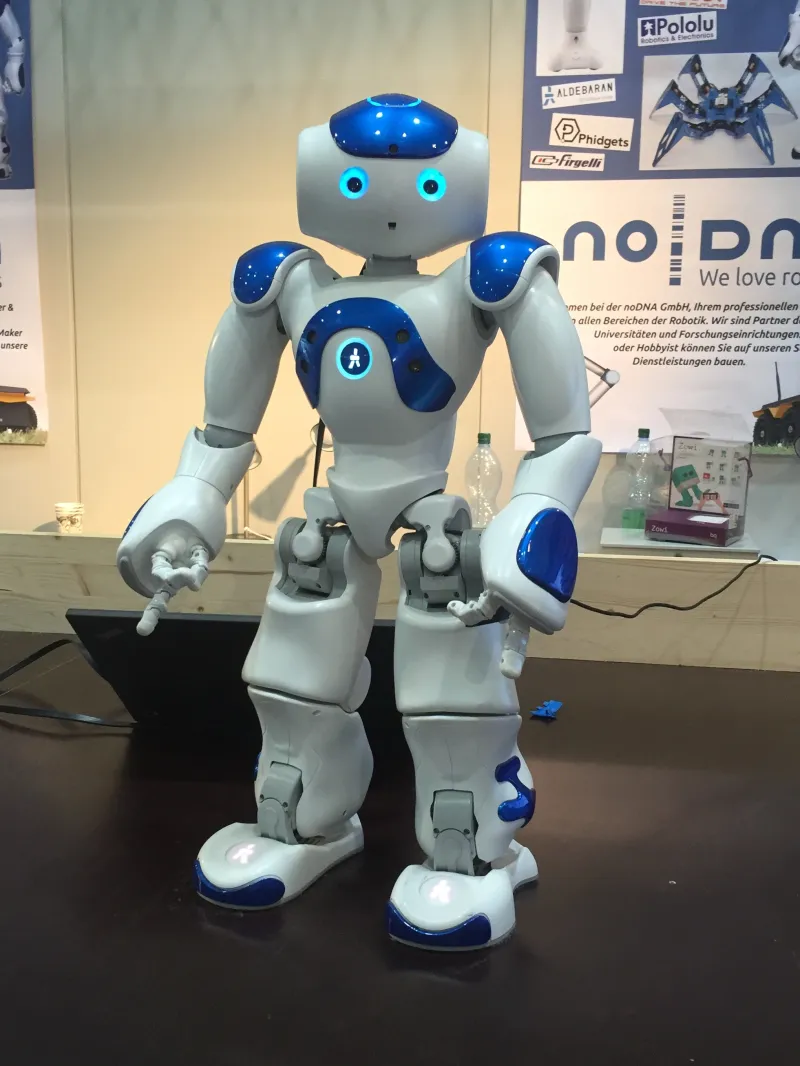
NAO6 is the older, broader education and research platform. Our database lists it at about $16,990 through distributor pricing, with a 58 cm, 5.6 kg humanoid body, 25 degrees of freedom, two HD cameras, four directional microphones, ultrasonic sensors, tactile sensors, an IMU, and Choregraphe/Python/ROS support. DCS's earlier Link & Robo for Growing service used NAO, and Maxtronics now describes NAO6 for education, research, healthcare, and elderly environments.
NAO6's strength is flexibility and a long deployment history. Its weakness for a home buyer is cost and operating burden. A robot with a full body, short runtime, software tools, and institutional support expectations is not a plug-and-play solution for one family.
Miko 3 sits in a different lane. It is an available consumer kid companion listed in ui44 at $299, often discounted, with an optional Miko Max subscription. It is 22 cm tall, weighs about 0.9 kg, and has a 4.46-inch display, wide-angle HD camera, dual microphones, time-of-flight range sensor, odometry, touch sensors, parent app, educational games, stories, and COPPA/kidSAFE+ certification claims. Miko Mini is smaller and cheaper, with a sale price around €112 in our database.
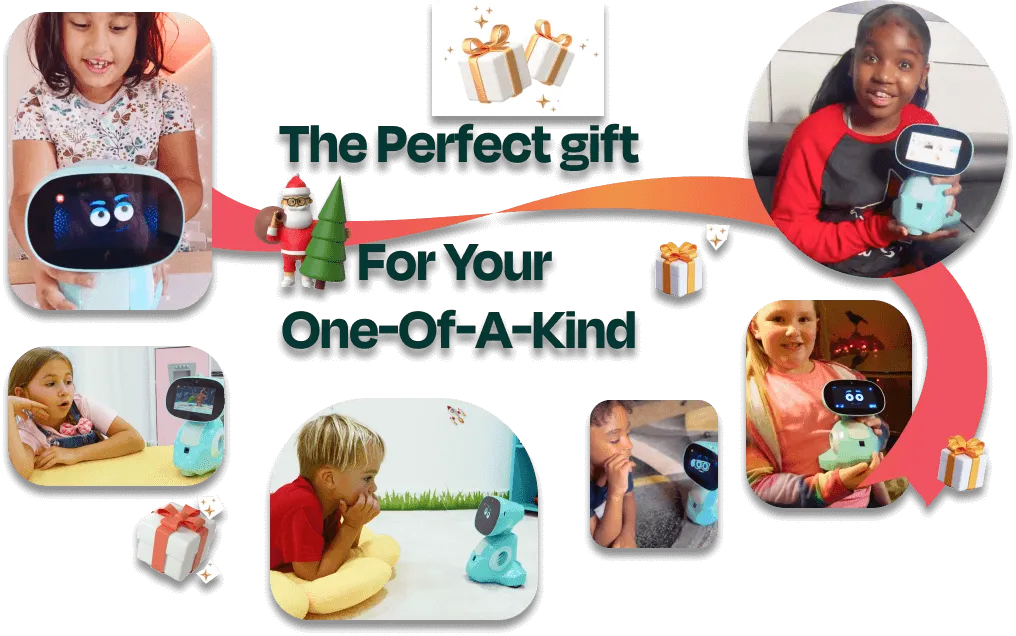
That makes Miko relevant for families comparing kid robots, but it should not be confused with a supervised social-skills intervention. The key buyer questions are privacy, parent controls, subscription boundaries, screen time, and whether the content fits the child's needs.
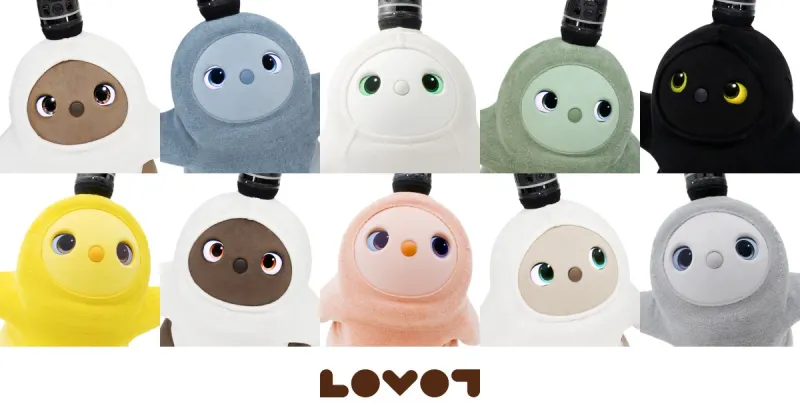
LOVOT and PARO show a third lane: companionship and emotional regulation. LOVOT is a Japan-focused companion robot priced at ¥577,500 plus a monthly care plan from ¥9,900, with a warm body, over 50 sensors, person recognition, touch response, and a deliberately pet-like design. PARO is a therapeutic baby-seal robot used in care settings, with tactile, light, audio, temperature, and posture sensors. These robots can be meaningful, but they are not the same as a lesson platform for greetings, quizzes, role-play, or classroom social-skills practice.
What should parents and schools check before trusting a social robot?
Start with the teaching workflow, not the robot.
1. Is there a defined practice goal? "Social skills" is too broad. Better goals are concrete: greeting a new person, taking turns, asking for help, answering a question, expressing a preference, practicing distance, or presenting through an avatar.
2. Who controls the session? The safest setup has an adult in the loop. DCS's project is school-led. QTrobot's education and therapy-support positioning also assumes a structured environment. If a consumer robot mainly encourages open AI conversation, ask how a parent or teacher can set limits and review what happened.
3. Can the content adapt to the child? DCS emphasizes customization by use scene and student characteristics. That matters. A child who enjoys quizzes may not enjoy avatar speech. A child who likes a tiny biped may find a larger humanoid too intense. Sensory load, voice, gestures, session length, and reward style all matter.
4. What data does it capture? Cameras and microphones are not automatically bad; they can support review and progress monitoring. But the school or family needs to know what is recorded, where it is stored, who can see it, how long it is retained, and whether identifiable voice or video data can be deleted.
5. What happens after novelty fades? A cute robot can get attention in week one. The harder test is month three. Does it still support a routine? Does it produce useful reports? Can adults create new scenarios quickly? Can the robot be repaired or replaced without losing the program?
6. Is the price aligned with the setting? A free school loan, a ¥109,780 education robot, a €10,900 QTrobot, a $16,990 NAO6, and a $299 Miko are not in the same budget universe. The right choice depends on whether the buyer is a school district, clinic, research lab, or family looking for a safer learning companion.
The buyer takeaway
Communication robots are most credible when they do less than the hype promises. The DCS pilot is interesting because it uses a small robot for a narrow, supervised purpose: conversation, quizzes, avatar speech, and social-skills practice inside special-support education.
That is a better model than pretending a robot can be a therapist, friend, teacher, and babysitter at once.
If you are evaluating this category, compare robots by role. Use QTrobot or NAO6 as institutional social-robot benchmarks. Use Miko 3 or Miko Mini as consumer kid-companion benchmarks. Use LOVOT or PARO as emotional companion benchmarks. Then use /compare and /categories to separate classroom practice, home learning, and companionship instead of lumping every cute talking robot together.
The best social-skills robot is not the one with the most human-like face. It is the one that helps a real adult create a safer, repeatable, measurable practice moment for a specific child.
Related in the database
Use this article as a privacy verification workflow
Turn the article into a privacy verification pass grounded in the robots, manufacturers, and components it actually references.
Communication Robots: Japan School Pilot already points you toward 6 linked robots, 5 manufacturers, and 4 countries inside the ui44 database. That matters because strong buyer guidance is easier to apply when you can move immediately from a claim or warning into concrete product pages, manufacturer directories, component explainers, and country-level context instead of treating the article as an isolated opinion piece. The fastest next step is to turn the article into a shortlist workflow: open the linked robot pages, verify which specs are actually published for those models, then compare the surrounding manufacturer and component context before you decide whether the underlying claim changes your buying plan.
For this topic, the useful discipline is to separate the editorial lesson from the catalog evidence. The article gives you the framing, but the robot pages tell you what each product actually ships with today: sensor stack, connectivity methods, listed price, release timing, category, and support-relevant compatibility notes. The manufacturer pages then show whether you are looking at a one-off launch, a broader lineup pattern, or a company that spans multiple categories. That layered workflow reduces the risk of buying on a single marketing phrase or a single support FAQ.
Use the robot pages to confirm which products actually expose cameras, microphones, Wi-Fi, or voice systems, then use the manufacturer pages to decide how much of the privacy question seems product-specific versus brand-wide. On this route cluster, QTrobot, NAO6, and Miko 3 form the fastest reality check. If you want a quick working shortlist, open Compare QTrobot, NAO6, and Miko 3 next, then keep this article open as the reasoning layer while you compare structured data side by side.
Practical Takeaway
Every robot, manufacturer, category, component, and country reference below resolves to a real ui44 page, keeping the follow-up path grounded in database records rather than generic advice.
Suggested next steps in ui44
- Open QTrobot and note the listed sensors, connectivity methods, and voice stack before you interpret any policy claim.
- Cross-check the wider brand context on LuxAI so you can see whether the privacy question touches one model or a broader lineup.
- Use the linked component pages to confirm how common the relevant sensors and connectivity layers are across the database.
- Keep a short note of which policy layers you checked, which device features are actually present on the robot page, and which items still depend on region- or app-level confirmation.
- Finish with Compare QTrobot, NAO6, and Miko 3 so the policy reading sits next to structured product data.
Robot profiles worth opening next
Use the linked product pages as the evidence layer
The linked robot pages are where this article becomes operational. Instead of asking whether the headline is interesting, use the robot entries to inspect the actual mix of sensors, connectivity options, batteries, pricing, release timing, and stated capabilities attached to the products mentioned in the article. That is the easiest way to see whether the warning or opportunity described here affects one product family, a specific design pattern, or an entire buying lane.
QTrobot is tracked on ui44 as a available research robot from LuxAI. The database currently records a listed price of €10,900, a release date of 2017, External power supply; optional battery/runtime not publicly disclosed battery life, N/A (external power supply; charging details not published) charging time, and a published stack that includes Intel RealSense depth camera (D455 in LuxAI docs), ReSpeaker microphone array, and Motor rotary encoder feedback (position, speed, overload, temperature) plus Wi-Fi and Ethernet.
For privacy-focused reading, this page matters because it shows the concrete device surface behind the policy discussion. Use it to verify whether QTrobot combines sensors and connectivity in a way that could change the in-home data footprint, and compare the listed capabilities such as Facial-expression based interaction, Upper-body gesture control, and Text-to-speech and audio playback with any cloud, app, or voice layers.
NAO6
Aldebaran / Maxtronics · Research · Active
NAO6 is tracked on ui44 as a active research robot from Aldebaran / Maxtronics. The database currently records a listed price of $16,990, a release date of 2018, 45 minutes to 2 hours battery life, ~2 hours charging time, and a published stack that includes 2 HD Cameras (forehead + mouth), 4 Directional Microphones, and 2 Ultrasonic Sensors plus Wi-Fi (802.11a/b/g/n) and Ethernet.
For privacy-focused reading, this page matters because it shows the concrete device surface behind the policy discussion. Use it to verify whether NAO6 combines sensors and connectivity in a way that could change the in-home data footprint, and compare the listed capabilities such as 25 Degrees of Freedom, Bipedal Walking, and Facial Recognition with any cloud, app, or voice layers, including Multilingual Text-to-Speech (2 speakers).
Miko 3 is tracked on ui44 as a available companions robot from Miko. The database currently records a listed price of €269, a release date of 2021, 5–7 hours active use, up to 12 hours standby battery life, ~4 hours (15W USB-C adapter) charging time, and a published stack that includes Time-of-Flight Range Sensor, Odometric Sensors, and Dual MEMS Microphones plus Wi-Fi and Bluetooth.
For privacy-focused reading, this page matters because it shows the concrete device surface behind the policy discussion. Use it to verify whether Miko 3 combines sensors and connectivity in a way that could change the in-home data footprint, and compare the listed capabilities such as AI-Powered Conversations, Face Recognition, and Voice Recognition with any cloud, app, or voice layers.
Miko Mini is tracked on ui44 as a available companions robot from Miko. The database currently records a listed price of €169, a release date of 2023-09-18, Up to 1 hour active gameplay; up to 15 hours standby on Miko's global comparison page (India FAQ lists up to 7 hours standby) battery life, ~90 minutes charging time, and a published stack that includes Microphone Array, Wide-Angle HD Camera, and Time-of-Flight Range Sensor plus Wi-Fi.
For privacy-focused reading, this page matters because it shows the concrete device surface behind the policy discussion. Use it to verify whether Miko Mini combines sensors and connectivity in a way that could change the in-home data footprint, and compare the listed capabilities such as Conversational Learning, Educational Games and Stories, and Music and Dance Activities with any cloud, app, or voice layers.
LOVOT is tracked on ui44 as a available companions robot from GROOVE X. The database currently records a listed price of ¥577,500, a release date of 2019, 30-45 minutes active, then returns to nest battery life, 15-30 minutes (on charging nest) charging time, and a published stack that includes Horn Top Camera (half-sphere), Horn Front Camera, and Depth Camera plus Wi-Fi and Bluetooth.
For privacy-focused reading, this page matters because it shows the concrete device surface behind the policy discussion. Use it to verify whether LOVOT combines sensors and connectivity in a way that could change the in-home data footprint, and compare the listed capabilities such as Emotional Companionship, Person Recognition, and Touch Response (full body sensors) with any cloud, app, or voice layers.
Manufacturer context behind the article
Check whether this is one product story or a broader company pattern
Manufacturer pages add the privacy context that individual product pages cannot show on their own. They help you check whether cameras, microphones, cloud accounts, app controls, and policy assumptions appear across a broader lineup or stay tied to one specific product story.
LuxAI
ui44 currently tracks 1 robot from LuxAI across 1 category. The company is grouped under Luxembourg, and the current catalog footprint on ui44 includes QTrobot.
That wider brand context matters because privacy questions rarely stop at one FAQ page. A manufacturer route helps you see whether the article is centered on one premium model or on a company that has several relevant products and therefore more than one place where the same policy or app assumptions might matter. The category mix here currently points toward Research as the most useful next route if you want to see whether this article reflects a wider pattern inside the brand.
Aldebaran / Maxtronics
ui44 currently tracks 1 robot from Aldebaran / Maxtronics across 1 category. The company is grouped under France, and the current catalog footprint on ui44 includes NAO6.
That wider brand context matters because privacy questions rarely stop at one FAQ page. A manufacturer route helps you see whether the article is centered on one premium model or on a company that has several relevant products and therefore more than one place where the same policy or app assumptions might matter. The category mix here currently points toward Research as the most useful next route if you want to see whether this article reflects a wider pattern inside the brand.
Miko
ui44 currently tracks 2 robots from Miko across 1 category. The company is grouped under India, and the current catalog footprint on ui44 includes Miko 3, Miko Mini.
That wider brand context matters because privacy questions rarely stop at one FAQ page. A manufacturer route helps you see whether the article is centered on one premium model or on a company that has several relevant products and therefore more than one place where the same policy or app assumptions might matter. The category mix here currently points toward Companions as the most useful next route if you want to see whether this article reflects a wider pattern inside the brand.
GROOVE X
ui44 currently tracks 1 robot from GROOVE X across 1 category. The company is grouped under Japan, and the current catalog footprint on ui44 includes LOVOT.
That wider brand context matters because privacy questions rarely stop at one FAQ page. A manufacturer route helps you see whether the article is centered on one premium model or on a company that has several relevant products and therefore more than one place where the same policy or app assumptions might matter. The category mix here currently points toward Companions as the most useful next route if you want to see whether this article reflects a wider pattern inside the brand.
Broaden the scan without leaving the database
Categories, components, and countries add the wider context
Category framing
Category pages are useful when the article touches a buying pattern that shows up across brands. A category route helps you confirm whether the linked products sit in a narrow niche or whether the same question should be tested across a larger field of alternatives.
Research
The Research category page currently groups 49 tracked robots from 39 manufacturers. ui44 describes this lane as: Academic and research robotics platforms pushing the boundaries of what machines can learn and do in the lab and beyond.
That makes the category route a practical follow-up when you want to check whether the products linked in this article are typical for the lane or whether they sit at one edge of the market. Useful starting examples currently include HRP-4C, HRP-5P, NAO6.
Companions
The Companions category page currently groups 53 tracked robots from 48 manufacturers. ui44 describes this lane as: Social robots, robot pets, and elderly-care companions designed for emotional connection and everyday support at home.
That makes the category route a practical follow-up when you want to check whether the products linked in this article are typical for the lane or whether they sit at one edge of the market. Useful starting examples currently include PARO, Abi, Next-Generation Companion Robot.
Country and ecosystem context
Country pages give extra context when support practices, launch sequencing, regulatory posture, or manufacturer mix matter. They are not a substitute for model-level verification, but they do help you see which ecosystems cluster together and which manufacturers sit in the same regional field when you broaden the search beyond the article headline.
Luxembourg
The Luxembourg route currently groups 1 tracked robots from 1 manufacturers in ui44. That gives you a useful regional lens when the article points toward support practices, launch sequencing, or brand clusters that may share similar ecosystem assumptions.
On the current route, manufacturers like LuxAI make the page a good way to broaden the scan without losing the regional context that often shapes availability, documentation style, and adjacent alternatives.
France
The France route currently groups 8 tracked robots from 7 manufacturers in ui44. That gives you a useful regional lens when the article points toward support practices, launch sequencing, or brand clusters that may share similar ecosystem assumptions.
On the current route, manufacturers like Pollen Robotics, Aldebaran / Maxtronics, Aldebaran Robotics make the page a good way to broaden the scan without losing the regional context that often shapes availability, documentation style, and adjacent alternatives.
India
The India route currently groups 6 tracked robots from 5 manufacturers in ui44. That gives you a useful regional lens when the article points toward support practices, launch sequencing, or brand clusters that may share similar ecosystem assumptions.
On the current route, manufacturers like Miko, Addverb Technologies, iHub Robotics make the page a good way to broaden the scan without losing the regional context that often shapes availability, documentation style, and adjacent alternatives.
Questions to answer before you move from reading to buying
A follow-up FAQ built from the entities already linked in this article
Frequently Asked Questions
Which page should I open first after reading “Communication Robots: Japan School Pilot”?
Start with QTrobot. That gives you a concrete product anchor for the article’s main claim. From there, branch into the manufacturer and component pages so you can tell whether the article is describing one specific model, a repeated brand pattern, or a wider technology issue that affects multiple shortlist options.
How do the manufacturer pages change the buying decision?
LuxAI help you zoom out from one article and one product. On ui44 they show lineup breadth, category spread, and the neighboring robots tied to the same company. That context is useful when you are deciding whether a risk belongs to a single model, whether it shows up across a brand’s portfolio, and whether you should keep looking at alternatives before committing.
When should I switch from reading to side-by-side comparison?
Move into Compare QTrobot, NAO6, and Miko 3 as soon as you understand the article’s main warning or promise. The article explains what to watch for, but the compare view is where you can check whether price, status, battery life, connectivity, sensors, and category fit still make the robot a good match for your own home and budget.
Where to go next in ui44
Keep the research chain inside the database
If you want to keep going, these follow-on pages give you the cleanest expansion path from article to research session. Open the comparison route first if you are deciding between products today. Open the manufacturer, category, and component routes if you still need to understand the broader pattern behind the claim.
Written by
ui44 Team
Published May 15, 2026
Share this article
Open a plain share link on X or Bluesky. No embeds, no widgets, no cookie baggage.