Why it matters
What it tends to unlock
Remote access, orchestration, and software maintenance, ecosystem fit across apps, fleets, and smart-home layers, and faster rollout of updates, telemetry, and support workflows.
Usb Camera And Hub Connections appears across 1 tracked robots, concentrated in Research. Use this page to understand why the signal matters, who relies on it most, and which live profiles deserve the first comparison click.
Tracked robots
1
Ready now
0
Manufacturers
1
Public prices
0
Why it matters
Remote access, orchestration, and software maintenance, ecosystem fit across apps, fleets, and smart-home layers, and faster rollout of updates, telemetry, and support workflows.
What to verify
Real protocol support, not just marketing labels, offline behavior, pairing friction, and network dependency, and whether the stack stays useful when the vendor service changes.
Coverage
The heaviest concentration is in Research (1). Top manufacturers include JSK Robotics Laboratory, The University of Tokyo (1).
Research brief
The useful questions here are how common Usb Camera And Hub Connections really is, which robot classes depend on it, and which live profiles are worth opening before you compare the whole stack.
Verified 30d
0
0 in the last 90 days
Top category
Research
1 tracked robots
Paired most often with
Can-usb Interfaces, Intel RealSense D435i RGB-D camera with onboard IMU (installed but not used in the reported study), and Intel Realsense D455 Rgb-d Camera
Decision brief
Where it helps most
What to validate
Evidence basis
Source pack
Use the structure first: which categories lean on Usb Camera And Hub Connections, which manufacturers repeat it, and what usually ships beside it.
Lead category
1 tracked robots currently anchor this label.
Most repeated manufacturer
1 tracked robots make this the clearest manufacturer-level signal on the route.
Most common adjacent signal
1 shared robots pair this component with Can-usb Interfaces.
| # | Name | Usage |
|---|---|---|
| 1 | Research | 1 robot |
| # | Name | Usage |
|---|---|---|
| 1 | JSK Robotics Laboratory, The University of Tokyo | 1 robot |
| # | Name | Shared robots |
|---|---|---|
| 1 | Can-usb Interfaces | 1 robot |
| 2 | Intel RealSense D435i RGB-D camera with onboard IMU (installed but not used in the reported study) | 1 robot |
| 3 | Intel Realsense D455 Rgb-d Camera | 1 robot |
| 4 | Joystick/operator input for reported experiments | 1 robot |
| 5 | Rgb-d Camera And IMU Data For Rtab-map SLAM | 1 robot |
| 6 | RTAB-Map SLAM with the D455 RGB-D camera, parallel wire-driven and wheeled-legged controllers, and an SMACH state machine for mode transitions; reported demos still include partial operator input rather than fully autonomous task execution. | 1 robot |
How to read the market
Category concentration tells you where the component is actually doing work, manufacturer repetition shows whether the signal is market-wide or vendor-specific, and pairings reveal which neighboring technologies usually ship alongside it.
The old card wall is replaced with a featured first-click strip and a dense inventory table so the route behaves like a serious directory.
Directory briefing
Open the clearest profiles first, then sweep the full inventory in a denser table. Featured cards are selected by readiness, image quality, and official source availability, so the first click is usually the most informative one.
Ready now
0
Public price
0
Official links
1
Featured now
1
How to scan this directory
Best first clicks
These robots score highest on readiness, public detail quality, and image clarity, making them the fastest way to understand how Usb Camera And Hub Connections shows up in practice.
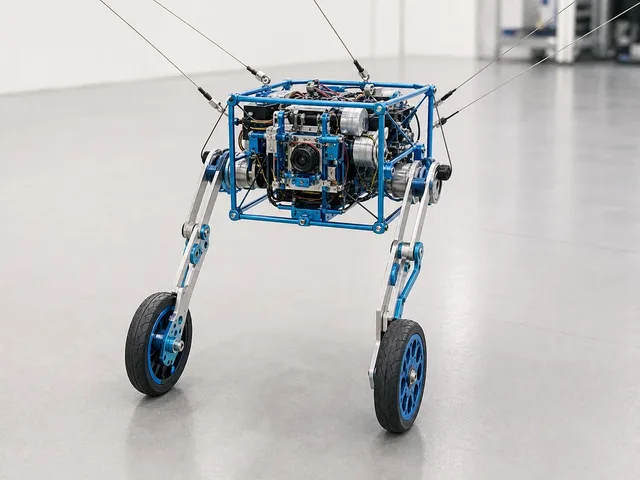
WiXus is a JSK Robotics Laboratory research robot from the University of Tokyo that fuses a two-wheeled-legged base with wire-driven environmental anchoring. The ICRA 2026 project page and paper describe a 180 mm cubic body, two 3-DOF wheeled legs, four environmental anchor wires, and a fifth tool wire, controlled by a Jetson Orin Nano with RGB-D cameras and RTAB-Map SLAM. Demonstrations include wheeled mapping, wire-assisted cliff climbing, a suspended rescue-style manipulation task that repurposes the legs as arms, and using loppers to harvest a mock apple. The paper notes the demonstrations include partial operator input, so WiXus should be treated as an early research prototype rather than a finished autonomous field robot. Best treated as an exploratory lead until field readiness improves.
Compact mobile scan: status, price, standout context, and links stay visible without sideways scrolling.
JSK Robotics Laboratory, The University of Tokyo · Research
Price
Price TBA
Standout
Payload · Not officially rated; demos include moving a stuffed dog and operating 650 mm loppers on a mock apple
Quick answers
The short version of what this label means in the ui44 catalog, where it matters, and how to compare it without over-reading the marketing copy.
Usb Camera And Hub Connections currently appears on 1 tracked robots across 1 manufacturers. That makes this route useful for both deep research and fast shortlist scanning, not just one-off editorial reading.
The strongest concentration is in Research (1). Category mix is the fastest clue for whether this component behaves like baseline plumbing or a more selective differentiator.
0 of the 1 tracked profiles are currently marked Available or Active. That means the label has live market relevance here, but you should still open the profiles with public pricing or official links first before treating it as a clean buyer signal.
Start with readiness, official source quality, and the standout spec column in the inventory table. On component routes, those three signals usually remove weak profiles faster than reading every descriptive paragraph.
The strongest shared-stack signals here are Can-usb Interfaces (1), Intel RealSense D435i RGB-D camera with onboard IMU (installed but not used in the reported study) (1), and Intel Realsense D455 Rgb-d Camera (1). Use those pairings to branch into adjacent component pages when one label is too narrow for the decision.
0 matching robots currently expose public pricing. That is enough to create directional context, but not enough to treat one price bracket as the whole market. Use the directory to find the transparent profiles first, then widen the sweep.
Start with JSK Robotics Laboratory, The University of Tokyo (1). Repetition across manufacturers is often the clearest signal that the component is part of a stable market pattern rather than a one-off marketing callout.
The original long-form component research is still here, but collapsed so the main route can prioritize hierarchy and scan speed.
The baseline explanation of what Usb Camera And Hub Connections is, why it matters, and how to think about it before comparing implementations.
Usb Camera And Hub Connections is a connectivity component found in 1 robot tracked in the ui44 Home Robot Database. As a connectivity technology, Usb Camera And Hub Connections plays a specific role in enabling robot perception, interaction, or operation depending on its implementation in each platform.
Component Type
Used By
1 robot
Manufacturer
Category
Connectivity components define how a robot communicates with other devices, networks, and cloud services. Connectivity determines whether a robot can receive software updates, stream data, integrate with smart home systems, and be remotely controlled.
In the ui44 database, Usb Camera And Hub Connections is categorized under Connectivity components. For a comprehensive explanation of all component types, consult the components glossary.
A robot's connectivity stack determines its ecosystem compatibility and long-term value. Limited connectivity can mean the robot operates in isolation, cannot be updated, or requires specific hub hardware.
Broad connectivity support means more smart home platform integrations
Enables over-the-air updates that improve the robot over time
Allows remote monitoring and control from anywhere
Used in 1 robot across 1 category — Research, indicating specialized use across the robotics industry.
Wireless connectivity uses radio frequencies to transmit data between the robot and other devices. The robot's firmware manages protocol switching and connection prioritization automatically.
Wi-Fi
High-bandwidth local network access for data-heavy tasks like video streaming
Bluetooth
Direct device-to-device pairing for initial setup and nearby peripherals
Zigbee / Z-Wave
Low-power mesh networking for IoT device coordination
Cellular (4G/5G)
Operation beyond home Wi-Fi range for outdoor or commercial robots
Usb Camera And Hub Connections Integration
Implementation varies by robot platform and manufacturer. Each robot integrates Usb Camera And Hub Connections differently depending on system architecture, use case, and target tasks. Integration with other onboard connectivity modules and the main processing unit determines real-world performance.
Deeper technical framing, matched technology profiles, and the longer use-case treatment for Usb Camera And Hub Connections.
In-depth technical analysis of 1 technology domain relevant to this component
While the sections above cover general connectivity principles, this analysis focuses on the particular technology domains relevant to Usb Camera And Hub Connections based on its implementation characteristics.
USB ports on robots provide versatile wired connectivity for peripherals, debugging, firmware updates, and expansion modules. USB 2.0 ports (480 Mbps) handle standard peripherals like keyboards, mice, and storage devices. USB 3.0 and later (5-20 Gbps) support high-bandwidth peripherals including external cameras, 3D sensors, and FPGA accelerator boards commonly used in research robotics. USB-C has become the standard physical connector, offering reversible insertion, higher power delivery, and support for alternate modes including DisplayPort video output.
In consumer robots, USB ports are typically used for diagnostics and development rather than daily operation. Manufacturer service technicians connect via USB for firmware recovery, log extraction, and hardware diagnostics. Research-oriented robots expose USB ports for adding custom sensors, external computing, or recording devices. Some robots use USB connections at their charging dock for higher-bandwidth data transfer than what Wi-Fi provides during the charging period.
Serial interfaces (UART, SPI, I2C) are internal communication buses that connect the robot's main processor to its sensor modules, motor controllers, battery management system, and other subsystems. While end users rarely interact with these directly, they are fundamental to the robot's architecture. The choice of internal communication protocols affects system latency, expandability, and the ability to add or replace components. Robots designed for research or developer communities often expose these internal buses through expansion connectors, enabling hardware-level customization that is not possible on sealed consumer products.
In the ui44 database, Usb Camera And Hub Connections is currently tracked exclusively in the WiXus by JSK Robotics Laboratory, The University of Tokyo. This research robot integrates Usb Camera And Hub Connections as part of a total technology stack comprising 9 components: 4 sensors, 4 connectivity modules, and a RTAB-Map SLAM with the D455 RGB-D camera, parallel wire-driven and wheeled-legged controllers, and an SMACH state machine for mode transitions; reported demos still include partial operator input rather than fully autonomous task execution. AI platform.
WiXus is a JSK Robotics Laboratory research robot from the University of Tokyo that fuses a two-wheeled-legged base with wire-driven environmental anchoring. The ICRA 2026 project page and paper describe a 180 mm cubic body, two 3-DOF wheeled legs, four environmental anchor wires, and a fifth tool wire, controlled by a Jetson Orin Nano with RGB-D cameras and RTAB-Map SLAM. Demonstrations include w…
Visit the full WiXus specification page for complete technical details and availability information.
Usb Camera And Hub Connections works alongside 3 other connectivity components in the WiXus: CAN-USB interfaces, Wireless emergency stop, Joystick/operator input for reported experiments. This combination of connectivity technologies creates the WiXus's overall connectivity capabilities, with each component contributing different aspects of network communication.
Beyond the high-level overview, understanding the technical foundations of connectivity technologies like Usb Camera And Hub Connections helps buyers and researchers evaluate implementations more critically.
Wireless connectivity relies on electromagnetic radiation at specific frequency bands regulated by international standards bodies.
For robotics, latency is often more critical than raw bandwidth.
Robot connectivity has evolved from simple serial cables to sophisticated multi-protocol wireless systems.
Early robots: basic infrared remote control or proprietary radio links
Standardized protocols (Wi-Fi, Bluetooth) dramatically improved interoperability
IoT-specific protocols (Zigbee, Z-Wave, Thread) enabled efficient smart home integration
Matter standard (2022): unifying smart home communication under a single application layer
Wireless connectivity faces inherent challenges in home environments.
Key application domains for connectivity technologies like Usb Camera And Hub Connections.
Connectivity allows robots to communicate with other smart home devices — thermostats, lights, locks, cameras, and appliances. A well-connected robot can serve as a mobile hub or coordinator for your smart home, executing routines that involve multiple devices across different rooms.
Wi-Fi and cellular connectivity enable users to monitor and control their robot remotely via smartphone apps. This is particularly valuable for security robots, pet-monitoring robots, and home assistants, allowing owners to check in, receive alerts, and issue commands from anywhere.
Network connectivity is essential for receiving firmware and software updates that improve the robot's capabilities, fix bugs, and patch security vulnerabilities. Robots without reliable connectivity may become outdated quickly and miss important safety updates.
Some robots offload computationally intensive AI tasks to cloud servers via network connections. This allows smaller, more affordable robots to access powerful AI capabilities like advanced natural language processing, image recognition, and complex decision-making that would be impossible with on-device hardware alone.
In commercial and industrial settings, connectivity allows multiple robots to coordinate their activities, share maps, divide tasks, and avoid interfering with each other. This fleet management capability requires reliable, low-latency communication between robots and a central coordination system.
Visit each robot's detail page to see which capabilities are available on specific models.
Manufacturer mix, specs context, price context, category overlap, and adjacent components worth branching into next.
Usb Camera And Hub Connections spans 1 robot category — from consumer to research platforms.
Technologies most often paired with Usb Camera And Hub Connections across 1 robot.
Browse the full components directory or see the components glossary for detailed explanations of each technology.
423 other connectivity technologies tracked in ui44, ranked by adoption.
124 robots
70 robots
38 robots
37 robots
22 robots
19 robots
10 robots
8 robots
Browse all Connectivity components or use the robot comparison tool to evaluate how different connectivity configurations perform across specific robot models.
Robot connectivity is evolving rapidly as the smart home ecosystem matures and new wireless standards emerge. Supporting the right mix of protocols is a strategic decision for manufacturers.
Wi-Fi 6/7 adoption
Better performance in dense device environments typical of modern smart homes with dozens of connected devices
Matter protocol
Unified smart home standard backed by Apple, Google, Amazon, and Samsung — simplifying cross-platform integration
5G expansion
Opening new possibilities for outdoor robots, delivery platforms, and commercial service robots beyond home Wi-Fi
Industry Adoption Snapshot
Usb Camera And Hub Connections is adopted by 1 robot from 1 manufacturer in the ui44 database, providing a data-driven view of real-world deployment patterns.
Platform compatibility, voice integration, and AI capabilities across robots with Usb Camera And Hub Connections.
The long-form buyer, maintenance, and troubleshooting material kept available without forcing it into the main scan path.
If Usb Camera And Hub Connections is an important factor in your robot selection, here are key considerations to guide your decision.
Wi-Fi version
Dual-band (2.4/5 GHz) is preferred for reliability in congested environments
Smart home integration
Does it work with your existing ecosystem (Alexa, Google Home, HomeKit)?
Range & reliability
Important for large homes, multi-floor coverage, or outdoor robots
Data privacy
Does the robot require cloud connectivity to function, or can it operate locally?
Currently, none of the robots with Usb Camera And Hub Connections are listed as directly available for purchase. They are in prototype status. Monitor the individual robot pages for updates.
A component is only as good as its integration. Check how the manufacturer has incorporated Usb Camera And Hub Connections into the overall robot design and software stack.
Review what other connectivity technologies are paired with Usb Camera And Hub Connections in each robot — see the related components section.
Make sure the robot's category matches your use case. Usb Camera And Hub Connections serves different roles in different robot types.
Consider the manufacturer's reputation for software updates, support, and component reliability.
Compare Before You Buy
Use the ui44 comparison tool to evaluate robots with Usb Camera And Hub Connections side by side.
Connectivity components are generally among the most reliable parts of a robot, as they consist entirely of solid-state electronics with no moving parts. However, the evolving nature of wireless standards and smart home ecosystems means that connectivity capabilities can become outdated even while the hardware continues to function perfectly.
Wireless radio hardware (Wi-Fi, Bluetooth, Zigbee modules) is extremely durable under normal operating conditions. These components typically outlast the useful life of the robot itself.
Connectivity components require minimal physical maintenance. The primary ongoing concern is software-level maintenance: keeping firmware updated, managing Wi-Fi network changes (new router, changed password), and maintaining compatibility with evolving smart home platforms.
Connectivity is an area where future-proofing requires particular attention. Wireless standards evolve: Wi-Fi 6E and Wi-Fi 7 offer significant improvements over older standards, and a robot purchased with Wi-Fi 5 may not benefit from a new router upgrade.
For the 1 robot in the ui44 database using Usb Camera And Hub Connections, we recommend checking the individual robot pages for manufacturer-specific maintenance guidance and support documentation. Each manufacturer has different support policies, update frequencies, and warranty terms that affect the long-term ownership experience of their connectivity technologies.
Connectivity issues can make even the most capable robot frustrating to use. Wi-Fi drops, Bluetooth pairing failures, and smart home integration problems are among the most commonly reported issues. The good news is that most connectivity problems stem from network configuration rather than robot hardware, making them resolvable without manufacturer support.
Likely Causes
Resolution
Likely Causes
Resolution
Likely Causes
Resolution
For model-specific troubleshooting, visit the individual robot pages for the 1 robot using Usb Camera And Hub Connections. Each manufacturer provides model-specific support resources and diagnostic tools for their connectivity implementations.
What to do next
This page should hand you off to the next useful comparison step, not strand you at the bottom of a long detail route.
Widen the layer
Open the full connectivity workbench when Usb Camera And Hub Connections is only one part of the decision and you need the broader market map.
Side-by-side check
Move from label-level research into direct robot comparison once you know which profiles are documented well enough to trust.
Adjacent signal
This is the most common neighboring component on robots that already use Usb Camera And Hub Connections, so it is the fastest next branch if you need stack context.
