A phone can sit on a nightstand. A robot vacuum can disappear under a sofa. A humanoid robot is different: it is tall, heavy, battery powered, full of moving joints, and likely to spend most of its life waiting for the next task. The parking spot you choose affects daily convenience, charging habits, fall risk, joint wear, cable strain, privacy, and whether the robot becomes a useful appliance or an expensive obstacle.
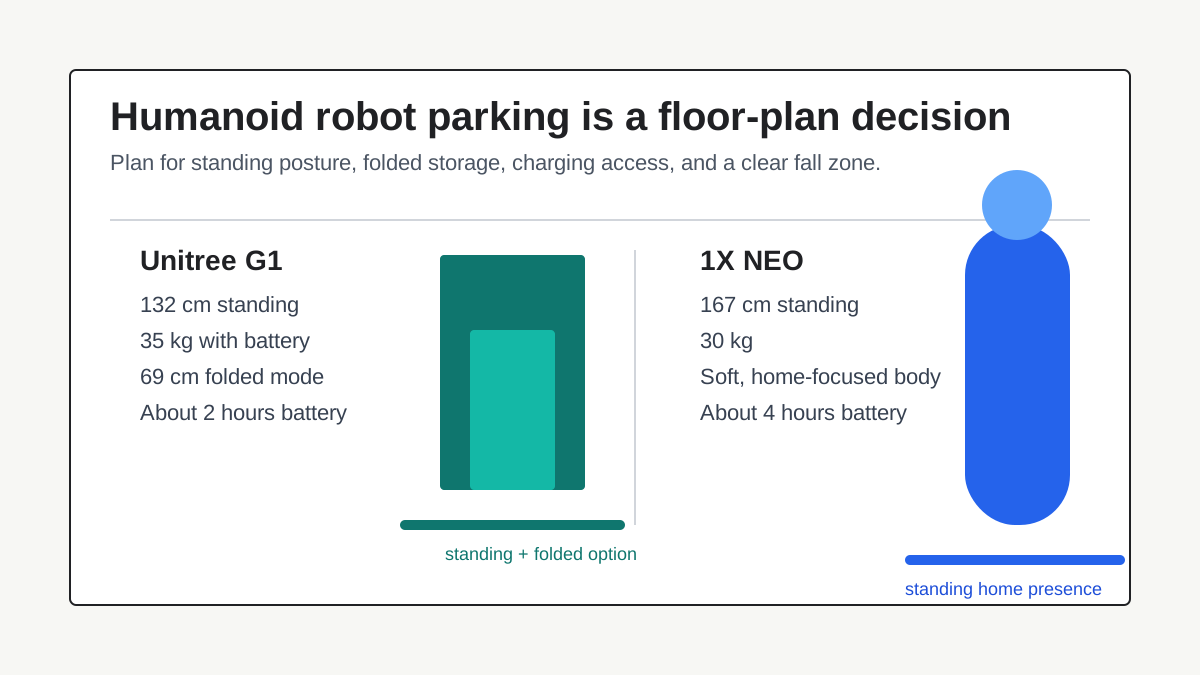
This matters because early home humanoids are no longer just fictional category markers. The 1X NEO is listed in the ui44 database as a 167 cm, 30 kg, home-focused humanoid with about 4 hours of battery life and a soft body designed for human coexistence. The Unitree G1 is a smaller 132 cm, 35 kg humanoid research platform with a listed folded mode, about 2 hours of battery life, and pricing that starts at $13,500 before tax, shipping, duties, and configuration choices.
The buying question is not only "What can it do?" A better first question is: "Can my home safely absorb this machine when it is idle?"
Where Should A Home Humanoid Robot Park?
A home humanoid robot needs a place to return to that is more deliberate than "near an outlet." For buyer planning, think of parking as a system with four pieces:
Parking factor
Standing footprint
- Why it matters
- Humanoids occupy human-height space, not just floor area
- Buyer question
- Can the robot stand without blocking a door, cabinet, stair, or narrow hallway?
Parking factor
Resting posture
- Why it matters
- Joints, cables, tendons, and actuators may not like every idle position equally
- Buyer question
- Does the manufacturer define a folded, seated, docked, or powered-down posture?
Parking factor
Charging access
- Why it matters
- Charging cable placement affects trip hazards and connector strain
- Buyer question
- Can the robot charge without a cable across a walking path?
Parking factor
Fall zone
- Why it matters
- A 30-35 kg machine falling sideways is a real household event
- Buyer question
- What would it hit if balance, power, or teleoperation failed?
| Parking factor | Why it matters | Buyer question |
|---|---|---|
| Standing footprint | Humanoids occupy human-height space, not just floor area | Can the robot stand without blocking a door, cabinet, stair, or narrow hallway? |
| Resting posture | Joints, cables, tendons, and actuators may not like every idle position equally | Does the manufacturer define a folded, seated, docked, or powered-down posture? |
| Charging access | Charging cable placement affects trip hazards and connector strain | Can the robot charge without a cable across a walking path? |
| Fall zone | A 30-35 kg machine falling sideways is a real household event | What would it hit if balance, power, or teleoperation failed? |
Robot vacuums made docking feel automatic because the dock is small, floor-level, and already part of the category. Home humanoids are still too early for that assumption. Some models may eventually ship with standing docks, wall anchors, service cradles, or furniture-like charging stations. Until that is standard, buyers should treat parking as a requirement to verify, not a detail to solve after delivery.
Compare The Two Parking Profiles
The Unitree G1 and 1X NEO show how different the same "humanoid" label can be once the robot is inside a home.
The G1 is the more compact robot in standing height: 132 cm and 35 kg with battery, according to the ui44 database. Its most important storage clue is not just height, though. The G1 entry lists "Foldable Design (69cm folded)" as a capability. That one line changes the storage conversation. A robot that can fold into a defined, compact posture may be easier to park in an office corner, workshop, utility room, or transport case than a robot that expects to remain upright.
NEO is different. It is taller at 167 cm, lighter at 30 kg, and explicitly home-focused. Its database entry emphasizes a soft, lightweight body, household chores, safe human interaction, adaptive learning, and gentle manipulation. That framing suggests a robot meant to share living space rather than disappear between sessions. But a taller robot still needs a place to stand where it is not in the way.
The practical comparison looks like this:
Robot
- ui44 status
- Available
- Height
- 132 cm standing
- Weight
- 35 kg with battery
- Battery life
- About 2 hours
- Storage signal
- Foldable design listed at 69 cm folded
Robot
- ui44 status
- Pre-order
- Height
- 167 cm
- Weight
- 30 kg
- Battery life
- About 4 hours
- Storage signal
- Home-focused soft body, no disclosed charging time in ui44 data
| Robot | ui44 status | Height | Weight | Battery life | Storage signal |
|---|---|---|---|---|---|
| Unitree G1 | Available | 132 cm standing | 35 kg with battery | About 2 hours | Foldable design listed at 69 cm folded |
| 1X NEO | Pre-order | 167 cm | 30 kg | About 4 hours | Home-focused soft body, no disclosed charging time in ui44 data |
Neither profile is automatically better. A compact research robot may still be the wrong home robot if it lacks consumer-grade support, safe household software, or clear storage instructions. A taller home-focused robot may be easier to live with if it is designed to pause, charge, and wait near people. The key is to compare the whole idle-life pattern, not just the sales video.
Ask Whether It Stands, Folds, Sits, Or Docks
Every home humanoid listing should answer one question clearly: what is the approved resting posture?
For a buyer, "resting posture" means the position the manufacturer expects the robot to hold when it is not working. That may be standing under balance control, folded down, seated, locked in a dock, powered off in a support frame, or stored in a transport configuration. The answer matters because a humanoid robot contains actuators, bearings, wiring, batteries, sensors, covers, hands, and sometimes soft external materials. A pose that looks harmless in a video may not be the safest long-term parking mode.
Look for these details before placing an order:
What to verify
Official idle pose
- Why it matters
- Prevents guessing about joint load, cable routing, and startup behavior
What to verify
Power-off stability
- Why it matters
- Tells you whether the robot can safely stand without active balancing
What to verify
Folded or seated dimensions
- Why it matters
- Determines whether the robot fits a closet, cabinet, utility space, or vehicle
What to verify
Manual handling points
- Why it matters
- Reduces risk of lifting by a limb, cover, sensor bar, or hand assembly
What to verify
Transport mode
- Why it matters
- Useful for stairs, service visits, moving house, or long storage
| What to verify | Why it matters |
|---|---|
| Official idle pose | Prevents guessing about joint load, cable routing, and startup behavior |
| Power-off stability | Tells you whether the robot can safely stand without active balancing |
| Folded or seated dimensions | Determines whether the robot fits a closet, cabinet, utility space, or vehicle |
| Manual handling points | Reduces risk of lifting by a limb, cover, sensor bar, or hand assembly |
| Transport mode | Useful for stairs, service visits, moving house, or long storage |
The G1's listed folded design gives buyers a concrete item to investigate further: what exact folded footprint, clearance, and support conditions does Unitree recommend? NEO's home-oriented design raises a different set of questions: where does 1X expect it to wait between chores, and does the charging setup fit ordinary apartments and houses?
Do not infer the answer from humanoid marketing footage. Walking, waving, and object handling are active behaviors. Parking is a low-glamour reliability behavior. It deserves its own checklist.
Charging Is A Layout Problem
Battery life changes how often the robot returns to its parking zone.
The Unitree G1 is listed with about 2 hours of battery life. The 1X NEO is listed with about 4 hours. Neither ui44 entry lists charging time. That missing field is important. A buyer should ask not only how long the robot runs, but how long the robot occupies its parking spot while recovering.
For a home, the charging spot should meet five conditions:
Requirement
Dedicated outlet
- What good looks like
- The robot does not compete with a vacuum, heater, router, or laptop charger
Requirement
No walkway cable
- What good looks like
- The cable does not cross a hallway, doorway, kitchen path, or stair approach
Requirement
Connector slack
- What good looks like
- The robot can move slightly without loading the plug or charging port
Requirement
Ventilation
- What good looks like
- The battery area is not boxed into a hot, dusty, or fabric-covered corner
Requirement
Recovery room
- What good looks like
- A human can reach the robot to restart, inspect, or unplug it
| Requirement | What good looks like |
|---|---|
| Dedicated outlet | The robot does not compete with a vacuum, heater, router, or laptop charger |
| No walkway cable | The cable does not cross a hallway, doorway, kitchen path, or stair approach |
| Connector slack | The robot can move slightly without loading the plug or charging port |
| Ventilation | The battery area is not boxed into a hot, dusty, or fabric-covered corner |
| Recovery room | A human can reach the robot to restart, inspect, or unplug it |
This is where a home humanoid differs from a tablet or speaker. A 30 kg to 35 kg robot cannot be casually lifted out of the way every morning. If it needs frequent charging, the charger belongs in a place that can tolerate the robot being present for hours.

Apartment buyers should be especially strict here. A humanoid parked beside the only entry path, kitchen path, or bedroom door will become annoying quickly, even if the robot itself is impressive. If the robot needs to be unplugged and repositioned by hand, the daily friction is part of the real cost.
Treat Fall Risk As A Normal Buyer Topic
It is tempting to talk about humanoid fall risk as if it only matters in factories or labs. At home, it may matter more because the environment is less controlled.
A 35 kg Unitree G1 weighs roughly as much as a large checked suitcase, but it is taller, jointed, and powered. A 30 kg 1X NEO is lighter, but still not a harmless object if it tips near a glass table, pet bowl, stair landing, child gate, or sleeping area. A soft exterior can reduce some contact concerns, but it does not remove basic mass, height, and balance questions.
Before buying, map the parking zone as if the robot could lose power or be bumped:
Zone check
Side fall area
- Avoid
- Glass doors, mirrors, low windows, fish tanks, TV stands
Zone check
Forward/backward fall area
- Avoid
- Stairs, fireplace edges, sharp coffee tables, floor lamps
Zone check
Startup path
- Avoid
- Loose rugs, toys, cables, thresholds, pet beds
Zone check
Human path
- Avoid
- Door swings, narrow hallways, night-time walking routes
| Zone check | Avoid |
|---|---|
| Side fall area | Glass doors, mirrors, low windows, fish tanks, TV stands |
| Forward/backward fall area | Stairs, fireplace edges, sharp coffee tables, floor lamps |
| Startup path | Loose rugs, toys, cables, thresholds, pet beds |
| Human path | Door swings, narrow hallways, night-time walking routes |
If the manufacturer supplies a dock or support stand, ask whether it physically stabilizes the robot or only charges it. A charging point is not automatically a safety fixture.
Maintenance Starts With The Idle State
Maintenance advice for home robots usually focuses on brushes, filters, and consumables because robot vacuums dominate the market. Humanoids shift the maintenance focus toward batteries, joints, sensors, hands, covers, and software state.
Parking habits can influence all of those. A robot left in a poor pose may stress a joint or tendon route. A cable pulled tight may damage a connector. A dusty corner may obscure cameras or depth sensors. A spot beside a sunny window may heat the battery area. A hallway parking place may invite bumps from people, pets, chairs, or bags.
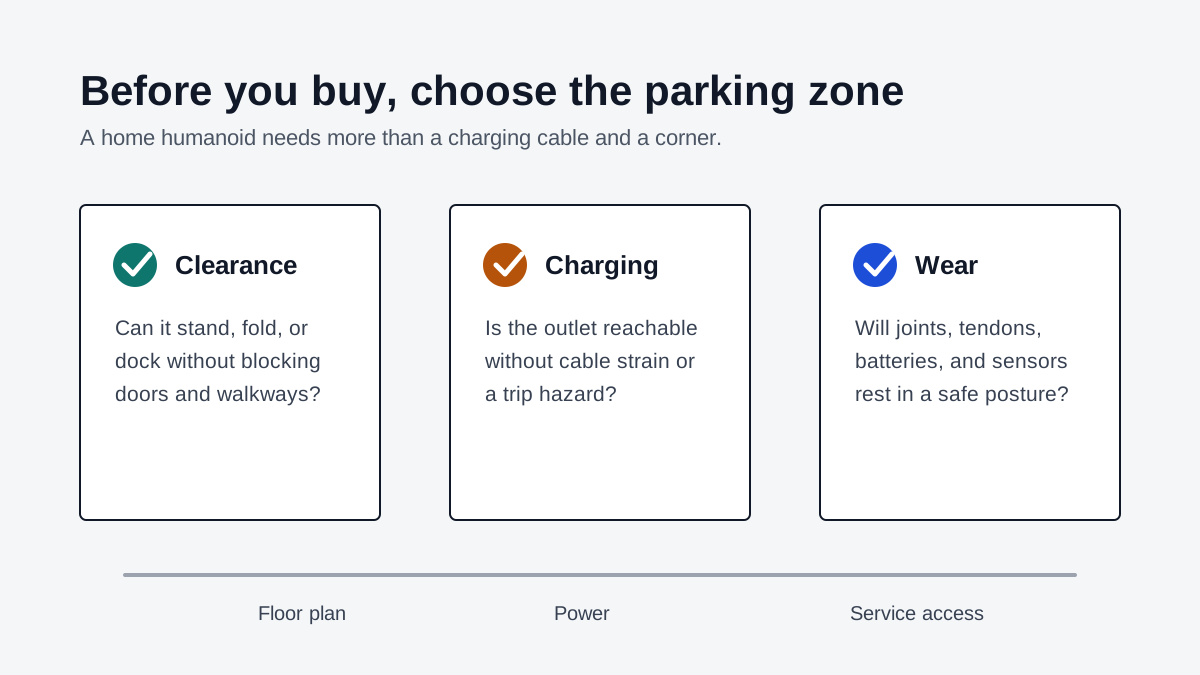
For early buyers, the useful maintenance questions are simple:
Question
What should the robot do before shutdown?
- Why it matters
- Some robots may need a posture, brake, or software state before power-off
Question
Which joints are load-bearing at rest?
- Why it matters
- Helps identify whether long standing idle time is expected or risky
Question
How should the battery be stored?
- Why it matters
- Battery habits affect lifespan, warranty coverage, and safety
Question
How are cameras and depth sensors protected?
- Why it matters
- Idle placement can scratch, block, or contaminate perception hardware
Question
Can the robot be serviced in place?
- Why it matters
- A cramped parking area can make basic inspection harder
| Question | Why it matters |
|---|---|
| What should the robot do before shutdown? | Some robots may need a posture, brake, or software state before power-off |
| Which joints are load-bearing at rest? | Helps identify whether long standing idle time is expected or risky |
| How should the battery be stored? | Battery habits affect lifespan, warranty coverage, and safety |
| How are cameras and depth sensors protected? | Idle placement can scratch, block, or contaminate perception hardware |
| Can the robot be serviced in place? | A cramped parking area can make basic inspection harder |
This is also where warranty language matters. If a manual says to use a specific storage mode, support frame, battery procedure, or environmental range, treat that as part of ownership. Do not assume the robot will tolerate being parked like furniture unless the manufacturer says so.
The Best Parking Places In Real Homes
The right location depends on the home, but some options are clearly better than others.
A utility room is often the best candidate if it has enough clearance, a dedicated outlet, ventilation, and no stair exposure. A home office can work for a smaller humanoid if the robot is part of research, teleoperation, or software development and the room can be closed off. A garage is tempting, but only if temperature, dust, moisture, and security are acceptable for the robot's battery and sensors. A living room can make sense for a companion-like or chore-focused robot, but only if the parking spot does not dominate the room or create a trip hazard.
Avoid placing a humanoid robot at the top of stairs, beside fragile furniture, across an emergency exit path, or in a narrow hallway. Also avoid hiding it so deeply that you cannot inspect it, reach the power connector, or move it without lifting awkwardly.
Here is a practical scoring method before you buy:
Score
0
- Parking readiness
- No dedicated spot; robot would float between rooms
Score
1
- Parking readiness
- Outlet exists, but walkway, fall, or clearance problems remain
Score
2
- Parking readiness
- Dedicated space exists, but charging or service access is awkward
Score
3
- Parking readiness
- Clear space, safe outlet, reachable robot, and acceptable fall zone
Score
4
- Parking readiness
- Manufacturer-approved dock or support location with service access
| Score | Parking readiness |
|---|---|
| 0 | No dedicated spot; robot would float between rooms |
| 1 | Outlet exists, but walkway, fall, or clearance problems remain |
| 2 | Dedicated space exists, but charging or service access is awkward |
| 3 | Clear space, safe outlet, reachable robot, and acceptable fall zone |
| 4 | Manufacturer-approved dock or support location with service access |
If your home scores below 3, the robot may still be interesting, but the ownership plan is incomplete.
What To Ask Before Paying A Deposit
Deposits and preorders make storage questions easy to postpone. Resist that. Ask the vendor or reseller direct questions before committing:
Buyer question
What are the official storage dimensions in every supported mode?
- Good answer
- Standing, folded, seated, docked, and transport dimensions are documented
Buyer question
Can it safely remain standing when powered off?
- Good answer
- The answer is explicit, with limits and warnings
Buyer question
What charging hardware is included?
- Good answer
- Cable length, dock dimensions, input power, and placement rules are disclosed
Buyer question
What battery storage procedure is recommended for weeks away?
- Good answer
- The manual gives a charge level, temperature range, and check interval
Buyer question
How should the robot be moved by one adult?
- Good answer
- Lift points, rolling method, cart, or two-person handling instructions are defined
Buyer question
What happens after a fall or emergency stop?
- Good answer
- Inspection and restart steps are documented
Buyer question
Does warranty coverage depend on storage or charging compliance?
- Good answer
- The vendor can point to written terms
| Buyer question | Good answer |
|---|---|
| What are the official storage dimensions in every supported mode? | Standing, folded, seated, docked, and transport dimensions are documented |
| Can it safely remain standing when powered off? | The answer is explicit, with limits and warnings |
| What charging hardware is included? | Cable length, dock dimensions, input power, and placement rules are disclosed |
| What battery storage procedure is recommended for weeks away? | The manual gives a charge level, temperature range, and check interval |
| How should the robot be moved by one adult? | Lift points, rolling method, cart, or two-person handling instructions are defined |
| What happens after a fall or emergency stop? | Inspection and restart steps are documented |
| Does warranty coverage depend on storage or charging compliance? | The vendor can point to written terms |
For the Unitree G1, the buyer should also ask how the folded 69 cm mode is intended to be used, whether it is for storage, transport, startup, or only a temporary pose. For 1X NEO, the buyer should ask how the home charging setup works in ordinary living spaces and how the robot parks between tasks.
A Shortlist For Comparing Home Humanoids
When comparing robots in the ui44 robot database or using the comparison tool, add an idle-life pass to the usual price and capability comparison.
Use this sequence:
- Confirm height, weight, battery life, and charging time.
- Look for a documented dock, folded mode, seated mode, or storage mode.
- Check whether the robot can be moved by one adult without special tools.
- Decide where it charges without creating a cable hazard.
- Map a fall zone and remove fragile objects from it.
- Ask what maintenance is required after long idle periods.
- Read warranty language for battery, joint, and storage exclusions.
The result may change which robot looks best. A lower-priced robot with unclear home storage may cost more in friction than a higher-priced robot with a safer dock. A taller robot may be fine if it is specifically designed to wait in a living space. A compact robot may still be awkward if its charging setup belongs in a lab.
Bottom Line
Home humanoid robots will not be judged only by their best task demo. They will be judged by the boring hours: charging, waiting, rebooting, being moved, sitting unused during vacations, and staying out of the way when people are tired.
That is why parking deserves to be part of the purchase decision. Before buying a Unitree G1, 1X NEO, or any other home humanoid, choose the physical spot first. Measure it. Check the outlet. Think about the fall zone. Ask for the official idle posture. If the answer is vague, treat that as meaningful buyer data.
A home robot that has nowhere safe to rest is not really ready for the home yet.
Related in the database
Use this article as a setup-friction workflow
Turn the article into a first-day setup pass grounded in the robots, manufacturers, and countries it actually references.
Where Should a Home Humanoid Robot Park? already points you toward 2 linked robots, 2 manufacturers, and 2 countries inside the ui44 database. Treat those links as a first-day setup trail: open the robot pages, check what is actually published about charging, battery life, control method, app or OTA support, and recovery, then use the surrounding manufacturer and country context to judge whether the article describes a low-friction product path or a still-specialist deployment.
For setup topics, the useful discipline is to separate a polished demo from the work required after the box arrives. The article gives you the narrative, but the robot pages show the operational clues: dimensions, weight, battery runtime, charging time, controller support, listed availability, and the capabilities that might need supervision. Manufacturer pages then reveal whether the same setup assumptions repeat across a wider lineup.
Use the robot pages to verify what happens between delivery and the first useful task: size, weight, battery, charger or dock path, controller, app, OTA support, and recovery cues. On this route cluster, G1 and NEO form the fastest setup-friction reality check. If you want a quick working shortlist, open Compare G1 and NEO next, then keep this article open while you compare first-day setup evidence side by side.
Practical Takeaway
The links below stay tied to the robots, manufacturers, and countries actually referenced by this setup article, so the checklist remains grounded in published ui44 records rather than generic humanoid advice.
Suggested next steps in ui44
- Open G1 and check the concrete first-day fields: box contents, charger or dock path, battery life, controller, app, OTA support, and recovery options.
- Use Unitree to see whether the company’s broader lineup looks appliance-like, developer-first, or still closer to a pilot deployment.
- Run Compare G1 and NEO with the article open and compare battery, size, weight, price path, status, and support cues side by side.
- Write down the first realistic task each robot can plausibly attempt on day one, then separate low-friction setup signals from impressive but still lab-style demos.
Robot profiles worth opening next
Use the linked product pages as the evidence layer
The linked robot pages are where this setup article becomes operational. Use the robot entries to inspect the actual mix of size, weight, battery runtime, charging path, control method, pricing, availability, and stated capabilities attached to the products mentioned in the article. That is the easiest way to see whether the first useful task looks appliance-like, developer-led, or still dependent on supervised experimentation.
G1 is tracked on ui44 as a available humanoid robot from Unitree. The database currently records a listed price of $13,500, a release date of 2024-05-13, ~2 hours battery life, Not disclosed charging time, and a published stack that includes Depth Camera, 3D LiDAR, and 4 Microphone Array plus Wi-Fi 6 and Bluetooth 5.2.
For setup-friction reading, this page matters because it shows the physical and support burden behind the demo. Use it to verify whether G1 has a credible day-one path across charging, control, recovery, battery limits, and listed capabilities such as Bipedal Walking, Object Manipulation, and Dexterous Hands (optional Dex3-1).
NEO
1X Technologies · Humanoid · Pre-order
NEO is tracked on ui44 as a pre-order humanoid robot from 1X Technologies. The database currently records a listed price of $20,000, a release date of 2025-10-28, ~4 hours battery life, Not disclosed charging time, and a published stack that includes RGB Cameras, Depth Sensors, and Tactile Skin plus Wi-Fi and Bluetooth.
For setup-friction reading, this page matters because it shows the physical and support burden behind the demo. Use it to verify whether NEO has a credible day-one path across charging, control, recovery, battery limits, and listed capabilities such as Household Chores, Tidying Up, and Safe Human Interaction.
Manufacturer context behind the article
Check whether this is one product story or a broader company pattern
Manufacturer pages add the setup context that individual product pages cannot show on their own. They help you check whether a brand repeats the same controller, battery, update, support, and availability patterns across multiple robots, or whether the article is really describing one early product path. That matters for humanoids because first-day friction usually comes from the surrounding ecosystem as much as from the robot itself.
Unitree
ui44 currently tracks 2 robots from Unitree across 1 category. The company is grouped under China, and the current catalog footprint on ui44 includes H1, G1.
That wider brand context matters because setup friction is rarely just a box problem. A manufacturer route helps you see whether the company has repeated controller, battery, support, and update patterns across its lineup, or whether the article is really about one early product story. The category mix here currently points toward Humanoid as the most useful next route if you want to see whether this article reflects a wider pattern inside the brand.
1X Technologies
ui44 currently tracks 2 robots from 1X Technologies across 1 category. The company is grouped under Norway, and the current catalog footprint on ui44 includes NEO, EVE.
That wider brand context matters because setup friction is rarely just a box problem. A manufacturer route helps you see whether the company has repeated controller, battery, support, and update patterns across its lineup, or whether the article is really about one early product story. The category mix here currently points toward Humanoid as the most useful next route if you want to see whether this article reflects a wider pattern inside the brand.
Broaden the scan without leaving the database
Categories, components, and countries add the wider context
Category framing
Category pages are useful when the article touches a buying pattern that shows up across brands. A category route helps you confirm whether the linked products sit in a narrow niche or whether the same question should be tested across a larger field of alternatives.
Humanoid
The Humanoid category page currently groups 129 tracked robots from 92 manufacturers. ui44 describes this lane as: Full-size bipedal humanoid robots built to work alongside people — from factory floors to household tasks. Compare the cutting edge of humanoid robotics.
That makes the category route a practical follow-up when you want to check whether the products linked in this article are typical for the lane or whether they sit at one edge of the market. Useful starting examples currently include NEO, EVE, Mornine M1.
Country and ecosystem context
Country pages give extra context when support practices, launch sequencing, regulatory posture, or manufacturer mix matter. They are not a substitute for model-level verification, but they do help you see which ecosystems cluster together and which manufacturers sit in the same regional field when you broaden the search beyond the article headline.
China
The China route currently groups 189 tracked robots from 87 manufacturers in ui44. That gives you a useful regional lens when the article points toward support practices, launch sequencing, or brand clusters that may share similar ecosystem assumptions.
On the current route, manufacturers like AGIBOT, Dreame, Unitree Robotics make the page a good way to broaden the scan without losing the regional context that often shapes availability, documentation style, and adjacent alternatives.
Norway
The Norway route currently groups 2 tracked robots from 1 manufacturers in ui44. That gives you a useful regional lens when the article points toward support practices, launch sequencing, or brand clusters that may share similar ecosystem assumptions.
On the current route, manufacturers like 1X Technologies make the page a good way to broaden the scan without losing the regional context that often shapes availability, documentation style, and adjacent alternatives.
Questions to answer before you move from reading to buying
A follow-up FAQ built from the entities already linked in this article
Frequently Asked Questions
Which page should I open first after reading “Where Should a Home Humanoid Robot Park?”?
Start with G1. That gives you a concrete product anchor for the article’s main claim. From there, branch into the manufacturer and component pages so you can tell whether the article is describing one specific model, a repeated brand pattern, or a wider technology issue that affects multiple shortlist options.
How do the manufacturer pages change the buying decision?
Unitree help you zoom out from one article and one product. On ui44 they show lineup breadth, category spread, and the neighboring robots tied to the same company. That context is useful when you are deciding whether a risk belongs to a single model, whether it shows up across a brand’s portfolio, and whether you should keep looking at alternatives before committing.
When should I switch from reading to side-by-side comparison?
Move into Compare G1 and NEO as soon as you understand the article’s main warning or promise. The article explains what to watch for, but the compare view is where you can check whether price, status, battery life, connectivity, sensors, and category fit still make the robot a good match for your own home and budget.
Where to go next in ui44
Keep the research chain inside the database
If you want to keep going, these follow-on pages give you the cleanest expansion path from article to research session. Open the comparison route first if you are deciding between products today. Open the manufacturer, category, and component routes if you still need to understand the broader pattern behind the claim.
Written by
ui44 Team
Published July 9, 2026
Share this article
Open a plain share link on X or Bluesky. No embeds, no widgets, no cookie baggage.