Commercial model
See pricing details
Sold primarily via Robotics-as-a-Service subscriptions (region-dependent pricing)
Battery
up to 3 h
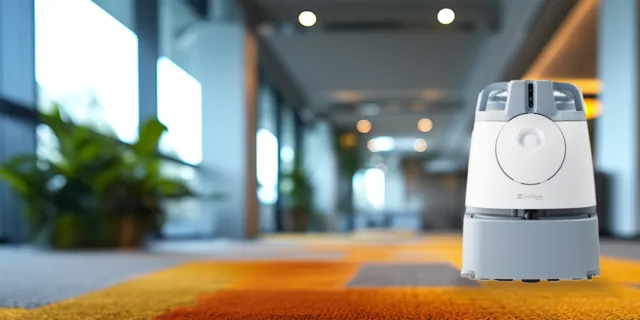
Whiz is SoftBank Robotics' autonomous commercial vacuum robot for carpeted indoor facilities such as hotels, airports, workplaces, universities, healthcare sites, and senior living communities. The system is positioned as a collaborative cleaning robot that follows programmed routes, navigates around obstacles, and reports cleaning performance through connected software. SoftBank states the platform is powered by Brain Corp's BrainOS operating system. In market expansion coverage, The Robot Report documented that Whiz can store up to 600 cleaning routes and cover up to 1,500 m² for about three hours per run on a four-hour battery charge. Whiz is commonly deployed as part of service bundles with deployment/training support and ongoing fleet reporting rather than as a one-time hardware sale.
Listed price
See pricing details
Sold primarily via Robotics-as-a-Service subscriptions (region-dependent pricing)
Release window
Jan 1, 2018
Current status
Active
SoftBank Robotics
Last verified
Mar 5, 2026
Share this robot
Open a plain share composer on X or Bluesky for this robot profile.
Technical overview
A fast read on the mechanical profile, sensing package, and listed platform details for Whiz.
Height
Not publicly disclosed in official product page
Weight
Not publicly disclosed in official product page
Battery Life
up to 3 h
Charging Time
4 h
Max Speed
Not publicly disclosed
Operational profile
Capabilities
6
Connectivity
2
Key capabilities
Listed platforms & ecosystem
Explore further
Benchmark set
Shortcuts to the closest alternatives in the current ui44 set.
Commercial
STEAMA
SoftBank Robotics
See pricing details
Commercial
FLAMA
SoftBank Robotics
See pricing details
Commercial
Titan
RoboForce
See pricing details
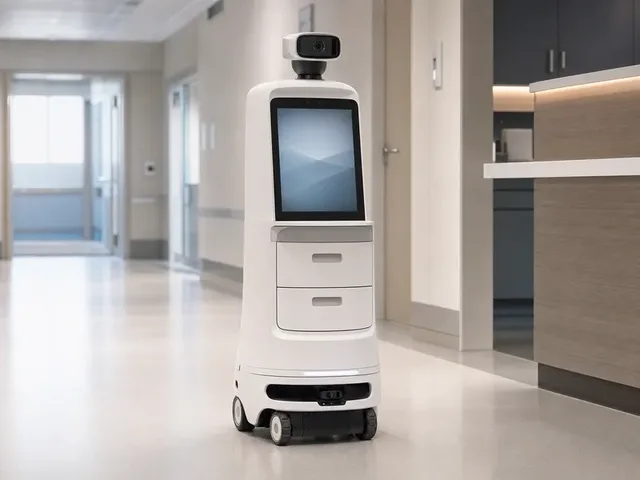
Commercial
VSee AI Robot
VSee Health
See pricing details
The Whiz is a Commercial robot built by SoftBank Robotics. Whiz is SoftBank Robotics' autonomous commercial vacuum robot for carpeted indoor facilities such as hotels, airports, workplaces, universities, healthcare sites, and senior living communities. The system is positioned as a collaborative cleaning robot that follows programmed routes, navigates around obstacles, and reports cleaning performance through connected software. SoftBank states the platform is powered by Brain Corp's BrainOS operating system. In market expansion coverage, The Robot Report documented that Whiz can store up to 600 cleaning routes and cover up to 1,500 m² for about three hours per run on a four-hour battery charge. Whiz is commonly deployed as part of service bundles with deployment/training support and ongoing fleet reporting rather than as a one-time hardware sale.
Sold primarily via Robotics-as-a-Service subscriptions (region-dependent pricing) See all SoftBank Robotics robots on the SoftBank Robotics page.
Detailed specifications for the Whiz
Battery Life
Up to 3 hours (reported by The Robot Report, citing SoftBank)This is the recorded runtime entry. Test conditions and independent verification are not established by this field. Confirm workload, operating mode and environmental conditions before comparing runtimes.
Charging Time
4 hoursA charging time of 4 hours means the ratio of operation to downtime is an important consideration for applications requiring near-continuous availability. Some deployments use multiple robots in rotation to maintain uninterrupted service.
Read this recorded AI entry alongside the model description and source notes for announcement or deployment context. A platform name alone does not establish implemented features, autonomy, or performance.
The profile lists the sensor descriptions below. These entries do not establish physical sensor counts, sensor fusion, redundancy, or performance.
Consult the linked profile sources for hardware configuration and tested behavior. A technology label alone does not verify an operating capability.
Explore sensor technologies: components glossary · full components directory
Commercial robots handle tasks in business environments — delivering food in restaurants, guiding visitors in hotels, transporting supplies in hospitals, and moving inventory in warehouses. Their value is measured in operational efficiency, labor cost savings, and improved service consistency.
The Whiz record lists 6 capabilities. Keep any announcement or demonstration qualifiers attached to these entries; the count alone does not establish practical performance.
These are the capabilities listed in the profile. Hardware configuration and demonstrated performance should be checked against the linked sources.
These are the platforms, communities, or ecosystem relationships listed in the profile. A listed name or protocol alone does not confirm home-device interoperability or automation support.
6
Capabilities
AI
BrainOS commercial autonomy…
The Whiz profile lists the following communication and voice-system descriptions.
The Whiz by SoftBank Robotics has the following technology descriptions in its profile.
The profile lists Obstacle-detection/navigation sensor suite (BrainOS-powered autonomous navigation). Hardware quantities, integration, and tested behavior require separate source evidence.
The connectivity descriptions listed for the Whiz are Whiz Connect smartphone app, SoftBank Robotics Connect reporting platform. Specific services and device interoperability require separate documentation.
Recorded AI description: BrainOS commercial autonomy platform (Brain Corp)
Commercial robots are acquired by businesses including restaurants, hotels, hospitals, retail stores, and logistics facilities. Purchasing decisions typically involve operations managers and IT departments evaluating ROI against human labor costs.
Reliability and uptime, navigation in crowded dynamic environments, payload capacity, integration with business systems (POS, inventory management), ease of deployment and maintenance, and total cost of ownership (including service contracts) are the primary factors.
Listed pricing
The Whiz is listed as Active. This status alone does not confirm public purchase availability or operational reliability. Contact SoftBank Robotics for current access options and any purchase or participation requirements.
Recorded features and considerations to assess
The Whiz record lists 6 capabilities. Review their qualifiers and supporting evidence for the tasks you need. The number of entries does not establish workflow coverage, reliability, or the ability to replace other robots.
The battery-life entry is Up to 3 hours (reported by The Robot Report, citing SoftBank). Check the source conditions and operating mode before using this figure to plan a session. It does not establish task completion, area coverage, or continuous-use runtime.
The charging-time entry is 4 hours; the battery-life entry is Up to 3 hours (reported by The Robot Report, citing SoftBank). These figures may use different conditions or qualifiers. They do not by themselves establish an operating-to-charging ratio or continuous availability.
Sold primarily via Robotics-as-a-Service subscriptions (region-dependent pricing)
Note: This strengths and trade-offs assessment is based on the Whiz's documented specifications as tracked in the ui44 database. Real-world performance depends on deployment conditions, firmware maturity, and environmental factors. For the most current information, check the SoftBank Robotics manufacturer page or visit the official source. Use the comparison tool to evaluate these trade-offs against competing robots in the same category.
Understanding the engineering behind this category
Commercial robots operate in the demanding intersection of technology and business operations. From restaurant servers to warehouse movers, these robots must perform reliably in dynamic, crowded environments while delivering measurable return on investment. The technology behind commercial robots emphasizes reliability, integration with business systems, and graceful handling of the unpredictable situations that characterize human-occupied commercial spaces.
Commercial robots navigate environments that are significantly more challenging than typical homes — crowded restaurant floors, busy hotel lobbies, and dense warehouse aisles all present unique navigation challenges. These robots typically use LiDAR combined with depth cameras for robust obstacle detection, with special attention to detecting low-height obstacles (children, pets, dropped items) and moving obstacles (people walking unpredictably). Commercial-grade navigation includes fleet coordination — multiple robots sharing maps and position data to avoid congestion and optimize collective efficiency. Elevator integration allows robots to serve multiple floors autonomously.
AI in commercial robots focuses on operational efficiency and customer interaction. Route optimization minimizes delivery times in restaurants. Task prioritization ensures urgent orders are handled first. Customer-facing AI must handle natural language interaction in noisy environments, provide useful information, and maintain a professional and brand-appropriate demeanor. Back-end AI integrates with business systems — restaurant POS (Point of Sale), hotel PMS (Property Management System), warehouse WMS (Warehouse Management System) — to receive tasks and report completions automatically. Predictive AI anticipates demand patterns, pre-positioning robots where they will be needed based on historical data.
Commercial robots combine navigation sensors (LiDAR, cameras, ultrasonic) with application-specific sensors. Restaurant delivery robots use weight sensors to confirm payload presence and tilt sensors to maintain tray stability. Warehouse robots use barcode or RFID readers for inventory tracking. Hotel robots may include temperature sensors for room-service food. All commercial robots share the need for robust human detection — they must navigate safely around unpredictable human movement while maintaining efficient operation. Edge-case handling is critical: a restaurant robot must correctly respond to a child running into its path, a guest stepping backward without looking, or a server carrying a full tray through a narrow aisle.
Commercial operations demand high uptime, making power management a business-critical concern. Robots serving during peak hours cannot afford lengthy charging breaks. Solutions include fast-charging docks positioned at strategic locations, hot-swappable battery packs for zero-downtime operation, and intelligent charging schedules that top up during naturally low-demand periods. Fleet management systems monitor battery levels across all robots and redistribute tasks to ensure no single robot runs critically low during service. Power consumption monitoring also feeds into TCO (Total Cost of Ownership) calculations that businesses use to evaluate robot deployment ROI.
Commercial robots operate in regulated business environments with specific safety requirements. Food-handling robots must meet hygiene standards. Robots in public spaces must comply with accessibility requirements, avoiding blocking wheelchair paths or emergency exits. Speed limits are typically set below walking pace in pedestrian areas. Visual and audio signals indicate the robot's presence and intent — lights, gentle sounds, or voice announcements warn nearby people. Payload security ensures items being transported cannot fall. In warehouse environments, safety zones around humans trigger automatic speed reduction or stopping. Integration with building fire alarm and evacuation systems ensures robots do not obstruct emergency procedures.
Commercial robotics is moving toward greater specialization and deeper business system integration. Rather than general-purpose commercial platforms, expect more robots designed specifically for restaurant table service, hotel room delivery, warehouse aisle picking, or retail shelf scanning. Fleet orchestration — coordinating dozens of robots across a large facility — will become more sophisticated. The business model is also evolving, with Robotics-as-a-Service (RaaS) subscriptions replacing upfront purchases, lowering the barrier to adoption for small and medium businesses.
These are category-level technology examples; they do not establish the capabilities of the Whiz. For its recorded hardware details, see the sensor analysis and connectivity sections above. Check model-specific documentation from SoftBank Robotics for supported behavior, or use the components glossary to look up terminology.
How this robot compares in the commercial landscape
Sold primarily via Robotics-as-a-Service subscriptions (region-dependent pricing)
The Whiz is listed as Active. This status alone does not confirm public purchase availability or operational reliability. Contact SoftBank Robotics for current access options and any purchase or participation requirements.
Side-by-side specs, capability overlap analysis, and key differentiators.
For the full picture of SoftBank Robotics's portfolio and market strategy, visit the SoftBank Robotics manufacturer page.
What the public profile tells you, and what still needs direct vendor confirmation
From a buying and rollout perspective, the Whiz should be read as a commercial platform aimed at service operations that need predictable task throughput. ui44 currently tracks 6 capability signals and a last verification date of 2026-03-05. That mix gives buyers a useful first-pass picture, but it is still only the public layer of due diligence, especially when procurement, uptime, and support commitments are decided directly with SoftBank Robotics.
Commercial model
See pricing details
Sold primarily via Robotics-as-a-Service subscriptions (region-dependent pricing)
Integration posture
2 connectivity options
The profile lists Whiz Connect smartphone app, SoftBank Robotics Connect reporting platform. These labels do not establish APIs, fleet-management features, or workflow integration. These are the platforms, communities, or ecosystem relationships listed in the profile. A listed name or protocol alone does not confirm home-device interoperability or automation support.Recorded AI description: BrainOS commercial autonomy platform (Brain Corp)
Spec disclosure
2/7 core specs public
ui44 currently has 2 of 7 core physical and operating specs filled in for this model, leaving 5 gaps that matter for deployment planning. Missing runtime, charge, speed, or payload details can materially change staffing and site-readiness assumptions.
The current profile is useful for scouting, but it still leaves meaningful operational unknowns. If this robot is heading toward a pilot or purchase discussion, the next step should be a structured vendor Q&A that fills the remaining runtime, charging, payload, safety, or integration blanks before anyone builds ROI assumptions around it.
If you want a faster apples-to-apples read, compare the Whiz against nearby alternatives in ui44's compare view, then cross-check the underlying AI, sensor, and subsystem terms in the components glossary. For manufacturer-level context, the SoftBank Robotics profile helps anchor this robot inside the wider product lineup.
Practical guide from day one through years of ownership
Commercial robot deployment is a project, not just a setup. Begin with a site assessment covering floor plans, traffic patterns, integration requirements, and staff training needs. Map the operating environment with the robot, marking restricted areas, service points, and charging stations. Integrate with business systems — POS for restaurants, PMS for hotels, WMS for warehouses. Train staff on robot interaction, troubleshooting, and emergency procedures. Run a supervised pilot period before transitioning to full autonomous operation. Gather and address staff and customer feedback during the pilot to optimize the deployment before scaling.
Commercial robots earn their keep through consistent operation, making maintenance an operational priority rather than an afterthought. Establish daily visual inspection routines for operations staff. Schedule weekly maintenance windows for thorough cleaning, sensor calibration, and software updates. Track key performance indicators — delivery times, task completion rates, customer feedback — to detect performance degradation before it becomes noticeable. For food-handling robots, follow strict hygiene protocols including regular sanitization of tray surfaces and contact points. Multi-robot deployments benefit from staggered maintenance schedules to maintain coverage.
Commercial robot updates can add new capabilities, improve navigation in your specific environment, and fix operational edge cases. The manufacturer may release updates based on fleet-wide learning — improvements discovered at one deployment benefiting all customers. Test significant updates during low-traffic periods before deploying to your full fleet. Keep communication channels open with your robot vendor's support team to provide feedback that can drive improvement in future updates.
Commercial robots in daily operation can last three to five years or more with proper care. The primary wear items are wheels, motors, and batteries. Maintain a spare parts inventory for consumables to minimize downtime. Track operating hours and correlate with maintenance needs to develop predictive maintenance schedules specific to your deployment conditions. Consider the total cost of ownership over the deployment lifetime when evaluating robot vendors — the cheapest robot up front may cost more over five years if parts are expensive or support is limited.
Find product and source links on the SoftBank Robotics page on ui44 or open SoftBank Robotics's official source. Use model-specific manufacturer documentation for setup, cleaning, and service instructions.
The Whiz record brings together the listed specifications and attributed claims. Consult the model description and source notes to distinguish manufacturer announcements, reported information, and unknowns. A source link or review date does not establish independent testing or manufacturer confirmation of every claim. Record last checked: 2026-03-05. Official source: SoftBank Robotics official source. If you find outdated or incorrect information, please let us know — accuracy is our top priority.
See how the Whiz stacks up — compare specs, browse the commercial category, or search the full database.