Why it matters
What it tends to unlock
Remote access, orchestration, and software maintenance, ecosystem fit across apps, fleets, and smart-home layers, and faster rollout of updates, telemetry, and support workflows.
RS422 appears across 1 tracked robots, concentrated in Commercial. Use this page to understand why the signal matters, who relies on it most, and which live profiles deserve the first comparison click.
Tracked robots
1
Ready now
1
Manufacturers
1
Public prices
0
Why it matters
Remote access, orchestration, and software maintenance, ecosystem fit across apps, fleets, and smart-home layers, and faster rollout of updates, telemetry, and support workflows.
What to verify
Real protocol support, not just marketing labels, offline behavior, pairing friction, and network dependency, and whether the stack stays useful when the vendor service changes.
Coverage
The heaviest concentration is in Commercial (1). Top manufacturers include Hyundai (1).
Research brief
The useful questions here are how common RS422 really is, which robot classes depend on it, and which live profiles are worth opening before you compare the whole stack.
Verified 30d
1
1 in the last 90 days
Top category
Commercial
1 tracked robots
Paired most often with
2× 3D LiDAR (Pro), 3× Cameras (Pro), and 8× RADAR (Pro)
Decision brief
Where it helps most
What to validate
Evidence basis
Source pack
Use the structure first: which categories lean on RS422, which manufacturers repeat it, and what usually ships beside it.
Lead category
1 tracked robots currently anchor this label.
Most repeated manufacturer
1 tracked robots make this the clearest manufacturer-level signal on the route.
Most common adjacent signal
1 shared robots pair this component with 2× 3D LiDAR (Pro).
| # | Name | Usage |
|---|---|---|
| 1 | Commercial | 1 robot |
| # | Name | Usage |
|---|---|---|
| 1 | Hyundai | 1 robot |
| # | Name | Shared robots |
|---|---|---|
| 1 | 2× 3D LiDAR (Pro) | 1 robot |
| 2 | 3× Cameras (Pro) | 1 robot |
| 3 | 8× RADAR (Pro) | 1 robot |
| 4 | AI-based autonomous driving system with real-time obstacle detection and path planning (Pro) | 1 robot |
| 5 | Ethernet | 1 robot |
| 6 | GNSS Antenna (Pro) | 1 robot |
How to read the market
Category concentration tells you where the component is actually doing work, manufacturer repetition shows whether the signal is market-wide or vendor-specific, and pairings reveal which neighboring technologies usually ship alongside it.
The old card wall is replaced with a featured first-click strip and a dense inventory table so the route behaves like a serious directory.
Directory briefing
Open the clearest profiles first, then sweep the full inventory in a denser table. Featured cards are selected by readiness, image quality, and official source availability, so the first click is usually the most informative one.
Ready now
1
Public price
0
Official links
1
Featured now
1
How to scan this directory
Best first clicks
These robots score highest on readiness, public detail quality, and image clarity, making them the fastest way to understand how RS422 shows up in practice.
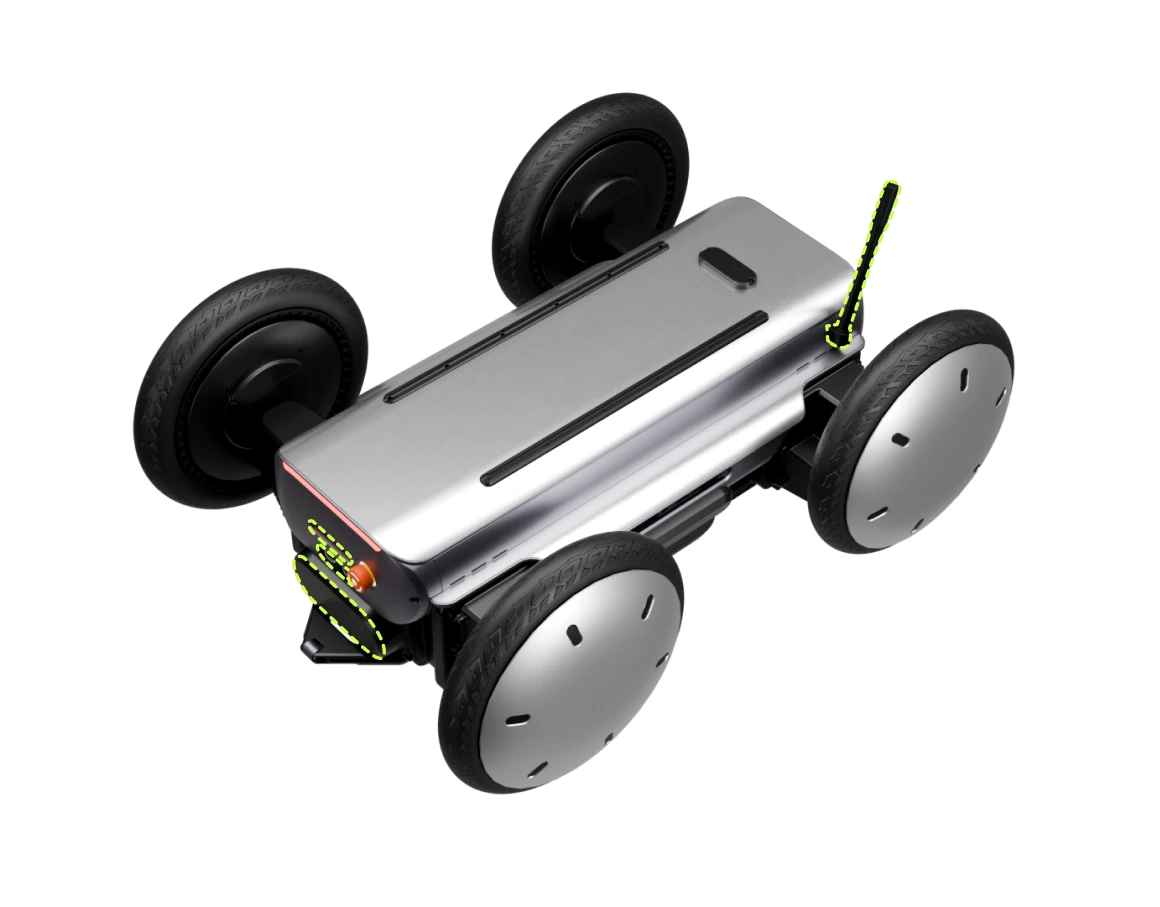
MobED (Mobile Eccentric Droid) is a modular mobile robot platform developed by Hyundai Motor Group's Robotics Lab. Unveiled at iREX in December 2025 with mass production and sales beginning Q1 2026, it features four independently controlled wheels with an eccentric mechanism that enables agile movement and stable balance across uneven terrain, including curbs up to 200mm. The platform comes in Pro and Basic variants — the Pro adds 2× 3D LiDAR, 3× cameras, 8× RADAR, IMU, GNSS antenna, and autonomous navigation. MobED is designed for delivery, patrol, education, and industrial logistics. Its mounting rail system allows easy customization for different use cases. It won a CES 2026 Best of Innovation Award in the robotics category.
Public price
Price TBA
Contact Hyundai Robotics Lab…
Battery
4+ hours
Charge 2.5 hours (10%–90%)
Shortlist read
Active in the catalog with enough detail to review immediately.
Compact mobile scan: status, price, standout context, and links stay visible without sideways scrolling.
Hyundai · Commercial
Price
Price TBA
Standout
Battery · 4+ hours
Quick answers
The short version of what this label means in the ui44 catalog, where it matters, and how to compare it without over-reading the marketing copy.
RS422 currently appears on 1 tracked robots across 1 manufacturers. That makes this route useful for both deep research and fast shortlist scanning, not just one-off editorial reading.
The strongest concentration is in Commercial (1). Category mix is the fastest clue for whether this component behaves like baseline plumbing or a more selective differentiator.
1 of the 1 tracked profiles are currently marked Available or Active. That means the label has live market relevance here, but you should still open the profiles with public pricing or official links first before treating it as a clean buyer signal.
Start with readiness, official source quality, and the standout spec column in the inventory table. On component routes, those three signals usually remove weak profiles faster than reading every descriptive paragraph.
The strongest shared-stack signals here are 2× 3D LiDAR (Pro) (1), 3× Cameras (Pro) (1), and 8× RADAR (Pro) (1). Use those pairings to branch into adjacent component pages when one label is too narrow for the decision.
0 matching robots currently expose public pricing. That is enough to create directional context, but not enough to treat one price bracket as the whole market. Use the directory to find the transparent profiles first, then widen the sweep.
Start with Hyundai (1). Repetition across manufacturers is often the clearest signal that the component is part of a stable market pattern rather than a one-off marketing callout.
The original long-form component research is still here, but collapsed so the main route can prioritize hierarchy and scan speed.
The baseline explanation of what RS422 is, why it matters, and how to think about it before comparing implementations.
RS422 is a connectivity component found in 1 robot tracked in the ui44 Home Robot Database. As a connectivity technology, RS422 plays a specific role in enabling robot perception, interaction, or operation depending on its implementation in each platform.
Component Type
Used By
1 robot
Manufacturer
Category
Available Now
1 robot
Connectivity components define how a robot communicates with other devices, networks, and cloud services. Connectivity determines whether a robot can receive software updates, stream data, integrate with smart home systems, and be remotely controlled.
In the ui44 database, RS422 is categorized under Connectivity components. For a comprehensive explanation of all component types, consult the components glossary.
A robot's connectivity stack determines its ecosystem compatibility and long-term value. Limited connectivity can mean the robot operates in isolation, cannot be updated, or requires specific hub hardware.
Broad connectivity support means more smart home platform integrations
Enables over-the-air updates that improve the robot over time
Allows remote monitoring and control from anywhere
Used in 1 robot across 1 category — Commercial, indicating specialized use across the robotics industry.
Wireless connectivity uses radio frequencies to transmit data between the robot and other devices. The robot's firmware manages protocol switching and connection prioritization automatically.
Wi-Fi
High-bandwidth local network access for data-heavy tasks like video streaming
Bluetooth
Direct device-to-device pairing for initial setup and nearby peripherals
Zigbee / Z-Wave
Low-power mesh networking for IoT device coordination
Cellular (4G/5G)
Operation beyond home Wi-Fi range for outdoor or commercial robots
RS422 Integration
Implementation varies by robot platform and manufacturer. Each robot integrates RS422 differently depending on system architecture, use case, and target tasks. Integration with other onboard connectivity modules and the main processing unit determines real-world performance.
Deeper technical framing, matched technology profiles, and the longer use-case treatment for RS422.
Beyond the high-level overview, understanding the technical foundations of connectivity technologies like RS422 helps buyers and researchers evaluate implementations more critically.
Wireless connectivity relies on electromagnetic radiation at specific frequency bands regulated by international standards bodies.
For robotics, latency is often more critical than raw bandwidth.
Robot connectivity has evolved from simple serial cables to sophisticated multi-protocol wireless systems.
Early robots: basic infrared remote control or proprietary radio links
Standardized protocols (Wi-Fi, Bluetooth) dramatically improved interoperability
IoT-specific protocols (Zigbee, Z-Wave, Thread) enabled efficient smart home integration
Matter standard (2022): unifying smart home communication under a single application layer
Wireless connectivity faces inherent challenges in home environments.
Key application domains for connectivity technologies like RS422.
Connectivity allows robots to communicate with other smart home devices — thermostats, lights, locks, cameras, and appliances. A well-connected robot can serve as a mobile hub or coordinator for your smart home, executing routines that involve multiple devices across different rooms.
Wi-Fi and cellular connectivity enable users to monitor and control their robot remotely via smartphone apps. This is particularly valuable for security robots, pet-monitoring robots, and home assistants, allowing owners to check in, receive alerts, and issue commands from anywhere.
Network connectivity is essential for receiving firmware and software updates that improve the robot's capabilities, fix bugs, and patch security vulnerabilities. Robots without reliable connectivity may become outdated quickly and miss important safety updates.
Some robots offload computationally intensive AI tasks to cloud servers via network connections. This allows smaller, more affordable robots to access powerful AI capabilities like advanced natural language processing, image recognition, and complex decision-making that would be impossible with on-device hardware alone.
In commercial and industrial settings, connectivity allows multiple robots to coordinate their activities, share maps, divide tasks, and avoid interfering with each other. This fleet management capability requires reliable, low-latency communication between robots and a central coordination system.
Visit each robot's detail page to see which capabilities are available on specific models.
Manufacturer mix, specs context, price context, category overlap, and adjacent components worth branching into next.
RS422 spans 1 robot category — from consumer to research platforms.
Technologies most often paired with RS422 across 1 robot.
Browse the full components directory or see the components glossary for detailed explanations of each technology.
142 other connectivity technologies tracked in ui44, ranked by adoption.
115 robots · 1 also use RS422
54 robots
34 robots · 1 also use RS422
9 robots
9 robots
8 robots
7 robots
6 robots
Browse all Connectivity components or use the robot comparison tool to evaluate how different connectivity configurations perform across specific robot models.
Robot connectivity is evolving rapidly as the smart home ecosystem matures and new wireless standards emerge. Supporting the right mix of protocols is a strategic decision for manufacturers.
Wi-Fi 6/7 adoption
Better performance in dense device environments typical of modern smart homes with dozens of connected devices
Matter protocol
Unified smart home standard backed by Apple, Google, Amazon, and Samsung — simplifying cross-platform integration
5G expansion
Opening new possibilities for outdoor robots, delivery platforms, and commercial service robots beyond home Wi-Fi
Industry Adoption Snapshot
RS422 is adopted by 1 robot from 1 manufacturer in the ui44 database, providing a data-driven view of real-world deployment patterns.
Certifications carried by robots incorporating RS422, indicating compliance with safety, EMC, and quality standards.
Platform compatibility, voice integration, and AI capabilities across robots with RS422.
The long-form buyer, maintenance, and troubleshooting material kept available without forcing it into the main scan path.
If RS422 is an important factor in your robot selection, here are key considerations to guide your decision.
Wi-Fi version
Dual-band (2.4/5 GHz) is preferred for reliability in congested environments
Smart home integration
Does it work with your existing ecosystem (Alexa, Google Home, HomeKit)?
Range & reliability
Important for large homes, multi-floor coverage, or outdoor robots
Data privacy
Does the robot require cloud connectivity to function, or can it operate locally?
A component is only as good as its integration. Check how the manufacturer has incorporated RS422 into the overall robot design and software stack.
Review what other connectivity technologies are paired with RS422 in each robot — see the related components section.
Make sure the robot's category matches your use case. RS422 serves different roles in different robot types.
Consider the manufacturer's reputation for software updates, support, and component reliability.
Compare Before You Buy
Use the ui44 comparison tool to evaluate robots with RS422 side by side.
Connectivity components are generally among the most reliable parts of a robot, as they consist entirely of solid-state electronics with no moving parts. However, the evolving nature of wireless standards and smart home ecosystems means that connectivity capabilities can become outdated even while the hardware continues to function perfectly.
Wireless radio hardware (Wi-Fi, Bluetooth, Zigbee modules) is extremely durable under normal operating conditions. These components typically outlast the useful life of the robot itself.
Connectivity components require minimal physical maintenance. The primary ongoing concern is software-level maintenance: keeping firmware updated, managing Wi-Fi network changes (new router, changed password), and maintaining compatibility with evolving smart home platforms.
Connectivity is an area where future-proofing requires particular attention. Wireless standards evolve: Wi-Fi 6E and Wi-Fi 7 offer significant improvements over older standards, and a robot purchased with Wi-Fi 5 may not benefit from a new router upgrade.
For the 1 robot in the ui44 database using RS422, we recommend checking the individual robot pages for manufacturer-specific maintenance guidance and support documentation. Each manufacturer has different support policies, update frequencies, and warranty terms that affect the long-term ownership experience of their connectivity technologies.
Connectivity issues can make even the most capable robot frustrating to use. Wi-Fi drops, Bluetooth pairing failures, and smart home integration problems are among the most commonly reported issues. The good news is that most connectivity problems stem from network configuration rather than robot hardware, making them resolvable without manufacturer support.
Likely Causes
Resolution
Likely Causes
Resolution
Likely Causes
Resolution
For model-specific troubleshooting, visit the individual robot pages for the 1 robot using RS422. Each manufacturer provides model-specific support resources and diagnostic tools for their connectivity implementations.
What to do next
This page should hand you off to the next useful comparison step, not strand you at the bottom of a long detail route.
Widen the layer
Open the full connectivity workbench when RS422 is only one part of the decision and you need the broader market map.
Side-by-side check
Move from label-level research into direct robot comparison once you know which profiles are documented well enough to trust.
Adjacent signal
This is the most common neighboring component on robots that already use RS422, so it is the fastest next branch if you need stack context.