Why it matters
What it tends to unlock
Hands-free control, accessibility, and ambient routines, smarter placement in homes already built around voice platforms, and simpler day-one setup for households that stay inside one ecosystem.
Apple Siri Shortcuts appears across 1 tracked robots, concentrated in Cleaning. Use this page to understand why the signal matters, who relies on it most, and which live profiles deserve the first comparison click.
Tracked robots
1
Ready now
1
Manufacturers
1
Public prices
1
Why it matters
Hands-free control, accessibility, and ambient routines, smarter placement in homes already built around voice platforms, and simpler day-one setup for households that stay inside one ecosystem.
What to verify
Regional support, account requirements, and supported commands, whether voice is primary control or just a convenience layer, and how well the robot still works outside the preferred ecosystem.
Coverage
The heaviest concentration is in Cleaning (1). Top manufacturers include Yeedi (1).
Research brief
The useful questions here are how common Apple Siri Shortcuts really is, which robot classes depend on it, and which live profiles are worth opening before you compare the whole stack.
Verified 30d
0
0 in the last 90 days
Top category
Cleaning
1 tracked robots
Paired most often with
3d Structured Light, AIVI 3D 4.0 Camera, and AIVI 3D 4.0 camera-based obstacle avoidance with object recognition and nighttime illumination
Market snapshot
Category concentration, manufacturer repetition, and the strongest adjacent signals.
Dense inventory
Featured first clicks up top, then the full scannable robot table below.
Browse the full Voice Assistant layer
Open the workbench when this one component is too narrow for the decision.
Decision brief
Where it helps most
What to validate
Evidence basis
Source pack
Use the structure first: which categories lean on Apple Siri Shortcuts, which manufacturers repeat it, and what usually ships beside it.
Lead category
1 tracked robots currently anchor this label.
Most repeated manufacturer
1 tracked robots make this the clearest manufacturer-level signal on the route.
Most common adjacent signal
1 shared robots pair this component with 3d Structured Light.
| # | Name | Usage |
|---|---|---|
| 1 | Cleaning | 1 robot |
| # | Name | Usage |
|---|---|---|
| 1 | Yeedi | 1 robot |
| # | Name | Shared robots |
|---|---|---|
| 1 | 3d Structured Light | 1 robot |
| 2 | AIVI 3D 4.0 Camera | 1 robot |
| 3 | AIVI 3D 4.0 camera-based obstacle avoidance with object recognition and nighttime illumination | 1 robot |
| 4 | Amazon Alexa | 1 robot |
| 5 | Carpet Detection Sensor | 1 robot |
| 6 | Cliff Sensors | 1 robot |
How to read the market
Category concentration tells you where the component is actually doing work, manufacturer repetition shows whether the signal is market-wide or vendor-specific, and pairings reveal which neighboring technologies usually ship alongside it.
The old card wall is replaced with a featured first-click strip and a dense inventory table so the route behaves like a serious directory.
Directory briefing
Open the clearest profiles first, then sweep the full inventory in a denser table. Featured cards are selected by readiness, image quality, and official source availability, so the first click is usually the most informative one.
Ready now
1
Public price
1
Official links
1
Featured now
1
How to scan this directory
Best first clicks
These robots score highest on readiness, public detail quality, and image clarity, making them the fastest way to understand how Apple Siri Shortcuts shows up in practice.
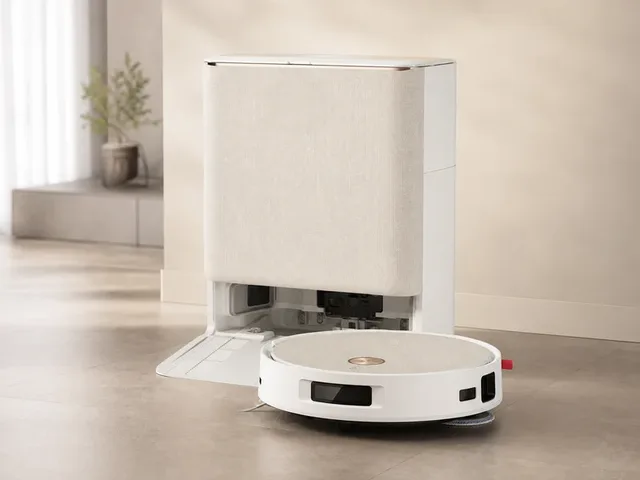
Yeedi's flagship robot vacuum and mop, launched March 13, 2026 and winner of the CES 2026 Gold Award for Innovation in Affordable Cleaning Technology. The M16 Infinity features 30,000 Pa BLAST suction, the OZMO Roller 3.0 mopping system with a roller 50% longer than the previous generation, and pressurized self-washing that continuously rinses the mop with clean water during operation. ZeroTangle 4.0 anti-tangle technology reduces hair wrap around the main brush. The Omni Station handles automatic dust emptying into a 2.5 L bag, hot-water mop washing, hot-air mop drying, and clean-water refilling. PowerBoost fast charging replenishes roughly 10% battery in about three minutes via gallium nitride technology. AIVI 3D 4.0 obstacle avoidance combines a camera with structured-light and edge sensors, and the robot can cross thresholds up to 24 mm. Matter support enables voice control through Amazon Alexa, Google Assistant, and Apple Siri Shortcuts. Shipping now with public pricing visible.
Compact mobile scan: status, price, standout context, and links stay visible without sideways scrolling.
Yeedi · Cleaning
Price
$600
Standout
Battery · 4,000 mAh Li-ion; up to 140 min
Sorted by readiness first so live, scannable profiles do not get buried under the long tail.
| Robot | Status | Price | Link |
|---|---|---|---|
M16 Infinity Yeedi · Cleaning |
Available | $600 | Official |
Quick answers
The short version of what this label means in the ui44 catalog, where it matters, and how to compare it without over-reading the marketing copy.
Apple Siri Shortcuts currently appears on 1 tracked robots across 1 manufacturers. That makes this route useful for both deep research and fast shortlist scanning, not just one-off editorial reading.
The strongest concentration is in Cleaning (1). Category mix is the fastest clue for whether this component behaves like baseline plumbing or a more selective differentiator.
1 of the 1 tracked profiles are currently marked Available or Active. That means the label has live market relevance here, but you should still open the profiles with public pricing or official links first before treating it as a clean buyer signal.
Start with readiness, official source quality, and the standout spec column in the inventory table. On component routes, those three signals usually remove weak profiles faster than reading every descriptive paragraph.
The strongest shared-stack signals here are 3d Structured Light (1), AIVI 3D 4.0 Camera (1), and AIVI 3D 4.0 camera-based obstacle avoidance with object recognition and nighttime illumination (1). Use those pairings to branch into adjacent component pages when one label is too narrow for the decision.
1 matching robots currently expose public pricing. That is enough to create directional context, but not enough to treat one price bracket as the whole market. Use the directory to find the transparent profiles first, then widen the sweep.
Start with Yeedi (1). Repetition across manufacturers is often the clearest signal that the component is part of a stable market pattern rather than a one-off marketing callout.
The original long-form component research is still here, but collapsed so the main route can prioritize hierarchy and scan speed.
The baseline explanation of what Apple Siri Shortcuts is, why it matters, and how to think about it before comparing implementations.
Apple Siri Shortcuts is a voice assistant component found in 1 robot tracked in the ui44 Home Robot Database. As a voice assistant technology, Apple Siri Shortcuts plays a specific role in enabling robot perception, interaction, or operation depending on its implementation in each platform.
Component Type
Used By
1 robot
Manufacturer
Category
Price Range
$600
Available Now
1 robot
Voice assistants are the conversational interface layer of a robot. They enable hands-free interaction through natural language, allowing users to give commands, ask questions, control smart home devices, and receive spoken responses.
In the ui44 database, Apple Siri Shortcuts is categorized under Voice Assistant components. For a comprehensive explanation of all component types, consult the components glossary.
Voice interaction is often the primary way users communicate with home robots. A good voice assistant makes the robot feel intuitive and accessible, while a limited one creates friction. It also shapes accessibility, privacy expectations, and everyday convenience.
Platform choice determines smart home ecosystem compatibility
Quality of voice recognition directly affects daily usability
Alexa-integrated robots work seamlessly with Alexa-compatible devices
Used in 1 robot across 1 category — Cleaning, indicating specialized use across the robotics industry.
Voice assistants use a pipeline of technologies that process speech in stages. This pipeline may run partially on-device and partially in the cloud.
Wake word detection
Continuously listens for the trigger phrase on a low-power processor
Speech recognition (ASR)
Converts the audio stream into text using neural network models
Natural language understanding
Extracts intent and relevant entities from the transcribed text
Dialog management
Maintains conversation context and determines the appropriate response
Text-to-speech (TTS)
Generates natural-sounding audio output with human-like prosody
Apple Siri Shortcuts Integration
Implementation varies by robot platform and manufacturer. Each robot integrates Apple Siri Shortcuts differently depending on system architecture, use case, and target tasks. Integration with other onboard voice interfaces and the main processing unit determines real-world performance.
Deeper technical framing, matched technology profiles, and the longer use-case treatment for Apple Siri Shortcuts.
In-depth technical analysis of 1 technology domain relevant to this component
While the sections above cover general voice assistant principles, this analysis focuses on the particular technology domains relevant to Apple Siri Shortcuts based on its implementation characteristics.
Siri and HomeKit integration embeds a robot into Apple's privacy-focused smart home ecosystem. HomeKit provides a secure local-first smart home protocol where device communication stays on the local network by default, with iCloud relay available for remote access. For households deeply invested in the Apple ecosystem — using iPhones, iPads, Apple Watch, HomePod, and Apple TV — HomeKit integration ensures the robot works seamlessly with existing devices and automation routines.
HomeKit integration typically focuses on smart home control rather than full Siri voice assistant embedding (since Siri is not available as a third-party SDK for full integration). The robot appears as a HomeKit accessory that can be controlled through the Apple Home app and Siri voice commands on other Apple devices. Depending on the robot type, it may expose sensors (motion detection, temperature, air quality), actuators (cleaning start/stop, navigation commands), or cameras (live video streaming through HomeKit Secure Video).
Apple's emphasis on privacy translates to specific technical requirements for HomeKit-compatible robots. All communication is encrypted end-to-end. Camera streams can be processed on a HomePod or Apple TV for on-device person and object detection without sending video to the cloud. Sensitive data remains within the household's Apple ecosystem rather than being transmitted to the robot manufacturer's servers. For privacy-conscious buyers, HomeKit compatibility can be a decisive factor, even if it means fewer third-party integrations compared to Alexa or Google Assistant.
In the ui44 database, Apple Siri Shortcuts is currently tracked exclusively in the M16 Infinity by Yeedi. This cleaning robot integrates Apple Siri Shortcuts as part of a total technology stack comprising 13 components: 6 sensors, 2 connectivity modules, 4 voice interfaces, and a AIVI 3D 4.0 camera-based obstacle avoidance with object recognition and nighttime illumination AI platform.
Yeedi's flagship robot vacuum and mop, launched March 13, 2026 and winner of the CES 2026 Gold Award for Innovation in Affordable Cleaning Technology. The M16 Infinity features 30,000 Pa BLAST suction, the OZMO Roller 3.0 mopping system with a roller 50% longer than the previous generation, and pressurized self-washing that continuously rinses the mop with clean water during operation. ZeroTangle …
The M16 Infinity is priced at $600, which includes Apple Siri Shortcuts as part of the integrated voice assistant package. Visit the full M16 Infinity specification page for complete technical details and purchasing information.
Apple Siri Shortcuts works alongside 3 other voice assistant components in the M16 Infinity: Amazon Alexa, Google Assistant, Yandex Alice. This combination of voice assistant technologies creates the M16 Infinity's overall voice assistant capabilities, with each component contributing different aspects of voice interaction.
Beyond the high-level overview, understanding the technical foundations of voice assistant technologies like Apple Siri Shortcuts helps buyers and researchers evaluate implementations more critically.
Voice assistant technology involves a complex pipeline of signal processing and AI working in sequence.
Real-world voice performance can differ significantly from laboratory benchmarks.
Voice assistants have evolved from rigid command syntax to genuinely conversational interfaces.
Early: rigid command syntax — 'robot, move forward three meters'
Statistical language models enabled more flexible recognition
Platform integration (Alexa, Google) brought vast skill ecosystems to robots
LLM integration: handling ambiguous requests, following context, explaining actions
On-device processing improvements reducing cloud dependency and latency
Voice assistants face several well-documented limitations.
Key application domains for voice assistant technologies like Apple Siri Shortcuts.
Voice assistants allow users to control their robot without touching a screen or phone. Commands like 'start cleaning,' 'go to the kitchen,' or 'play music' can be executed entirely by voice, which is especially valuable when users are busy with other tasks or have mobility limitations.
A robot with a voice assistant can serve as a mobile smart home controller, carrying the voice interface from room to room. Unlike fixed smart speakers, a mobile robot brings voice control to wherever you are in the house, enabling commands like 'turn off the bedroom lights' from any location.
Voice assistants provide quick access to information — weather, news, timers, reminders, calendar events, and general knowledge questions — all without requiring the user to find and use a screen-based device. This ambient information access is one of the most commonly used voice assistant features.
Voice interfaces are a critical accessibility feature, making robot technology usable for people with visual impairments, limited mobility, or difficulty with touchscreen interfaces. The ability to control a robot entirely by voice significantly broadens the user base and real-world utility of home robots.
Advanced voice assistants can recognize different voices, personalizing responses and access levels for each household member. This enables features like individual calendars, personalized music preferences, and age-appropriate content filtering for children.
Visit each robot's detail page to see which capabilities are available on specific models.
Manufacturer mix, specs context, price context, category overlap, and adjacent components worth branching into next.
Apple Siri Shortcuts spans 1 robot category — from consumer to research platforms.
Technologies most often paired with Apple Siri Shortcuts across 1 robot.
Browse the full components directory or see the components glossary for detailed explanations of each technology.
1 of 1 robots with Apple Siri Shortcuts have public pricing, ranging $600 – $600.
Lowest
$600
M16 Infinity
Average
$600
1 robot with pricing
Highest
$600
M16 Infinity
76 other voice assistant technologies tracked in ui44, ranked by adoption.
34 robots · 1 also use Apple Siri Shortcuts
24 robots · 1 also use Apple Siri Shortcuts
9 robots
8 robots
4 robots
3 robots
2 robots
2 robots
Browse all Voice Assistant components or use the robot comparison tool to evaluate how different voice assistant configurations perform across specific robot models.
The voice assistant market in robotics reflects the broader smart speaker industry, where Amazon Alexa, Google Assistant, and Apple Siri maintain dominant positions.
On-device processing
Reducing cloud dependency for faster response and better privacy — accelerated by privacy regulations
LLM integration
Large language models enable genuinely conversational interactions beyond simple command-and-response
Multi-language support
A key competitive differentiator for manufacturers targeting global markets
Industry Adoption Snapshot
Apple Siri Shortcuts is adopted by 1 robot from 1 manufacturer in the ui44 database, providing a data-driven view of real-world deployment patterns.
Platform compatibility, voice integration, and AI capabilities across robots with Apple Siri Shortcuts.
The long-form buyer, maintenance, and troubleshooting material kept available without forcing it into the main scan path.
If Apple Siri Shortcuts is an important factor in your robot selection, here are key considerations to guide your decision.
Platform compatibility
Does it work with your existing smart home setup?
Language support
Does it understand your preferred language and accent?
Offline capability
Can it handle basic commands without internet?
Privacy controls
Can you disable the mic, review recordings, or opt out of data collection?
Third-party skills
Can the assistant be extended with additional capabilities?
A component is only as good as its integration. Check how the manufacturer has incorporated Apple Siri Shortcuts into the overall robot design and software stack.
Review what other voice assistant technologies are paired with Apple Siri Shortcuts in each robot — see the related components section.
Make sure the robot's category matches your use case. Apple Siri Shortcuts serves different roles in different robot types.
Consider the manufacturer's reputation for software updates, support, and component reliability.
Compare Before You Buy
Use the ui44 comparison tool to evaluate robots with Apple Siri Shortcuts side by side.
Voice assistant longevity is closely tied to platform sustainability. Since most robot voice assistants depend on cloud-based services from major technology companies, the maintenance model differs significantly from purely on-device components. Understanding the dependency structure helps assess long-term reliability.
The hardware side of voice assistants — microphone arrays and speakers — is quite durable. MEMS microphones have no moving parts and typically last for decades.
Physical maintenance of voice hardware is minimal — occasionally cleaning microphone ports to prevent dust blockage is the primary requirement. Software maintenance is more involved: voice assistants require ongoing cloud connectivity and depend on platform provider updates for speech recognition improvements, new language support, and skill additions.
The biggest future-proofing risk with voice assistants is platform discontinuation or degradation. If a cloud-based voice service is shut down or significantly changed, robots depending on it may lose voice capabilities entirely.
For the 1 robot in the ui44 database using Apple Siri Shortcuts, we recommend checking the individual robot pages for manufacturer-specific maintenance guidance and support documentation. Each manufacturer has different support policies, update frequencies, and warranty terms that affect the long-term ownership experience of their voice assistant technologies.
Voice assistant issues in robots range from minor annoyances like occasional misrecognition to significant problems like complete unresponsiveness. Since voice assistants depend on multiple subsystems — microphones, processing hardware, network connectivity, and cloud services — diagnosing issues requires checking each layer systematically.
Likely Causes
Resolution
Likely Causes
Resolution
Likely Causes
Resolution
For model-specific troubleshooting, visit the individual robot pages for the 1 robot using Apple Siri Shortcuts. Each manufacturer provides model-specific support resources and diagnostic tools for their voice assistant implementations.
What to do next
This page should hand you off to the next useful comparison step, not strand you at the bottom of a long detail route.
Widen the layer
Open the full voice assistant workbench when Apple Siri Shortcuts is only one part of the decision and you need the broader market map.
Side-by-side check
Move from label-level research into direct robot comparison once you know which profiles are documented well enough to trust.
Adjacent signal
This is the most common neighboring component on robots that already use Apple Siri Shortcuts, so it is the fastest next branch if you need stack context.
