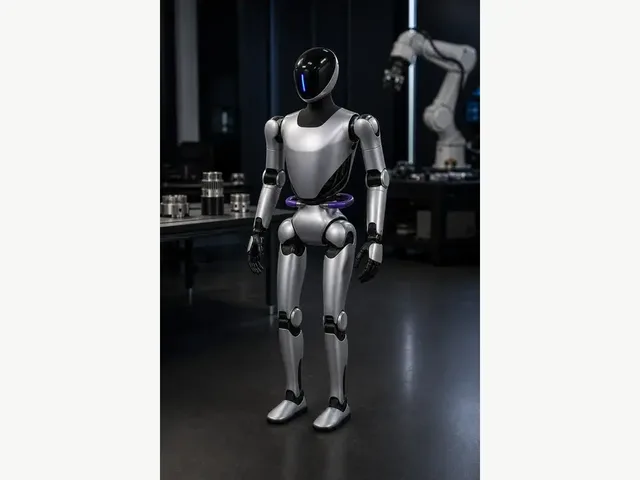
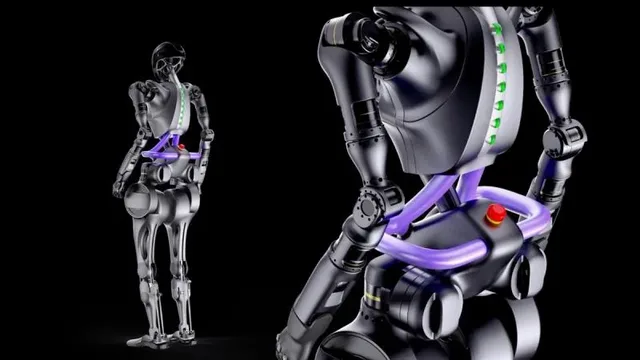
- Price N/A
- Weight 63kg
- Battery Life 2 hours
- Max Speed 5 km/h
- Status Active
- Category Humanoid
Capabilities
Select 2–4 robots to compare specs side-by-side.
Selected robots
Tip: On mobile, comparison results switch to swipeable cards for easier reading.
Share this comparisonSwipe horizontally to compare robot cards. Green highlights indicate best-in-class numeric values.
Capabilities
Capabilities
| Spec | ||
|---|---|---|
| Price | N/A | N/A |
| Height | 175cm | 165cm |
| Weight | 63kg | 55kg |
| Battery Life | 2 hours | ~60 minutes (483 Wh battery) |
| Charging Time | Not disclosed | Not disclosed |
| Max Speed | 5 km/h | 5 km/h walking |
| AI | Fourier AI platform | Large language model integration, visual perception systems, autonomous locomotion |
| Sensors | Vision System, 6 Array-Type Tactile Sensors (hands), Force/Torque Sensors, IMU | Intel RealSense Depth Camera D435i, IMU, Force/Torque Sensors |
| Connectivity | Wi-Fi, Bluetooth | Wi-Fi, Ethernet |
| Voice Assistants | None | None |
| Status | Active | Active |
| Category | Humanoid | Humanoid |
| Manufacturer | Fourier | Fourier |
| Capability | GR-2 | GR-1 |
|---|---|---|
| Autonomous Navigation | — | ✓ |
| Bipedal Walking | ✓ | ✓ |
| Language Model Integration | — | ✓ |
| Object Manipulation | ✓ | ✓ |
| Payload Carrying (up to 50kg) | — | ✓ |
| Rehabilitation Assistance | ✓ | — |
| Research Platform | ✓ | — |
| Stair Climbing | — | ✓ |
| Uneven Terrain Navigation | — | ✓ |
| Visual Perception | — | ✓ |
Choosing between robots requires more than looking at a spec sheet — it requires understanding what each specification means in practice and how different robots make trade-offs between capabilities, price, and design philosophy. The ui44 comparison tool helps you evaluate up to four robots simultaneously across every dimension tracked in our database: specifications, capabilities, components, sensors, connectivity, and pricing.
This guide explains how to get the most out of robot comparisons, which specifications matter most for different use cases, and how to interpret the differences you see in the comparison table.
The most useful comparisons are between robots that serve the same purpose. Comparing a $300 robot vacuum to a $100,000 humanoid does not yield actionable insights — they solve completely different problems. Start by selecting robots from the same category or price range:
That said, cross-category comparisons can be useful in specific scenarios. For example, you might compare a specialized cleaning robot against a home assistant robot that includes cleaning capabilities to decide whether a specialized or multi-purpose approach is better for your home.
The comparison table organizes robot attributes into several sections. Here is what to focus on in each:
Price is the most obvious comparison point, but context matters. A $2,000 robot that is commercially available today provides value now, while a $1,500 robot in "Development" status might not ship for a year or more. Consider the total cost of ownership — some robots require ongoing subscriptions for cloud features, replacement parts (brushes, filters, batteries), or premium app features. Of the 109 robots in our database, 36 have publicly listed prices.
Physical specifications like dimensions, weight, battery capacity, and runtime define the practical constraints of a robot. A heavier robot may be more stable but harder to carry between floors. Larger dimensions mean the robot cannot fit under low furniture. Battery capacity and runtime determine how much work the robot can do per charge — critical for cleaning and outdoor robots that need to cover large areas.
The sensor suite determines how well a robot perceives its environment. Look for these key sensors in comparisons:
ui44 tracks 331 unique sensor types across all robots. Each robot's sensor configuration is listed in the comparison table for direct side-by-side evaluation.
Capabilities describe what a robot can functionally do — from basic tasks like scheduling and app control to advanced abilities like object manipulation, voice conversation, and autonomous outdoor navigation. The comparison tool shows all 799 capability types tracked across our database. Use the "Show differences only" toggle to quickly identify where robots diverge in capability.
If your home runs on a specific smart home ecosystem, connectivity compatibility is a potential deal-breaker. The comparison table shows which voice assistants, Wi-Fi standards, and smart home protocols each robot supports. Check for your specific platform — Amazon Alexa, Google Home, Apple HomeKit, or others — and verify the integration level (basic on/off control versus full routine support).
For robots that share many features, the "Show differences only" checkbox filters the comparison table to show only the specifications where robots diverge. This is particularly useful when comparing robots from the same manufacturer or category, where 80% of specs may be identical and the remaining 20% represents the actual decision points.
Not everything that matters appears in a comparison table. Consider these factors alongside the specs:
Based on common buyer research patterns, here are the most valuable types of robot comparisons:
Every comparison on ui44 generates a unique shareable URL. After selecting your robots, use the "Share this comparison" link to copy a permanent URL that you can bookmark, share with family members, or post in forums for feedback. The URL preserves your exact robot selections and difference-only toggle state.
All comparison data is sourced from official manufacturer specifications, product documentation, and press materials. Specifications are independently verified and updated on a rolling basis to ensure accuracy. When manufacturers update their products with new firmware, hardware revisions, or pricing changes, we update the corresponding entries in our database. The comparison tool displays specifications exactly as they appear in each robot's individual profile, ensuring consistency across the site. For the most current and detailed information about any specific robot, visit its dedicated detail page accessible through the comparison table.
Comparing robot specifications side by side is a critical step in the buying process, but it is only one step. The comparison table reveals objective differences between robots — the data — but translating those differences into a confident purchase decision requires applying a framework that weighs each difference against your specific needs, environment, and priorities. This section provides that framework, helping you move from "I can see the differences" to "I know which robot is right for me."
Not all specification differences matter equally. A $200 price difference between two cleaning robots might be decisive for a budget-conscious buyer but irrelevant for a commercial deployment. A battery life gap of 30 minutes might be critical for a robot covering a large warehouse floor but meaningless for a companion robot that spends most of its time docked. The weighted priority method helps you rank specification categories by their actual importance to your use case:
This method prevents the common trap of choosing the robot with the most green cells in a comparison table. A robot that is marginally better across many unimportant specifications but worse on the one thing that matters most to you is not actually the best choice — it just looks good in a side-by-side view that treats all specifications equally.
The comparison table shows the listed price for each robot, but the total cost of ownership extends beyond the sticker price. When comparing robots with similar upfront costs, investigate these additional cost factors that can significantly affect the long-term value proposition:
Of the 109 robots in the ui44 database, 36 have publicly listed base prices. For the remainder, manufacturers typically provide pricing through direct inquiry or partner channels, which is common for enterprise and commercial robots where pricing depends on deployment scale and support package selection.
Specifications tell you what a robot can do in ideal conditions. Your home or deployment environment determines what it will actually do. Before finalizing a comparison-based decision, evaluate each finalist against these environmental factors:
The comparison tool includes robots at every status level — from commercially available to early prototype. When your comparison includes robots at different availability stages, timing becomes a crucial decision factor. Of the 109 robots tracked, 83 are currently available for purchase. Comparing an available robot against one in development is valuable for understanding the market direction, but only the available robot can solve your problem today.
If a development-stage robot significantly outperforms available options on your key criteria, you face a classic "buy now versus wait" dilemma. Consider the opportunity cost of waiting — the value you would gain from having a robot working for you during the months or years before the development robot ships. For many use cases, particularly commercial deployments and daily household tasks, the cumulative value of immediate deployment outweighs the incremental improvement of a future product. For exploratory or experimental deployments where timing is flexible, waiting for a superior product can be worth the delay.
Two robots with identical specifications from different manufacturers are not identical products. The manufacturer behind a robot determines the quality of ongoing software updates, customer support responsiveness, spare parts availability, and the likelihood that the product will be supported for years rather than months. The comparison table does not capture these intangible factors, but they significantly affect the ownership experience.
After narrowing your comparison to two or three finalists, visit each manufacturer's profile in the manufacturers directory to evaluate their product portfolio breadth, market presence, and the range of robots they support. Manufacturers with multiple products across 9 categories demonstrate deeper commitment to the robotics market and are more likely to provide sustained support than single-product companies. Similarly, manufacturers whose robots are widely used across multiple component types — as shown in the components directory — tend to have stronger engineering teams and more robust supply chains.
Sometimes two robots are so closely matched on specifications that the comparison table cannot identify a clear winner. When this happens, these tiebreaker criteria often resolve the decision:
Ultimately, the goal of comparison is not to find the objectively perfect robot — that does not exist. The goal is to find the robot that best fits your specific situation, budget, and priorities. The comparison tool provides the data; this decision framework helps you apply it with confidence.
You can compare up to four robots simultaneously. The comparison table displays all specifications side by side, with robots arranged in columns. For the clearest results, comparing two or three robots at a time tends to be most manageable, but four-way comparisons are fully supported.
Yes. The comparison tool lets you select any 109 robots in the database regardless of category. Cross-category comparisons can reveal interesting differences in approach — for example, how a specialized cleaning robot compares to a general-purpose home assistant with cleaning capabilities. The comparison table adapts to show all relevant specifications for the selected robots.
The differences toggle filters the comparison table to hide rows where all selected robots have identical values, showing only the specifications where they differ. This is extremely useful when comparing similar robots — for example, two models from the same manufacturer — where most specs are the same and you want to focus on the actual differentiators.
After selecting your robots, a 'Share this comparison' link appears in the selector panel. This link contains a permanent URL with your exact robot selections encoded. Anyone who opens the URL will see the same comparison you created. The URL also preserves the differences-only toggle state.
Specifications are sourced from official manufacturer documentation and verified on a rolling basis. Each robot page shows a 'last verified' date. Available products are re-verified most frequently. If you notice a discrepancy between our data and current manufacturer specs, please let us know.
While the comparison tool shows price as one of many attributes, if you primarily want to sort by price, the all robots page offers price sorting (low to high and high to low) combined with category and manufacturer filters for efficient price-based browsing.
Not all manufacturers disclose every specification. When data is unavailable, the comparison table shows a dash or 'Not specified' in that cell. This does not necessarily mean the robot lacks that feature — it may simply mean the manufacturer has not published the information. Check the robot's official website for the most current data.
The comparison table includes sensor and component breakdowns. For deeper component analysis, visit the components directory where each component page lists all robots that use it, letting you see which robots share specific technologies. The component trends page shows which technologies are gaining or losing adoption.