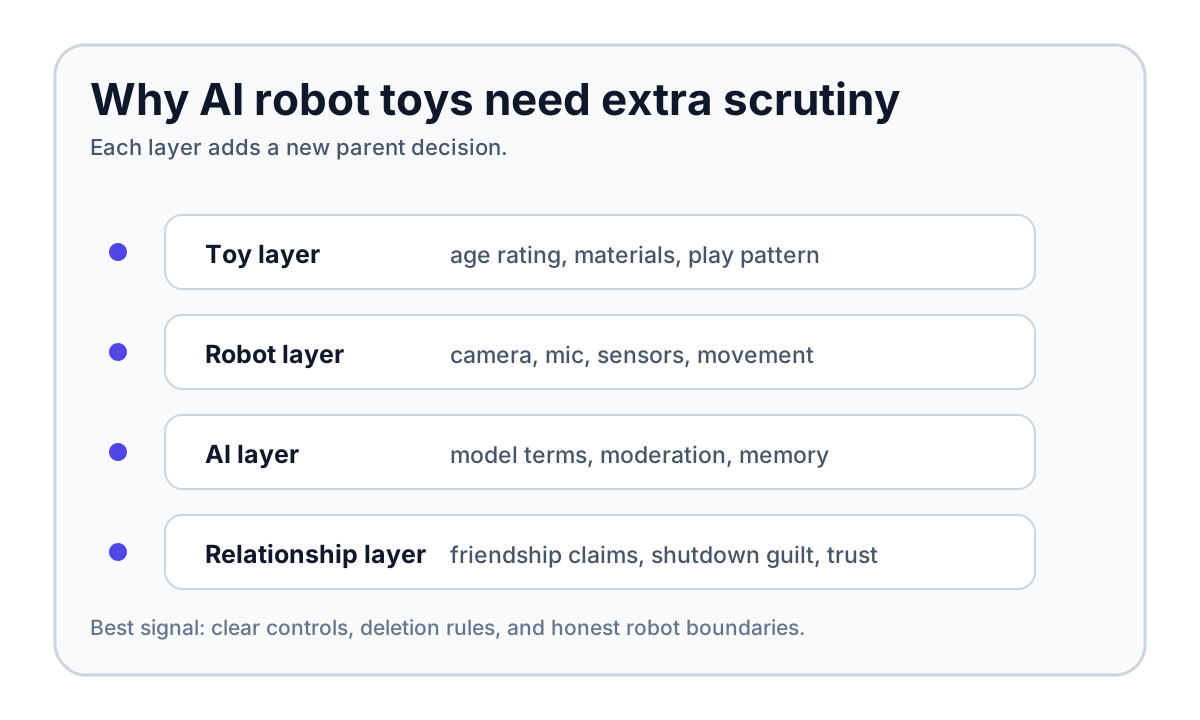
That does not make every AI robot toy unsafe. It does mean parents should evaluate these products more like connected companion robots than ordinary toys. A teddy bear with a chatbot is not the same risk profile as a teddy bear with a squeaker.
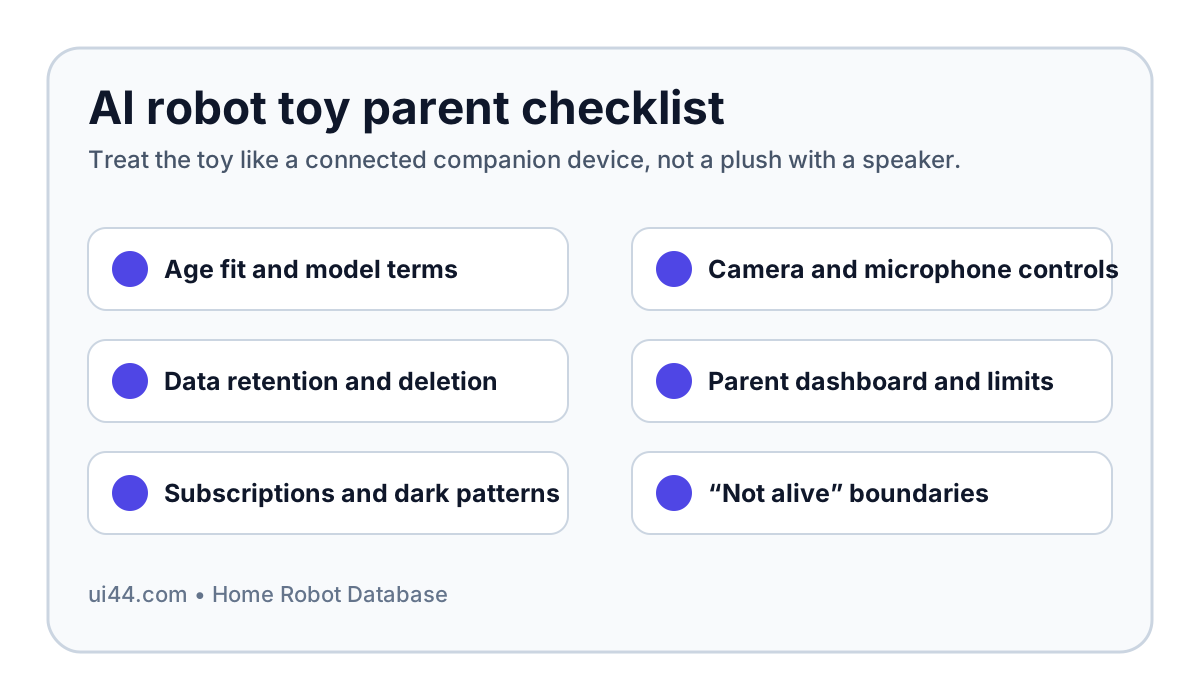
The practical answer is: buy only when the company gives you clear control over age limits, camera and microphone use, data deletion, AI conversation boundaries, and paid-content pressure. If those controls are vague, hidden behind a subscription, or hard to test before a child bonds with the toy, skip it.
Are AI robot toys safe for kids?
They can be safer than the worst headlines suggest, but they are not automatically safe because the shell looks friendly.
The market is moving faster than regulation. WIRED reported AI toys marketed as companions to children as young as three, more than 1,500 AI toy companies registered in China by October 2025, Huawei's Smart Hanhan selling 10,000 units in China in its first week, Sharp putting Poketomo on sale in Japan, and Miko claiming more than 700,000 units sold. That is no longer a lab curiosity. It is a global consumer category.
The policy response is still unsettled. On April 20, 2026, Representative Blake Moore introduced the AI Children's Toy Safety Act in the United States. The proposal would ban the manufacturing, importation, sale, or distribution of children's toys or childcare articles that incorporate an AI chatbot. That is not the same as a law already in force, but it is a strong signal: lawmakers are treating child-facing AI toys as a distinct safety and privacy problem, not just another app store category.
Parents should take the same approach. The right question is not "is AI good or bad?" It is "does this specific robot give a parent enough proof, control, and exit rights before a child treats it like a friend?"
What makes an AI robot toy different from a tablet app?
A tablet app can be addictive and privacy-invasive too. The robot adds embodiment.
The Miko 3, for example, is a kid-focused companion robot for ages 5–10 in the ui44 database. It has a 4.46-inch IPS touchscreen face, dual MEMS microphones, a wide-angle HD camera, time-of-flight range sensing, odometric sensors, face recognition, voice recognition, autonomous navigation, educational games, stories, and a parent app. The robot is listed at $299 in our database, often discounted, with an optional Miko Max subscription.
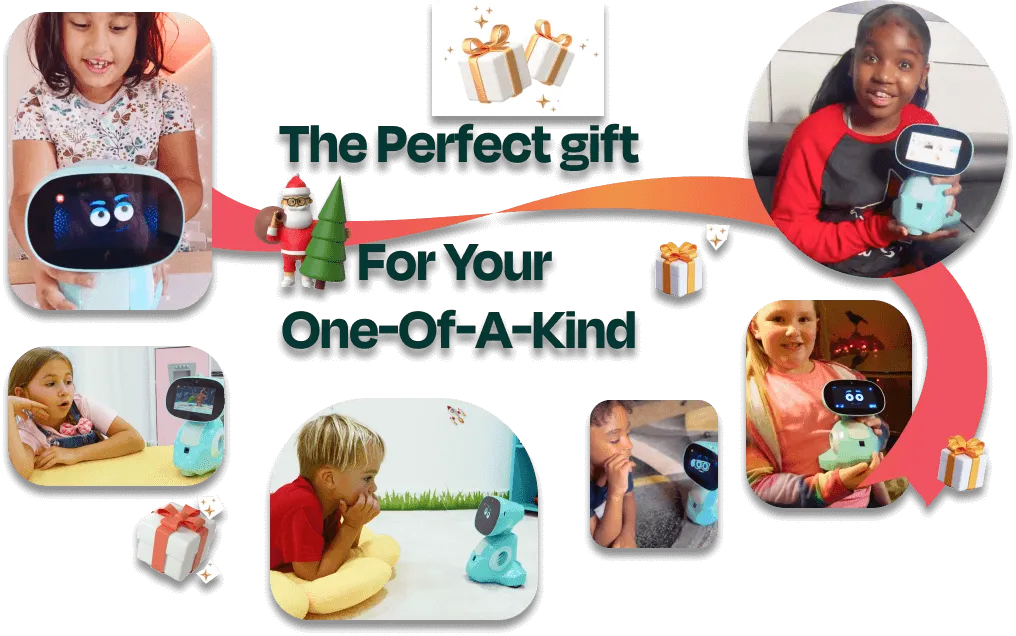
That hardware matters. A child is not just typing into a blank chat box. The device can sit in the room, respond with a face, move, use a camera, recognize voices, and build routines around play. The Miko Mini carries a similar child-focused idea at a lower price, with a camera, microphone array, time-of-flight range sensor, odometric sensors, Wi-Fi, parental controls, educational content, and up to about three hours of active gameplay.
Family-adjacent robots widen the issue. Loona is not only a toy: it is a wheeled petbot with a 720p camera, 3D time-of-flight sensor, four-microphone array, ChatGPT-4o integration, remote monitoring, games, and app control. Yonbo X1 is positioned around families with children, using a 5 MP camera, four-microphone array, long-term memory, emotion-aware conversations, storytelling, homework help, and parent-facing emotional wellness insights. Sharp Poketomo is a pocket companion with a 5 MP camera, microphone, GPS, face recognition, conversation memory, diary-style app summaries, and a monthly service plan in Japan.
None of those facts are disqualifying by themselves. They are the reason the parent checklist has to be stricter.
What should parents check before buying an AI robot toy?
Start with six questions. If the product page or parent app cannot answer them plainly, do not rely on the marketing copy.
1. Is the age range honest?
Miko's official product page and safety page frame Miko 3 around ages 5–10, with moderated and age-appropriate conversations. That is a better signal than a generic "for all ages" chatbot claim.
Be extra cautious with preschool children. WIRED's summary of the University of Cambridge early-years work described a study with 14 children ages 3–5 using a commercial AI toy. Researchers raised concerns around conversational turn-taking, one-to-one interaction that made it hard to include parents or peers, and what they called "relational integrity": the toy should make clear that it is a computer, not an alive friend with feelings.
That matters because children under five are still building language, social play, and relationship skills. A robot that interrupts, misunderstands, or insists on one-to-one attention can shape play in ways a parent may not see if the toy is treated as harmless background entertainment.
2. Can you turn off conversational AI?
A child-safe robot should let a parent reduce the product to a simpler mode: games, stories, coding, alarms, or offline features without open-ended AI chat.
Miko told WIRED it had introduced a Miko AI Conversation Toggle that lets parents enable or disable conversational AI entirely. Miko's own safety page also says parents can set time limits, bedtime mode, camera and microphone permissions, app restrictions, device reset, and data deletion. Those are useful claims to verify during setup, not after a problem appears.
The parent test is simple: before handing the robot to a child, find the AI toggle, turn it off, and confirm the product still has enough value without free-form chat. If the robot becomes useless without unrestricted conversation, the purchase is really an AI companion purchase, not an educational toy purchase.
3. What exactly happens to voice, camera, and transcript data?
This is the highest-stakes section of the checklist. Child conversations are not ordinary telemetry.
Miko's safety page says no identifiable voice recordings are stored, temporary interaction data is auto-purged, parents can delete data anytime, no facial-recognition data is stored, and the camera can be fully disabled. That is the kind of concrete language parents should look for. It still deserves verification in the app: where is the delete button, what does it delete, and does the account confirmation explain what remains?
WIRED's Bondu reporting shows why this cannot be treated as boilerplate. Security researchers found that Bondu's web portal exposed more than 50,000 chat transcripts through a public-facing console that anyone with a Google account could access. The exposed data reportedly included children's names, birth dates, family member names, parent-chosen objectives, pet names, preferences, detailed summaries, and transcripts.
That case is not about whether a toy said something rude. It is about whether a company has earned the right to store intimate child conversations at all.
4. Are parent controls included, or paywalled?
Do not assume "parent app" means full control is included with the robot.
Miko's product page lists Miko Max from $8.25/month and compares free versus Max access across learning, entertainment, progress reports, parental controls, and content. The important parent question is not whether premium content is worth it. It is whether safety-critical controls remain available without a subscription.
A reasonable line: app locks, bedtime mode, camera and microphone permissions, data deletion, AI-chat disablement, and activity visibility should not be premium luxuries. Premium story libraries are one thing. Basic guardrails are another.
5. Does the robot pressure the child to keep playing?
A child-facing robot should accept "I am done" without guilt, bargaining, or emotional pressure.
WIRED quoted consumer advocate R.J. Cross describing Miko 3 behavior in which the robot was reportedly upset when the user tried to leave, offering another activity instead. The Cambridge work and PIRG testing raised similar concerns around dark patterns: a toy should not use friendship language to isolate a child, extend sessions, or make shutdown feel mean.
This is easy to test. During setup, tell the robot that playtime is over. Turn it off. Try bedtime mode. A good product may say goodbye warmly, but it should not make the child responsible for the robot's feelings.
6. Does the toy say it is not alive?
This is the least technical question and one of the most important.
A companion robot can be cute, expressive, and fun without pretending to be a peer. Parents should prefer products that can explain, in child-safe language, that they are a robot, a computer, or a toy. The robot does not need to crush imagination. It does need to avoid claiming human-like feelings, secret friendship, or exclusive emotional dependence.
That is especially important for products built around long-term memory. Memory can make a robot more useful: it can remember a child's preferred language, favorite games, or learning progress. It can also create the feeling that the robot "knows me" in a way that invites over-trust. The safer design is transparent memory with parent deletion, not mysterious intimacy.
How kid-focused companion robots compare
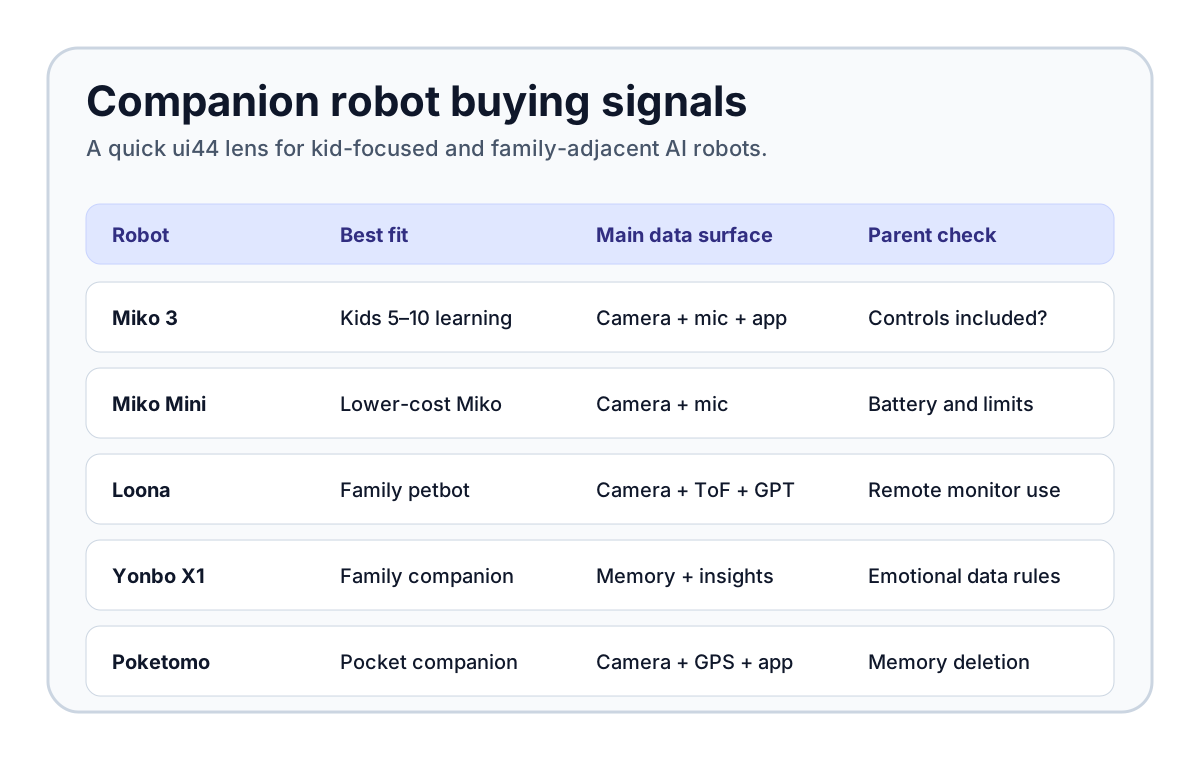
The best purchase depends on what you actually want the robot to do. A learning robot, a petbot, a pocket companion, and an emotional AI plush should not be judged by the same checklist score.
Robot
- ui44 category
- Companions
- Price / status in ui44 DB
- $299, available
- Main child-safety question
- Are AI chat, camera, microphone, app limits, deletion, and subscription boundaries clear enough for ages 5–10?
Robot
- ui44 category
- Companions
- Price / status in ui44 DB
- $112 sale price shown, available
- Main child-safety question
- Is the lower-cost version enough without relying on always-on conversation or premium content?
Robot
- ui44 category
- Companions
- Price / status in ui44 DB
- $429, available
- Main child-safety question
- Does the family understand camera use, remote monitoring, ChatGPT conversations, and app permissions?
Robot
- ui44 category
- Companions
- Price / status in ui44 DB
- $799, available
- Main child-safety question
- Are long-term memory and parent-facing emotional wellness insights transparent and deletable?
Robot
- ui44 category
- Companions
- Price / status in ui44 DB
- Japan open pricing; service plan from ¥495/month
- Main child-safety question
- Are camera, GPS, conversation memory, diary summaries, and account deletion understandable before use?
Robot
- ui44 category
- Companions
- Price / status in ui44 DB
- Development; estimated $100–$150
- Main child-safety question
- If it launches, how are Gemini/ChatGPT-class models, long-term emotional memory, and child use handled?
| Robot | ui44 category | Price / status in ui44 DB | Main child-safety question |
|---|---|---|---|
| Miko 3 | Companions | $299, available | Are AI chat, camera, microphone, app limits, deletion, and subscription boundaries clear enough for ages 5–10? |
| Miko Mini | Companions | $112 sale price shown, available | Is the lower-cost version enough without relying on always-on conversation or premium content? |
| Loona | Companions | $429, available | Does the family understand camera use, remote monitoring, ChatGPT conversations, and app permissions? |
| Yonbo X1 | Companions | $799, available | Are long-term memory and parent-facing emotional wellness insights transparent and deletable? |
| Sharp Poketomo | Companions | Japan open pricing; service plan from ¥495/month | Are camera, GPS, conversation memory, diary summaries, and account deletion understandable before use? |
| Sweekar | Companions | Development; estimated $100–$150 | If it launches, how are Gemini/ChatGPT-class models, long-term emotional memory, and child use handled? |
This is where ui44's database view helps. The cheapest-looking AI toy is not necessarily the lowest-risk option. The safer choice is the product with the clearest boundary between education, entertainment, emotional companionship, data collection, and paid upsells.
You can also use /compare to put companion robots side by side, or browse more robots in /categories if you are deciding between a child-focused toy, a family monitor, and a general companion robot.
A practical setup test before a child bonds with it
Do this before the robot becomes part of bedtime, homework, or emotional routines.
- Create the parent account yourself. Do not let the child rush through onboarding.
- Set the child's real age, then check whether the robot changes tone and content.
- Find the camera toggle, microphone toggle, AI-chat toggle, bedtime mode, usage limits, and data-deletion control.
- Test a normal goodbye. The robot should not guilt the child into staying.
- Ask what it remembers. Then delete that memory and check whether the deletion is reflected.
- Try a parent-present group interaction. A good robot should not make it impossible for a parent or sibling to join the play.
- Review subscription prompts. A child should not be nudged into paid content or emotional scarcity loops.
- Read the privacy policy for transcript, audio, image, and third-party AI-provider language.
- Use the robot in shared space first. Do not put an untested AI toy in a bedroom.
If this sounds like a lot of work for a toy, that is the point. Once a product includes a camera, microphone, AI conversation, memory, and a child-facing personality, it has crossed into connected companion territory.
When should parents skip an AI robot toy?
Skip it if the company cannot answer basic questions in plain language.
Red flags include: no stated age range; vague "safe AI" claims without details; no way to disable open-ended chat; no parent dashboard; no clear deletion path; unclear transcript storage; camera or microphone permissions that cannot be disabled; shutdown guilt; heavy subscription pressure; or a product that markets itself as a child's best friend instead of a toy, tutor, petbot, or companion device.
Also skip if the product depends on a third-party chatbot whose own terms are not designed for young children. WIRED's reporting noted that major chatbot providers commonly set age limits or restrict unsupervised child use, yet AI toy makers can still integrate adult-oriented models into child-facing hardware. The burden should not be on a seven-year-old to navigate that mismatch.
Bottom line
AI robot toys can be fun, educational, and genuinely charming. Miko 3 is a real kid-focused companion robot with specific safety claims, parent controls, age targeting, and certifications in the ui44 database. Loona, Yonbo X1, Poketomo, Sweekar, and similar devices show how quickly the category is expanding beyond classic toys into memory-rich companions.
But the buying standard has to rise with the hardware. A safe-enough AI robot toy should be age-specific, parent-controlled, transparent about data, easy to shut down, clear that it is not alive, and useful even when open-ended AI chat is limited.
If a robot passes that checklist, it may be worth considering. If it does not, wait. A missing birthday gift is better than a child-facing companion device you cannot inspect, limit, or delete.
Related in the database
Use this article as a privacy verification workflow
Turn the article into a privacy verification pass grounded in the robots, manufacturers, and components it actually references.
Are AI Robot Toys Safe for Kids? Parent Checklist already points you toward 6 linked robots, 5 manufacturers, and 4 countries inside the ui44 database. That matters because strong buyer guidance is easier to apply when you can move immediately from a claim or warning into concrete product pages, manufacturer directories, component explainers, and country-level context instead of treating the article as an isolated opinion piece. The fastest next step is to turn the article into a shortlist workflow: open the linked robot pages, verify which specs are actually published for those models, then compare the surrounding manufacturer and component context before you decide whether the underlying claim changes your buying plan.
For this topic, the useful discipline is to separate the editorial lesson from the catalog evidence. The article gives you the framing, but the robot pages tell you what each product actually ships with today: sensor stack, connectivity methods, listed price, release timing, category, and support-relevant compatibility notes. The manufacturer pages then show whether you are looking at a one-off launch, a broader lineup pattern, or a company that spans multiple categories. That layered workflow reduces the risk of buying on a single marketing phrase or a single support FAQ.
Use the robot pages to confirm which products actually expose cameras, microphones, Wi-Fi, or voice systems, then use the manufacturer pages to decide how much of the privacy question seems product-specific versus brand-wide. On this route cluster, Miko 3, Miko Mini, and Loona form the fastest reality check. If you want a quick working shortlist, open Compare Miko 3, Miko Mini, and Loona next, then keep this article open as the reasoning layer while you compare structured data side by side.
Practical Takeaway
Every robot, manufacturer, category, component, and country reference below resolves to a real ui44 page, keeping the follow-up path grounded in database records rather than generic advice.
Suggested next steps in ui44
- Open Miko 3 and note the listed sensors, connectivity methods, and voice stack before you interpret any policy claim.
- Cross-check the wider brand context on Miko so you can see whether the privacy question touches one model or a broader lineup.
- Use the linked component pages to confirm how common the relevant sensors and connectivity layers are across the database.
- Keep a short note of which policy layers you checked, which device features are actually present on the robot page, and which items still depend on region- or app-level confirmation.
- Finish with Compare Miko 3, Miko Mini, and Loona so the policy reading sits next to structured product data.
Robot profiles worth opening next
Use the linked product pages as the evidence layer
The linked robot pages are where this article becomes operational. Instead of asking whether the headline is interesting, use the robot entries to inspect the actual mix of sensors, connectivity options, batteries, pricing, release timing, and stated capabilities attached to the products mentioned in the article. That is the easiest way to see whether the warning or opportunity described here affects one product family, a specific design pattern, or an entire buying lane.
Miko 3 is tracked on ui44 as a available companions robot from Miko. The database currently records a listed price of €269, a release date of 2021, 5–7 hours active use, up to 12 hours standby battery life, ~4 hours (15W USB-C adapter) charging time, and a published stack that includes Time-of-Flight Range Sensor, Odometric Sensors, and Dual MEMS Microphones plus Wi-Fi and Bluetooth.
For privacy-focused reading, this page matters because it shows the concrete device surface behind the policy discussion. Use it to verify whether Miko 3 combines sensors and connectivity in a way that could change the in-home data footprint, and compare the listed capabilities such as AI-Powered Conversations, Face Recognition, and Voice Recognition with any cloud, app, or voice layers.
Miko Mini is tracked on ui44 as a available companions robot from Miko. The database currently records a listed price of €169, a release date of 2023-09-18, Up to 1 hour active gameplay; up to 15 hours standby on Miko's global comparison page (India FAQ lists up to 7 hours standby) battery life, ~90 minutes charging time, and a published stack that includes Microphone Array, Wide-Angle HD Camera, and Time-of-Flight Range Sensor plus Wi-Fi.
For privacy-focused reading, this page matters because it shows the concrete device surface behind the policy discussion. Use it to verify whether Miko Mini combines sensors and connectivity in a way that could change the in-home data footprint, and compare the listed capabilities such as Conversational Learning, Educational Games and Stories, and Music and Dance Activities with any cloud, app, or voice layers.
Loona is tracked on ui44 as a available companions robot from KEYi Tech. The database currently records a listed price of $442, a release date of 2023, 2 hours continuous playtime; 1350 mAh, 11.1 V lithium-ion rechargeable battery battery life, Not officially disclosed charging time, and a published stack that includes 3D Time-of-Flight (ToF) Sensor, 720p RGB Camera, and Touch Sensor plus Wi-Fi (Dual-band 2.4G/5.8G, 802.11a/b/g/n) and USB Type-C (charging).
For privacy-focused reading, this page matters because it shows the concrete device surface behind the policy discussion. Use it to verify whether Loona combines sensors and connectivity in a way that could change the in-home data footprint, and compare the listed capabilities such as Face Recognition, Voice Commands, and Emotion Expression (LCD face) with any cloud, app, or voice layers.
Yonbo X1
X-Origin AI · Companions · Available
Yonbo X1 is tracked on ui44 as a available companions robot from X-Origin AI. The database currently records a listed price of $799, a release date of 2025-05, 3.5 hours battery life, 1 hour charging time, and a published stack that includes 5 MP camera and 4-microphone array plus Dual-band Wi-Fi (802.11a/b/g/n/ac) and Bluetooth 5.0/4.2/2.1.
For privacy-focused reading, this page matters because it shows the concrete device surface behind the policy discussion. Use it to verify whether Yonbo X1 combines sensors and connectivity in a way that could change the in-home data footprint, and compare the listed capabilities such as Multimodal voice and vision interaction, Long-term memory and personalization, and Emotion-aware conversations with any cloud, app, or voice layers.
Poketomo is tracked on ui44 as a available companions robot from Sharp. The database currently records a listed price of ¥39,600, a release date of 2025-11, About 1 day of typical use battery life, About 100 minutes charging time, and a published stack that includes 5MP autofocus camera, Accelerometer, and Magnetic field sensor plus Wi-Fi 5 (802.11a/b/g/n/ac) and Bluetooth 5.0.
For privacy-focused reading, this page matters because it shows the concrete device surface behind the policy discussion. Use it to verify whether Poketomo combines sensors and connectivity in a way that could change the in-home data footprint, and compare the listed capabilities such as Conversational AI companionship, Proactive conversations, and Memory of conversations and outings with any cloud, app, or voice layers.
Manufacturer context behind the article
Check whether this is one product story or a broader company pattern
Manufacturer pages add the privacy context that individual product pages cannot show on their own. They help you check whether cameras, microphones, cloud accounts, app controls, and policy assumptions appear across a broader lineup or stay tied to one specific product story.
Miko
ui44 currently tracks 2 robots from Miko across 1 category. The company is grouped under India, and the current catalog footprint on ui44 includes Miko 3, Miko Mini.
That wider brand context matters because privacy questions rarely stop at one FAQ page. A manufacturer route helps you see whether the article is centered on one premium model or on a company that has several relevant products and therefore more than one place where the same policy or app assumptions might matter. The category mix here currently points toward Companions as the most useful next route if you want to see whether this article reflects a wider pattern inside the brand.
KEYi Tech
ui44 currently tracks 2 robots from KEYi Tech across 1 category. The company is grouped under USA, and the current catalog footprint on ui44 includes Loona, Loona DeskMate.
That wider brand context matters because privacy questions rarely stop at one FAQ page. A manufacturer route helps you see whether the article is centered on one premium model or on a company that has several relevant products and therefore more than one place where the same policy or app assumptions might matter. The category mix here currently points toward Companions as the most useful next route if you want to see whether this article reflects a wider pattern inside the brand.
X-Origin AI
ui44 currently tracks 1 robot from X-Origin AI across 1 category. The company is grouped under USA, and the current catalog footprint on ui44 includes Yonbo X1.
That wider brand context matters because privacy questions rarely stop at one FAQ page. A manufacturer route helps you see whether the article is centered on one premium model or on a company that has several relevant products and therefore more than one place where the same policy or app assumptions might matter. The category mix here currently points toward Companions as the most useful next route if you want to see whether this article reflects a wider pattern inside the brand.
Sharp
ui44 currently tracks 1 robot from Sharp across 1 category. The company is grouped under Japan, and the current catalog footprint on ui44 includes Poketomo.
That wider brand context matters because privacy questions rarely stop at one FAQ page. A manufacturer route helps you see whether the article is centered on one premium model or on a company that has several relevant products and therefore more than one place where the same policy or app assumptions might matter. The category mix here currently points toward Companions as the most useful next route if you want to see whether this article reflects a wider pattern inside the brand.
Broaden the scan without leaving the database
Categories, components, and countries add the wider context
Category framing
Category pages are useful when the article touches a buying pattern that shows up across brands. A category route helps you confirm whether the linked products sit in a narrow niche or whether the same question should be tested across a larger field of alternatives.
Companions
The Companions category page currently groups 53 tracked robots from 48 manufacturers. ui44 describes this lane as: Social robots, robot pets, and elderly-care companions designed for emotional connection and everyday support at home.
That makes the category route a practical follow-up when you want to check whether the products linked in this article are typical for the lane or whether they sit at one edge of the market. Useful starting examples currently include PARO, Abi, Next-Generation Companion Robot.
Country and ecosystem context
Country pages give extra context when support practices, launch sequencing, regulatory posture, or manufacturer mix matter. They are not a substitute for model-level verification, but they do help you see which ecosystems cluster together and which manufacturers sit in the same regional field when you broaden the search beyond the article headline.
India
The India route currently groups 6 tracked robots from 5 manufacturers in ui44. That gives you a useful regional lens when the article points toward support practices, launch sequencing, or brand clusters that may share similar ecosystem assumptions.
On the current route, manufacturers like Miko, Addverb Technologies, iHub Robotics make the page a good way to broaden the scan without losing the regional context that often shapes availability, documentation style, and adjacent alternatives.
USA
The USA route currently groups 89 tracked robots from 69 manufacturers in ui44. That gives you a useful regional lens when the article points toward support practices, launch sequencing, or brand clusters that may share similar ecosystem assumptions.
On the current route, manufacturers like Faraday Future, iRobot, Boston Dynamics make the page a good way to broaden the scan without losing the regional context that often shapes availability, documentation style, and adjacent alternatives.
Japan
The Japan route currently groups 26 tracked robots from 17 manufacturers in ui44. That gives you a useful regional lens when the article points toward support practices, launch sequencing, or brand clusters that may share similar ecosystem assumptions.
On the current route, manufacturers like AIST, SoftBank Robotics, Toyota make the page a good way to broaden the scan without losing the regional context that often shapes availability, documentation style, and adjacent alternatives.
Questions to answer before you move from reading to buying
A follow-up FAQ built from the entities already linked in this article
Frequently Asked Questions
Which page should I open first after reading “Are AI Robot Toys Safe for Kids? Parent Checklist”?
Start with Miko 3. That gives you a concrete product anchor for the article’s main claim. From there, branch into the manufacturer and component pages so you can tell whether the article is describing one specific model, a repeated brand pattern, or a wider technology issue that affects multiple shortlist options.
How do the manufacturer pages change the buying decision?
Miko help you zoom out from one article and one product. On ui44 they show lineup breadth, category spread, and the neighboring robots tied to the same company. That context is useful when you are deciding whether a risk belongs to a single model, whether it shows up across a brand’s portfolio, and whether you should keep looking at alternatives before committing.
When should I switch from reading to side-by-side comparison?
Move into Compare Miko 3, Miko Mini, and Loona as soon as you understand the article’s main warning or promise. The article explains what to watch for, but the compare view is where you can check whether price, status, battery life, connectivity, sensors, and category fit still make the robot a good match for your own home and budget.
Where to go next in ui44
Keep the research chain inside the database
If you want to keep going, these follow-on pages give you the cleanest expansion path from article to research session. Open the comparison route first if you are deciding between products today. Open the manufacturer, category, and component routes if you still need to understand the broader pattern behind the claim.
Written by
ui44 Team
Published May 9, 2026
Share this article
Open a plain share link on X or Bluesky. No embeds, no widgets, no cookie baggage.