
Comparison ready

4 robots selected.

The comparison cards start below. Open the editor only when you need to swap the shortlist.

Share
Edit selected robots
376 robots 9 categories 161 priced

Comparing 4 robots

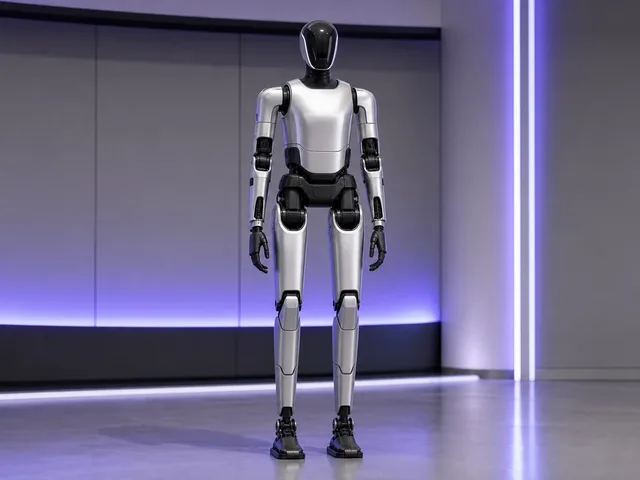
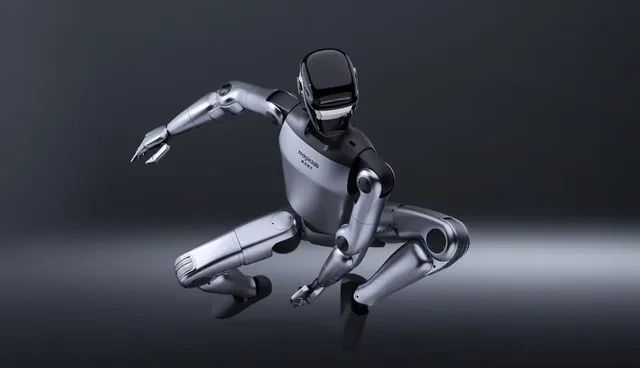
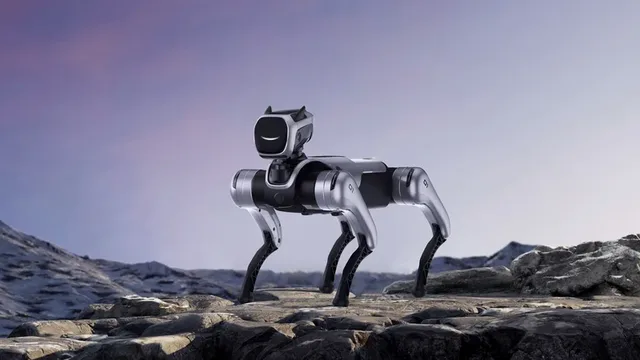
Green cells flag numeric leaders, while AI, sensors, and capability rows keep the real buying tradeoffs visible.

Updating comparison...
Each row compares one spec across your shortlist. Green marks the best value.

Price

N/A
N/A
N/A
N/A

Weight

70 kg
Approximately 70 kg
Approximately 40 kg with battery; development version approximately 40 kg+
15.8kg excluding battery

Battery Life

Dual-battery system described for 24/7 continuous operation; per-charge runtime not officially disclosedNot safely comparable as a typed unit
3-5 hours
Approximately 2 hours
1.5-3 hours

Max Speed

Overall motion speed reported as more than 30% faster than MagicBot Gen1; exact speed not officially disclosedNot safely comparable as a typed unit
≥4 km/h
Not officially disclosed
3.0 m/s

AI

Unveiled alongside MagicLab's Magic-Mix world model; public sources do not yet disclose an X1-specific compute stack or onboard model specification
8-core CPU with 100 TOPS AI processor; MagicLab navigation algorithms, motion-control self-learning, 6D visual servoing, full-body imitation learning, and Atomic Myriad scene-model stack
8-core high-performance CPU; MagicLab describes IL/RL-based human-like walking, rapid full-body motion learning, 360° perception, autonomous navigation, and multimodal dialogue, with an optional high-computing module on the development version
MagicLab emotional interaction system and SAGE AI algorithm; AI voice interaction includes offline commands, intercom, music playback, and LLM conversations that may require a paid subscription

Sensors

Not officially disclosed
3D LiDAR, 2 × Depth Cameras, 3 × Fisheye Cameras, Omnidirectional Microphone Array
3D LiDAR, Depth Camera, Binocular Fisheye Camera, Head Tactile Sensor, Microphone Array
2D LiDAR, Dual Camera, Depth Camera, 4K HD Camera, Fisheye Camera, Ultrasonic Sensor, Microphone Array, Touch Interaction Sensors

Connectivity

Not officially disclosed
Wi-Fi 6, 5G, Bluetooth 5.2
Wi-Fi 6, Bluetooth 5.2
Real-time transmission support; wireless standards not officially disclosed

Status

Development
Active
Active
Active

Category

Humanoid
Humanoid
Humanoid
Companions

Capabilities

31 Active Degrees of Freedom450 N·m Maximum Joint TorqueBipedal Humanoid LocomotionCustomizable ConfigurationsDual-Battery Continuous-Operation ArchitectureHigh-Dynamic Motion ScenariosHumanoid ManipulationIndustrial and Service-Robot ApplicationsResearch Edition for Secondary DevelopmentStandard Edition for Commercial Deployment
6D Visual ServoingAll-terrain LocomotionAutonomous NavigationAutonomous Obstacle AvoidanceBipedal WalkingDexterous ManipulationFace RecognitionFactory Material Handling and AssemblyFull-body Imitation LearningGuided Tour CommentaryIntelligent Voice GuidanceManual Mapping and Map ManagementMulti-robot CollaborationOTA UpgradesSecondary DevelopmentVoice Commands and Chatbot Interaction
Autonomous NavigationBipedal WalkingHandheld Remote ControlHigh-Dynamic Humanoid MotionHuman-like Walking with IL/RLImpact RecoveryMultimodal DialogueOTA UpgradesOptional 11-DOF Tactile Dexterous HandProne RecoveryScientific Research and EducationSecondary Development on Development VersionWide-Range Joint Motion up to 320°
15cm Obstacle Clearance40° Climb AngleAcrobatic MovementsAll-Terrain Quadruped LocomotionAutonomous Emotional ExpressionFacial Expression DisplayGraphical ProgrammingHead-Torso CoordinationHuman RecognitionOTA UpdatesPatrol ModePhoto and Video CaptureSDK Support on EDU VariantSmart Obstacle AvoidanceTarget Detection and FollowingVoice, Vision, and Touch Interaction

How to Compare Robots

Use this flow to get to a clean shortlist fast. The route works best as a dense research workbench, not a marketing page.

1

Choose comparable robots

Start with robots that solve the same job. Use category anchors like Humanoid, Cleaning, Companions, Research before you worry about micro-spec wins.

2

Read the big deltas first

Check price, status, battery, sensors, and capabilities before getting lost in minor spec rows.

3

Switch to differences only

Once you have a shortlist, hide shared rows. That turns the table from a spec dump into a real decision tool.

Cross-category comparisons still have value

A dedicated cleaner versus a home assistant with cleaning features can reveal whether you really need a specialist or just broader household coverage. Compare around the same outcome, not the same marketing language.

Making Your Decision

Turn comparison rows into an actual recommendation — not just more reading.

1

Weighted priorities

Not all spec deltas matter equally. Rank your buying criteria before crowning a winner.

  • List must-haves — smart-home platform, clearance, shipping status, or anything that eliminates a robot instantly.
  • Pick your top 3 differentiators — navigation, noise, battery, support, or whatever changes daily use.
  • Score only the finalists against those. The robot that wins your real priorities beats the one with the most green cells.
2

Total cost of ownership

The sticker price is only one row. Subscriptions, consumables, and service access often decide the real winner.

Subscriptions

Cloud AI and premium app tiers can make a cheaper robot more expensive over three years.

Consumables

Brushes, pads, filters, and bags flip the value story on high-frequency robots.

Energy & battery

Large batteries and frequent charging reveal everyday operating demands.

Repair & warranty

Local servicing and spare-parts access are the quietest but most important long-term costs.

3

Environment check

Specs describe ideal conditions. Your rooms, pets, and Wi-Fi determine what actually performs.

  • Floor types — carpet, hardwood, tile, and transition handling.
  • Space layout — open plans vs. multi-room homes with tight doorways.
  • Wi-Fi coverage — cloud-heavy robots need stable signal everywhere.
  • Household — pets, kids, shared spaces, and noise tolerance.

Buy now vs. wait

Of 376 robots tracked, 228 are available now. For household tasks, getting a capable robot into daily use today usually beats waiting for incremental improvements. For research or early-adopter use, waiting can make sense if the next model changes the platform story.

When it's too close to call

If two robots are still neck-and-neck, use softer signals that affect ownership quality more than spec sheets admit.

Return policy User community Ecosystem Aesthetics

Comparison FAQ

Questions buyers ask before the final click

Short answers to the questions that usually show up once the shortlist is live and the tradeoffs feel real.

Frequently Asked Questions

Using the workspace
How many robots can I compare at once?
You can compare up to four robots at once. Two or three is usually the cleanest decision view, but four-way comparisons work well for wider market scans.
What does 'Show differences only' do?
It hides rows where all selected robots share the same value, leaving only the rows that actually change your decision. It is especially useful for same-brand or same-category shortlists.
Can I compare robots from different categories?
Yes. You can compare any of the 376 robots in the database. Cross-category comparisons work best when the robots still compete for the same outcome in your home or workflow.
What makes a good comparison?
The best pairings share at least one real-world anchor: same job, similar price band, same room constraints, or competing brand tier. That keeps the table decision-focused instead of random.
Sharing & shortlisting
How do I share a comparison?
Once you have a live shortlist, a Share this comparison link appears in the workbench. It preserves your selected robots and the differences-only toggle in a permanent URL.
Can I save or bookmark a comparison for later?
Yes. Every live comparison has a stable route, so bookmarking the page preserves the exact configuration you built.
Can I compare by price alone?
Price is one row in the compare table, but if you want pure price sorting first, the all robots page is the better place to shortlist before coming back here.
Data & methodology
Are specifications up to date?
ui44 comparison data is sourced from official manufacturer documentation and re-verified on a rolling basis. Shipping products get the most frequent freshness checks.
What if a spec is missing?
A dash or 'Not specified' usually means the manufacturer has not published the detail clearly. It does not automatically mean the robot lacks the feature.
How should I compare robots at different development stages?
Treat Available and Active robots as the most reliable operational baselines. Development, Announced, or Pre-order rows can still be useful, but they should carry more uncertainty in your decision.
Can I compare specific sensors or components more deeply?
Yes. The compare table gives you the side-by-side overview, then the components directory lets you go deeper on shared sensors, radios, and platform pieces across the catalog.